CRM SOFTWARE
Zendesk Sell vs HubSpot: Which should you choose in 2026?

By Geethapriya
Last updated on Sep 30, 2026
Explore the blog to understand Zendesk Sell vs HubSpot, such as feature comparison, pricing, and migration support
Geethapriya
Updated on Sep 30, 2026
With Zendesk Sell set to retire in 2027, sales teams are starting to explore alternatives that can support their existing sales processes. HubSpot is one option teams may consider as a replacement for Zendesk Sell.
In this guide, we compare Zendesk Sell vs HubSpot across features, pricing, integrations, and migration to help you understand what changes when moving from one CRM to the other.
Key takeaways
- HubSpot offers a broader CRM platform with connected sales, marketing, service, reporting, and automation capabilities.
- Migration from Zendesk Sell is possible through imports, Smart Transfer, or migration services, depending on the size and complexity of your data.
- HubSpot can be more powerful but may cost more as your needs grow, especially when you need advanced automation, reporting, and AI features
Comparison at a glance
Feature/Attribute | Zendesk Sell | HubSpot |
|---|---|---|
Platform Status | Scheduled for retirement on August 31, 2027 | Active CRM and customer platform |
Primary Focus | Sales CRM designed for managing prospects, customers, deals, and sales activities | Broad customer platform covering CRM, sales, marketing, service, and other business functions |
Free Plan | No free plan | Free CRM with no expiration |
Sales Pipelines | Pipeline limits vary by plan: 2 on Team, 10 on Growth, 20 on Professional, and unlimited on Enterprise | Pipeline limits depend on the HubSpot subscription and sales hub edition |
Lead Management | Manage leads separately from contacts, qualify prospects, score leads, and convert them into deals | Manage leads through CRM records, prospecting tools, lead scoring, and sales automation |
Contact Management | Organize contacts, companies, and associated sales information | Manage contacts, companies, deals, activities, and custom CRM properties |
Deal Management | Track deals through customizable sales pipelines with values, stages, close dates, and other details | Manage deals through customizable pipelines with automation, forecasting, and sales activity tracking |
Sales Automation | Automate selected sales tasks and actions using triggers and rules | Offers workflows, sequences, automated sales actions, and AI-assisted automation |
AI Capabilities | Includes AI-related capabilities within its sales CRM features | Includes AI capabilities across sales and the wider HubSpot platform through Breeze |
Lead Scoring | Supports lead scoring based on defined criteria | Offers lead scoring and predictive capabilities, depending on the subscription |
Sales Forecasting | Provides forecasting based on deal information and expected close dates | Provides forecasting and sales analytics, with more advanced functionality available on higher tiers |
Reporting & Analytics | Sales reports, dashboards, pipeline reporting, and forecasting | Dashboards, sales reports, forecasting, custom reporting, and broader customer analytics |
Email Integration | Connects with email accounts such as Gmail and Microsoft Outlook for syncing sales communication | Gmail and Outlook integrations, email tracking, templates, sequences, and sales engagement features |
Activity Tracking | Tracks sales activities such as calls, emails, tasks, and appointments | Tracks emails, calls, meetings, tasks, and other customer interactions within CRM records |
Integrations | Third-party integrations through the Zendesk Marketplace and API connections | Large ecosystem of third-party apps through the HubSpot App Marketplace, plus APIs |
Data Export | Provides export options through Settings → Data → Export for supported Sell data | CRM records and other data can be exported, with options depending on the object and subscription |
Migration Support | Zendesk provides export tools and has partnered with Pipedrive to support Sell customers moving to another CRM | Provides import tools for bringing CRM data into HubSpot and supports several migration approaches |
Standard Export Coverage | Export supports leads, contacts, deals, notes, tasks, Smart Lists, and other supported account data | Import and export capabilities vary depending on the data type and HubSpot subscription |
Export Limitations | Standard Sales export does not include activity history, appointments, emails, call logs, or documents | Export availability and limits vary by object, tool, and subscription |
Customization | Custom fields, pipelines, layouts, and sales processes can be configured | Extensive customization through custom properties, objects, pipelines, workflows, and other CRM settings |
Pricing | Starts at $19/user/month for Team; Growth $55, Professional $115, and Enterprise $169 | Free CRM available; paid Sales Hub plans start at $7/seat/month when billed annually |
Free Trial / Availability | Sell remains available until August 31, 2027, when it will be retired | Free CRM is available |
Feature comparison: Zendesk Sell vs HubSpot
1. Contact and relationship management
I have researched Zendesk Sell and HubSpot to see how both the platfrom is managing contacts and relationship management.
Zendesk Sell
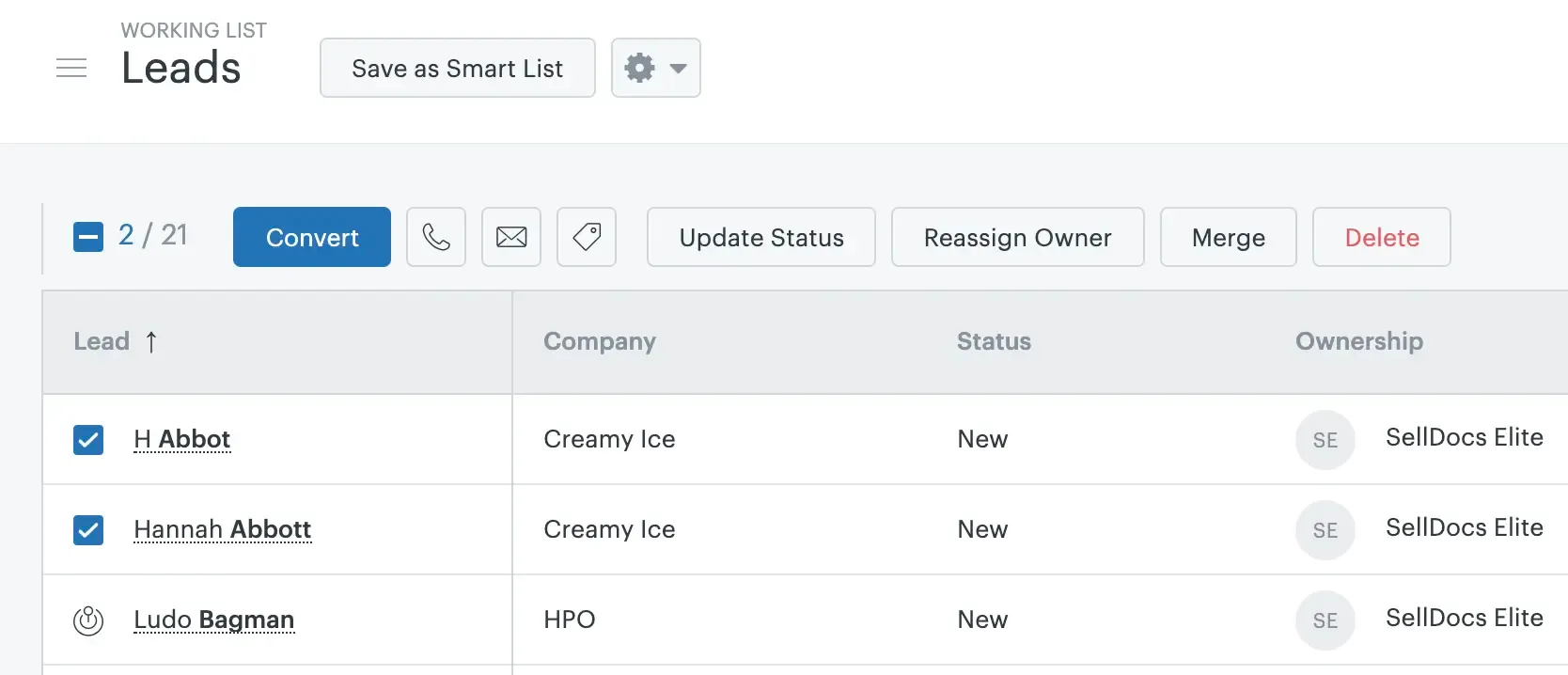
In Zendesk Sell, leads and contacts are managed separately. You can keep new or unqualified prospects in the Leads section while your existing customers and qualified prospects are managed as contacts. This gives sales teams a separate space to work on lead qualification before moving a lead into the sales pipeline.
Source: support.zendesk.com
Once a lead is qualified, you can convert it and continue managing the opportunity as a contact or deal. This makes the process fairly straightforward if your sales team follows a lead → contact → deal workflow.
For customer communication, Zendesk Sell also lets sales reps connect with customers through email and Sell Voice. This means reps can manage their sales conversations and calls alongside the customer records instead of keeping communication completely separate from the CRM.
HubSpot
HubSpot takes a more connected approach to contact management. Instead of treating contacts as standalone records, you can connect them with companies, deals, tickets, and other CRM records. This helps sales reps understand not just who a customer is, but also which company they belong to and which deals or other activities are associated with them.

Source: knowledge.hubspot.com
For example, when you open a contact in HubSpot, you can see the activities and records connected to that person. Emails, calls, meetings, and notes can be logged against the contact and associated records, giving the sales rep more context when following up.
HubSpot can also automatically associate contacts with companies using information such as the contact's email domain. This can reduce the amount of manual work required to connect individual contacts with their company records.
2. Deal and pipeline
I have researched the deals and pipeline for both HubSpot and Zendesk Sell, such as how many pipeline supports and how they have AI features around it.
Zendesk Sell
In Zendesk Sell, a deal represents a sales opportunity linked to a contact. When creating one, sales reps can enter details such as the deal value, source, stage, and expected close date, then move the opportunity through a customizable sales pipeline.
The pipeline is displayed as a visual board, allowing reps to see the status of their deals and drag them between stages as the sales process moves forward. Each pipeline can have its own stages, users, custom fields, and deal-card layouts. Teams can also set up multiple pipelines for different sales processes, although the available number depends on the Sell plan.
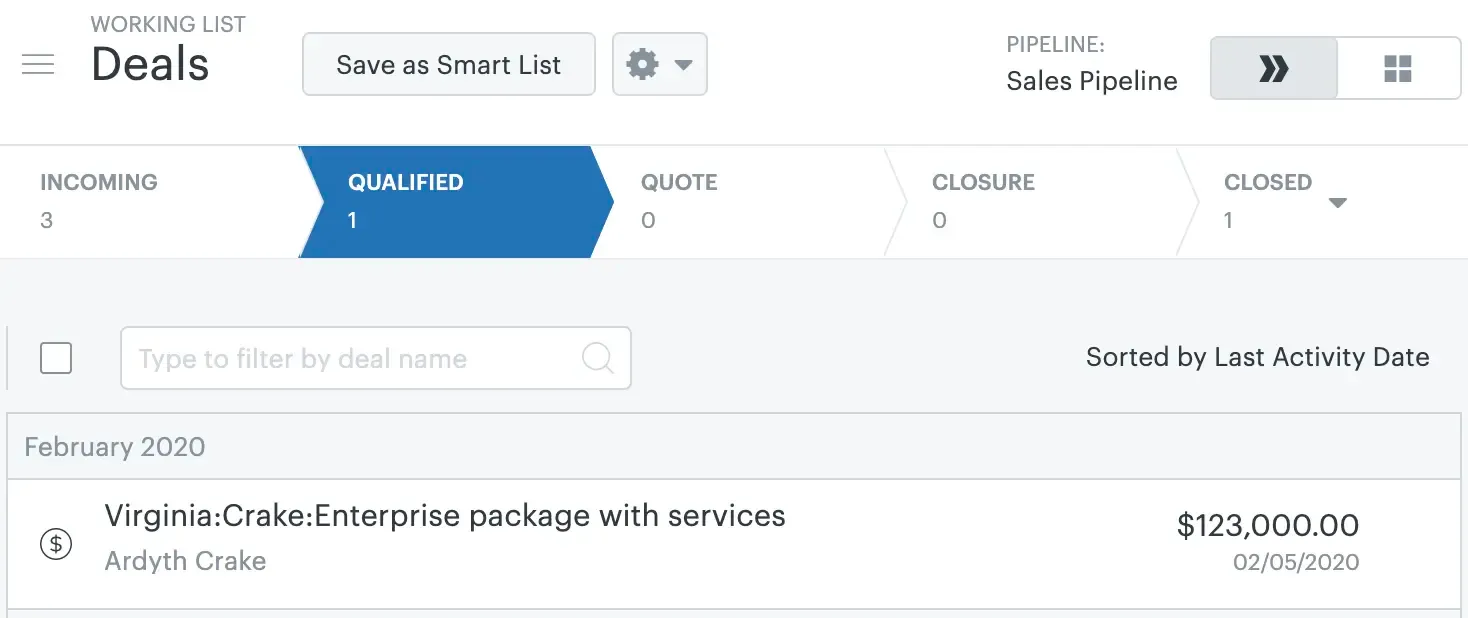
Source: support.zendesk.com
Zendesk Sell also offers keyboard shortcuts for faster deal creation. Reps can press C → D to create a new deal without navigating through the menu.
Deal information in Zendesk Sell also supports sales forecasting. Win likelihood and estimated close date are key inputs: the forecast combines the deal value with its likelihood of closing to estimate expected sales for a specific period. Forecasting is more accurate when reps regularly update deal stages, values, win likelihood, and close dates.
HubSpot
HubSpot follows a similar pipeline-based approach, but gives sales teams more ways to analyze and automate what happens as deals move through the pipeline.
You can create separate pipelines for different sales processes and customize their stages. HubSpot currently allows 15 custom pipelines on Starter, 100 on Professional, and 350 on Enterprise for seat-based pricing portals, while free tools have no custom pipelines.
Within the deal record, reps can track information such as the deal amount, pipeline, stage, close date, activities, and associated contacts and companies. HubSpot also tracks how long deals spend in different stages, which can help sales managers identify where opportunities are getting stuck.
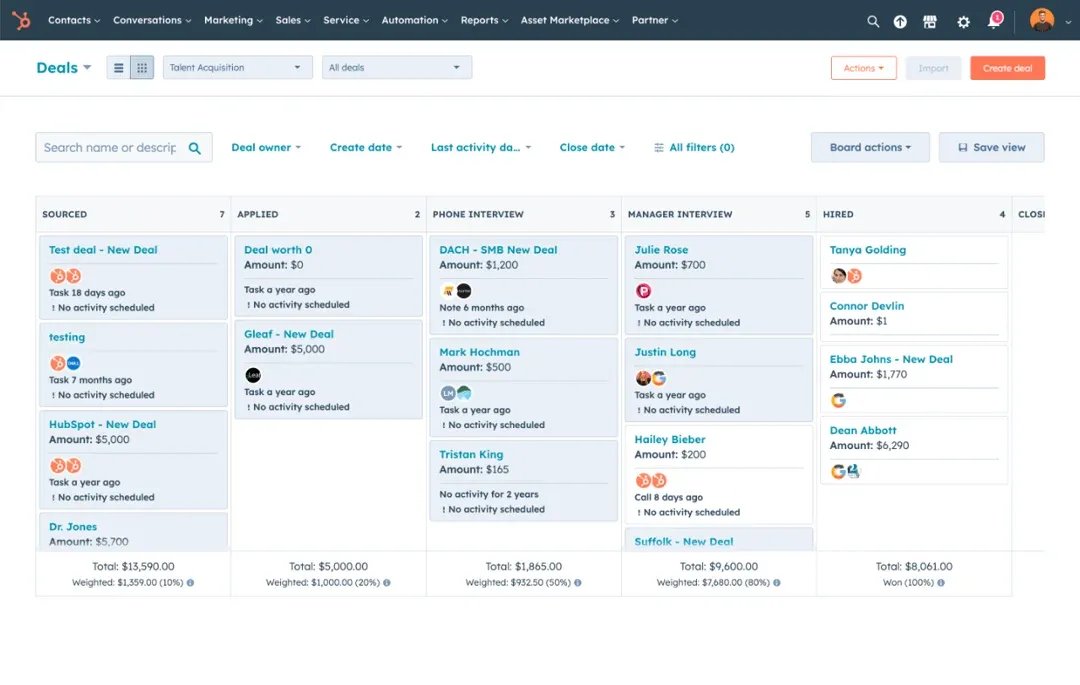
Source: knowledge.hubspot.com
The bigger difference is the amount of AI assistance around deals. HubSpot's Breeze features can help sales reps work through opportunities instead of simply storing deal information.
For example, AI-powered deal scores predict the likelihood that an open deal will close by looking at deal properties and activities. This can help reps prioritize opportunities that are more likely to convert.
HubSpot also provides recommended next steps after meetings or calls. Breeze can analyze meeting and call transcripts to identify action items and suggest updates to the deal, such as changing the deal stage or next activity. Reps can review those suggestions, generate follow-up emails, or turn action items into tasks.
Looking for a simpler CRM after Zendesk Sell?
3. Lead management
I have researched both platforms around the lead management process, like lead qualification, lead nurturing, and lead scoring.
Zendesk Sell
Zendesk Sell has a separate Leads tab where sales teams can manage both inbound and outbound leads before they become part of the sales pipeline. This gives reps a dedicated place to review and qualify prospects before moving them forward.
When a lead is ready to move into the sales process, reps can select multiple leads in bulk and convert them. During the conversion, the lead can be moved into the sales pipeline, and a task can be created for follow-up.
Zendesk Sell also supports keyboard shortcuts for faster lead creation. Reps can press Shift + C → Shift + L to create a new lead without going through the navigation menu.
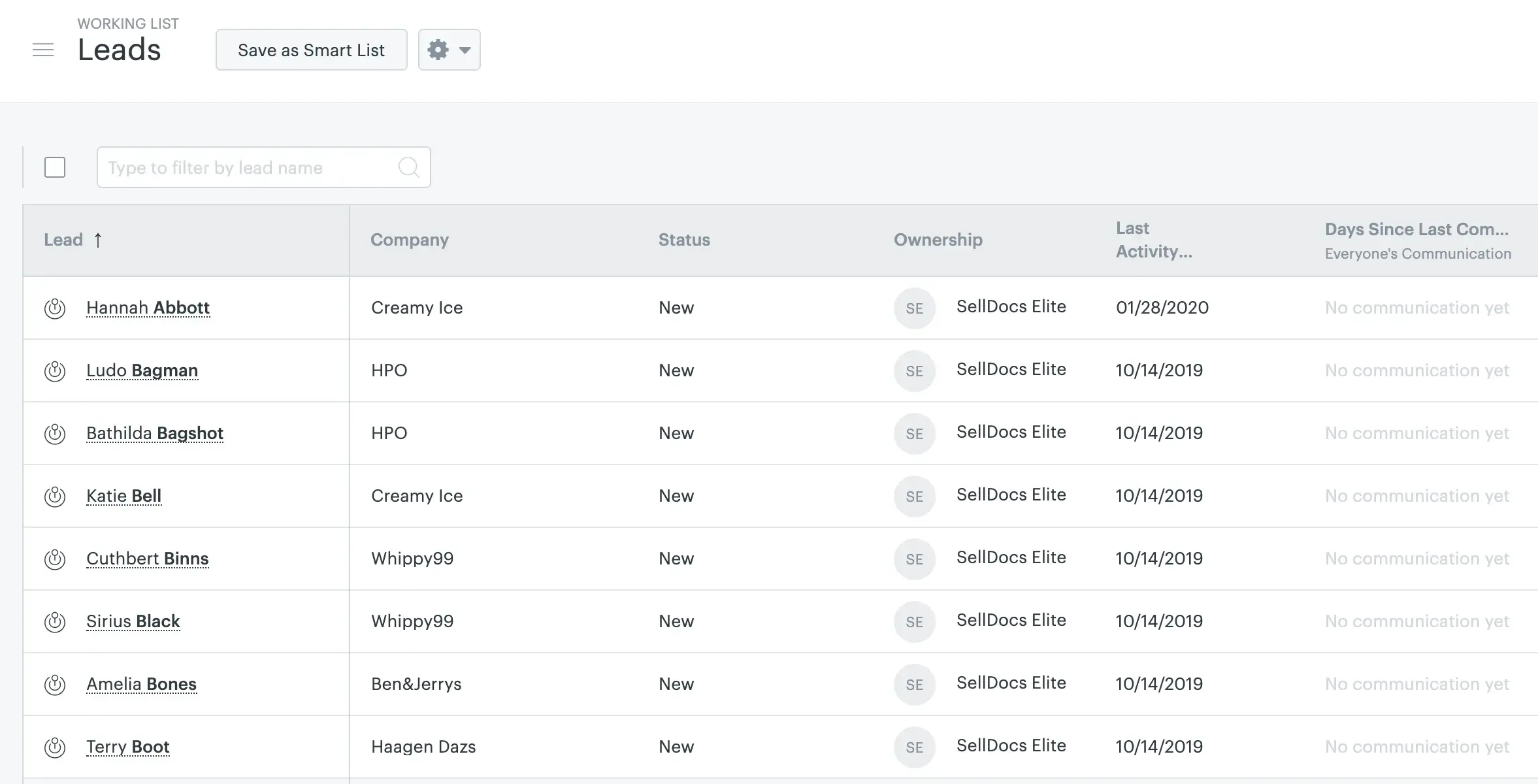
Source: support.zendesk.com
For lead capture, teams can create forms from the settings and publish them on their website. These forms can collect information from visitors and create leads in Sell. However, the native form customization options are limited, so teams may need to connect tools such as Zapier when they want to customize or extend the form experience.
Lead scoring in Zendesk Sell requires more manual setup. Teams define the criteria, options, and weightage they want to use, and Sell calculates the score based on those predefined rules. This gives teams control over how leads are scored, but the scoring model needs to be configured and maintained manually.
HubSpot
HubSpot also provides a dedicated Leads area, but a lead cannot exist on its own. Each lead is associated with a contact or company, so reps can work on the prospect while still having access to the underlying customer record and its activities.
When creating a lead, a rep can select the associated contact or company and then set details such as the lead stage, lead type, and lead label. Leads can also be created from the sales workspace, from contact records, or automatically through workflows.
HubSpot also automates some parts of the qualification process. For example, when a rep sends an email, makes a call, schedules a meeting, or completes another outreach activity, the lead can automatically move from New to Attempting. When the prospect responds or connects with the rep, HubSpot can move the lead to Connected. Qualified and Disqualified stages can then be updated manually.
Source: knowledge.hubspot.com
Lead capture is also built into HubSpot through its forms. You can create a form, choose the information you want to collect, customize its fields and appearance, and embed it on a HubSpot page or an external website. Form submissions can create or update CRM records and trigger follow-up actions or workflows.
Lead scoring is where HubSpot offers more flexibility. Instead of relying only on manually assigned rules, teams can create scores based on properties and prospect behavior, such as website activity, email engagement, or other events. The scoring system can be used to identify which contacts, companies, or deals are more likely to become customers.
4. Reports and Dashboard
I researched both platforms’ reporting and dashboard capabilities, including report creation, available chart types, dashboard customization, and the level of advanced analysis each platform supports.
Zendesk Sell
Zendesk Sell provides reports covering pipeline analysis, sales performance, marketing effectiveness, forecasting, and sales goals. Sales teams can use these reports to look at metrics such as total sales, funnel progression, deal distribution across stages, deal sources, reasons for lost deals, and performance by sales owner.
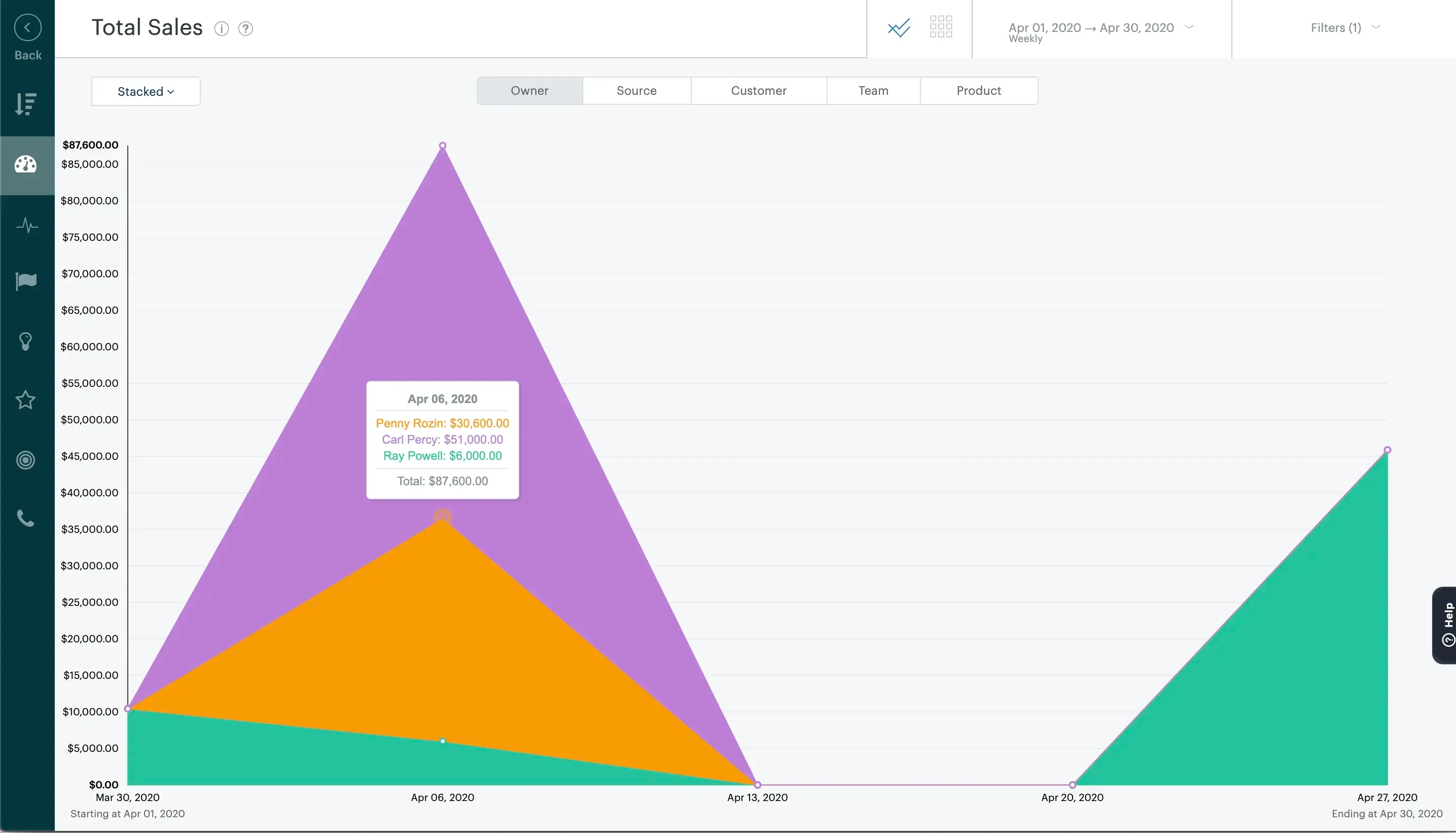
Source: support.zendesk.com
For dashboards, the Performance Dashboard brings several sales metrics into one view. It includes widgets for Revenue, Forecast, New Deals, Active Deals, Pipeline Coverage, Revenue Goal Attainment, Top Deals, Tasks, and Appointments. This gives sales managers a quick way to monitor pipeline health and sales activity without opening each report separately.
The reporting experience is also useful when teams want to look at specific areas of their sales process, such as where deals are getting stuck, which sources are generating opportunities, or how individual owners are performing. However, some reports and dashboard widgets are available only on higher-tier plans.
HubSpot
HubSpot takes a broader approach to reporting because sales teams can analyze not only deals and pipeline data, but also contacts, companies, activities, marketing data, and customer interactions from the same platform.
For everyday reporting, teams can use HubSpot's report library or create their own reports. When building a custom report, you select the data sources, choose the fields you want to analyze, apply filters, and then select how the results should be visualized. HubSpot also has a Smart Chart option that recommends suitable chart types based on the data selected.
For example, a sales manager could build a report comparing deal revenue by sales rep, analyze conversion between pipeline stages, or look at sales activities alongside deal performance. HubSpot also supports funnel reports for measuring conversion between stages in a lifecycle or deal pipeline.
For deeper analysis, HubSpot's custom report builder can combine multiple data sources. This means a team can build reports that connect sales and marketing activity instead of looking at each dataset separately. Custom reports can also be saved to dashboards or exported for further analysis.
5. Workflow
I researched both platforms to compare their automation capabilities, workflow creation, triggers, conditions, actions, and advanced automation features.
Zendesk Sell
Zendesk Sell lets admins create sales triggers that automatically perform an action when a specific event happens and the configured conditions are met. For example, if a deal is updated and its value is greater than $1,000, a trigger can automatically update the deal owner to a specific sales rep.
The setup follows a simple When → If → Then structure. You select the trigger event, add conditions using AND/OR logic, and then define the action Sell should take. This can be useful for automating repetitive deal management tasks without requiring every sales rep to handle them manually.
However, the current sales trigger functionality is relatively limited. Deal is updated is the only supported trigger event, and Deal is currently the only supported object. This means Sell triggers are mainly focused on automatically updating deal information rather than building complex, multi-step sales workflows.
Admins are required to create triggers, while any Sales user can perform an action that causes a trigger to run. Sell also allows multiple conditions and actions to be configured within a trigger, with safeguards such as nullifying conditions to prevent a trigger from repeatedly updating the same deal.
HubSpot
HubSpot takes a more flexible approach with its Workflows tool. Instead of limiting automation to a single trigger type, teams can build workflows that respond to different CRM events and then perform a series of actions.
For example, a workflow can enroll a record when a specific property changes, evaluate conditions, wait for a particular period, update the record, create a task, send an email, or branch into different paths depending on the situation. This makes it possible to build longer processes rather than just one automatic action.
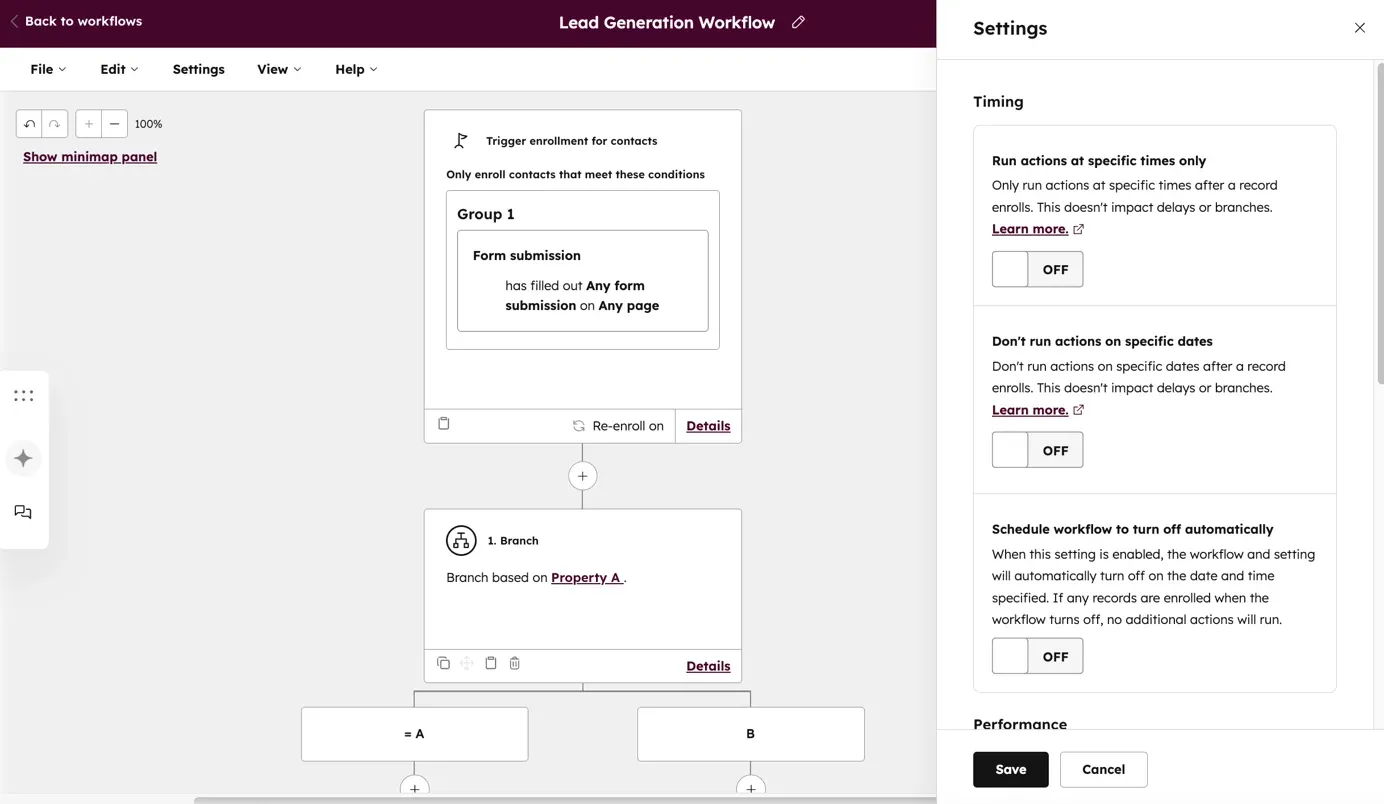
Source: knowledge.hubspot.com
HubSpot also supports if/then branches, delays, and multiple actions within the same workflow. This allows teams to create different paths for different types of leads or deals. For example, a workflow could send one follow-up sequence to a qualified lead while creating a task for a sales rep when another condition is met.
Automation can also extend beyond simple CRM updates. Depending on the HubSpot subscription, workflows can be used with sales, marketing, and customer data, allowing teams to connect processes across different parts of the customer journey.
Explore our guide to the best Zendesk Sell alternatives and compare the top options for migration, features, integrations, and pricing.
Pricing comparison: Zendesk Sell vs SparrowCRM
Pricing is one of the areas where Zendesk Sell and HubSpot can look similar at first, but the cost changes significantly depending on which features and level of functionality a sales team needs.
Zendesk Sell
Plan | Price | Best suited for |
|---|---|---|
Sell Team | $19/user/month | Teams getting started with core lead, contact, and deal management |
Sell Growth | $55/user/month | Growing teams that need more sales tools, forecasting, and analytics |
Suite Professional | $115/user/month | Scaling teams that need task automation, lead and deal scoring, and advanced permissions |
Suite Enterprise | $169/user/month | Larger or more complex sales teams with advanced requirements |
Zendesk Sell starts at $19/user/month, making the Team plan relatively accessible for teams that only need the core CRM capabilities. As teams move into Growth and Professional, the price increases considerably, but those plans also add capabilities such as forecasting, analytics, automation, and scoring.
HubSpot
Plan | Price shown | Best suited for |
|---|---|---|
Free | $0/month | Small teams that need basic sales tools |
Starter | $7/user/month when billed annually | Teams that want additional sales and CRM capabilities at a lower entry price |
Professional | $90/user/month when billed annually | Teams that need advanced sales automation and more comprehensive sales functionality |
Enterprise | $150/user/month | Teams that need advanced control, flexibility, and enterprise-level sales features |
HubSpot has a lower entry point because its Free plan can be used at no cost for up to two users. Its Starter plan is also cheaper than Zendesk Sell Team when billed annually. However, the price rises sharply once you move to Professional, which is where many of HubSpot's more advanced sales capabilities become available.
The pricing shown in your screenshot lists Starter at $7/user/month, Professional at $90/user/month, and Enterprise at $150/user/month when billed annually. HubSpot's current product catalog also confirms that Professional and Enterprise are priced per sales seat, with Professional starting at $100/month and Enterprise at $150/month under its current catalog pricing.
Can HubSpot fit the same budget as Zendesk Sell?
For basic CRM needs, yes. For comparable advanced functionality, not necessarily.
If a team is currently paying for Zendesk Sell Team at $19/user/month, HubSpot Starter can fit within a similar budget, particularly with annual billing. However, HubSpot Starter should not be treated as a direct feature-for-feature replacement for Zendesk Sell's higher plans.
For example:
- Zendesk Sell Team: $19/user/month → HubSpot Starter at $7/user/month annually is cheaper.
- Zendesk Sell Growth: $55/user/month → HubSpot Professional at $90/user/month annually is $35 more per user/month.
- Zendesk Sell Professional: $115/user/month → HubSpot Professional at $90/user/month annually is cheaper based on the pricing shown in your screenshot, but the plans are not directly equivalent.
- Zendesk Sell Enterprise: $169/user/month → HubSpot Enterprise at $150/user/month is slightly cheaper based on the screenshot.
The important point is that price alone doesn't make the plans equivalent. HubSpot's lower-cost Starter plan can work for teams that need basic CRM and sales functionality, while teams moving to HubSpot for advanced automation, reporting, AI, and sales features may need Professional or Enterprise, which can change the overall cost significantly.
Free AI CRM for Teams of 3

How does HubSpot support the migration process?
HubSpot gives Zendesk Sell customers a few ways to move their CRM data, depending on how complex the migration is.
For a self-service migration, teams can export their data from Zendesk Sell and import it into HubSpot using CSV or Excel files. HubSpot's import tool lets you map columns to HubSpot properties, create or update records, and maintain relationships between objects such as contacts, companies, and deals. You can also import activities such as calls and meetings.
For a more structured migration, HubSpot's Smart Transfer supports transfers from Zendesk. The process starts with an audit of the existing data, followed by preparing the HubSpot portal, mapping the data, syncing records, and transferring any remaining data that needs a one-time migration. It also includes cleanup steps and allows a transfer to be reverted if needed. Custom field mapping through Smart Transfer requires a Data Hub subscription.
HubSpot also offers third-party migration services and migration support for more complicated projects. Its migration options include partners such as Import2 and SyncMatters, while HubSpot consultants can help with custom migration requirements and data mapping.
For a typical Zendesk Sell migration, the process would look something like this:
Export data from Zendesk Sell → audit and clean the data → map Sell fields to HubSpot → import/sync records → check associations and activities → move the team to HubSpot.
Bottom line
If you’re moving away from Zendesk Sell, HubSpot is a strong option for teams that want more than a direct CRM replacement. It covers the core sales workflows you’d expect: leads, contacts, deals, pipelines, reporting, and automation, while connecting sales with marketing and customer service.
The main trade-off is complexity and cost as your requirements grow. If cost at the higher tiers is the sticking point, see how Zendesk Sell vs SparrowCRM compare on AI features and price. HubSpot offers more flexibility and automation, but advanced features are generally available on higher-tier plans. Migration can be handled through imports, Smart Transfer, or migration services, so the right approach depends on how much data and customization you need to move.

Geethapriya
Geethapriya is a Growth Marketer and Business Researcher who researches and writes about CRM, sales, marketing, and customer engagement. Her work focuses on understanding industry trends, customer and sales challenges, and how businesses can use technology to build more effective growth processes.
.webp?2026-09-10T10:50:01.560Z)