CRM SOFTWARE
Zendesk Sell vs SparrowCRM: Which CRM to choose before the 2027 retirement?

By Geethapriya
Last updated on Sep 30, 2026
Explore the key differences between Zendesk Sell and SparrowCRM, including features, pricing, AI capabilities, reporting, automation, and migration options, to choose the right CRM before Zendesk Sell retires in 2027.
Geethapriya
Updated on Sep 30, 2026
Since Zendesk announced the retirement of Zendesk Sell, teams have started looking for alternative CRMs that can support their existing sales processes, features, and migration needs without unnecessary disruption. SparrowCRM is one such alternative that can support teams moving away from Zendesk Sell. In this guide, we compare Zendesk Sell vs. SparrowCRM to help you evaluate their features, capabilities, and migration options.
key takeaways
- Zendesk Sell is retiring on August 31, 2027, so teams should start evaluating alternatives and planning their migration before the deadline.
- SparrowCRM offers a more AI-driven approach to sales, with AI-powered lead scoring, deal intelligence, automated routing, deal loss analysis, and recommended next actions, while Zendesk Sell relies more on structured and manual workflows.
- Migration options differ between the platforms: Zendesk Sell supports CSV exports, Smart Lists, and REST APIs, while SparrowCRM supports CSV imports, REST API transfers, and native migration for supported CRMs.
Comparison on glance
Feature/Attribute | Zendesk Sell | SparrowCRM |
|---|---|---|
Platform Status | Retiring August 31, 2027 | Active and available |
Free Plan | No free version | Free plan for up to 3 users |
Sales Pipelines | Team: 2; Growth: 10; Professional: 20; Enterprise: Unlimited | Unlimited sales pipelines across all plans |
AI Approach | Traditional CRM with manual workflows | AI-native, agentic CRM with autonomous AI agents |
Lead Management | Manual qualification with separate lead and contact entities | Automatic lead scoring based on ICP fit, engagement signals, and buying intent |
AI Copilot | No | Yes, AI assistance for lead qualification and next-action recommendations |
Lead Routing | Manual assignment to sales reps | Automated routing based on round-robin, territory, industry, or company size |
Pipeline Management | Visual drag-and-drop pipeline with manual updates | Continuous deal health scoring based on deal velocity, stakeholder engagement, and buying intent |
Deal Risk Detection | Email sentiment analysis to identify at-risk deals | Identifies risks such as declining engagement, missing stakeholders, and competitor mentions |
Deal Loss Analysis | Manual | Automatically analyzes email threads, call transcripts, and engagement patterns |
Activity Capture | Requires manual activity logging | Automatically captures emails, calls, and meetings |
Email Integration | Gmail and Outlook sync with email open and reply tracking | Bidirectional email integration with conditional-logic sequences |
Automation Type | Rule-based triggers for field updates and task assignments | Agentic workflows powered by autonomous AI agents |
Reporting | Pre-built dashboards with 20+ chart types | Unified reporting with AI-powered insights, pipeline coverage, sales velocity, and stale-opportunity tracking |
Data Export | CSV export for leads, contacts, deals, notes, tasks, and smart lists | CSV export and API access |
Migration Support | CSV data export and migration support through Zendesk's Pipedrive partnership | Dedicated Data Sync system, CSV import, and REST API migration |
CSV Import Capacity | Not applicable; Zendesk Sell provides CSV export for migration | Up to 50,000 records or 100 MB |
REST API Migration | No documented REST API migration path in Zendesk's retirement guidance | REST API available for larger datasets and automated transfers |
Free Trial / Availability | Product access ends August 31, 2027, when Zendesk Sell retires | 14-day free trial with full platform access |
What is Zendesk Sell?
Zendesk Sell is a sales CRM that Zendesk introduced in 2018 after acquiring Base CRM. It was designed to connect sales and customer support workflows, helping businesses manage their sales activities alongside their help desk operations.
Why did Zendesk announce the 2027 retirement of Zendesk Sell?
According to Jennifer Chang, VP of Product Development Program Management at Zendesk, the decision to retire Zendesk Sell is mainly driven by Zendesk’s focus on customer and employee service. By concentrating its resources on its service platforms, Zendesk aims to move faster, drive greater innovation, and strengthen its use of AI across its help desk products.
As a result, Zendesk is moving away from its dedicated sales CRM and focusing its product investments on customer and employee service.
What is SparrowCRM?
SparrowCRM is an AI-native CRM built by SurveySparrow to simplify the day-to-day sales process. It helps sales teams manage leads, contacts, deals, and pipelines while using AI to provide insights and support throughout the sales cycle. The platform is designed to keep sales workflows simple while helping teams work more efficiently and focus on moving deals forward.

Are you planning to switch from Zendesk Sell before it retires in 2027?
Core CRM features: Zendesk Sell vs SparrowCRM
1. Contacts and relationship management
To compare contact and relationship management, I researched Zendesk Sell’s capabilities and tested SparrowCRM hands-on across its Contacts and related features.
Zendesk Sell
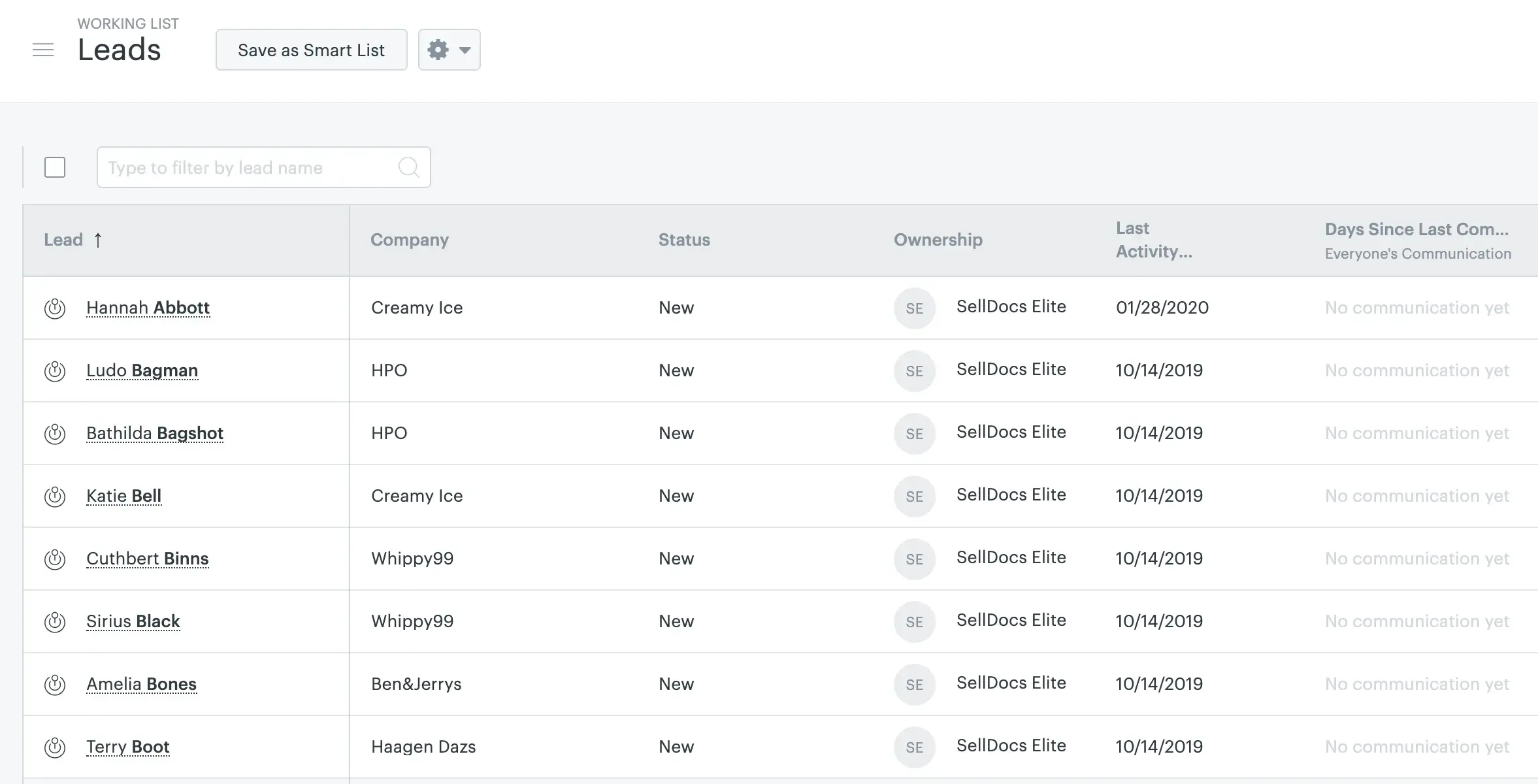
In Zendesk Sell, the Contacts module helps sales teams manage prospects and people they have reached out to. For inbound prospects, the Lead Inbox provides a separate space to review and qualify leads based on the criteria defined by the organization.
Source: support.zendesk.com
Once a lead is qualified, sales reps can convert it into a deal or create a follow-up task. This gives teams a structured way to move prospects from initial qualification into the sales pipeline.
SparrowCRM
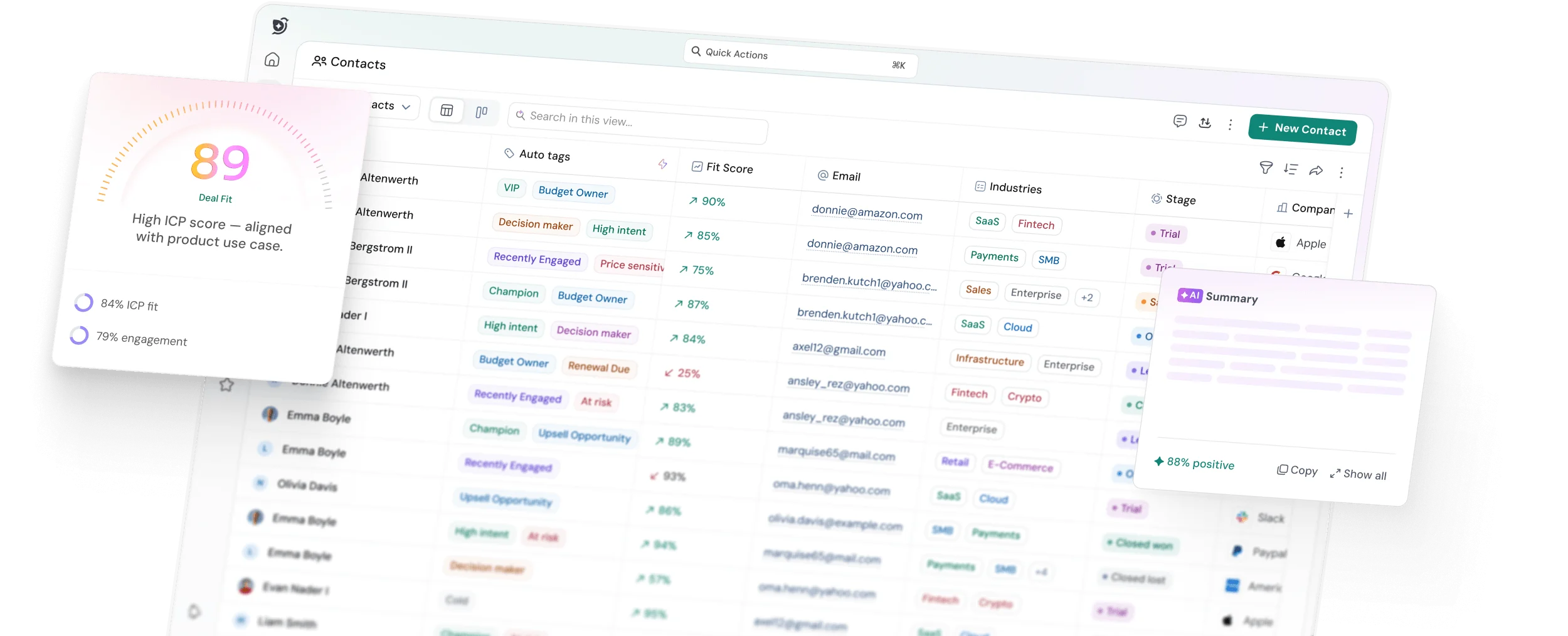
In SparrowCRM, the Contacts module helps sales teams manage prospects while giving them more context about the relationships they are building. Beyond basic contact information, SparrowCRM uses ICP Fit Score, engagement signals, and buying intent to help sales reps understand which prospects are a stronger fit for their business.
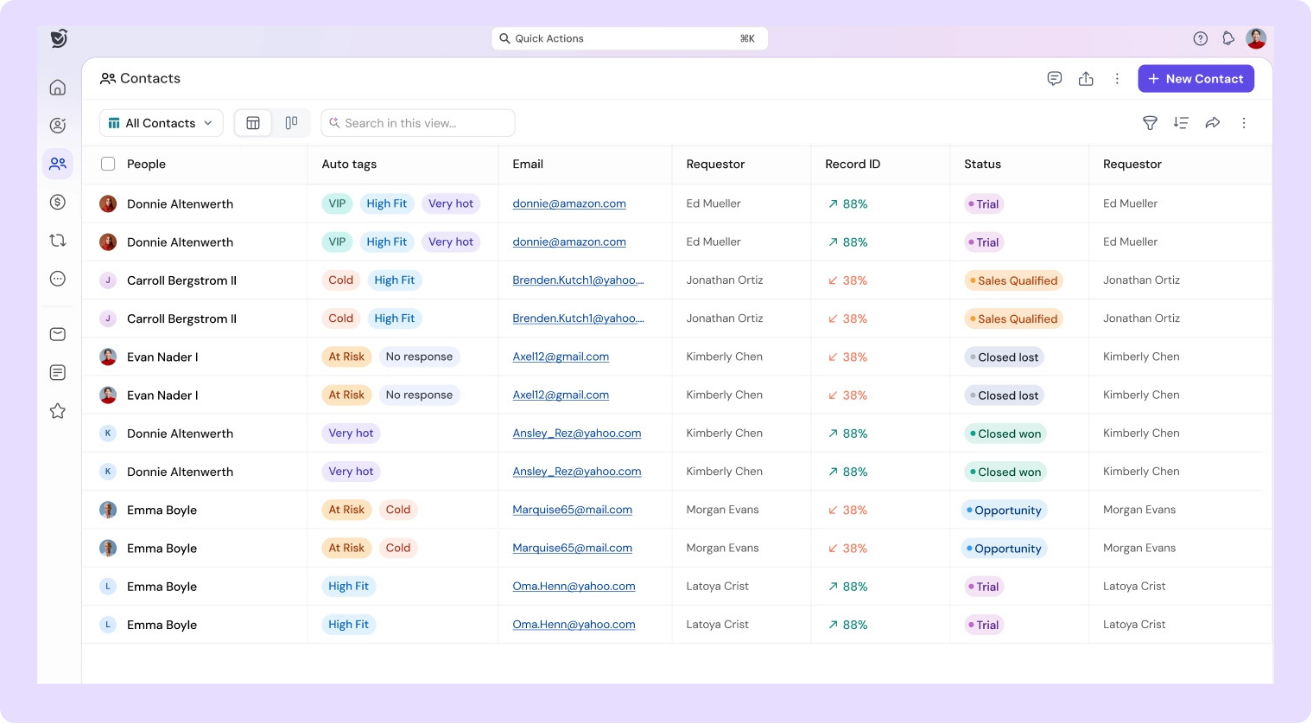
The ICP Fit Score helps reps identify contacts that closely match their ideal customer profile, while engagement and buying signals provide additional context about a prospect's level of interest. This helps sales teams prioritize relationships more likely to turn into opportunities.
SparrowCRM also helps reps understand who they should connect with and where to focus their outreach, rather than relying only on manually reviewing contact records.
2. Deal pipeline
I have researched both Zendesk Sell and SparrowCRM deal capabilities and features, which support the sales process.
Zendesk Sell
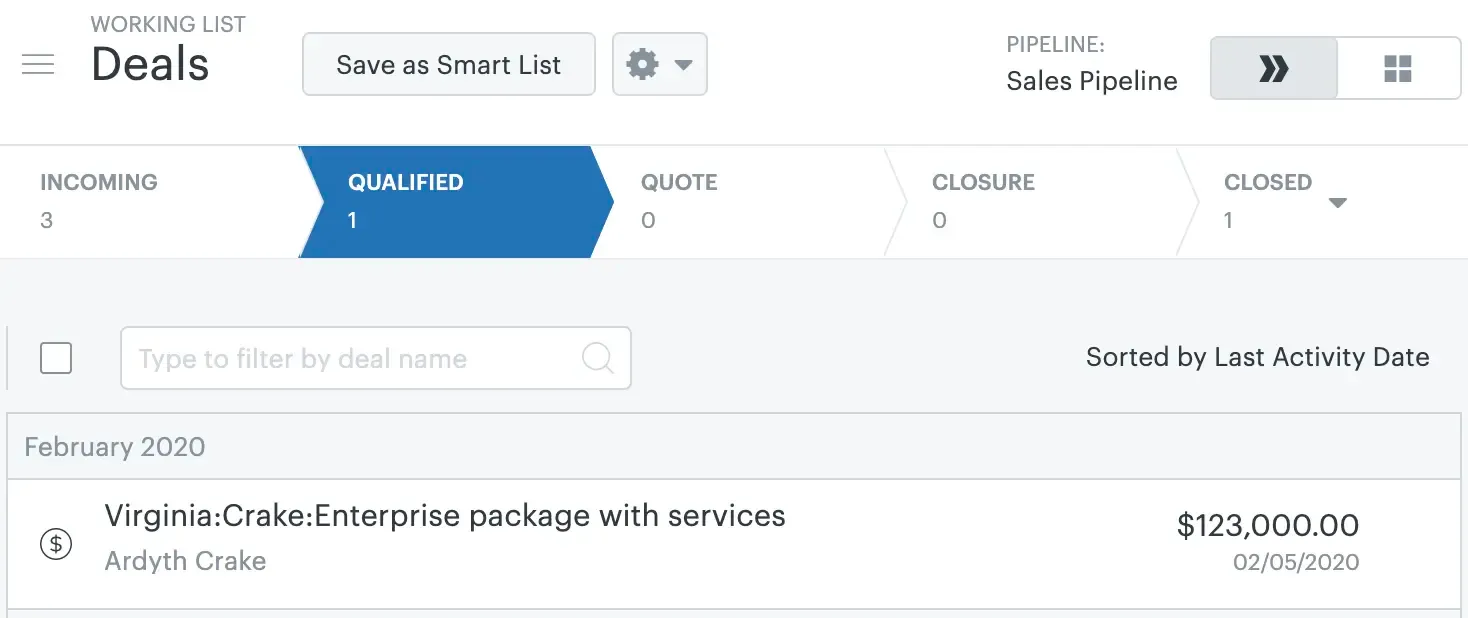
In Zendesk Sell, a deal represents a sales opportunity associated with a contact. Sales reps can add details such as deal value, source, stage, and expected close date, then move the opportunity through a customizable sales pipeline.
Zendesk Sell provides a visual pipeline where teams can drag and drop deals between stages. Each pipeline can be customized with its own stages, users, custom fields, and deal-card layouts. Teams can also create multiple pipelines for different sales processes, although the number of pipelines depends on the Sell plan.
Source: support.zendesk.com
For quick deal creation, Zendesk Sell supports keyboard shortcuts. Sales reps can press C → D to create a new deal without navigating through the menu.
For sales forecasting, Zendesk Sell uses two main inputs: win likelihood and estimated close date. Win likelihood can be set for individual deals or assigned to pipeline stages. The forecast is then calculated using the deal value and its win likelihood, giving teams an estimate of expected sales for a given period.
However, forecasting depends on reps keeping deal values, stages, win likelihood, and close dates up to date as opportunities progress.
SparrowCRM
In SparrowCRM, the Deals object is the central place for managing sales opportunities from prospecting through to a closed outcome. Deals can be associated with contacts and companies and include information such as deal value, stage, expected close date, forecast amount, ACV, TCV, ARR, and MRR.
SparrowCRM provides both Kanban and Table views. The Kanban view lets sales teams visually manage deals by pipeline stage and drag and drop opportunities as they progress. Deal cards also surface AI-generated tags, deal health, and other signals so reps can quickly identify opportunities that need attention.
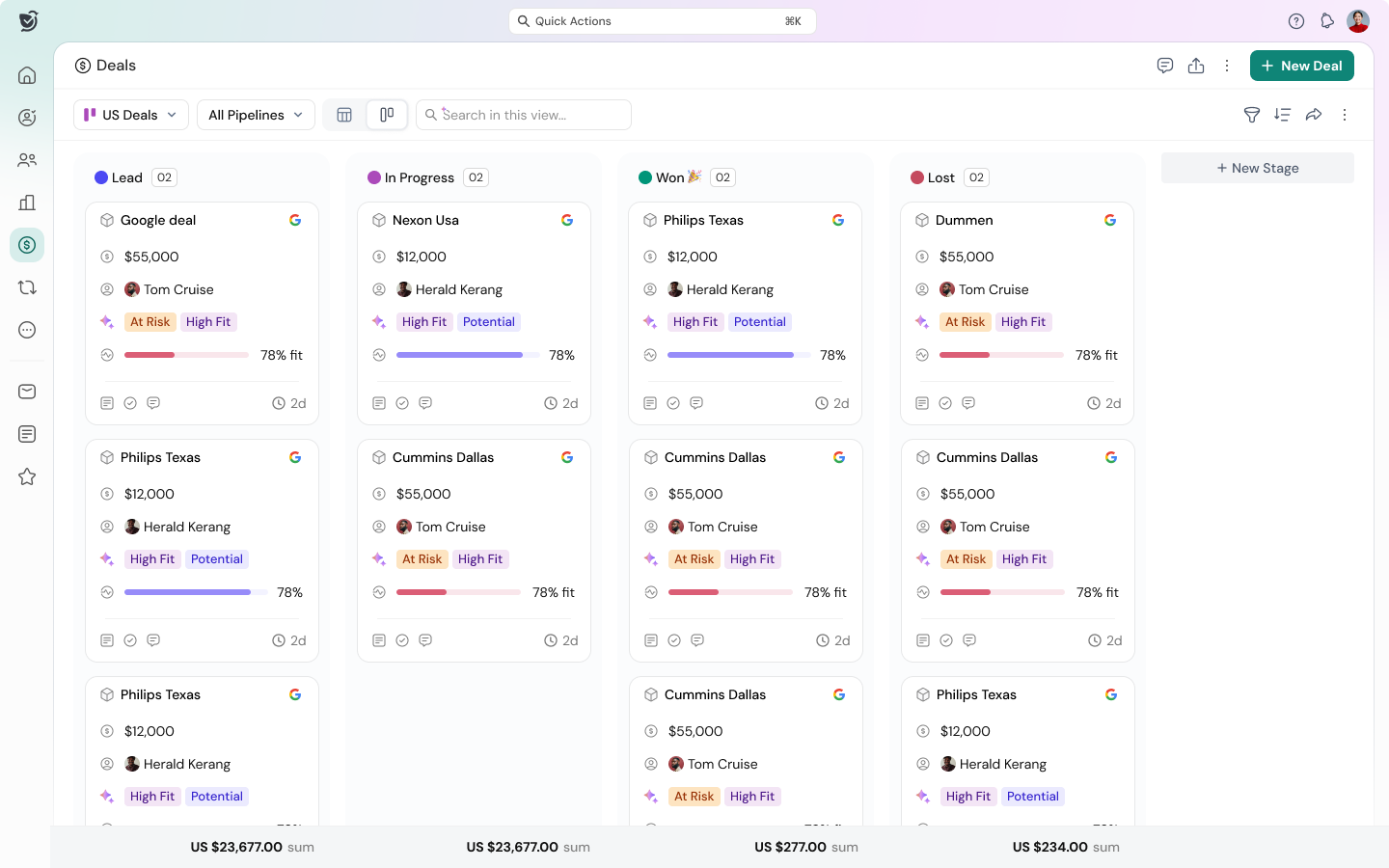
Teams can create multiple pipelines for different sales motions, with each pipeline having its own stages and weightage. For example, teams can maintain separate pipelines for standard sales, enterprise deals, or channel partnerships.
The bigger difference is the level of AI intelligence available within the deal. SparrowCRM's Deal Score combines engagement, customer fit, and process signals to assess overall deal strength. Deal Health also looks at deal velocity and engagement, while Buying Intent, Risk Factors, Buying Committee Analysis, Competitor Mentions, and Similar Customer Stories provide additional context.
SparrowCRM also provides AI-generated Next Actions, recommending specific follow-ups based on what is happening in the deal.
Ready to switch from Zendesk Sell? Explore SparrowCRM, an AI-native CRM for modern sales teams.
Lead management
To compare lead management, I researched Zendesk Sell’s lead capture and management capabilities and tested SparrowCRM hands-on.
Zendesk Sell
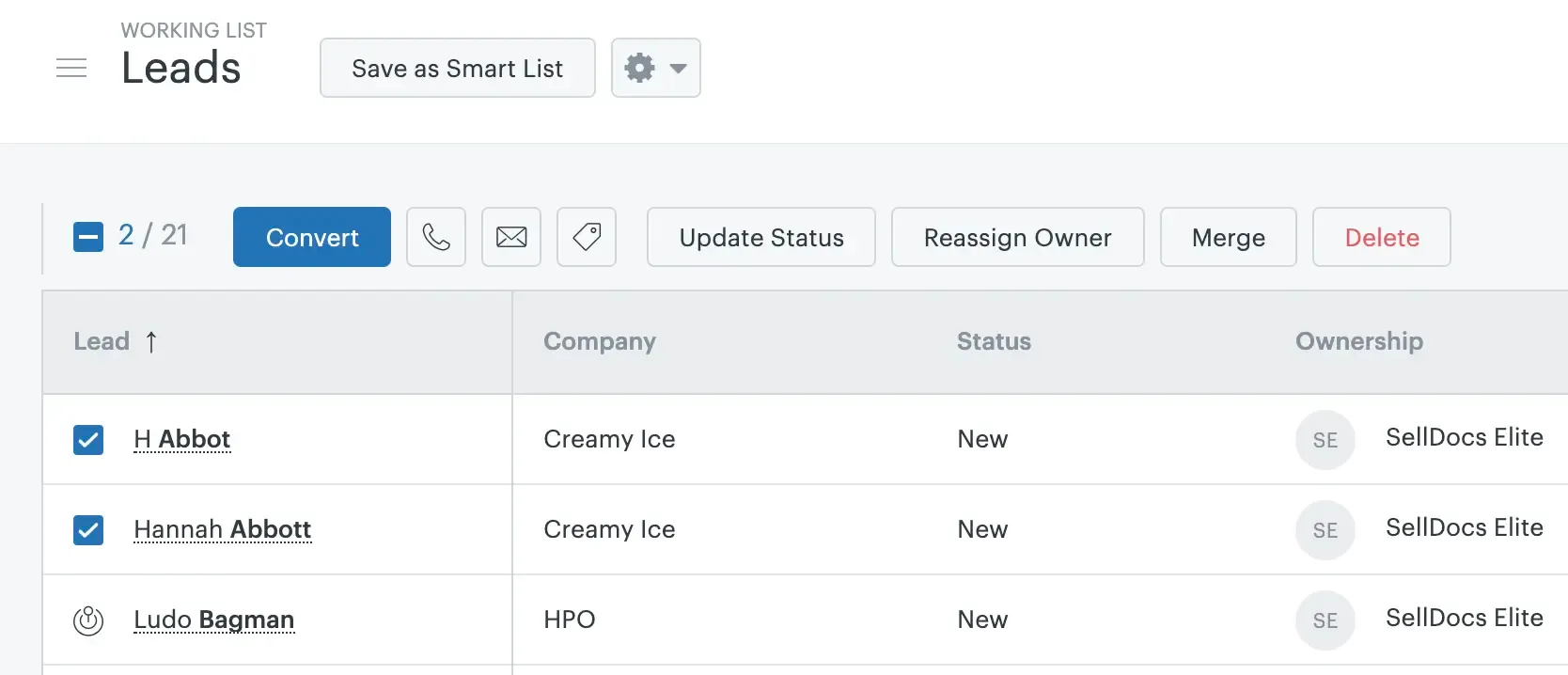
Zendesk Sell has a dedicated Leads tab where sales teams can manage and qualify prospects before moving them into the sales pipeline. Once leads are qualified, reps can convert them into the pipeline. You can also select multiple leads and convert them in bulk. Zendesk Sell also provides a keyboard shortcut, Shift + C → Shift + L to quickly create a new lead.
Source: support.zendesk.com
For lead capture, Zendesk Sell provides Lead Capture forms that can be created from the Settings section and published on a website. However, the form's design and colors have limited customization options. If you need more control over the form's appearance, you may need to connect it with Zapier and use another form solution.
Lead scoring in Zendesk Sell is largely rule-based and manually configured. Teams can define criteria based on specific lead attributes and assign weightages to those criteria to calculate a lead score. This means sales teams need to decide which factors matter and configure the scoring rules themselves.
SparrowCRM
SparrowCRM takes a more automated approach to lead management, using Smart Routing, AI enrichment, ICP Fit, engagement signals, and buying intent to help sales teams identify and prioritize leads.
For lead capture, SparrowCRM lets teams create contact forms and meeting forms that can be embedded on their website. The form builder allows teams to customize fields, labels, placeholders, required fields, hidden fields, and visual elements such as colors, fonts, spacing, buttons, images, and logos.
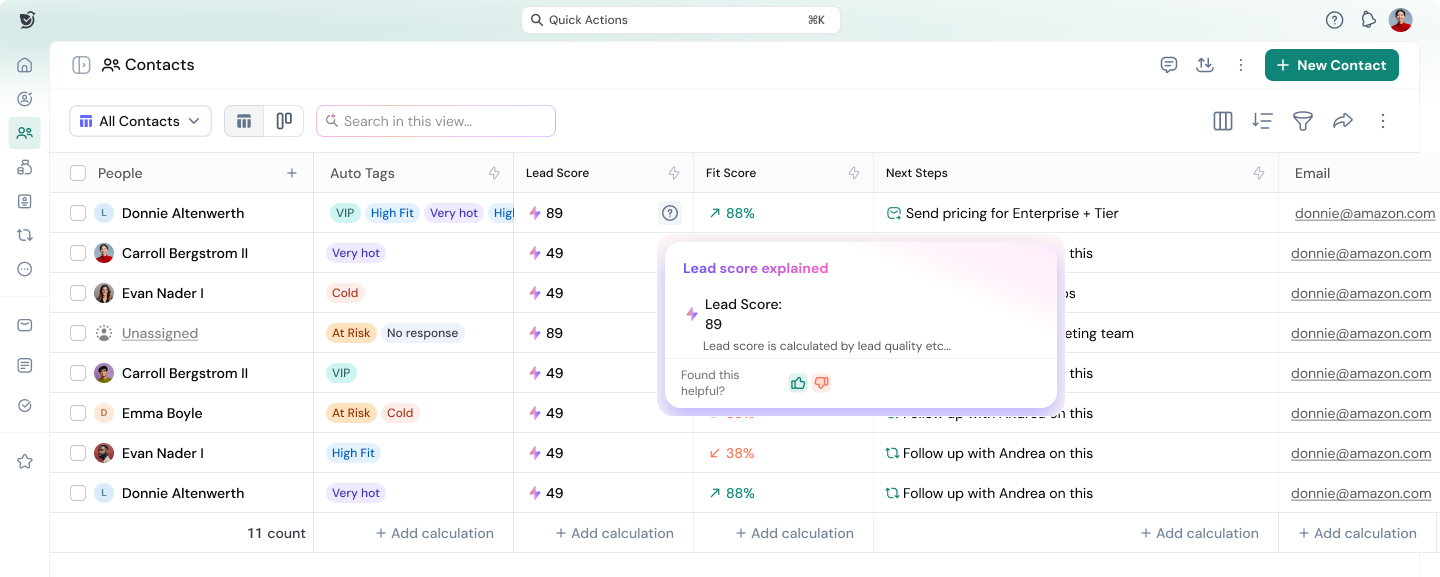
SparrowCRM can also automatically route incoming leads to the right sales representative based on rules such as territory, deal size, industry, lead source, round-robin distribution, or custom conditions. It can collect leads through forms or an API and assign them automatically, reducing the need for manual lead distribution.
The main difference is automation. Zendesk Sell provides a structured lead-management system where qualification, conversion, and scoring require more manual configuration. SparrowCRM combines lead capture with AI enrichment and automated routing, helping teams capture, qualify, and distribute leads with less manual work.
Reports and dashboards
To compare the reporting and dashboard capabilities of Zendesk Sell and SparrowCRM, I researched how both platforms help sales teams analyze performance, monitor pipelines, and create reports.
Zendesk Sell
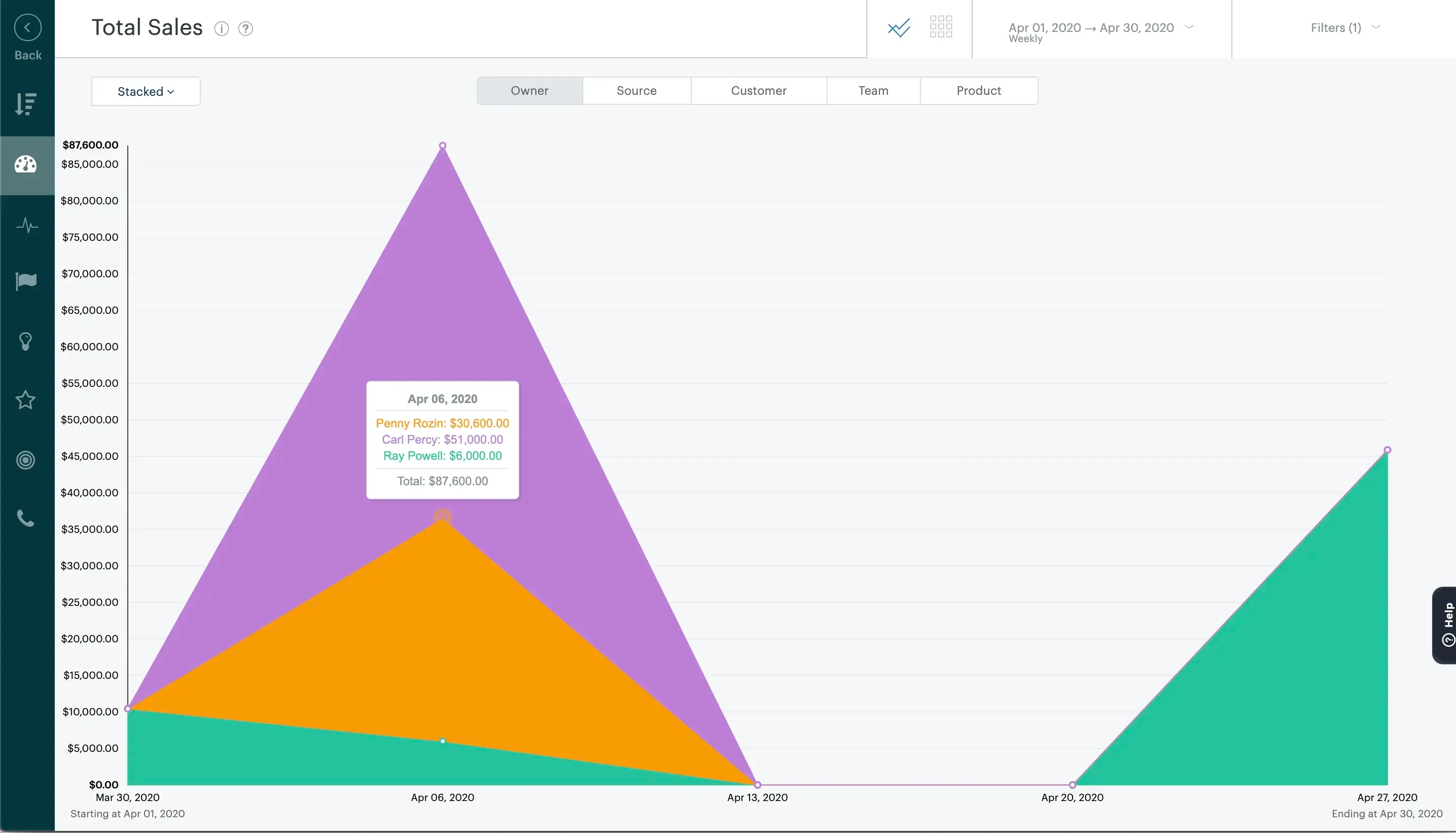
Zendesk Sell provides a Performance Dashboard with customizable widgets for monitoring sales performance, pipeline activity, revenue, and goals. Each user has their own dashboard and can add, remove, resize, and reorganize widgets based on their reporting needs.
Source: support.zendesk.com
The available reports cover areas such as pipeline analysis, sales performance, marketing effectiveness, forecasting, and sales goals. Teams can analyze metrics including total sales, funnel progression, stage distribution, deal sources, lost-deal reasons, and sales performance by owner.
The Performance Dashboard also includes widgets for Revenue, Forecast, New Deals, Active Deals, Pipeline Coverage, Revenue Goal Attainment, Top Deals, Tasks, and Appointments. However, some reports and widgets are limited to higher-tier plans.
SparrowCRM
SparrowCRM takes a more flexible approach to dashboards, allowing teams to build dashboards from scratch, start with templates, or generate dashboards using AI. Users can describe what they want to analyze in natural language, and SparrowCRM can generate relevant charts automatically.
Dashboards can combine charts and text widgets, allowing teams to visualize metrics while adding context or explanations alongside the data. SparrowCRM supports multiple chart types, including bar, line, area, pie, donut, KPI, funnel, gauge, table, and pivot table charts.
The platform also provides flexibility in managing dashboards. Teams can apply dashboard-level filters, move or duplicate charts, edit chart configurations, and share dashboards with read-only, edit, or share access. Reports can also be sent through recurring emails as an embed, attachment, or link.
The key difference is how reporting is created. Zendesk Sell provides a structured set of pre-built reports and dashboard widgets, with some advanced reporting capabilities restricted to higher plans. SparrowCRM gives teams more flexibility to build dashboards from scratch or use AI to generate charts from natural-language reporting requests.
Deal loss analysis
To compare deal loss analysis, I reviewed Zendesk Sell’s deal loss capabilities and SparrowCRM’s approach to analyzing lost deals.
Zendesk Sell
In Zendesk Sell, when a deal is marked as Lost, sales reps can be prompted to select a loss reason. Admins can customize the list of loss reasons and choose whether reps are required to provide one.
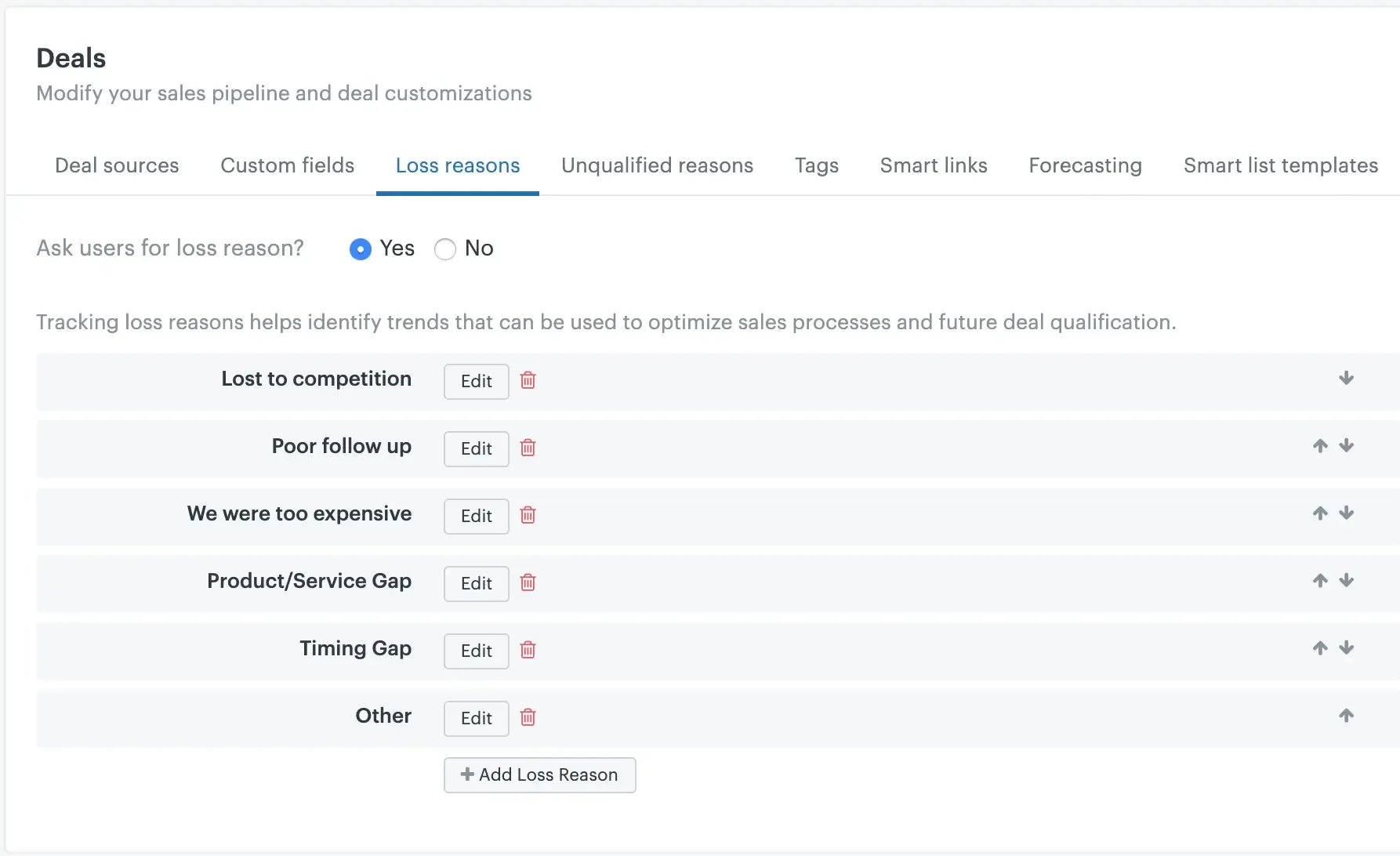
Source: support.zendesk.com
Once captured, loss reasons can be used to filter and analyze lost deals. Sell provides a Deal Loss Reasons report across all plans. Higher-tier plans also provide Loss Reasons by Owner and Loss Reasons by Source reports, helping teams understand whether certain reps or lead sources are associated with more lost deals.
However, the analysis depends on sales reps selecting or entering the appropriate loss reason when closing a deal.
SparrowCRM
SparrowCRM takes a more automated approach to deal loss analysis. Instead of relying only on a manually selected loss reason, it analyzes the deal's activities and interactions to identify patterns that may have contributed to the loss.
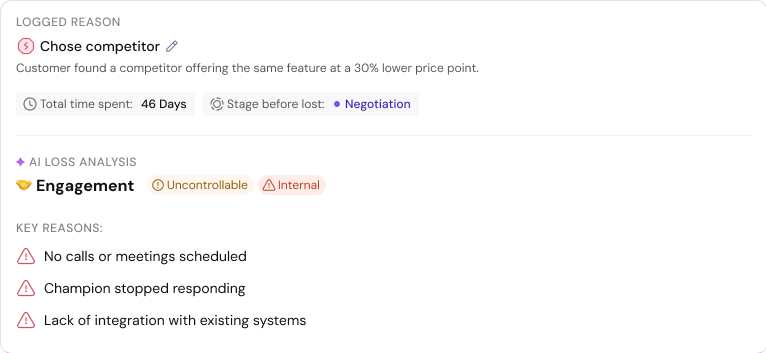
It can use signals from email conversations, call transcripts, engagement, and other deal activity to provide context around why a deal was lost. This helps sales teams understand the factors behind the outcome rather than simply recording a predefined loss reason.
The key difference: Zendesk Sell primarily relies on manually captured loss reasons and reports to analyze lost deals, while SparrowCRM uses AI to analyze deal activity and interactions to provide deeper insight into why a deal was lost.
Automation and workflow tools
Zendesk Sell automation focuses on rule-based triggers that update fields when deal stages change or contacts are added. The system applies labels, updates statuses, and assigns tasks based on simple conditions automatically.
SparrowCRM's agentic workflows let you build AI agents that automate recurring sales work from lead qualification to nurturing and routing. These agents operate within the sales workflow autonomously rather than waiting for manual triggers.
From first touch to close, automate your entire sales pipeline with AI

Pricing comparison of Zendesk Sell vs SparrowCRM
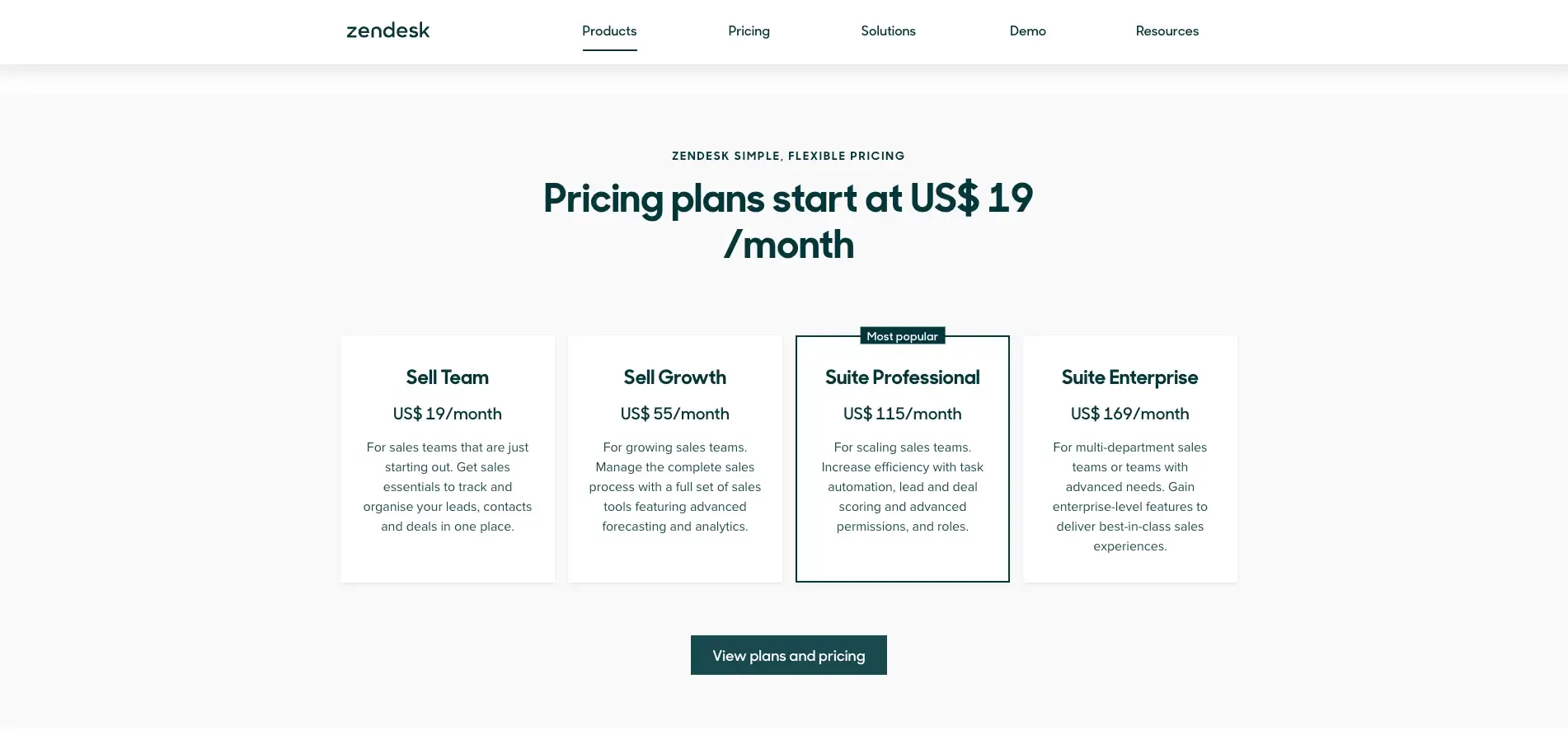
Zendesk Sell pricing starts at $19/month, with higher tiers at $55, $115, and $169/month. SparrowCRM has a free plan for up to 3 seats, followed by Growth at $19/seat/month, Pro at $49/seat/month, and Enterprise with custom pricing.
Pricing | Zendesk Sell | SparrowCRM |
Free plan | No free plan; free trial available | Free forever for up to 3 seats |
Entry plan | Sell Team: $19/month | Free : $0/seat/month |
Next plan | Sell Growth: $55/month | Growth: $19/seat/month |
Professional plan | Sell Professional: $115/month | Pro: $49/seat/month |
Enterprise plan | Sell Enterprise: $169/month | Enterprise: Custom pricing |
Pricing shown is based on the current pricing pages and can change. Zendesk's page currently lists Sell pricing at $19, $55, $115, and $169/month, while SparrowCRM lists $0, $19/seat/month, $49/seat/month, and custom pricing.
Zendesk Sell
Source: zendesk.com/in/sell/
Zendesk Sell's pricing starts at $19/month with the Sell Team plan. The Sell Growth plan costs $55/month and adds capabilities such as advanced forecasting and analytics. Sell Professional costs $115/month and adds features such as task automation, lead and deal scoring, and advanced permissions. The Sell Enterprise plan costs $169/month and is aimed at teams with more advanced requirements.
SparrowCRM
SparrowCRM offers a Free plan at $0 per seat/month for up to three seats and 50,000 records. It includes features such as AI copilot, data enrichment, email sync, calling, CSV import, data export, Deal Kanban, and custom reports and dashboards.
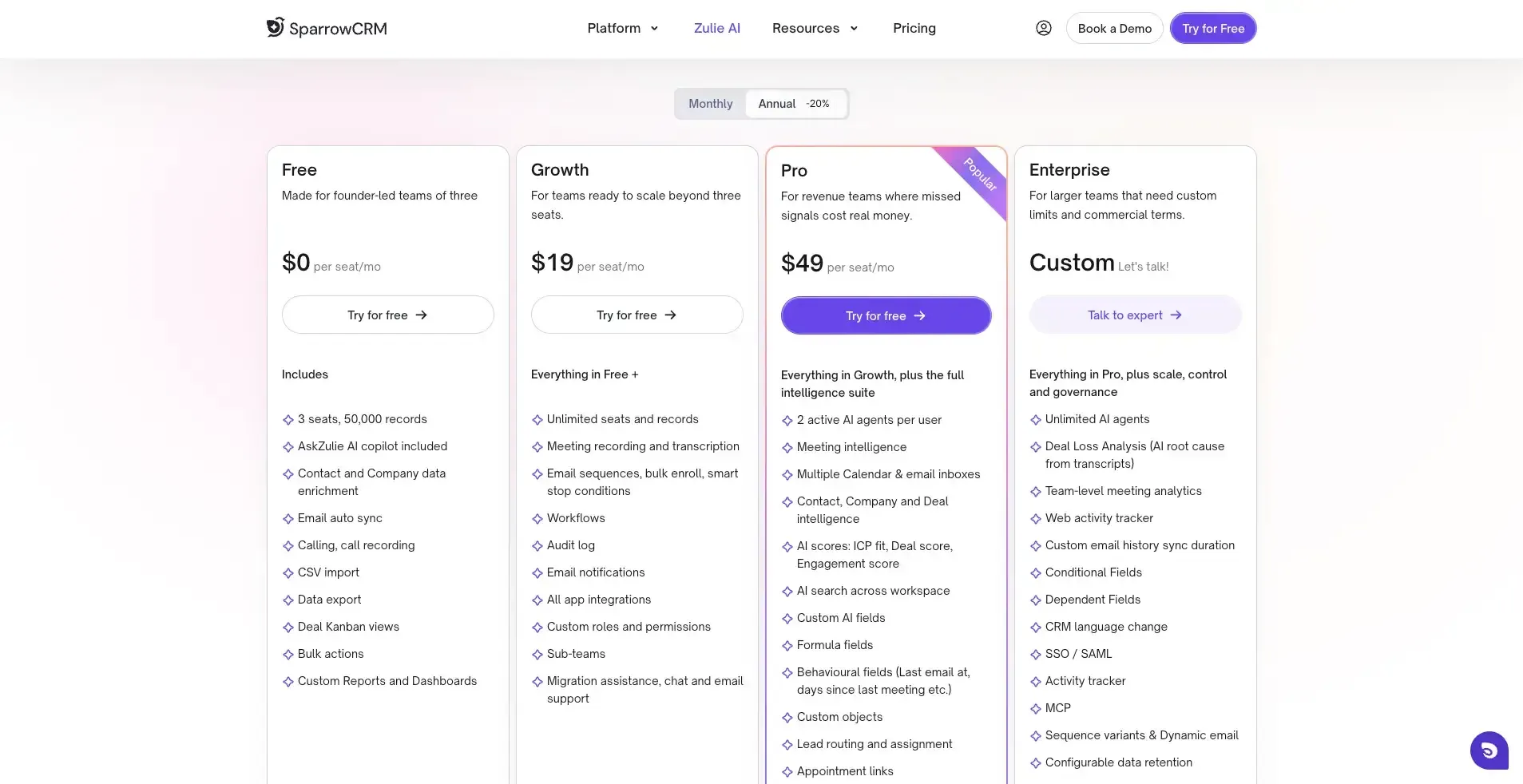
For growing teams, the Growth plan costs $19 per seat/month and includes unlimited seats and records, meeting recording and transcription, sequences, workflows, integrations, custom roles, and migration assistance. The Pro plan costs $49 per seat/month and adds features such as AI scoring, deal intelligence, lead routing, multiple inboxes, custom AI fields, and API access. Enterprise pricing is custom and includes advanced capabilities such as Deal Loss Analysis, goals and forecasting, SSO/SAML, and governance controls.
Which is more affordable?
For small teams, SparrowCRM has a lower starting cost because its Free plan supports up to three seats. Even its Growth plan starts at $19 per seat/month, while Zendesk Sell starts at $19/month for Sell Team.
The bigger pricing difference is at the higher end: SparrowCRM's Pro plan is $49 per seat/month, while Zendesk Sell's Professional plan is $115/month. However, these plans have different feature sets, so pricing alone should not be used as a direct feature-for-feature comparison.
Looking for alternatives to Zendesk Sell? Explore our guide to the 9 best Zendesk Sell alternatives and find the right CRM for your team. Explore the Zendesk Sell alternatives guide
Zendesk Sell vs SparrowCRM: Migration and data transfer
Migration is the most important part who moves from Zendesk Sell to other CRMs which is migration. Let’s have a look at how Zendesk Sell supports data exporting and how SparrowCRM supports migration.
Moving data from Zendesk Sell
Zendesk Sell provides multiple options for moving data to another CRM. You can export key records such as contacts, leads, deals, notes, and tasks. The exported records retain their customer IDs, which can help map records when importing them into another CRM.
For a more selective migration, you can create Smart Lists to filter the specific records you want and export those lists instead of exporting everything.
Zendesk Sell also provides REST APIs that can be used to programmatically create, read, update, and delete Sell data. The Core API is available across all Sell subscription plans, while the Sync, Firehose, and Search APIs are available on Growth and higher plans. This gives teams another option for moving or synchronizing data when a CSV-based migration isn't sufficient.
SparrowCRM import methods: CSV, API, and migrations
CSV import: SparrowCRM supports CSV imports of up to 100 MB per upload. You can map fields during the import and update existing records. Activities and notes can also be mapped using the customer ID, helping maintain relationships between records during migration.
REST API: For datasets that go beyond the CSV import limits, SparrowCRM provides a REST API. You can use GET requests to retrieve historical data from your existing CRM and then transfer that data into SparrowCRM through the API.
Native migration: SparrowCRM also provides a native migration option for supported CRMs. You can access it through Settings → Migration and connect your existing CRM to transfer data directly. The migration can include deals, contacts, notes, activities, and user data, reducing the need to manually export and import each data type. Which CRM Should You Choose Before 2027?
Choose Zendesk Sell Alternative if You Need Familiar Workflows
Zendesk partnered with Pipedrive as the official migration destination and created dedicated migration tools for smooth, accurate transitions. Pipedrive mirrors Zendesk Sell's visual pipeline management and drag-and-drop deal boards. The switch feels natural for reps accustomed to those workflows.
Salesforce remains the strongest long-term option for enterprises that require deep customization and scalability with advanced AI through Einstein and Agentforce. But Salesforce demands significant implementation time. Smaller teams may not need the complexity it carries.
Choose SparrowCRM if You Want AI-Driven Sales Intelligence
SparrowCRM was built from scratch as an AI-native, agentic CRM where autonomous agents execute tasks without waiting for human instruction. Reps spend only about 29% of their week selling. Admin and data entry consume 71%.
SparrowCRM's agentic AI handles follow-ups, research, record updates, and CRM hygiene without human intervention. Information stays current without manual upkeep. The platform understands context throughout the pipeline, knows what needs to happen next, and takes action during the sales process.
Bottom line
The retirement of Zendesk Sell means teams need to start planning for their next CRM, but it can also be an opportunity to move to a platform that better fits their current needs.
Pipedrive can be a good choice for teams looking for a familiar sales workflow and a straightforward transition. Salesforce is better suited to organizations that need extensive customization and enterprise-level capabilities. SparrowCRM is an option for teams looking for an AI-native CRM that can automate repetitive sales tasks and provide more intelligence throughout the sales process.
Although Zendesk Sell will remain available until August 31, 2027, starting the migration process early gives your team enough time to evaluate alternatives, plan the transition, and move your data without unnecessary pressure.
The right choice ultimately depends on your sales process, team size, and priorities. Whether you value a familiar workflow, advanced customization, or AI-powered sales automation, choosing and migrating to the right CRM early can make the transition much smoother.

Geethapriya
Geethapriya is a Growth Marketer and Business Researcher who researches and writes about CRM, sales, marketing, and customer engagement. Her work focuses on understanding industry trends, customer and sales challenges, and how businesses can use technology to build more effective growth processes.