AI & AUTOMATION
Sales Workflow Automation: How to Build an AI-Powered System with CRM

By Geethapriya
Last updated on May 26, 2026
Discover how sales workflow automation handles the repetitive work so your team can focus entirely on closing deals.
Geethapriya
Updated on May 26, 2026
Your sales reps didn't join your team to fill out spreadsheets.
Yet according to Salesforce's State of Sales research, sales professionals spend only 29% of their time actually selling. The rest disappears into data entry, manual follow-ups, CRM updates, and chasing deals that should have moved forward days ago.
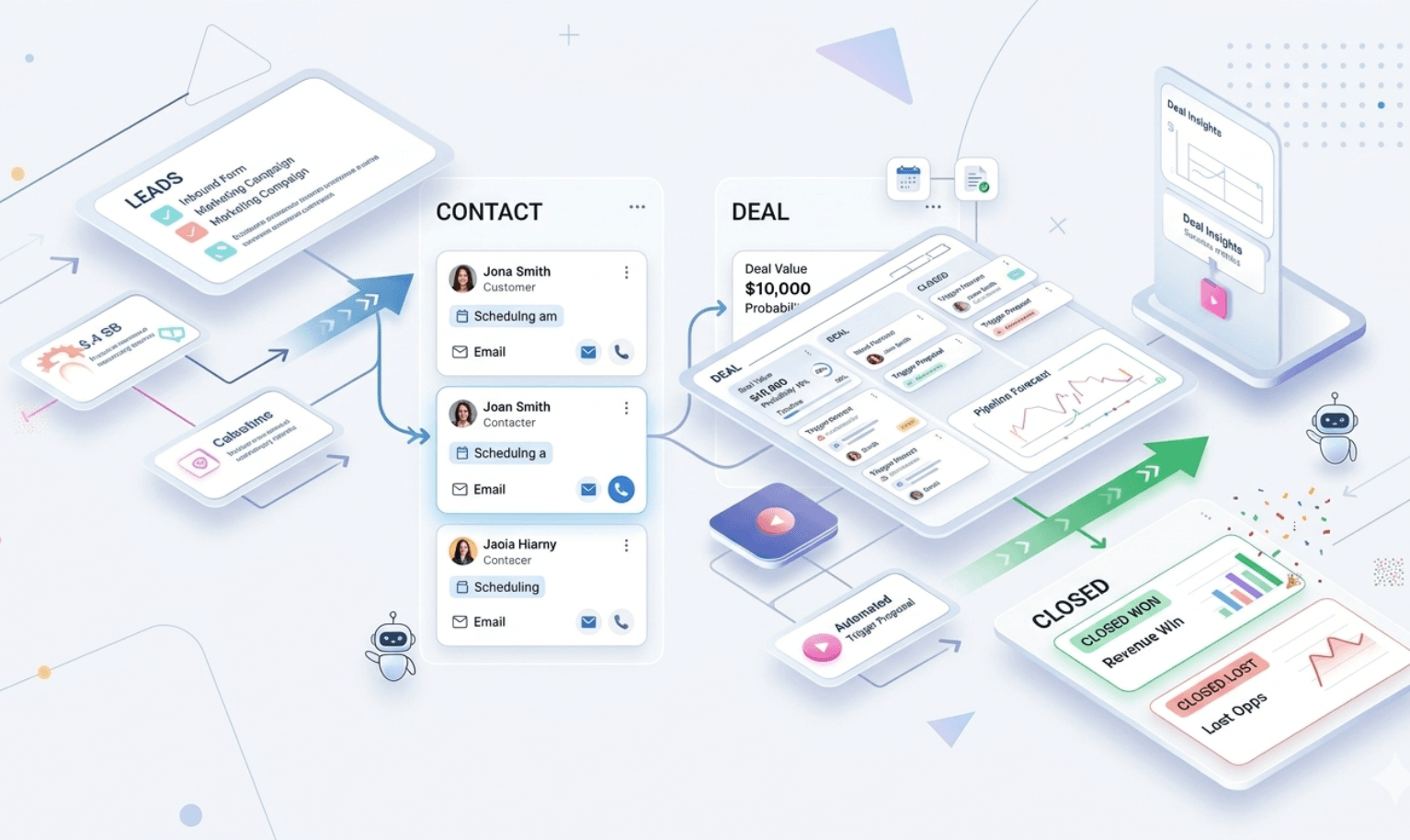
Sales workflow automation fixes that. It connects the dots between your tools, your reps, and your data — so the system does the repetitive work, and your team stays focused on closing.
This guide covers what sales workflow automation actually means inside a CRM, 10 real examples you can build today, a 5-step implementation plan, and an honest comparison of the top tools.
What is sales workflow automation?
Sales workflow automation uses software to convert manual, repetitive steps in your sales process into automated sequences that run without human intervention.
Every workflow is built on three core components:
- Trigger: the event that starts the automation (a lead fills out a form, a deal goes quiet for 7 days, a rep sends a proposal)
- Filter: the conditions that determine what happens next (lead score above 60, deal value over $5K, contact is in the US)
- Action: what the system does automatically (creates a CRM record, sends an email, alerts a manager, moves the deal stage)
Sales automation vs. workflow automation: what's the difference?
People use these terms interchangeably, but they mean different things in practice.
Sales automation | Workflow automation | |
What it covers | Individual, standalone tasks | End-to-end connected sequences |
Scope | One action at a time | Multiple steps across the full funnel |
Example | Sending a follow-up email | Lead enters → scored → routed → followed up → deal stage updated |
Runs without | Manual task execution | Manual coordination between steps |
Lives in | Single tool or CRM feature | Cross-tool, CRM-connected system |
Best for | Fixing specific bottlenecks | Redesigning how your whole process runs |
Think of it this way: sales automation handles a single step. Workflow automation runs the whole play, from the moment a lead enters your system to the day the deal closes and hands off to onboarding.
How CRM fits into all of this
Your CRM is the engine that makes workflow automation work. Without it, you have triggers firing into a void. With it, every automated action updates a real contact record, moves a real deal, and gives every rep full context the moment they open the account.
The best sales workflow automation systems are not bolt-on tools. They live inside your CRM — reading data, updating records, and triggering the next step automatically.
Why your team needs it now
Sales teams that still rely on manual processes aren't just slow, they're bleeding money.
The cost of doing things manually
Sales reps waste enormous amounts of time on tasks that shouldn't require a human. Here's what the data shows:
- Only 29% of a sales rep's week goes to actual selling; the rest is admin, data entry, and internal coordination
- 32% of reps spend an hour or more on CRM data entry every day, that's 250+ hours per rep per year
- For a team of 10 reps at $100K OTE, that's $250,000 in lost selling capacity annually just from data entry alone
- American businesses lose nearly $600 billion per year to sales inefficiencies that automation could eliminate
This isn't a motivation problem. It's an architecture problem. And the fix isn't hiring more reps, it's building a system that handles the work they shouldn't be doing.
What teams actually gain
Sales workflow automation is not just about saving time. The measurable outcomes are hard to argue with:
- 67% decrease in costs reported by companies after implementing sales automation
- 61% of companies that hit revenue targets use full workflow automation
- Teams using AI tools weekly report 78% shorter deal cycles, 70% larger deal sizes, and 76% better win rates
- Responding to new leads within one hour increases conversions by up to 7x; automation makes that response time the default, not the exception
These numbers reflect what teams experience when they stop managing workflows manually and start building systems that run without them.
10 sales workflow automation examples
These examples follow a simple format for each: the trigger that starts it, the action that runs automatically, and the result your team sees.
1. Automated lead capture and CRM entry
Trigger: A prospect fills out a demo request form on your website.
Action: The CRM creates a contact record instantly, pulling in company name, job title, industry, and enriched firmographic data. The lead is tagged by source, the lifecycle stage is set to "Lead," and the record is ready for scoring.
Result: Zero data entry. Zero delay. The rep opens their CRM, and the lead is already there with context, not a name and an email in an inbox.
2. AI-powered lead scoring and routing
Trigger: A new lead enters the CRM with enough data to score.
Action: The system evaluates ICP fit (industry, company size, revenue, seniority), engagement signals (email opens, page visits, demo sign-ups), and buying intent. Leads above a set threshold are automatically assigned to the best-fit rep based on territory, expertise, or current workload.
Result: Research from Harvard Business Review shows contacting a lead within the first hour increases conversion rates by up to 7x. Automated routing makes that the default, not a goal.
3. Automated follow-up email sequences
Trigger: A prospect opens your email but doesn't respond within 48 hours.
Action: A follow-up sequence fires automatically — a value-add message on day 2, a relevant case study on day 5, a final check-in on day 10. Each email is personalized using CRM data (company name, deal stage, and content they've engaged with). If they reply at any point, the sequence stops immediately.
Result: Research shows 80% of sales require at least 5 follow-ups, yet 44% of salespeople give up after one attempt. Automated sequences ensure every lead gets the full cadence, not just the ones a rep remembers.
4. Meeting scheduling automation
Trigger: A prospect replies to an outreach email and expresses interest.
Action: An automated message with a scheduling link fires back within minutes. When they book, the CRM creates a meeting record, updates the contact's lifecycle stage, notifies the assigned rep, and adds the meeting to their calendar, all without the rep logging in.
Result: The back-and-forth email chain to find a meeting time disappears. SMS meeting reminders alone have been shown to boost attendance rates by 300%.
5. Deal stage progression automation
Trigger: A rep sends a proposal to a prospect.
Action: The CRM automatically advances the deal from "Qualified" to "Proposal Sent." A task is created for the rep to follow up in 3 days. If the deal hasn't moved in 7 days, an alert fires to the rep's manager.
Result: Managers don't need to ask "where does this deal stand?" The sales pipeline reflects reality in real time. Forecast accuracy improves because stages match actual activity, not what a rep last remembered to update.
6. At-risk deal alerts
Trigger: A high-value deal has had no email opens, no calls, and no meeting activity for 10 days.
Action: The system flags the deal as at-risk, sends an alert to the rep with AI-suggested re-engagement actions, and notifies the manager if the deal is above a certain value threshold.
Result: Deals don't go cold quietly. Your team sees them stalling in time to act, not on the day a close date gets missed.
7. Conversation intelligence automation
Trigger: A sales call ends.
Action: The conversation intelligence system transcribes the call, generates an AI summary covering pain points, objections, and next steps, and logs it directly to the contact and deal record. Competitor mentions are flagged automatically. Follow-up tasks are created based on what was discussed.
Result: Reps stop spending 20–30 minutes after every call typing notes. Managers get coaching data from actual conversations — not rep self-reporting.
8. Sales forecasting automation
Trigger: It's Monday morning. A new week begins.
Action: The CRM generates a sales forecast report based on current pipeline value, deal health scores, stage-by-stage conversion rates, and historical close patterns. It's in every manager's inbox before their 9 a.m. meeting.
Result: Companies with automated forecasting are 38% more likely to hit their targets consistently. Forecast accuracy shifts from gut-feel estimates to data-driven projections.
9. Contract and proposal automation
Trigger: A demo is completed, and the deal moves to the "Proposal" stage.
Action: The CRM pulls relevant customer data (company name, use case, deal size, stakeholder names) and auto-generates a customized proposal. It's sent to the rep for review — ready to send in minutes, not hours.
Result: Companies report a 50% reduction in average lead time and 30% less time spent on data entry with contract and proposal automation. The paperwork gets done. The rep gets back to the conversation.
10. Post-sale onboarding handoff
Trigger: A deal moves to "Closed Won."
Action: A full onboarding workflow fires, a welcome email goes to the customer, the customer success manager is assigned and notified, call notes and deal context are transferred, and an onboarding task list is created. The CRM confetti animation fires for the team.
Result: No dropped handoffs. No, "I didn't know they were expecting a call." Customer success starts from the moment the deal closes, not from whenever someone remembers to send an intro email.
From first touch to close, automate your entire sales pipeline with AI
How AI makes automation smarter
Traditional workflow automation follows rules. If X happens, do Y every time, in the same way.
AI-powered CRM automation adapts. It reads patterns across thousands of interactions, learns what works, and makes decisions that static rules can't. Here's what that looks like in practice:
Lead scoring that learns: Instead of scoring based on a static rubric you set up once, AI agent continuously updates scores based on what actually predicts conversion engagement patterns, buying signals, demographic fit, and behavior across email, calls, and meetings.
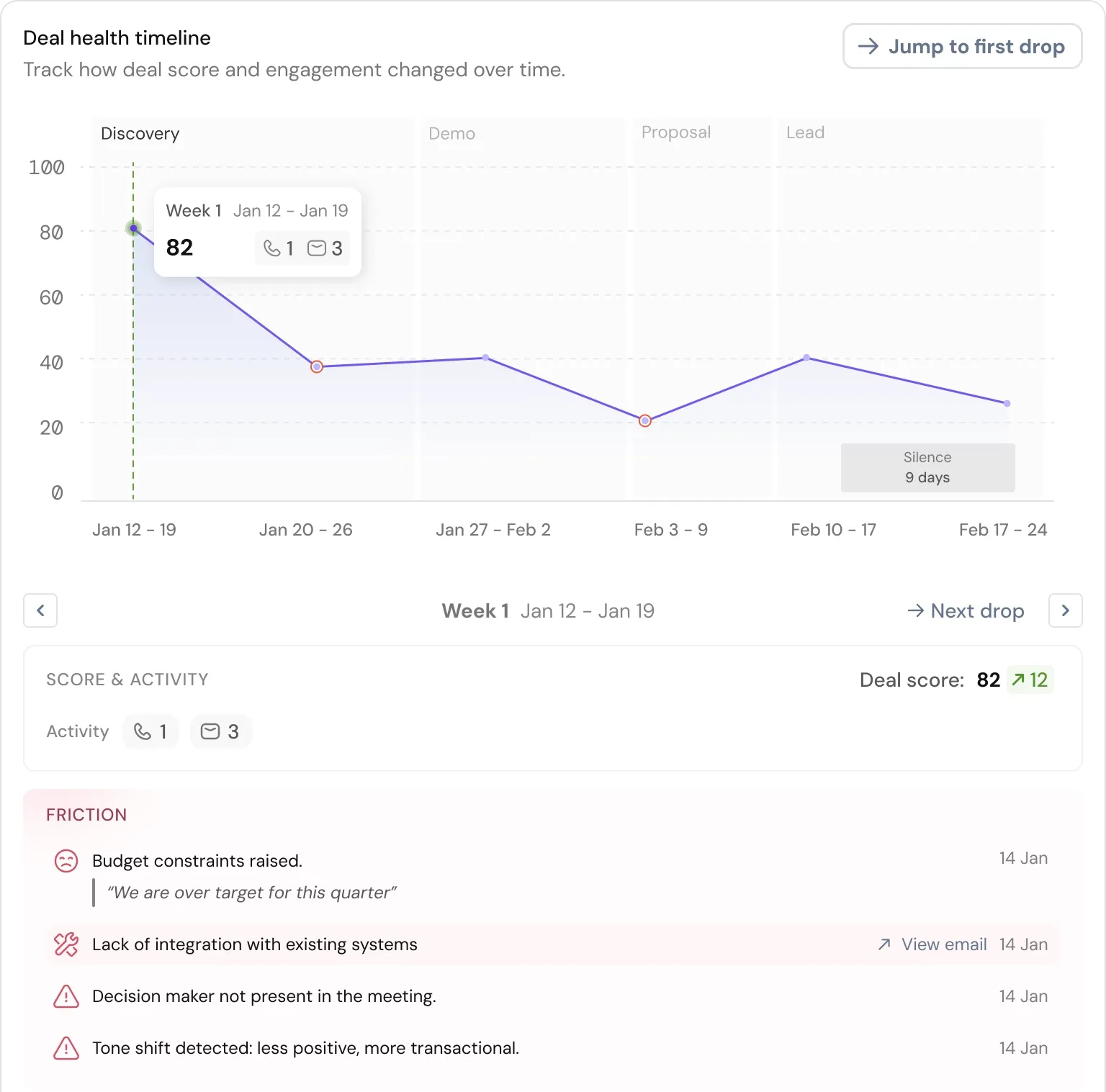
Predictive deal health: AI doesn't just alert you when a deal goes quiet. It identifies early warning signals, such as a drop in email response time, fewer stakeholders engaging, a close date that keeps getting pushed back, and flags risk before it becomes a loss.
SparrowCRM does this natively. Every contact gets an AI-calculated ICP Fit Score, Engagement Score, and Buying Intent signal, updated in real time as your reps interact with the account. When a deal starts showing risk signals, the Risk Factors widget surfaces the exact reasons: low engagement, a competitor mention in a recent call, or a single-threaded deal with no decision-maker involvement. Your reps see what's wrong and what to do next , without digging through notes or asking a manager.
Next-best-action recommendations: Rather than leaving reps to decide what to do next, AI surfaces specific recommendations: "Send pricing comparison. Three contacts at this company have viewed your pricing page this week."
Personalization at scale: AI agent can generate follow-up emails that reference the actual conversation from a call, the specific page they visited, or the objection they raised in a meeting, without a rep writing each one manually.
The shift is from automation that handles tasks to automation that handles decisions. And for growing sales teams, that's the difference between saving time and changing outcomes.
How to build your system in 5 steps
Step 1: Map your current sales process
Before automating anything, document every step from "lead enters the system" to "deal closes and hands off to success."
Look for:
- Where do deals get stuck most often?
- Which tasks does every rep do the same way every time?
- Where is data entered manually that could be captured automatically?
- Where do leads fall through because no one followed up?
This audit is the foundation. You can't automate what you haven't mapped.
Step 2: Identify your highest-friction points
Not everything should be automated first. Start with the tasks that consume the most time and create the most errors.
The highest-ROI starting points for most teams are:
- Lead capture and CRM entry (saves 2–4 hours/week per rep)
- Follow-up email sequences (ensure consistency across all leads)
- Deal stage updates (keep pipeline data accurate in real time)
- Lead routing and assignment (eliminates response time delays)
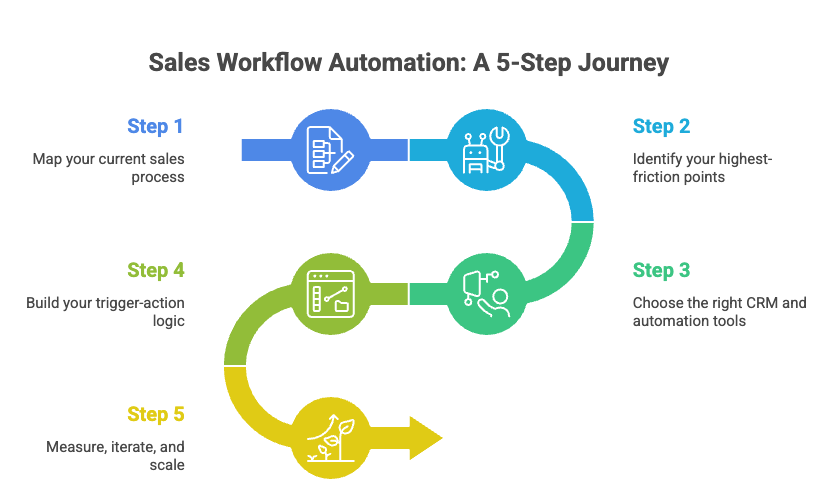
Step 3: Choose the right CRM and automation tools
Your tools need to fit your process, not the other way around. Before selecting, evaluate on:
- CRM integration: Does the tool work natively with your CRM or require a third-party connector?
- AI capabilities: Does it score leads intelligently or just follow static rules?
- Ease of use: Can a sales manager configure workflows without involving an engineer?
- Scalability: Will it handle your process at 5x your current lead volume?
- Integration depth: Does it connect with your email, calendar, and communication stack?
Step 4: Build your trigger-action logic
For each automation, define the trigger, filter conditions, and resulting action clearly before building anything.
A well-structured workflow looks like this:
- Trigger: New lead created from web form
- Filter: ICP score > 60 AND company size > 10 employees
- Action: Assign to senior rep + create follow-up task for Day 1
Keep individual workflows simple. Complex multi-step flows are easier to build when each component is working cleanly on its own.
Step 5: Measure, iterate, and scale
Launch with 2–3 core automations and track the right metrics:
- Response time to new leads — has it dropped?
- Follow-up consistency — are all leads getting touched at every stage?
- Deal stage accuracy — does your pipeline reflect actual progress?
- Rep time on selling vs. admin — is it shifting?
Once those metrics improve, expand. Add AI scoring, forecasting automation, and conversation intelligence. Build from a foundation that works — not from a wishlist.
Sales workflow automation tools compared (2026)
What to look for before you compare
Every tool in this space claims to "automate your entire sales process." Most automate parts of it. Evaluate based on what matters to your team:
- Does it have native CRM automation or just integrations?
- Does AI update dynamically or follow rules you set once?
- Is the workflow builder visual and self-serve, or does it require developers?
- What does it cost at your actual team size, not the entry-tier demo price?
Top tools at a glance
Tool | Best for | Key automation features | AI capabilities | Starting price |
SparrowCRM | SMBs and growing sales teams | Visual workflow builder, lead scoring, sequence automation, deal stage triggers, smart lead routing | AI scoring (ICP fit, engagement, buying intent), next actions, deal health tracking, competitor mention alerts | |
HubSpot Sales Hub | SMB / mid-market teams | Email sequences, lead routing, deal automation, and task creation | AI email assist, predictive lead scoring | $20/user/mo |
Salesforce Sales Cloud | Enterprise teams | Flow automation, lead assignment rules, contract, and approval workflows | Einstein AI, Agentforce autonomous agents | $25/user/mo |
Outreach.io | Enterprise SDR and AE teams | Multi-channel sequences, deal management, and AI deal agents | Conversation intelligence, deal risk scoring, forecasting | Custom |
Pipedrive | Small teams, visual pipeline | Deal stage automation, activity triggers, and task creation | AI sales assistant, deal likelihood scoring | $24/mo |
n8n / Activepieces | Tech-savvy teams needing custom flows | No-code workflow builder, 400+ app integrations | AI agent components, OpenAI integration | Free / $20/mo |
Teams that try to use automation tools disconnected from their CRM create more work, not less. The data splits across systems, reps end up with duplicate notifications, and nobody trusts the pipeline. The best automations run inside the CRM, not alongside it.
Common mistakes to avoid
Sales workflow automation fails when teams treat it as a technical project instead of a process redesign. Here are the mistakes to avoid while setup sales automation in your CRM:
Automating broken processes: If your lead routing logic is flawed manually, automating it makes the problem faster and harder to spot. Fix the process first. Then automate it.
Building too much at once: Teams that launch 15 automations simultaneously can't identify what's working and what isn't. Start with three. Prove they work. Then expand.
Ignoring the human touch points: Not every step should be automated. Discovery calls, objection handling, and negotiation require a rep. The goal is to automate the logistics so humans can focus on the conversations.
Letting data quality slide: Automation is only as good as the data it runs on. If your CRM has duplicate contacts, missing fields, and outdated records, your automations will fire on bad information. Clean data is a prerequisite, not an afterthought.
Skipping team training: The most sophisticated workflow automation fails if reps don't trust it or know how to work alongside it. Adoption requires context: explain what each automation does, why it exists, and how it makes their job easier, not just that it exists.
Conclusion
Sales workflow automation isn't about replacing your sales team. It's about removing the work that was never theirs to begin with.
When lead routing, CRM updates, follow-up sequences, and deal stage progression run automatically, your reps get their time back. They spend it on discovery calls, building relationships, and closing, not filling in fields and sending reminder emails.
The teams winning in 2026 aren't working harder. They built systems that handle the repetitive work so their people can focus on the work that actually moves deals forward.
Start with one or two automations; lead capture and follow-up sequences are the highest-impact starting points. Prove they work. Then build from there.
If you're looking for a CRM that has AI scoring, workflow automation, and deal intelligence built in, not bolted on, SparrowCRM is built for exactly that. See how growing sales teams use it to automate their pipeline from lead to close.

Geethapriya
Geethapriya is a Growth Marketer and Business Researcher who researches and writes about CRM, sales, marketing, and customer engagement. Her work focuses on understanding industry trends, customer and sales challenges, and how businesses can use technology to build more effective growth processes.