AI & AUTOMATION
AI CRM: The complete guide to AI-powered sales (2026)

By Ganesh Ravi Shankar
Last updated on Jul 21, 2026
Explore this blog to understand what AI CRM actually is, how agentic CRM is reshaping the way small sales teams sell, and what changes in 2027 will mean for every rep still relying on a passive database.

- What is AI CRM?
- How does AI in CRM actually work?
- Core features and capabilities of AI-driven CRM platforms
- Key benefits of AI in CRM for sales teams
- 4 real-world use cases of AI in sales CRM
- Top AI-powered CRM platforms compared
- Common challenges and how to overcome them
- How to implement AI CRM: step-by-step
- Final thoughts
Managing customer relationships shouldn't mean spending hours updating records, qualifying leads, and following up manually. Traditional CRMs often become data repositories instead of tools that actively help sales teams close more deals.
AI in CRM changes that by automating routine tasks, uncovering actionable insights, and helping sales teams make faster, smarter decisions. In this guide, you'll learn how AI-powered CRM works, its benefits, key features, and how to choose the right solution for your business.
TL;DR
What is AI CRM?
An AI CRM (Artificial Intelligence in Customer Relationship Management) is a customer relationship management system that uses artificial intelligence to automate sales tasks, analyze customer data, and provide actionable insights. Instead of simply storing contacts and tracking interactions, it helps sales teams prioritize leads, predict outcomes, recommend next steps, and make smarter decisions.
Unlike traditional CRMs, which primarily act as databases, AI-powered CRMs continuously learn from your sales data to identify patterns, forecast opportunities, and automate repetitive work.
AI-powered CRM vs. traditional CRM: key differences
Capability | Traditional CRM | AI CRM |
Data entry | Manual | Automated |
Lead prioritization | Rep decides | AI-scored |
Sales forecasting | Spreadsheet estimates | ML-powered predictions |
Follow-up reminders | Manual scheduling | AI-triggered nudges |
Deal risk detection | None | Real-time alerts |
Email personalization | Manual templates | AI-generated drafts |
Call analysis | None | Conversation intelligence |
Pipeline health | Rep judgment | Predictive scoring |
How does AI in CRM actually work?
AI CRM platforms combine several technologies to analyze data, make predictions, and drive action. Understanding how each layer works helps you evaluate which platforms are actually intelligent versus just labeled as AI.
Machine learning
Machine learning (ML) is the engine behind most AI CRM capabilities. The system trains on historical sales data, including won and lost deals, engagement patterns, and rep behavior, and builds models to predict future outcomes.
Every interaction you log makes the model smarter. Over time, a machine learning CRM can predict which leads will convert, which deals are at risk, and which reps are likely to hit quota with remarkable accuracy.
Natural language processing (NLP)
Natural language processing CRM capabilities allow the platform to read and understand human communication. This includes scanning email threads, analyzing call transcripts, and extracting sentiment from meeting notes.
NLP is what enables a CRM to detect when a prospect mentions a competitor automatically, raises a pricing objection, or signals buying intent without a rep manually tagging those moments.
Predictive analytics
Predictive analytics takes historical patterns and projects them into the future. In sales, this powers AI sales forecasting, lead scoring models, and churn prediction.
Rather than guessing whether a deal will close, an AI CRM calculates a probability based on dozens of signals: engagement velocity, deal stage duration, stakeholder involvement, and more. According to Gartner, organizations that use AI-driven forecasting reduce forecast error by up to 50%.
Types of AI CRM software: AI-added vs AI-native vs agentic
Not all AI CRMs are built the same. There is a significant difference between a legacy platform that has layered AI features on top of its original architecture and a platform built from the ground up with AI at its core. Understanding this distinction is critical when evaluating vendors.
Type 1: AI-added CRMs
These are traditional CRMs that have incorporated AI features as upgrades to an existing platform. Examples include Salesforce Einstein and HubSpot AI tools. The AI works within a system that was originally designed for manual data entry and human-driven workflows.
While useful, these features often feel bolted on. Data silos within the platform can limit how well AI models perform, and the core workflow is still largely manual.
Type 2: AI-native CRMs
AI-native CRMs are built from scratch with machine learning and automation as foundational capabilities, not add-ons. Every feature, from lead scoring to pipeline management, is designed to be AI-driven by default.
These platforms offer tighter integration between AI signals and workflows. Insights are embedded throughout the product rather than surfaced in a separate analytics module.
Type 3: Agentic CRMs
The most advanced category is the agentic CRM, a platform where AI doesn't just surface insights but actively takes action. In an agentic CRM, autonomous AI agents execute tasks: enrolling contacts into sequences, updating deal stages, routing leads, generating follow-up emails, and managing workflows without waiting for human instruction.
This is the next evolution of CRM technology. Instead of assisting reps, agentic CRM acts as an always-on virtual sales assistant that runs in parallel with your team. SparrowCRM is built around this agentic model, where AI takes initiative so your reps can focus on conversations that matter.
Core features and capabilities of AI-driven CRM platforms
The features that define an AI CRM go well beyond basic automation. Here are the six capabilities that separate genuine AI CRM platforms from traditional tools with a few smart features added on.
1. AI lead scoring
AI lead scoring CRM features use machine learning to evaluate every contact in your pipeline and rank them by conversion likelihood. Instead of reps relying on gut feel, the system scores leads based on behavioral signals, firmographic fit, engagement patterns, and deal history.
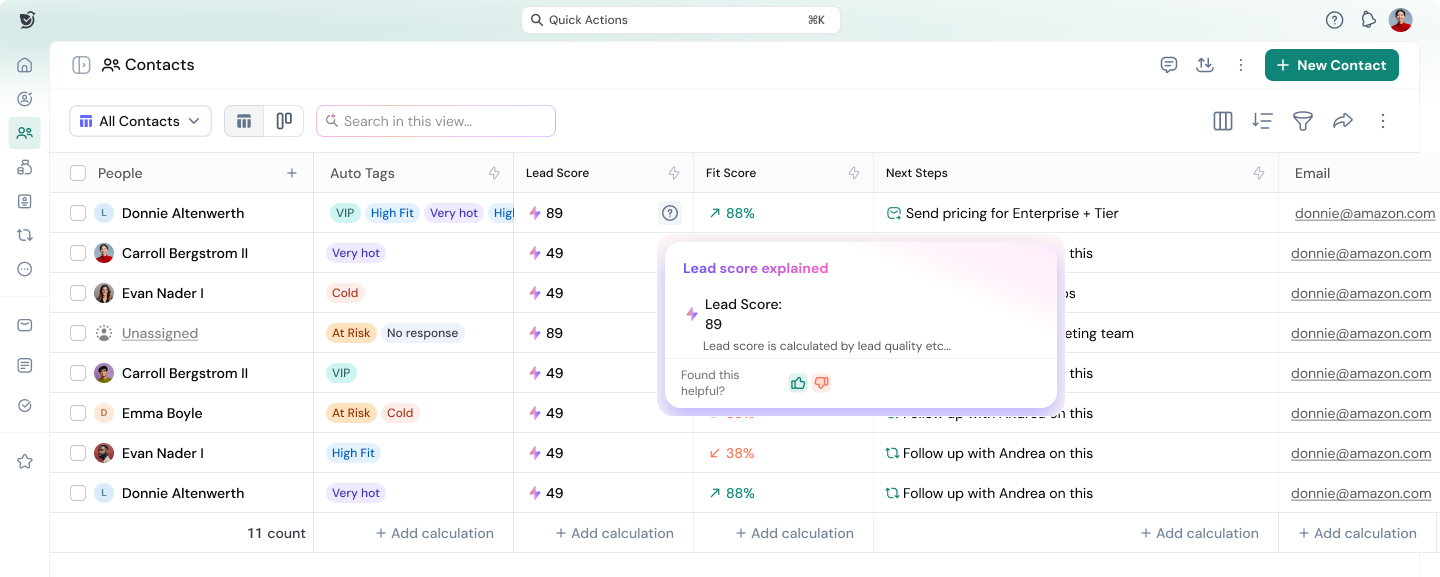
The best platforms offer predictive lead scoring that continuously updates as new interactions occur. A contact that opens three emails, visits your pricing page, and attends a demo should score higher than someone who downloaded a PDF six months ago, and the AI knows this instantly. Learn more about AI-driven lead scoring and pipeline management.
SparrowCRM surfaces an ICP Fit Score and Buying Intent Score (0–100%) on every contact record — both update automatically as engagement signals change, with no rep input required.
2. Conversation intelligence
Call intelligence is one of the most powerful capabilities in modern AI CRM. The system records and transcribes chatbot conversations, sales calls, and meetings, then analyzes them for sentiment, keyword mentions, competitor references, objections, and talk-to-listen ratios.
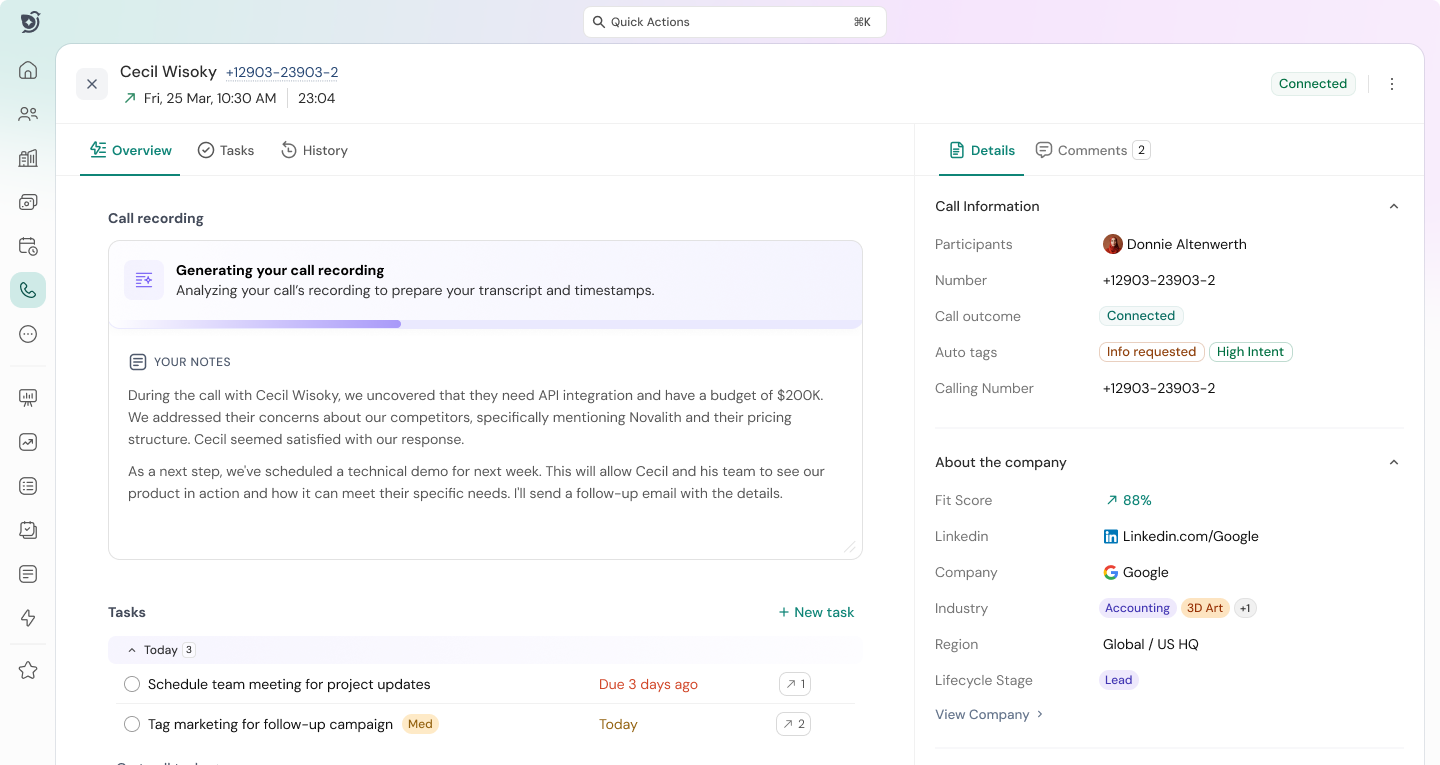
This gives sales managers visibility into every conversation without having to listen to hours of recordings. It also enables reps to review their own calls and identify where deals stall. Research from Chorus.ai found that top-performing reps spend 54% of calls listening — a ratio that conversation intelligence can now coach in real time.
3. Predictive sales forecasting
AI CRM platforms replace gut-based forecasting with data-driven probability models. AI sales forecasting analyzes deal age, stage velocity, engagement signals, and historical close rates to generate an accurate revenue projection.
Sales leaders can see not just what the number will likely be, but which specific deals are at risk of slipping. This makes pipeline reviews more actionable and quarterly planning far more reliable.
4. Personalized email and outreach automation
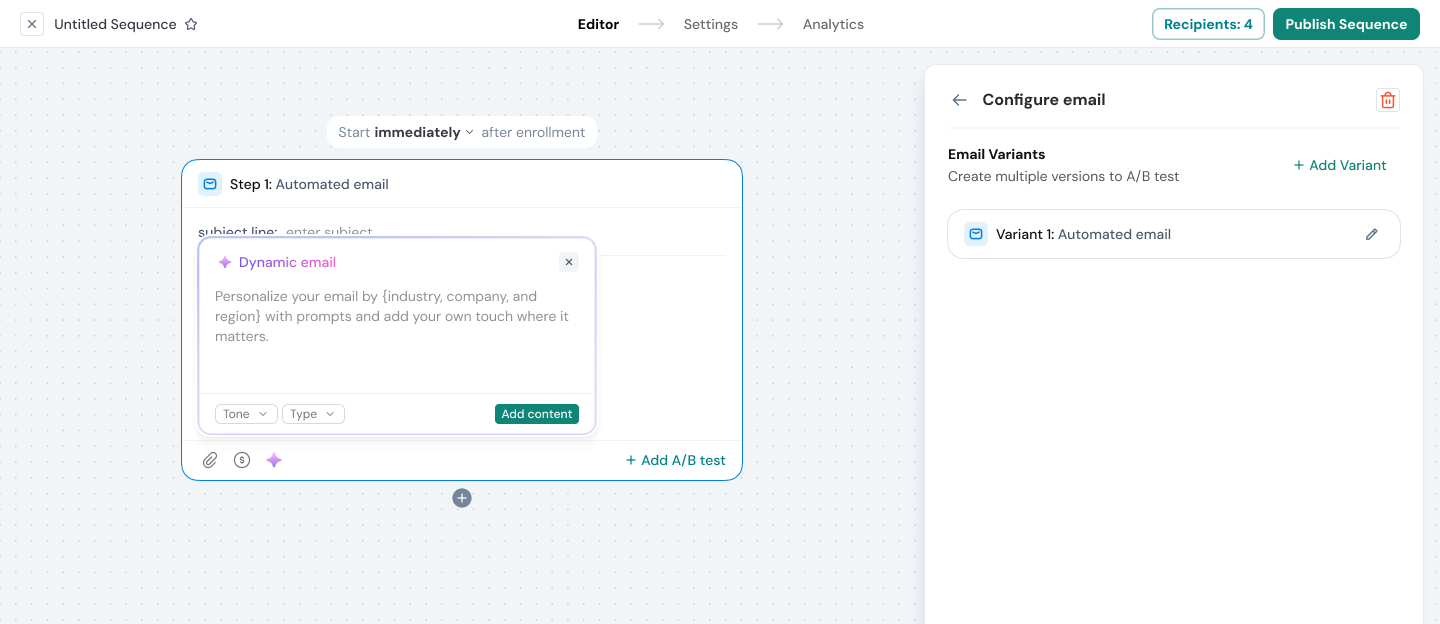
AI CRM doesn't just automate sequences; it personalizes them. The platform can analyze a prospect's behavior, job title, industry, and previous interactions to generate tailored email copy and suggest optimal send times.
AI sales automation tools can even run A/B tests across email variants and automatically shift sends toward the highest-performing version. SparrowCRM's sequence builder includes performance-based distribution. The system identifies the winning variant during the send window and automatically weights future sends toward it, without a rep having to monitor the test manually.
5. AI note-taking and meeting intelligence
Manual note-taking pulls reps out of conversations. AI note-taking for sales captures, transcribes, and summarizes every meeting automatically, then syncs those notes directly to the relevant deal, contact, and company record.
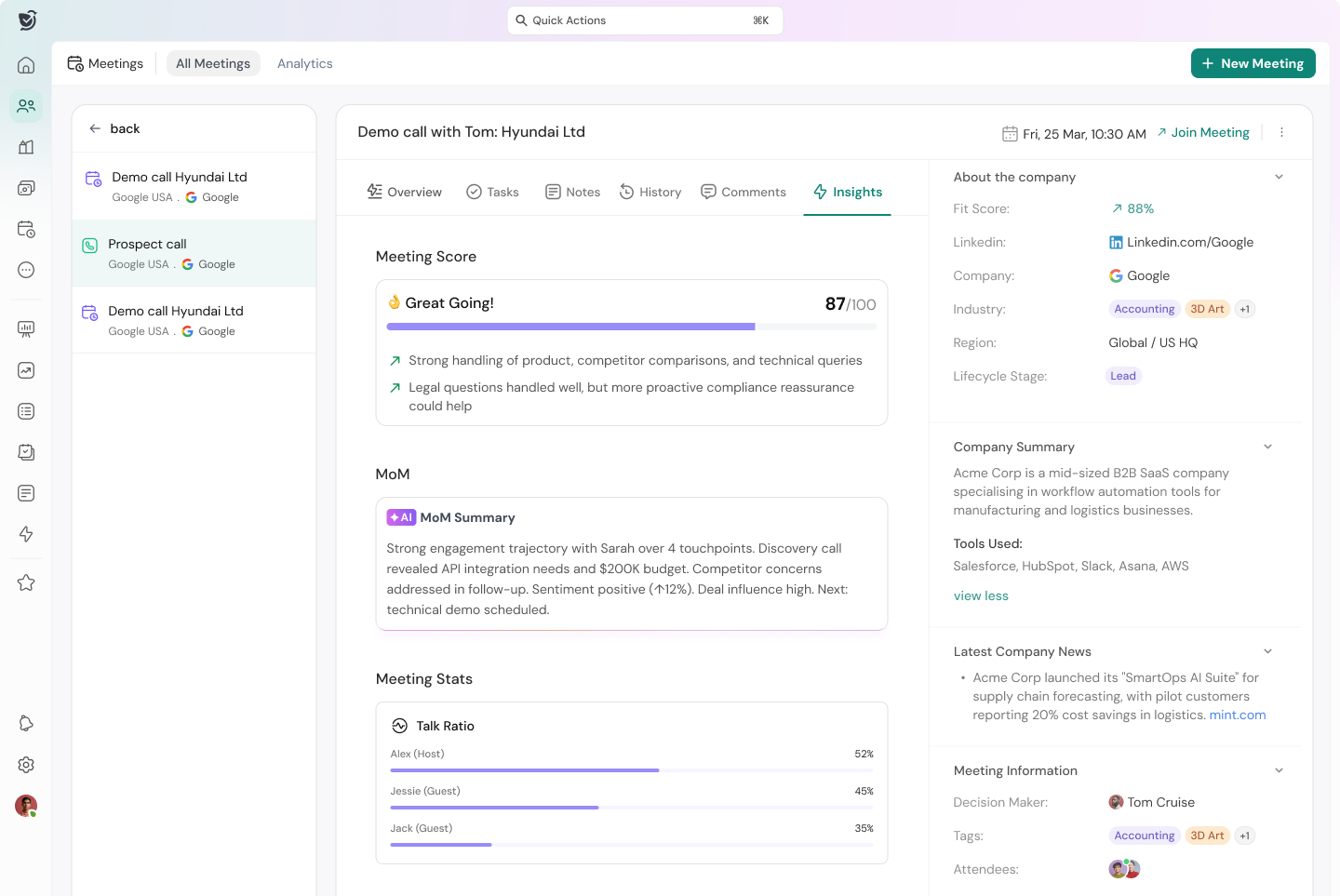
Post-meeting, the AI surfaces recommended next actions, identifies commitments made on the call, and flags any risks or competitive mentions that need follow-up. Reps leave every meeting with a full action plan already waiting in their CRM.
6. AI scheduling and productivity
AI scheduling tools eliminate the back-and-forth of booking meetings. Smart scheduling links detect rep availability in real time, route inbound meeting requests to the right person, and auto-create CRM records when a meeting is booked.

Beyond scheduling, AI productivity features help reps prioritize their day, surfacing which contacts need follow-up, which deals need attention, and which tasks are due, all ranked by urgency and conversion potential.
Close more deals with AI-native CRM
Key benefits of AI in CRM for sales teams
The business case for AI CRM is well-documented. Sales teams that adopt AI-powered tools consistently outperform those using traditional CRMs. Here are the six most measurable benefits.
1. Significant time savings on admin work
Sales reps spend a surprisingly large portion of their week on administrative tasks rather than selling. McKinsey research estimates that sales representatives spend only about 34% of their time actually selling. AI CRM automates data entry, call logging, email tracking, and meeting notes, returning hours of selling time every week.
2. Higher lead-to-close conversion rates
AI lead scoring ensures reps spend time on the prospects most likely to convert. Instead of treating every lead equally, AI CRM focuses on high-fit, high-intent accounts. Salesforce reports that AI tools can increase sales conversion rates by up to 30% when used effectively.
3. More accurate revenue forecasting
Gut-based forecasting creates planning chaos. Predictive CRM systems generate probability-weighted forecasts based on real deal signals, reducing the error rate and helping leadership make better headcount, budget, and capacity decisions.
.png?2026-06-19T06:56:39.560Z)
4. Faster response times
AI CRM can trigger automated outreach the moment a prospect shows intent — visiting a pricing page, opening an email, or completing a form. Speed matters: research from Harvard Business Review shows companies that respond to leads within five minutes are 100x more likely to connect. AI closes that gap automatically.
5. Better sales coaching at scale
Conversation intelligence gives every manager a window into their team's calls. They can identify coaching opportunities, replicate winning behaviors, and spot risky patterns before they become lost deals — all without sitting in on every call.
6. Reduced churn and stronger retention
AI CRM monitors engagement patterns across existing customers and flags accounts showing signs of disengagement or risk. This allows customer success teams to intervene before a renewal conversation becomes a churn conversation.
4 real-world use cases of AI in sales CRM
Understanding AI CRM features in the abstract is one thing. Seeing how they play out in real sales workflows is another. Here are four scenarios where AI CRM creates a measurable impact.
Use case 1: Prioritizing an overloaded SDR pipeline
An SDR at a mid-market SaaS company manages 400 contacts in various stages of outreach. Without AI, they work the list chronologically or rely on memory. With AI lead scoring, the CRM surfaces the 25 contacts showing the highest engagement and best ICP fit every morning, so the SDR starts each day focused on the most promising opportunities.
Result: More conversations with decision-ready prospects, fewer wasted calls on low-intent leads.
Use case 2: Rescuing an at-risk enterprise deal
An account executive has a $120,000 deal that has been stuck in the proposal stage for three weeks. The AI CRM detects declining engagement emails going unopened, a scheduled demo that was rescheduled twice, and flags the deal as at-risk. It surfaces relevant context: the last call mentioned budget concerns, and the economic buyer hasn't been engaged in 18 days.
The AE uses this insight to re-engage the right stakeholder with a tailored message. The deal moves forward.
Use case 3: Scaling outbound with AI-driven sequences
A growth-stage startup wants to reach 1,000 target accounts with personalized outreach but has a team of three. AI sales agents draft personalized first-touch emails based on each contact's industry, title, and recent company news. The AI then manages follow-up timing, adjusts messaging based on open and click behavior, and exits contacts automatically when they reply.
The team executes an enterprise-quality outreach program without scaling headcount.
Use case 4: Improving win rates through deal analysis
A sales manager notices the team's win rate is lower on deals involving technical evaluators. Using AI CRM's conversation intelligence and deal loss analysis, she identifies a pattern: reps struggle to articulate the platform's security architecture in technical conversations. She builds a coaching program around those specific call moments. Win rates on technical deals improve by 18% over the next quarter.
See how SparrowCRM turns AI into pipeline growth
How to choose the right AI CRM software
With dozens of platforms claiming to be AI-powered, choosing the right AI CRM software requires a structured evaluation process. Here is a five-step framework for making the right call.
Step 1: Define your team's core use cases
Start with specificity. Are you primarily solving for lead prioritization? Revenue forecasting? Outbound automation? Meeting intelligence? The best AI CRM for a 10-person outbound sales team looks very different from the right solution for a 200-person enterprise with complex deal cycles.
List your top three pain points and verify that any platform you evaluate has purpose-built AI features addressing each one, not just generic "AI" branding.
Step 2: Assess the depth of AI — not just the label
Ask vendors to demonstrate their AI in action, not just show slides about it. Specifically, test the lead scoring model: does it explain why a lead scored high or low? Test the forecasting: is it generating a single number or showing deal-level probability with risk signals?
AI-native CRM platforms will have AI woven into every workflow. Platforms that have bolted AI onto a legacy architecture will have it isolated in dashboards that reps rarely visit.
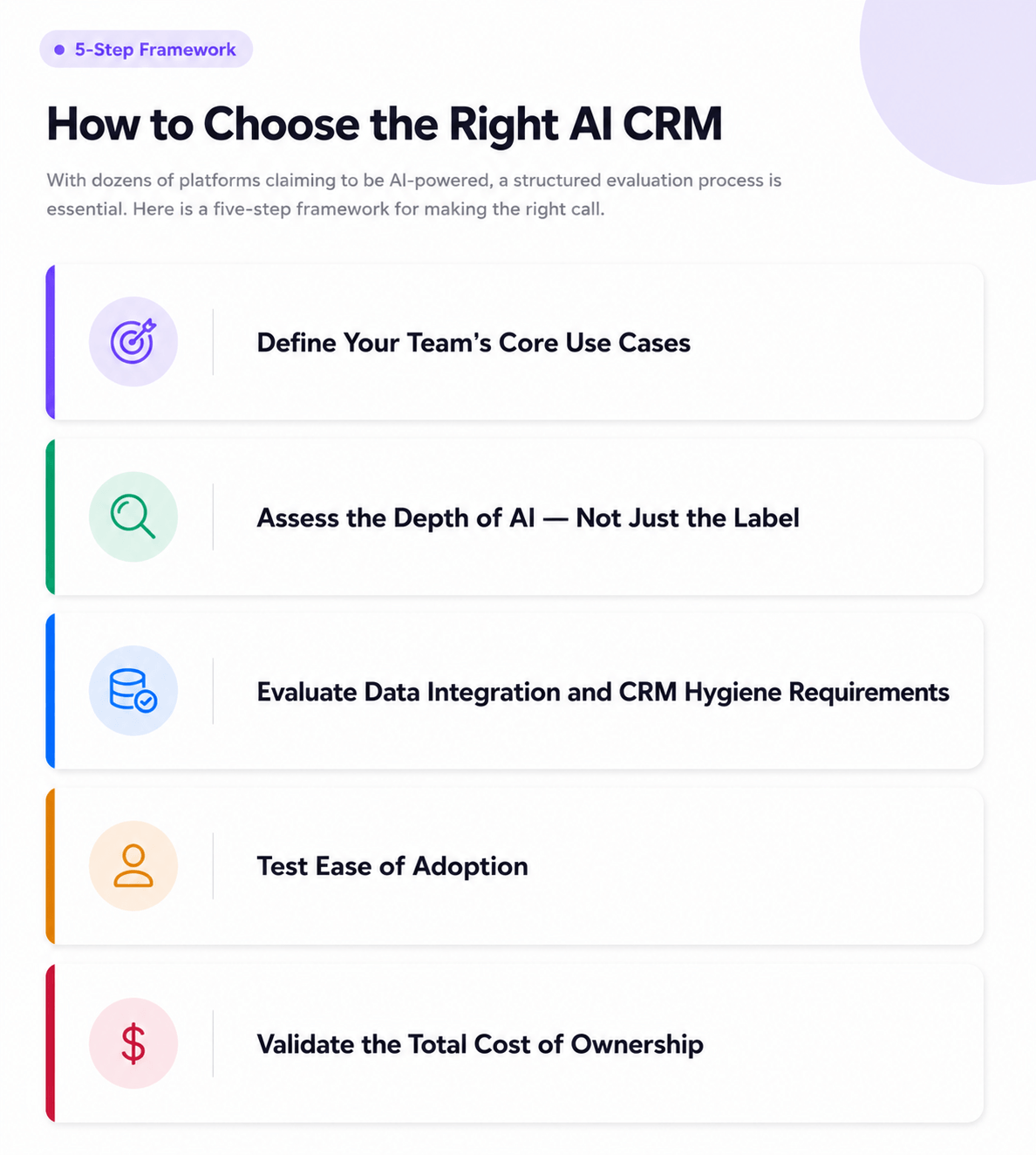
Step 3: Evaluate data integration and CRM hygiene requirements
AI is only as good as the data it learns from. A CRM full of incomplete records, outdated contacts, and missing activity logs will produce poor AI outputs. Ask vendors how their platform handles data enrichment, duplicate detection, and automatic record updates.
Platforms with built-in AI enrichment that pull firmographic, behavioral, and intent data automatically give your AI models far more to work with from day one.
Step 4: Test ease of adoption
The most common reason CRM implementations fail is adoption. If your reps find the tool complex or the AI outputs confusing, they won't use it consistently, and your data degrades further.
Prioritize platforms with clean, intuitive interfaces where AI suggestions appear in context (on the contact record, in the pipeline view, in the email composer) rather than requiring reps to navigate to a separate analytics screen.
Step 5: Validate the total cost of ownership
AI CRM pricing can be complex. Beyond per-seat fees, evaluate costs for:
- Conversation intelligence add-ons
- API call limits for AI features
- Data storage for call recordings and transcripts
- Onboarding and implementation support
- Required integrations with your existing tech stack
The cheapest plan rarely includes the most valuable AI capabilities. Make sure you're comparing what the platform actually costs to use at your scale and use case.
Discover how SparrowCRM helps reps focus on selling, not updating records.
Top AI-powered CRM platforms compared
Platform | Best For | AI Lead Scoring | Conversation Intelligence | Agentic Automation | AI Forecasting |
SparrowCRM | SMB + Midmarket sales teams | Native | Native | Agentic AI | Native |
HubSpot | Marketing-led teams | Add-on | Add-on | Limited | Add-on |
Salesforce | Enterprise | Einstein | Einstein | Agentforce | Native |
Pipedrive | SMB pipeline management | Limited | No | No | Limited |
Freshsales | SMB, ease of use | Freddy AI | Limited | Limited | Freddy AI |
Attio | Relationship-led sales | Limited | No | Limited | No |
Close CRM | High-velocity inside sales | Limited | Add-on | No | Limited |
Note: Features vary by plan tier. Always verify current capabilities directly with vendors, as AI feature sets are evolving rapidly.
Common challenges and how to overcome them
Adopting an AI CRM isn't without friction. These are the most common implementation challenges and how to navigate them.
Challenge 1: Poor data quality undermines AI performance
AI models learn from your CRM graph database. If records are incomplete, contacts are outdated, or activity isn't being logged consistently, the AI produces unreliable outputs. This is one of the most common reasons teams feel AI CRM "doesn't work." The model is only as good as the data it has been trained on.
Solution: Run a data audit before going live. Identify which fields are most commonly empty and either enrich them through the platform's built-in tools or establish a data quality protocol. Platforms with automatic enrichment and AI-powered data completeness scoring dramatically reduce this problem.
Challenge 2: Rep adoption and behavior change
Sales reps have established workflows. Introducing an AI CRM requires them to change habits, and resistance to change is real. If reps don't trust the AI's recommendations or don't understand how to act on them, adoption stalls.
Solution: Involve reps in the evaluation and implementation process. Choose a platform with an intuitive UX where AI recommendations are embedded in context in the record, in the pipeline, in the email composer, not hidden in dashboards. Early wins build trust.
Challenge 3: Integration complexity
Most sales teams use 5–10 tools alongside their CRM: email clients, calendar apps, dialers, marketing automation platforms, and LinkedIn. Getting AI to work effectively requires data from all of these sources.
Solution: Prioritize platforms with native integrations for your core stack and evaluate their API flexibility for custom connections. Verify that the AI features you care most about function without the integrations you can't build immediately.
Challenge 4: Measuring ROI
Many sales leaders struggle to attribute pipeline improvements to their AI CRM specifically, making it difficult to justify the investment internally.
Solution: Define baseline metrics before launch: average lead response time, win rate, forecast accuracy, deals per rep. Set a 90-day checkpoint to compare. Platforms with built-in analytics dashboards make before/after comparisons significantly easier. According to Nucleus Research, CRM investment returns an average of $8.71 for every dollar spent — AI-powered CRMs accelerate this further.
How to implement AI CRM: step-by-step
Successful AI CRM implementation follows a clear sequence. Rushing any stage, especially data setup, creates compounding problems later. Here is a five-step process that reduces risk and accelerates time to value.
Step 1: Audit your existing data and tech stack (Week 1–2)
Before migrating anything, map out what you have. Export your current CRM data and assess completeness. Identify which contacts, deals, and companies have the fields your AI models will need to function: email activity, job titles, company size, and deal history.
Simultaneously, document your current tech stack: email client, calendar, dialer, and marketing automation. Identify which integrations are available natively and which will require custom work.
Step 2: Configure AI models to your ICP and sales process (Week 2–3)
Every AI CRM gives you the ability to configure what "good" looks like for your business. Define your Ideal Customer Profile (ICP): target company size, industry, geography, revenue range, and title. Input your deal stage definitions and average sales cycle length.
The more specific you are in this configuration phase, the more accurate your lead scoring and forecasting will be from day one. Many platforms use default criteria until you customize. Don't skip this step.
Step 3: Migrate and enrich data (Week 3–4)
Import your contact, company, and deal records into the new platform. Use the CRM's enrichment tools to fill gaps in job titles, LinkedIn profiles, and company firmographics. Clean duplicates and merge records where necessary.
Enrich aggressively at this stage. AI scoring models need populated fields to produce meaningful outputs. A contact with only an email address will score neutrally; a contact with industry, job title, company size, and recent activity will score accurately.
Step 4: Train your team and set up workflows (Week 4–6)
Roll out the platform to reps in cohorts rather than all at once. Start with a small pilot group of eager adopters, gather feedback, refine the configuration, then expand.
Set up your core automated workflows: lead routing, follow-up sequence enrollment, deal stage transition triggers, and meeting booking links. Establish clear norms for which AI recommendations reps should act on and which require manager review.
Step 5: Monitor, optimize, and expand (Month 2 Onward)
Track adoption metrics (weekly active users, fields updated, AI tasks completed) alongside pipeline metrics (lead response time, win rate, forecast accuracy). Review AI recommendations weekly to identify whether the scored leads are actually converting. Is the forecast tracking against actuals?
Expand your AI workflows as confidence grows. Teams that start simple lead scoring and email automation and gradually add conversation intelligence, forecasting, and agentic workflows see stronger long-term adoption and ROI.
Experience an AI CRM built for modern sales teams.
What AI in CRM means for your sales team by 2027
Right now, your CRM records what happened. By 2027, it will decide what happens next.
A group of AI researchers published a detailed forecast at ai-2027.com that maps out how AI capability grows over the next two years. Their core finding: AI will soon be able to handle any task a knowledge worker does, from start to finish, without being told what to do at each step.
Sales is one of the clearest examples of what that looks like in practice.
What actually changes for sales teams
How sales teams work today | How they will work in 2027 |
|---|---|
A rep manually checks who to call next | AI reads the pipeline and tells the rep exactly who needs attention today, and why |
Notes from a sales call live in a rep's head | AI transcribes the call, writes the summary, and adds the next steps to the CRM automatically |
A deal goes cold, and nobody notices | AI flags the deal the moment engagement drops, before the rep loses it |
Follow-ups rely on a rep remembering to send | AI sends the follow-up at the right time, adjusts the message, and logs the reply |
Pipeline reviews take an hour every Monday | AI updates deal health in real time, and the manager just reviews what changed |
The market is already moving this way
- 83% of sales teams using AI CRM are more likely to hit their goals
- 79% of companies have started using AI agents, but only 1 in 9 is actually running them day-to-day
- 68% of customer conversations are expected to involve AI by 2028
- $11B → $48B: how fast the AI CRM market is growing between now and 2033
Why your CRM choice today determines what you can do in 2027
Think of it this way. Some CRMs were built as filing cabinets; they store your deals and contacts, and they added AI features on top later. Others were built from day one to think and act, not just store.
When 2027-level AI arrives, the filing-cabinet CRM will need a full renovation to handle it. The CRM that was already built to act just gets smarter.
The teams that will pull ahead are not the ones that wait to see what AI can do. They are the ones already running on a platform designed for it.
Final thoughts
AI CRM has moved from a competitive advantage to a baseline expectation for high-performing sales teams. The gap between teams using AI-powered tools and those relying on traditional CRMs is widening every quarter in win rates, in forecast accuracy, in ramp time, and in revenue per rep.
The decision isn't whether to adopt AI CRM, but which type of platform matches your team's stage, scale, and go-to-market motion. Whether you're evaluating your first CRM or replacing a legacy system that hasn't kept pace with the AI era, the framework in this guide gives you the structure to make the right call.
Platforms like SparrowCRM are built for teams that want AI to do more than score leads in a dashboard; they want it working autonomously in the background, driving the pipeline forward while reps focus on what they do best.