CRM SOFTWARE
9 Mistakes to Avoid When Onboarding an AI-Powered CRM

By Ganesh Ravi Shankar
Last updated on Jun 17, 2026
Explore the 9 most common AI CRM onboarding mistakes and the exact fixes to avoid them before they cost you adoption

Ganesh Ravi Shankar
Updated on Jun 17, 2026
Buying an AI-powered CRM is the easy part. Getting your sales team to use it and ensuring the AI produces reliable outputs is where most companies make critical mistakes when onboarding CRM software.
Gartner's research on enterprise AI consistently finds that the majority of AI projects fail not because of the technology, but because teams underestimate what's required to make it work. CRM rollouts follow the same pattern. Teams spend months choosing a platform, rush through setup in two weeks, turn on every AI feature on day one, and wonder why adoption collapses by month three.
Every mistake on this list is preventable. None of them requires a different CRM. They require a different approach to onboarding.
This guide covers 9 CRM onboarding mistakes to avoid, each with a specific fix, plus three additional pitfalls unique to teams rolling out agentic CRM capabilities.
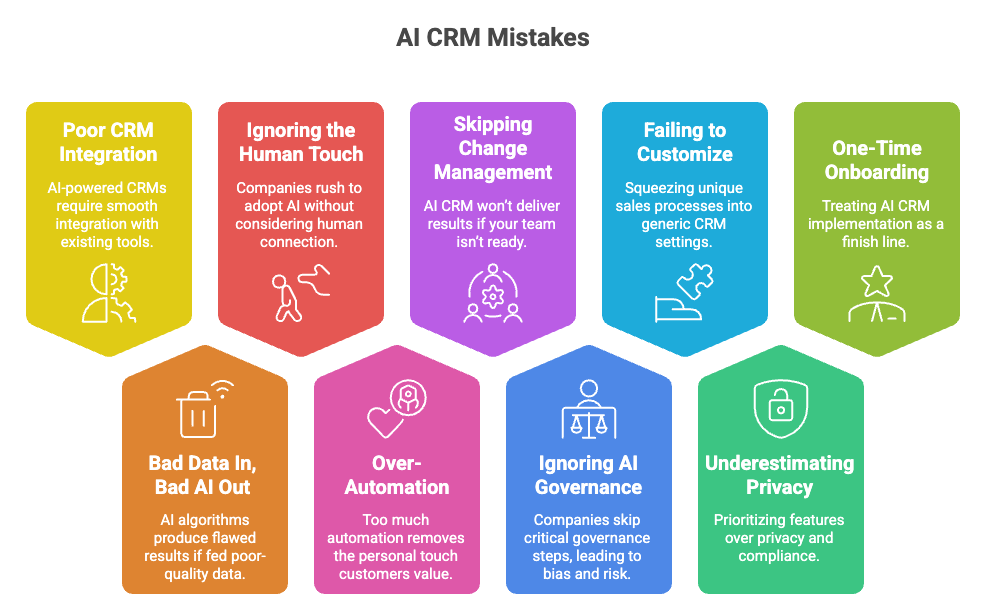
At a glance: 9 mistakes and how to fix them
Mistake | Root cause | Quick fix |
Poor integration with existing tools | Fragmented tech stack with no pre-audit | Audit your current stack before go-live; use phased integration |
Bad data fed into the AI | Dirty, duplicate, and incomplete CRM records | Run a full data cleanup before activating any AI features |
Removing the human element | Assuming AI handles everything end-to-end | Define clear AI/human handoff points for every workflow |
Over-automating before adoption | Enabling too many features too fast | Roll out 1–2 AI features at a time; expand after reps use them consistently |
Skipping change management | No structured launch or training plan | Train teams before go-live; appoint an internal CRM champion |
No AI governance or bias controls | No oversight process for AI outputs | Audit AI decisions regularly; set escalation rules for edge cases |
Not customizing AI to your sales process | Using default settings that don't match your GTM | Configure ICP criteria, lead scoring weights, and pipeline stages before launch |
Ignoring privacy and compliance | GDPR/HIPAA treated as an afterthought | Build compliance controls into setup, not after go-live |
Treating onboarding as a one-time event | Set-it-and-forget-it mindset post-implementation | Schedule monthly AI performance reviews and quarterly data audits |
9 Top Mistakes When Onboarding a CRM
Mistake 1: Poor CRM integration with existing tools
AI CRM value is only unlocked when the platform connects cleanly to your existing stack. When integration is flawed, you get duplicate records, missed follow-ups, and broken customer data from day one.
Why this happens
- No pre-go-live audit of your current tools and APIs
- Reliance on third-party plugins that create new data silos
- Data syncing between systems that use different field standards
How to fix it
- Audit your current tech stack before go-live. Map how each system stores, shares, and processes customer data.
- Choose your integration method deliberately: API-based for well-documented systems, middleware for bridging gaps, custom-coded when full flexibility is required.
- Set data governance rules before activating any integration, and define how fields are validated, formatted, and updated across systems.
- Roll out integrations in stages. Connect email and calendar first, then deepen from there.
Mistake 2: Bad data in, bad AI out
The most sophisticated AI features in your CRM will produce unreliable outputs if the underlying data is dirty. This is not a minor inconvenience, according to IBM; US businesses lose approximately $3.1 trillion annually due to poor data quality. Before activating any AI scoring or automation, read our guide on CRM data hygiene to understand what clean looks like in practice.
Why this happens
- Duplicate contact and company records that confuse AI scoring models
- Inconsistent field formats '50', '50-100', 'small' in the same Company Size field
- Stale contacts with zero activity sitting in the database for 12+ months
- Missing required fields (email, company, job title, lead source) that power AI enrichment
How to fix it
- Run a deduplication pass before importing data. Duplicate records with split engagement histories produce unreliable AI rankings from day one.
- Standardize all fields your AI will score against. Pick one format per field and enforce it before activation.
- Suppress or archive contacts with no activity in the past 12 months. Stale records distort engagement baselines.
- Set mandatory fields at record creation. Any contact missing email, company, job title, or lead source will return incomplete outputs from ICP fit scoring and buyer profile classification.
- Audit your pipeline stages against your actual sales process before deal scoring activates. Misaligned stages mean every AI-generated deal score is built on the wrong foundation.
Mistake 3: Removing the human element
The most common version of this mistake is not that teams stop using humans entirely; it's that they never define where humans stay in the loop. Reps see AI outputs, don't understand when to act on them versus when the system acts automatically, and start ignoring everything.
Why this happens
- No documented AI-human handoff map before go-live
- Reps unsure whether to act on a next-action recommendation or wait for automation to handle it
- AI reply classification misclassifies ~5–10% of ambiguous responses with no human review step
How to fix it: define your AI-human handoff map
Before activating any AI features, document three things and share them in your team's workspace:
- What the AI does automatically: follow-up emails, engagement score updates, and call summaries.
- What the AI recommends but the rep executes: next actions, deal escalation alerts, and at-risk account flags.
- What the rep owns fully: first qualification calls, late-stage negotiation, and any high-value decision that carries relationship risk.
Mistake 4: Over-automating before your team is ready
Enabling every AI feature at once before reps understand what any of them do is the fastest way to kill adoption. When a contact arrives flagged with a deal score, an ICP fit percentage, a buying intent signal, and a list of next actions simultaneously, reps cannot distinguish which signals matter. They dismiss everything.
Why this happens
- All AI features are activated on day one of rollout
- Sequences firing before ICP and messaging have been validated in the new system
- Manual checkpoints are removed in the first 60 days when data quality issues and misconfigured scoring weights surface
How to fix it
- Roll out one or two AI features at a time. Introduce deal scoring first, then add buying intent signals after reps are consistently using scores to prioritize.
- Validate AI-generated personalization against real CRM records before sequences fire. Contextually wrong emails at scale damage sender reputation faster than no outreach at all.
- Keep manual review checkpoints in the first 60 days. This is when configuration errors surface, automating past them compounds mistakes silently.
Mistake 5: Skipping change management and team enablement
Even a well-configured AI CRM will fail if your team isn't equipped to use it. Between 50–70% of CRM implementations fail to meet their objectives; the cause in most cases is adoption, not the software.
According to Salesforce's State of Sales research, the average sales rep spends less than a third of their working day actually selling. A CRM that adds manual effort makes this worse, which is why training has to start before launch, not after.
Why this happens
- No structured launch plan or internal CRM champion appointed
- Training delivered after go-live when reps are already frustrated
- One-size-fits-all onboarding that doesn't account for role differences
How to fix it
- Appoint an internal CRM champion before go-live, someone who will own adoption, answer questions, and flag friction points.
- Host a kickoff meeting aligned with goals, timeline, and what success looks like in 30 days.
- Deliver role-specific training. Sales, marketing, and operations have different workflows and different questions.
- Track adoption KPIs, user logins, feature usage, time to first value, not just go-live completion.
- Build a support loop: a channel for questions, a feedback mechanism for friction, and a 30-day check-in with every team.
For a broader view of how CRM rollouts succeed or stall at the process level, the CRM software guide covers implementation sequencing in detail.
Mistake 6: Ignoring AI governance and bias
Without oversight processes in place, your AI CRM can introduce bias, make flawed decisions, or expose you to regulatory risk. AI systems learn from whatever data they are fed, and if that data contains historical bias or outdated assumptions, the system amplifies them.
Why this happens
- No defined review process for AI-generated outputs in high-stakes areas
- Governance was added as an afterthought after deployment, rather than built into the setup
- No usage policies defining what the AI can and cannot be used for
How to fix it
- Map what data your AI features will access and classify it by sensitivity. Exclude data that the model does not need to see.
- Write usage policies before launch, outlining what AI can and cannot be used for within your team.
- Establish a review process for AI-generated outputs in high-risk areas: automated customer service responses, lead disqualification, and deal scoring.
- Audit AI decisions regularly. Set escalation rules for edge cases and log any instance where the system's output conflicts with rep's judgment.
From first touch to close, automate your entire sales pipeline with AI
Mistake 7: Not customizing AI to your sales process
Using default AI settings that don't reflect your actual GTM motion means every AI output, ICP scores, deal health, and next actions are built on the wrong foundation from day one.
Why this happens
- Default ICP criteria that don't match your actual customer profile
- Pipeline stages set to CRM defaults rather than mapped to how your team actually sells
- AI scoring weights have never been calibrated against closed-won deal data
How to fix it
- Configure your ICP criteria before activating lead scoring. Define company size, industry, and buying role filters that match your actual customer profile.
- Map pipeline stages to how deals move at your company, not the CRM default. AI deal scoring is only as accurate as the stages it scores against.
- Set scoring weights based on historical closed-won data. If seniority of the buyer is your strongest close predictor, that field should carry the most weight.
- Run a calibration pass 30 days after go-live. Compare AI-scored leads against actual outcomes and adjust weights where the model is consistently wrong.
Mistake 8: Ignoring privacy and compliance
Privacy and compliance requirements don't pause for CRM rollouts. GDPR, HIPAA, and other regulations apply from day one, and retrofitting controls after launch is significantly more complex than building them up front.
Why this happens
- Compliance is treated as an IT task to handle after go-live
- No consent management is configured before contacts are imported
- Data retention and deletion policies are not mapped to the CRM record lifecycle
How to fix it
- Build consent management into your data import process. No contacts should be imported without a defined consent status.
- Configure role-based access controls before go-live. Not every rep needs access to every record.
- Map your data retention policy to CRM record fields. Define when records are archived, anonymized, or deleted based on inactivity.
- Document your data flows. Know exactly what data your AI features access, where it is stored, and what third-party systems it passes through.
Mistake 9: Treating onboarding as a one-time event
CRM onboarding does not end at go-live. The teams that see lasting AI performance are the ones that treat the system as a continuous process, reviewing outputs, adjusting configurations, and monitoring adoption on a regular cadence.
Why this happens
- No post-launch review schedule was defined during rollout
- AI feature performance has never been audited against actual sales outcomes
- Data hygiene is maintained as a launch task rather than an ongoing practice
How to fix it
- Schedule a 30-day post-launch review. Assess AI scoring accuracy, rep adoption rates, and the quality of automated outputs.
- Run quarterly data audits. Stale records, inconsistent fields, and missing data accumulate fast in active pipelines.
- Review AI feature configuration every 90 days. Your ICP, pipeline stages, and scoring weights should evolve as your sales motion evolves.
- Monitor four KPIs monthly: AI recommendation acceptance rate, data completeness score, sequence open and reply rates, and deal score accuracy vs. actual close rate.
Bonus: 3 mistakes specific to agentic CRM deployments
Enabling all agentic features at once
Agentic CRM agents can autonomously follow up, re-engage contacts, and move records through pipeline stages. Activating all of these simultaneously before your data is clean and your ICP is calibrated means the agents are acting on bad inputs at scale. Start with one autonomous workflow, typically automated follow-up on stale leads, and expand after 30 days of validated output.
Skipping ICP calibration before autonomous outreach
AI agents personalize outreach based on the ICP criteria you configure. If those criteria are left at default, every agent-generated message is personalized to the wrong buyer profile. Configure your ICP fit scoring industry, company size, and buying role filters before any agent sends a single message. See how agentic CRM handles autonomous outreach in practice.
Ignoring AI-generated next actions
Agentic CRMs surface recommended next actions based on deal-health signals, engagement patterns, and competitor-mention detection. When reps habitually dismiss these without reviewing them, the system loses its feedback loop, and the agent cannot learn which recommendations led to outcomes. Build a weekly rep habit of reviewing and actioning or dismissing AI recommendations with a reason, not just closing the notification.
Pre-launch AI CRM onboarding readiness checklist
Run through this checklist before your go-live date. Every unchecked item is a known risk.
Checklist item | Owner | |
|---|---|---|
☐ | Tech stack audit completed — all integrations mapped and tested | IT / RevOps |
☐ | Data deduplication pass completed before import | RevOps |
☐ | Mandatory fields configured at record creation | Admin |
☐ | ICP criteria configured — industry, company size, buying role | Sales Lead |
☐ | Pipeline stages mapped to actual sales motion (not CRM default) | Sales Lead |
☐ | AI-human handoff map documented and shared with the team | Sales Lead |
☐ | Only 1–2 AI features are active at launch | Admin |
☐ | Role-specific training delivered before go-live | Enablement |
☐ | Internal CRM champion appointed | Leadership |
☐ | Compliance and consent configuration complete | IT / Legal |
☐ | 30-day post-launch review scheduled | Sales Lead |
How SparrowCRM prevents these onboarding mistakes
Most of the nine mistakes above share a root cause: teams configure the AI manually, activate it on bad data, and have no visibility into whether it’s working. SparrowCRM is built to close each of those gaps from day one.
ICP Fit Score: know which leads to work before you pick up the phone
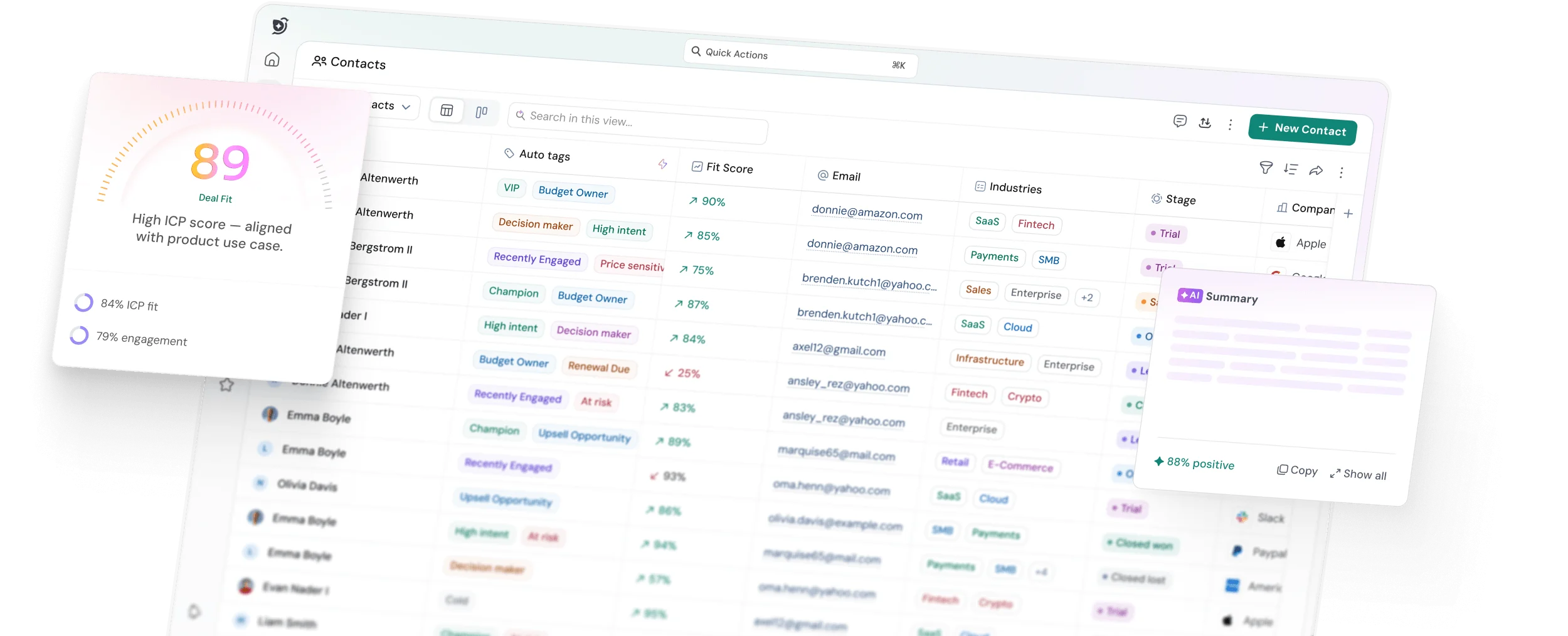
Fixes Mistake 7. Configure your ICP criteria for industry, company size, seniority, or any custom field. SparrowCRM auto-updates the 0–100 Fit Score across every contact and company record, so every rep prioritises the same way.
Buying Intent Score: act on real signals, not assumptions
Fixes Mistake 4. Each contact gets a Buying Intent Score (0–100%) with the exact signals behind it, pricing discussions, demo signups, and stakeholder involvement. Reps know why intent is High or Low, not just that it is.
AI-generated next actions: the human-in-the-loop built in
Fixes Mistake 3. SparrowCRM generates a prioritised next-action list per contact based on engagement and deal stage. Reps act or dismiss, and the AI learns from both. The human stays in the loop by design.
Competitor mention detection and deal intelligence
Fixes Mistake 9. Deal Score runs continuously after go-live. Competitor mentions in emails, calls, or transcripts are flagged instantly with the exact quote. Organisation change alerts surface funding moves and leadership changes before they affect the deal.
Buying committee mapping: no more single-threaded deals
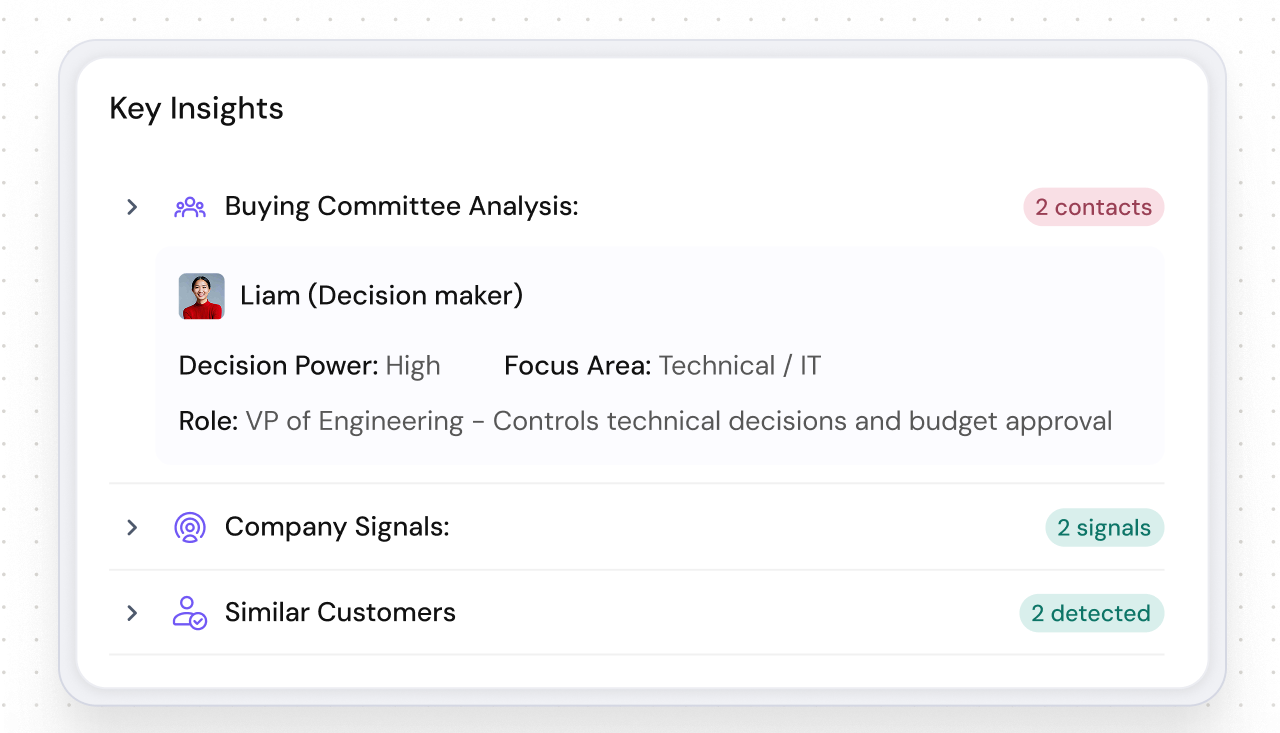
Fixes single-threaded deals. Every contact on a deal is mapped by role: Decision Maker, Influencer, Champion, Economic Buyer — with decision-making power and focus area. Reps see coverage gaps and get AI recommendations on who to engage next.
All five are built into every contact, company, and deal record in SparrowCRM. No separate configuration required.
See why teams choose SparrowCRM to get AI CRM right from the start.
Final thoughts
Every mistake in this list has the same root cause: moving too fast. Teams rush the data cleanup, skip the ICP configuration, skip the training, and activate too many features before reps trust any of them.
The CRM doesn't fail. The onboarding does.
The checklist in Section 7 is your safeguard. Work through it before go-live, assign an owner to each item, and schedule your 30-day review before you launch, not after. The teams that do this consistently are the ones still using their AI CRM productively at month six, not troubleshooting why adoption collapsed at month three.