CRM SOFTWARE
What Is CRM Software? The Complete Guide for Sales Teams in 2026

By Ganesh Ravi Shankar
Last updated on Sep 30, 2026
The complete CRM software guide: what it is, which type fits your business, and how to choose, implement, and get real ROI from the right platform in 2026

Ganesh Ravi Shankar
Updated on Sep 30, 2026
Every growing business reaches the same breaking point. Leads start slipping through the cracks, follow-ups get missed, and your best reps are spending more time updating spreadsheets than closing deals. That's not a people problem, it's a systems problem. And CRM software is how you fix it. Customer relationship management software gives your sales team one place to manage every contact, track every deal, and automate the routine work that's quietly costing you revenue every single day.
In this complete CRM software guide, you'll learn exactly what CRM software is, how it works, which type fits your business, and how to choose, implement, and get real ROI from the right platform in 2026. Whether you're evaluating your first CRM, outgrowing a free tool, or trying to understand why your current one isn't delivering results
1. What Is CRM Software?
CRM software, or Customer Relationship Management software, is a platform that helps businesses manage and improve every interaction with current and potential customers. It acts as a central hub where sales data, communication history, deal stages, and customer profiles all live in one place, accessible to every team member, on any device.
The concept isn't new. It dates back to the 1980s when businesses first started using digital contact databases to replace Rolodexes. What started as glorified address books evolved into pipeline management tools in the 1990s, then full-featured cloud platforms in the 2000s. In 2026, CRM software has become the operating system of modern sales, powered by AI, connected to every communication channel, and capable of autonomous action.
According to G2, the CRM market is projected to reach $96.39 billion by 2026, growing at a CAGR of 10.6%. Industry data puts the market even higher, valued at $98.84 billion in 2025 and expected to hit $145 billion by 2030. The United States alone accounts for $49.57 billion of that.
What's driving this growth? Businesses have realised that manual processes, spreadsheets, sticky notes, and shared inboxes break down the moment you scale. A CRM solves that by becoming the single source of truth for every customer relationship your company has.
Why CRM matters in 2026 specifically:
- 80–83% of companies now use AI features within their CRM (Pipeline CRM)
- Over 785 CRM products are now on the market, with nearly 10,000 new user reviews published in the past 12 months (G2)
- AI-native CRM platforms are challenging legacy vendors in nearly every segment of the market
- Less than 40% of CRM implementations are fully successful, making implementation strategy as important as platform selection
2. Types of CRM Software
Understanding the different types of CRM software is the first step toward choosing the right one. Most modern platforms blend all four types, but each has a primary strength you should evaluate based on your team's core needs.
Operational CRM
Operational CRM focuses on automating the day-to-day workflows of sales, marketing, and customer service. It handles the repetitive tasks your team would otherwise do manually — assigning leads, sending follow-up emails, scheduling tasks, and logging calls.
Best for: Sales-driven teams who want to move leads through a pipeline faster without adding headcount. Automated lead routing, email sequences, and task creation triggered by deal stage changes.
Examples: Pipedrive, HubSpot Sales Hub, SparrowCRM
Analytical CRM
Analytical CRM is built around data. It pulls information from all customer touchpoints and helps you identify patterns, segment audiences, and forecast future performance with precision.
Best for: Revenue Operations teams, Sales Managers, and CMOs who need to understand why their pipeline performs the way it does, not just what it looks like today.
Examples: Salesforce Analytics Cloud, Zoho Analytics
Collaborative CRM
Collaborative CRM breaks down the silos between sales, marketing, and customer support. It ensures that every team has access to the same customer history, so interactions are consistent, personal, and coordinated across every touchpoint.
Best for: Businesses where multiple teams touch the same customer, for example, SaaS companies managing both sales cycles and ongoing account management.
Examples: Microsoft Dynamics 365, Freshsales
AI-Powered CRM
AI-powered CRM is the newest and fastest-growing category. Rather than just storing data, these platforms actively use machine learning to surface recommendations, predict deal outcomes, score leads, write follow-up emails, and flag at-risk accounts, often without a rep having to ask.
Research from Monday.com found that 82% of respondents are already using AI features in their CRM to boost productivity. The gap between AI CRMs and traditional platforms is widening fast.
Best for: Modern sales teams who want their CRM to work for them, not just store data about their work.
Examples: Salesforce (Agentforce + Einstein AI), HubSpot (ChatSpot), SparrowCRM
3. Core CRM Features Every Business Needs
Not all CRM features are created equal. Most platforms list 50+ features in their marketing, but in practice, 10 of them drive the majority of the value.
For a deeper breakdown of what each feature does in practice, read our full CRM features guide.
1. Contact Management
The foundation of every CRM. Contact management stores every individual your team has interacted with, name, email, phone, company, communication history, and behavioural signals in one searchable, filterable profile. Without strong contact management, everything else breaks down.
2. Pipeline Management
A visual, stage-by-stage view of every active deal. Good pipeline management lets you see exactly where each opportunity stands, identify bottlenecks, and forecast revenue with confidence. Look for drag-and-drop deal cards, customisable stages, and real-time deal health signals.
3. Lead Management and Scoring
Leads are not created equal. Lead management tracks where each prospect came from and what actions they've taken. AI-driven lead scoring automatically ranks leads by their likelihood to convert, so your team always knows who to call first.
4. Workflow Automation
The feature that pays for itself fastest. Automation handles repetitive tasks: creating follow-up tasks when a deal stalls, sending a personalised email when a lead hits a certain score, notifying a manager when a high-value deal goes quiet. Every minute your team saves on admin is a minute spent selling.
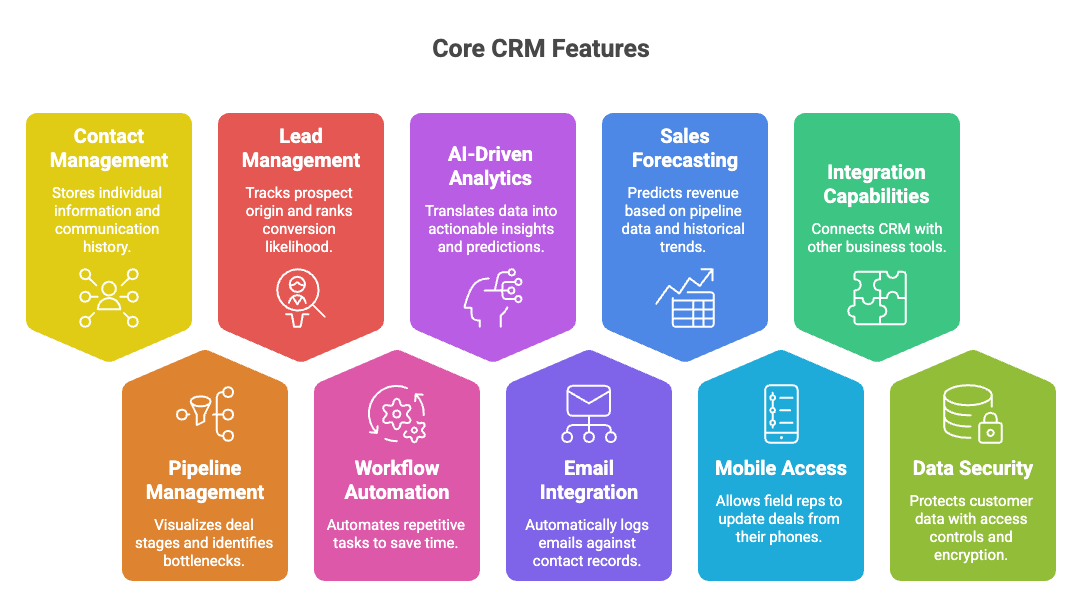
5. AI-Driven Analytics and Reporting
Your CRM should translate pipeline activity into actionable dashboards: conversion rates by stage, rep performance, revenue forecast, and deal velocity. AI-driven analytics go further; they tell you why deals are being lost and predict which ones are most at risk.
6. Email Integration
Your CRM and inbox should work as one. Email integration means every email sent, received, or opened is automatically logged against the right contact record, with no manual entry required. This is non-negotiable for sales teams managing high-volume email.
7. Sales Forecasting
A strong sales forecasting module pulls from pipeline data, historical close rates, and deal weights to give managers and executives a reliable revenue projection. Companies using predictive analytics in their CRM report a 32% ROI boost (Gartner).
8. Mobile Access
Your CRM is only as good as the data inside it. If your reps are in the field and can't update a deal from their phone, records go stale. A strong mobile CRM app, with offline access and voice-to-text logging, is essential for field sales and remote teams.
9. Integration Capabilities
No CRM works in isolation. Look for native integrations with your email client, calendar, Slack, marketing automation tools, and any industry-specific software your team uses. Deep integrations beat long integration lists; one broken sync can corrupt your entire contact database.
10. Data Security and Compliance
With customer data at the centre of your CRM, security matters. Look for role-based access controls, data encryption, GDPR compliance features, and audit logs. For regulated industries, this is not optional.
4. How CRM Helps Sales Teams
This is the question that gets asked most, and the answer is backed by hard numbers.
Companies using CRM software report (Salesforce Research / research.com):
- 29% increase in sales
- 34% improvement in sales productivity
- 42% better forecast accuracy
- $8.71 average ROI for every $1 spent on CRM
But what does this look like on the ground?
It eliminates the Monday morning mystery
Without a CRM, the first thing most sales reps do on a Monday is piece together where they left off, digging through emails, checking scattered notes, and wondering which leads they promised to follow up with. With a CRM, Monday morning starts with a dashboard that shows your open deals, overdue tasks, and highest-priority leads, ranked and ready to act on.
One finding from real users across CRM review communities is consistent: "CRMs don't fail because they're missing features, they fail because no one wants to use them." The best CRM is the one your team actually opens without being forced to.
It makes follow-ups automatic, not accidental
The single biggest source of lost revenue for most sales teams isn't a weak pitch; it's a missed follow-up. A prospect went cold not because they weren't interested, but because no one followed up at the right time. CRM workflow automation fixes this permanently.
When a deal sits in a stage for more than 5 days, the CRM flags it. When a lead opens your email three times in a row, the CRM creates a task. When a contact hasn't been touched in 30 days, the CRM reminds you. These aren't features you configure once and forget; they're the ongoing safety net that keeps your pipeline clean.
It gives managers real visibility without micromanagement
Sales managers don't need to ask for weekly updates when the CRM is updated in real time. Pipeline reviews become faster, coaching becomes more specific, and forecasting becomes reliable. This shift from backwards-looking reporting to forward-looking visibility is one of the most underrated benefits of a well-implemented CRM.
It makes onboarding new reps dramatically faster
When a new sales rep joins, every contact, call note, email, and deal history is already in the CRM. They can get up to speed on an account in minutes, not weeks. This institutional knowledge transfer is one of the highest-value things a CRM protects.
SparrowCRM is built around this sales-first philosophy, combining contact management, AI-driven lead scoring, pipeline tracking, and workflow automation in a single, sales-team-friendly interface that doesn't require a dedicated admin to maintain.
From first touch to close, automate your entire sales pipeline with AI
5. How to Choose the Right CRM: A Step-by-Step Framework
With over 785 CRM products on the market, the question isn't which CRM is the best, it's which CRM is the best for your team right now. Here's a six-step framework that removes the noise.
For a full deep-dive on the selection process, read our guide on choosing the right CRM.
Step 1: Define your real problems first
Don't start with features. Start with pain points. Is your team losing leads because of poor follow-up? Are managers flying blind on pipeline forecasts? Is data living in too many places? Write down the three biggest problems your sales process has today. These become your evaluation criteria.
A RevOps team quoted in Prospeo's CRM comparison said it well: "The winner wasn't the platform with the most features or the biggest brand name, it was the one reps actually opened on Monday morning."
Step 2: Know your team size and growth trajectory
Small teams (1–10 reps) need simplicity and speed. Mid-market teams (10–100 reps) need customisation and automation depth. Enterprise teams need governance, compliance, and integration with existing tech stacks.
Crucially: choose the CRM that fits your next 24 months, not just where you are today. Migration is expensive, 43% of businesses end up switching CRM systems within two years because they chose today and outgrew it fast.
Step 3: List your non-negotiable integrations
Before you evaluate a single feature, list every tool your team currently uses: email client, calendar, marketing automation, Slack, billing software, and any industry-specific apps. A CRM that doesn't integrate cleanly with your existing stack creates more problems than it solves.
Integration depth matters more than integration quantity. One CRM with "500+ integrations" that all feel half-baked is worse than a CRM with 20 deep, reliable connections.
Step 4: Shortlist three and trial with real data
Don't evaluate CRMs using demo data. Import your actual contacts, build your real pipeline stages, and run real follow-up workflows. Involve end users from day one — early team involvement is the single biggest predictor of successful adoption.
Limit your shortlist to three platforms. Give yourself a 30-day trial window per shortlist. Don't over-evaluate. Most teams that spend four months evaluating CRMs end up picking the same tool they identified in week two.
Step 5: Evaluate the full cost of ownership
Hidden costs to budget for:
- Implementation and setup: $0 for simple tools; $15,000–$50,000+ for Salesforce enterprise
- Data migration: 1–4 weeks of internal time, or $2,000–$10,000 with a consultant
- Training: Budget 1–2 days per rep for proper onboarding, not a 45-minute product tour
- Premium integrations: Many key integrations are paywalled behind Professional or Enterprise plans
- Ongoing admin: Complex CRMs often need a dedicated admin — a real $80K–$120K/year salary line
Always ask the vendor: "What costs extra that isn't on the pricing page?"
Step 6: Make a decision and commit
Evaluation paralysis is real. Define your decision criteria upfront, run your trials, and commit. A CRM you fully commit to and use well will always outperform a better CRM that your team half-uses.
6. CRM Implementation Roadmap
Buying a CRM is the easy part. Getting your team to use it consistently and correctly is where most implementations succeed or fail.
Less than 40% of CRM implementations are fully successful (Research.com). The most common failure reason isn't technical; it's adoption. Here's how to implement CRM the right way. For a full walkthrough of each phase, see our CRM implementation guide.
- Phase 1: Define goals and success metrics (Week 1): Align your team on what success means before configuring anything. Is it 90% pipeline data completeness? A 20% reduction in follow-up time? Without defined KPIs, adoption is impossible to measure.
- Phase 2: Clean your data before migration (Weeks 1–2): Only migrate data that is clean, relevant, and actively used. Duplicate contacts, outdated records, and orphaned deals will pollute your new CRM from day one.
- Phase 3: Configure around your actual workflow (Weeks 2–3): Map your real sales stages, not an idealised version. Resist the temptation to configure every feature on day one. Start with three automations: new-lead welcome, follow-up reminders, and stale-deal alerts.
- Phase 4: Train with real scenarios (Weeks 3–4): Generic product training creates generic usage. Train your team using real examples from your own pipeline. Show them how the CRM helps them close deals faster and earn more commission, not how it creates more admin.
- Phase 5: Drive adoption through visibility (Ongoing): Managers opening the CRM dashboard every morning non-negotiably is the single most powerful adoption signal. When managers use the CRM, reps use the CRM.
- Phase 6: Review, refine, and optimise (Monthly): Monthly reviews of field completeness, automation performance, and pipeline health keep the system useful and the team accountable.

Timeline reality check: Small and mid-sized teams with straightforward workflows can be live in 2–4 weeks. Complex multi-department setups with custom integrations typically take 3–6 months. Build in extra time for training and data cleanup, regardless of team size.
7. CRM Tool Comparison Overview
Here is a straightforward comparison of the five most widely used CRM platforms in 2026, evaluated across the dimensions that matter most for sales teams.
For detailed head-to-head comparisons, visit our CRM comparison hub.
CRM | Best For | Starting Price | AI Features | Ease of Use |
Salesforce | Enterprise, complex workflows | $25/user/mo | Deep Agentforce + Einstein AI | Steep learning curve |
HubSpot | SMB to mid-market, marketing-driven teams | Free → $20/user/mo | Strong Breeze AI, ChatSpot, and AI email | Very intuitive |
SparrowCRM | Growing sales teams, AI-native approach | AI-native lead scoring, pipeline AI, workflow automation | Sales-first UX | |
Zoho CRM | Mid-market, best feature-to-price ratio | $14/user/mo | Zia AI lead scoring, sentiment analysis | Moderate |
Pipedrive | Small sales teams, pipeline-focused | $14/user/mo | Basic AI sales assistant, smart tips | Very easy |
Freshsales | SMBs needing built-in phone, email & chat | $9/user/mo | Freddy AI lead scoring, deal insights, conversation intelligence | Easy |
Monday CRM | Teams already on Monday.com, flexible workflows | $12/user/mo | AI automation, email intelligence, no-code workflows | Very intuitive |
Microsoft Dynamics 365 | Enterprise teams in the Microsoft ecosystem | $65/user/mo | Copilot AI deep integration with Teams, Outlook, and Azure | Complex |
What real users say in 2026:
"The winners in 2026 are platforms where AI feels like a smart assistant, not a gimmick you turn off after two days." — BestCRMReviews.com
Independent reviewers across Reddit, G2, and Capterra consistently highlight three themes: (1) over-priced enterprise platforms charge heavily for features that should be standard; (2) ease of use at the rep level predicts adoption better than any other factor; (3) AI that feels like a smart assistant is the new differentiator separating winning platforms from the pack.
8. Industry-Specific CRM Considerations
Not all CRM implementations are the same. The core features are universal, but how you configure them and which platform you choose often depend on your industry.
CRM for B2B Sales Teams
B2B sales cycles are longer, involve multiple stakeholders, and require detailed account management across companies and individuals. Your CRM needs strong company-level records, multi-stakeholder pipeline tracking, and deal history that persists across rep changes. AI-powered account health scoring and competitor mention tracking become high-value features at this level.
CRM for Real Estate
Real estate teams need CRM features that map to property cycles: lead capture from listings, automated nurture sequences for long buying cycles, and calendar integration for property viewings. Many real estate teams use general CRMs configured for their workflow rather than niche real estate tools.
CRM for Small Businesses and Startups
Small businesses often start with a free CRM. The key consideration is the upgrade path. How much does it cost when you outgrow the free tier? HubSpot's jump from Starter to Professional ($100/user/mo) is steep. Zoho's pricing curve is gentler. Platforms like SparrowCRM are built specifically for growing teams that want AI-native intelligence without enterprise-grade complexity or pricing.
CRM for Healthcare and Regulated Industries
Healthcare CRM needs HIPAA compliance, data encryption, audit trails, and role-based access controls. Many regulated industries are moving toward on-premise or sovereign-hosted CRM solutions specifically to avoid data sovereignty concerns with US-hosted cloud platforms.
CRM for Recruiting
Recruiting teams use CRM differently from sales teams; the "customer" is a candidate, not a buyer, and the pipeline maps to sourcing, screening, and placement rather than a revenue deal. A good CRM for recruiting needs centralized candidate databases, talent pooling for passive candidates, automated outreach sequences, and hiring pipeline visibility across roles.
9. CRM Pricing and ROI: What to Expect
CRM pricing is one of the most confusing areas in business software. For a full breakdown of pricing models across platforms, see our CRM pricing models guide.
Typical pricing tiers in 2026:
Tier | Monthly Cost (per user) | What you get |
|---|---|---|
Free / Basic | $0 – $15 | Contact management, basic pipeline, limited automation |
Professional | $20 – $75 | Full automation, analytics, email sequences, and integrations |
Enterprise | $75 – $300+ | Custom objects, advanced AI, SSO, dedicated support, SLAs |
Hidden costs to budget for:
- Implementation: $0 for simple setups to $50,000+ for Salesforce enterprise deployments
- Data migration: Typically 1–4 weeks of internal time, or $2,000–$10,000 with a consultant
- Training: 1–2 days per rep for proper onboarding
- Premium integrations: Many are paywalled in paid tiers
- Ongoing admin: Complex CRMs often need a dedicated admin — a real salary line
The ROI case: The average ROI on CRM software is $8.71 for every $1 invested (Research.com). Companies that implement CRM effectively typically see payback in 6–12 months, with benefits compounding as historical data enables smarter forecasting and targeting.
The counter-case is also real: less than 40% of CRM implementations are fully successful. The difference between a CRM that pays back $8.71 per dollar and one that collects digital dust is almost always adoption.
Turn data into deals with intelligent insights from SparrowCRM

10. CRM Reports and Analytics: Measuring Success
A CRM with poor reporting is like a car without a dashboard. For a full guide to setting up your CRM analytics, see our CRM dashboard guide.
Five reports every sales team should run
1. Pipeline by stage: Shows deal count and total value at each stage, plus average time in each stage. Tells you where your pipeline is healthy and where it's stuck.
2. Sales forecast: Combines pipeline data with historical win rates to project revenue over the next 30, 60, and 90 days. A reliable sales forecasting model is the difference between reactive and proactive revenue management.
3. Rep performance dashboard: Tracks activities (calls, emails, meetings) and outcomes (deals won, deals lost, average deal size) by individual rep. Used for coaching and identifying what top performers do differently.
4. Lead source analysis: Shows which channels, organic search, paid, referrals, and outbound, generate the highest-quality leads. Directly informs where to invest marketing budget.
5. Deal velocity report: Measures how long deals take to move from first contact to closed. If deals in one specific stage take 20 days on average, that's your bottleneck — and your highest-leverage coaching opportunity.
AI-powered analytics in 2026
The best CRM platforms in 2026 go beyond reporting to prediction. AI analytics can flag deals that are statistically at risk before a rep realises it, identify which rep behaviours correlate with faster closes, and forecast quota attainment with greater accuracy than manual pipeline reviews. According to Gartner, companies using predictive analytics in their CRM report a 32% ROI boost compared to those using standard reporting only.
Conclusion
CRM software is no longer optional for businesses that want to grow predictably. It's the system of record for every customer relationship you have, and in 2026, with AI at the core, it's become the closest thing to a sustainable competitive advantage that a sales team can build.
The businesses winning in 2026 are not necessarily the ones with the biggest budgets or the most reps; they are the ones where every follow-up happens on time, every deal gets the right attention, and every manager can see exactly what's working and what isn't. That's what a well-implemented CRM makes possible. It turns a reactive sales team into a predictable revenue engine. And as AI continues to automate more of the routine work, the teams that have their CRM foundation right will compound that advantage faster than those still figuring out where their leads went.


.webp?2026-10-05T09:02:41.083Z)