CRM SOFTWARE
CRM data hygiene: the complete guide to keeping your CRM data clean [2026]

By Ganesh Ravi Shankar
Last updated on Jun 18, 2026
Discover why clean CRM data is the foundation every high-performing sales team builds on and how to maintain it
Ganesh Ravi Shankar
Updated on Jun 18, 2026
What is CRM data hygiene?
CRM data hygiene is the process of regularly reviewing, correcting, and maintaining the customer data stored in your CRM system. It includes tasks such as removing duplicate entries, correcting formatting errors, completing missing fields, validating contact information, and archiving records that are no longer useful.
Think of it like this. Your CRM is a living database. People change jobs, switch email addresses, move to new companies, and update their phone numbers. Without a regular hygiene routine, your records start to decay. Research shows that contact data decays at roughly 30 to 34 percent every year. That means nearly a third of your CRM could be outdated by this time next year if you do nothing.
Good CRM data hygiene is not a one-time cleanup project. It is an ongoing discipline that touches every team, sales, marketing, customer support, and revenue operations, which relies on customer data to do its work.
Your CRM Data Hygiene Check
Use this checklist to audit your CRM, fix what is broken, and build a repeating maintenance habit. Work through it once as a full cleanup, then run each section on its own cadence going forward.
CRM data hygiene vs data quality: what is the difference?
These two terms come up together often, but they are not the same thing.
CRM data hygiene | Data quality | |
What it is | The process of cleaning, validating, and maintaining CRM records | The outcome — how accurate, complete, and reliable your data actually is |
Focus | Actions you take (deduplication, validation, enrichment, archiving) | Metrics you measure (completeness rate, accuracy rate, duplicate rate) |
Analogy | Brushing your teeth every day | Having healthy teeth as a result |
In short, data hygiene is what you do. Data quality is what you get. You cannot improve one without the other.
Why CRM data hygiene matters more than you think
Dirty data is not just an annoyance. It costs real money.
Gartner estimates that poor data quality costs organizations an average of $15 million per year. Nearly half of all companies believe they lose more than 10 percent of annual revenue because of bad data. And only 3 percent of businesses actually meet basic data quality standards.
When your CRM data is messy, every downstream decision built on that data gets worse. Your sales forecasts become unreliable. Your lead routing breaks. Your marketing segments target the wrong people. And your team spends up to 32 percent of their time just fixing data issues instead of closing deals.
Clean CRM data, on the other hand, gives you accurate data you can trust for pipeline reviews, territory planning, and customer outreach. Companies that use data effectively are 23 times more likely to attract and retain customers.
How dirty CRM data hurts your sales team
Sales leaders depend on CRM data to track pipeline health, coach reps, and forecast revenue. When records are incomplete or outdated, the damage shows up fast.
Reps waste time calling wrong numbers and emailing bounced addresses. Pipeline stages stay stale because no one updates them. Deal values sit at placeholder amounts that make forecasting fiction. Only about 50 percent of sales teams currently rely on data for accurate forecasting, and bad CRM data hygiene is a big reason why.
Your team ends up spending more time validating information than actually selling.
How dirty CRM data hurts your marketing team
Marketing teams rely on CRM data for segmentation, lead scoring, and lifecycle campaigns. When fields like job title, company size, or industry are missing or wrong, targeting breaks down.
About 78 percent of brands struggle to deliver personalization because of insufficient customer data. Your email deliverability drops when you send to invalid addresses. Your ad spend gets wasted when audience lists are full of duplicates or outdated contacts. And compliance risks grow when you cannot track consent properly across messy records. For a deeper dive into fixing these issues, check out our guide on CRM data cleaning best practices.
Common causes of dirty CRM data
Dirty data rarely shows up all at once. It creeps in gradually through small, repeated mistakes. Here are the most common causes.
1. Manual data entry under pressure
Sales reps are under pressure to hit quota, not to log perfect CRM records. They rush through data entry, leave fields blank, use placeholder text like "TBD" or "will update later," and those quick shortcuts become permanent data quality problems.
2. Duplicate records
Duplicates are one of the most common CRM data problems. They happen when multiple team members enter the same contact, when a lead fills out a web form while their record already exists, or when data imports from another system create overlapping entries. Without regular deduplication, duplicate entries multiply fast.
3. No data standards or governance
When there are no clear rules about how to enter data, every rep does it differently. One person writes "VP of Sales," another writes "Vice President, Sales," and a third writes "VP Sales." This inconsistency makes it impossible to filter, segment, or report accurately.
4. Disconnected tools and data silos
When your CRM does not sync properly with your email platform, marketing automation tool, or support system, data conflicts appear. Field mappings break. Records get overwritten. And no single system holds the full picture. According to Forrester research, data silos cause employees to lose 12 hours a week just chasing information.
5. No validation at point of entry
If your CRM accepts any input without checks, no required fields, no email format validation, no dropdown constraints, bad data flows in from day one. Prevention is always cheaper than cleanup.
6. Legacy data bloat
Old imports from previous CRM migrations, trade show lists from three years ago, and thousands of contacts that never engaged, all of this bloat inflates your database, skews your metrics, and slows down your system.
7. High rep turnover
When reps leave, they take their context with them. New reps inherit messy records, unfamiliar naming conventions, and deals that were never properly updated. Without clear documentation and data ownership, each handoff makes the problem worse.
How to clean your CRM data: a step-by-step process
Whether this is your first CRM data cleaning project or a routine refresh, follow these six steps to get your database back in shape.
Step 1: Define your data standards and rules
Before you touch a single record, document what clean data looks like for your team. This includes:
- Required fields for contacts, companies, and deals (name, email, company, job title, lifecycle stage)
- Naming conventions (how to format job titles, company names, phone numbers)
- Lifecycle stage definitions that everyone agrees on ("Demo Booked" vs "Demo Requested" — pick one)
- Survivorship rules for duplicate merges (which record wins when two conflict?)
Write these rules down in a shared playbook. Every new hire should learn them during onboarding.
Step 2: Audit your existing CRM data
Run a baseline audit to understand how bad things are. Focus on:
- Missing fields: How many contacts lack an email, phone number, or company name?
- Duplicate rate: How many records share the same email domain or company name?
- Stale records: How many contacts have had zero activity in the last 90 or 180 days?
- Inconsistent values: Are lifecycle stages, industries, and job titles standardized?
Segment your audit by record type, region, or data source to spot patterns. This gives you a clear starting point and helps you prioritize what to fix first.
Step 3: Remove duplicates and merge records
Use rules-based logic to find duplicates by email address, company domain, or fuzzy name matching. When you merge, decide in advance which fields take priority. The record with the most recent "last modified" date usually wins, but some fields, like the original lead source, should always be preserved.
Log your merge rules so the process is repeatable. Automated CRM data cleaning tools can handle this at scale, but manual review is still important for edge cases.
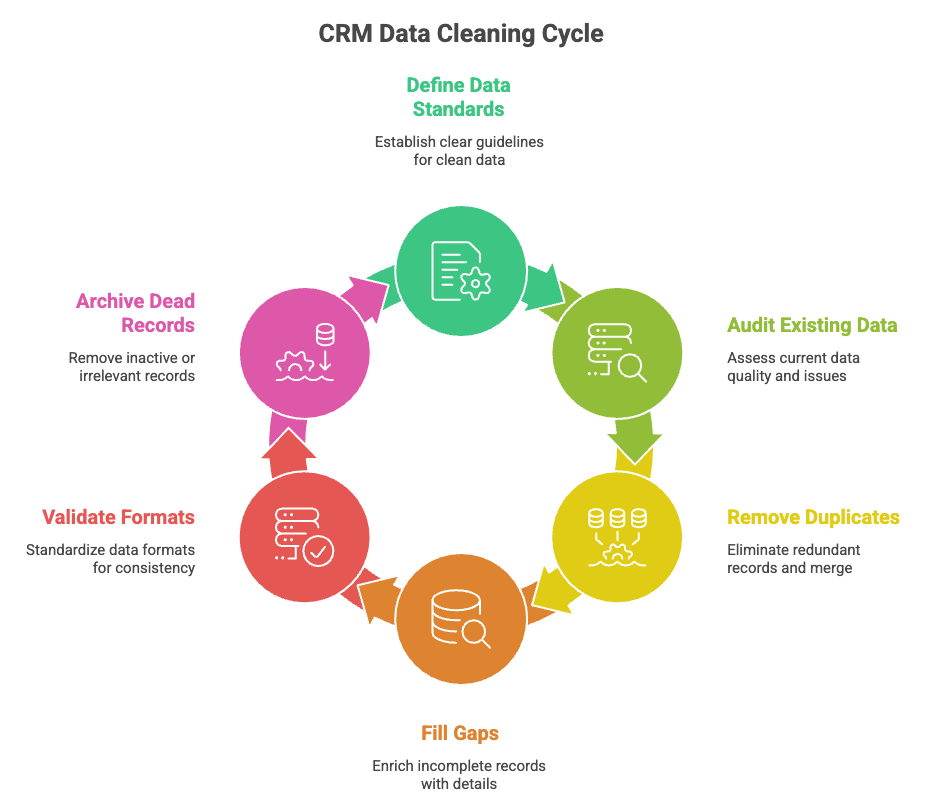
Step 4: Fill gaps and enrich incomplete records
Once duplicates are gone, focus on filling in what is missing. Use data enrichment tools to pull in firmographic details like company size, industry, revenue, and tech stack. Layer multiple enrichment vendors using waterfall logic to maximize match rates.
For contact data, update direct phone numbers, verified email addresses, and active social profiles. Every enriched field makes your outreach more targeted and your reporting more reliable.
Step 5: Validate and standardize formats
Standardize everything that people will filter or report on. This means:
- Email validation to catch typos and invalid domains
- Phone number formatting (pick one standard and stick with it)
- Job title normalization (map variations to a clean list)
- Address standardization for mailing and territory assignment
- Dropdown fields instead of free text wherever possible
Use validation rules at the CRM level to enforce these going forward.
Step 6: Archive or delete dead records
Not every record deserves to stay in your active CRM. Contacts who have not engaged in over a year, companies outside your total addressable market, and bounced email addresses should be archived or deleted.
Set clear criteria. For example: archive any contact with no activity in 12 months and no open deals. Delete any record with an invalid email and no phone number. Always check compliance requirements before deleting. GDPR and CCPA have specific rules about data retention and deletion requests.
SparrowCRM keeps your CRM data accurate automatically
CRM data hygiene best practices to keep data clean long-term
Cleaning your CRM once is a good start. Keeping it clean is the real challenge. These six best practices help you build CRM data hygiene into your daily workflow.
Assign clear data ownership
Someone needs to own data quality. In most organizations, this falls to revenue operations. Assign a data steward who sets governance rules, selects the right tools, and trains the team. Individual reps remain responsible for their own deals and contacts, but the steward ensures the system stays consistent across the board.
Validate data at the point of entry
The cheapest way to fix bad data is to never let it in. Configure required fields that block record creation without essential information. Add email format validation to catch obvious typos. Use dropdown menus instead of open text fields for anything you plan to filter or report on, job titles, industries, lifecycle stages, and lead sources.
Schedule regular data audits
Build a cadence that fits your team size:
- Weekly: Run automated reports to catch new duplicates and obvious formatting errors
- Monthly: Review newly created records for completeness and accuracy
- Quarterly: Full audit check lifecycle stage distribution, stale pipeline deals, enrichment gaps, and overall data completeness rate
Track your data quality metrics over time. Target above 95 percent completeness and below 2 percent duplication. AI sales automation tools can help you set up these recurring checks without manual effort.
Automate deduplication and enrichment
Manual data cleaning does not scale. Set up automated workflows that flag duplicates in real time, enrich new records as they enter the CRM, and alert reps when key fields go stale. Modern AI-powered CRMs can handle much of this automatically, detecting duplicate entries, standardizing formats, and enriching missing data without anyone lifting a finger.
Break down data silos across teams
Your CRM should be the single source of truth for every team. That means sales, marketing, and support all use the same system with the same field definitions. When each department runs its own database or its own version of the truth, data silos form. And those silos lead to conflicting records, missed handoffs, and reporting that nobody trusts.
Standardize field mappings across every connected tool. Make sure your marketing automation platform, support ticketing system, and CRM all speak the same language.
Track data quality metrics
You cannot improve what you do not measure. Track these metrics monthly:
- Completeness rate: Percentage of records with all required fields filled
- Duplicate rate: Percentage of records that are duplicates
- Decay rate: How fast your contact data becomes outdated
- Bounce rate: Percentage of emails that fail to deliver
- Stale record rate: Percentage of contacts with no activity in 90+ days
When these numbers trend in the wrong direction, you know it is time to act before the problem compounds.
Top CRM data hygiene tools compared
The right tools make CRM data cleaning far less painful. Here is how some of the leading options compare.
Tool | Best for | Key feature | CRM native | Pricing tier |
SparrowCRM | Teams wanting AI-native CRM with built-in data hygiene | Auto-deduplication, AI-powered enrichment, real-time data validation | Yes | |
Insycle | Bulk cleanups in Salesforce and HubSpot | Rules-based deduplication and formatting automation | Add-on | Mid-range |
ZoomInfo | B2B contact and company data enrichment | Massive contact database with intent signals | Add-on | Premium |
Openprise | Complex multi-system data orchestration | Cross-platform field standardization and validation | Add-on | Enterprise |
Default | RevOps teams needing automated enrichment workflows | Waterfall enrichment with scheduled QA rules | Add-on | Mid-range |
Clearout | Email verification and list cleaning | Real-time email validation with bulk processing | Add-on | Budget-friendly |
When you evaluate tools, ask yourself: does this tool fix data after it breaks, or does it prevent bad data from entering in the first place? The best CRM data cleaning solutions do both.
How AI is changing CRM data hygiene
Traditional CRM data hygiene depends heavily on manual effort. Reps have to remember to log their calls, update deal stages, and correct formatting errors. It works until it does not, and in fast-moving sales teams, it usually does not.
AI-native CRMs are changing this. Instead of waiting for someone to notice a problem, AI agents monitor your data continuously and act on their own. This is the core idea behind agentic CRM, a CRM that does not just store data but actively maintains it.
Here is what that looks like in practice:
- Auto-deduplication: AI detects duplicate records in real time using fuzzy matching and merges them based on your survivorship rules, no manual review needed for clear matches.
- Smart enrichment: When a new contact enters your CRM, AI automatically pulls in missing firmographic and contact details from multiple sources using waterfall logic.
- Predictive decay alerts: AI flags records that are likely going stale based on engagement patterns, so your team can update them before they become useless.
- Automated field standardization: AI normalizes job titles, company names, and other text fields as data enters the system, turning "VP Sales," "VP of Sales," and "Vice President, Sales" into one clean format.
- CRM activity logging: AI captures emails, calls, and meetings and logs them to the right records automatically, reducing the burden on reps. AI sales agents take this even further by handling follow-ups and next steps based on that logged data.
The shift from reactive cleanup to proactive prevention is the biggest change in CRM data hygiene right now. Teams that adopt AI-powered tools spend less time fixing data and more time using it.
Final thoughts
CRM data hygiene is not glamorous work, but it is the kind of work that separates high-performing sales and marketing teams from the ones constantly firefighting bad numbers. Every forecast you build, every campaign you launch, and every customer conversation your team has depends on the data sitting behind it. When that data is messy, everything downstream suffers quietly at first, then in ways that are hard to ignore.
The good news is that keeping your CRM clean does not require a massive overhaul or a dedicated team of data analysts. It starts with simple habits: setting clear standards, running regular audits, and putting validation rules in place before bad data ever enters the system. Layer in automation where you can, assign ownership so nothing slips through the cracks, and track your progress with a few key metrics.