CRM SOFTWARE
HubSpot vs Salesforce: Which CRM Is Right for Your Business? (2026)

By Ganesh Ravi Shankar
Last updated on Jul 24, 2026
Explore this blog to compare HubSpot and Salesforce across pricing, features, AI capabilities, ease of use, and total cost of ownership, with a clear verdict on which CRM fits your business size and budget.
- Platform Comparison at a Glance
- HubSpot vs Salesforce Pricing: Full Breakdown
- Automation and Flexibility
- Core Features: HubSpot vs Salesforce
- AI Capabilities: Breeze vs Einstein
- App Marketplaces and Integration Ecosystem
- Ease of Use and Onboarding
- Who Should Choose HubSpot
- Who Should Choose Salesforce
- Full Feature Comparison
- Final thoughts: The Right CRM Depends on Your Business Stage
Choosing between HubSpot and Salesforce means examining two fundamentally different philosophies of CRM. G2 rankings consistently place both platforms among the top solutions in the market, yet they serve very different buyers. HubSpot grew out of inbound marketing and is built for teams that want speed and simplicity. Salesforce has dominated enterprise CRM since 1999 and is built for organisations that need deep configurability. This guide breaks down both platforms across the metrics that actually matter for your buying decision.
Looking at user satisfaction data from G2, HubSpot scores better than Salesforce in six out of seven key categories. The largest gap appears in setup ease, where HubSpot earns 9.0 versus Salesforce's 7.6, based on over 2,200 combined reviews. But setup ease is only one dimension. Your business size, technical team, sales complexity, and total budget all determine which platform delivers better long-term ROI.
Platform Comparison at a Glance
Feature | HubSpot | Salesforce |
|---|---|---|
Core Strength | User-friendly CRM with built-in marketing tools | Highly customisable CRM for enterprise sales teams |
Ease of Use | Ideal for all experience levels, 8.7/10 on G2 | Better for experienced CRM users, 8.0/10 on G2 |
Setup Time | Average 36 days, self-service possible | 60+ days, typically requires certified administrators |
AI Tools | Breeze Copilot & Breeze Agents | Einstein AI & Agentforce |
App Ecosystem | 1,600+ apps | 7,000+ apps (4,000+ free on AppExchange) |
Best Suited For | SMBs and mid-market teams of up to 500 employees | Enterprises with complex, multi-stage sales cycles |
Free Version | Yes, unlimited time, up to 1M contacts | 30-day trial only |
HubSpot vs Salesforce Pricing: Full Breakdown
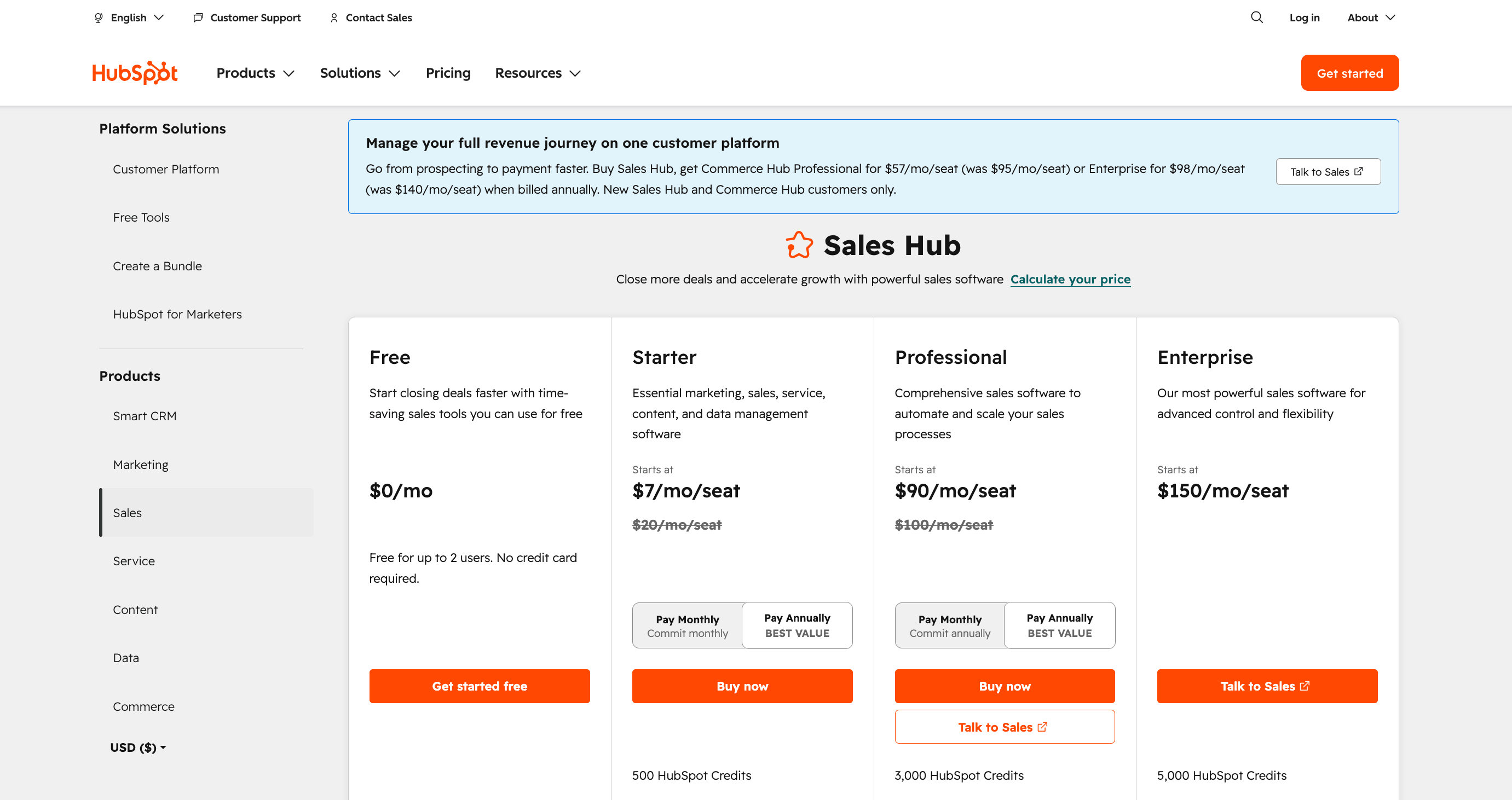
Pricing is where the two platforms diverge most sharply, not just in headline numbers, but in what is included versus sold as an add-on. For a full breakdown of HubSpot's tier structure, see the HubSpot pricing guide on the SparrowCRM blog.
Source: hubspot.com
HubSpot Pricing (Sales Hub)
Plan | Price | Key Inclusion |
|---|---|---|
Free | $0, unlimited time | Up to 1,000,000 contacts, basic tools across all Hubs |
Starter | $7/user/month | Email marketing, simple automation, live chat |
Professional | $90/user/month | Sequences, prospecting workspace, and custom reporting |
Enterprise | $150/user/month | Custom objects, advanced permissions, predictive scoring |
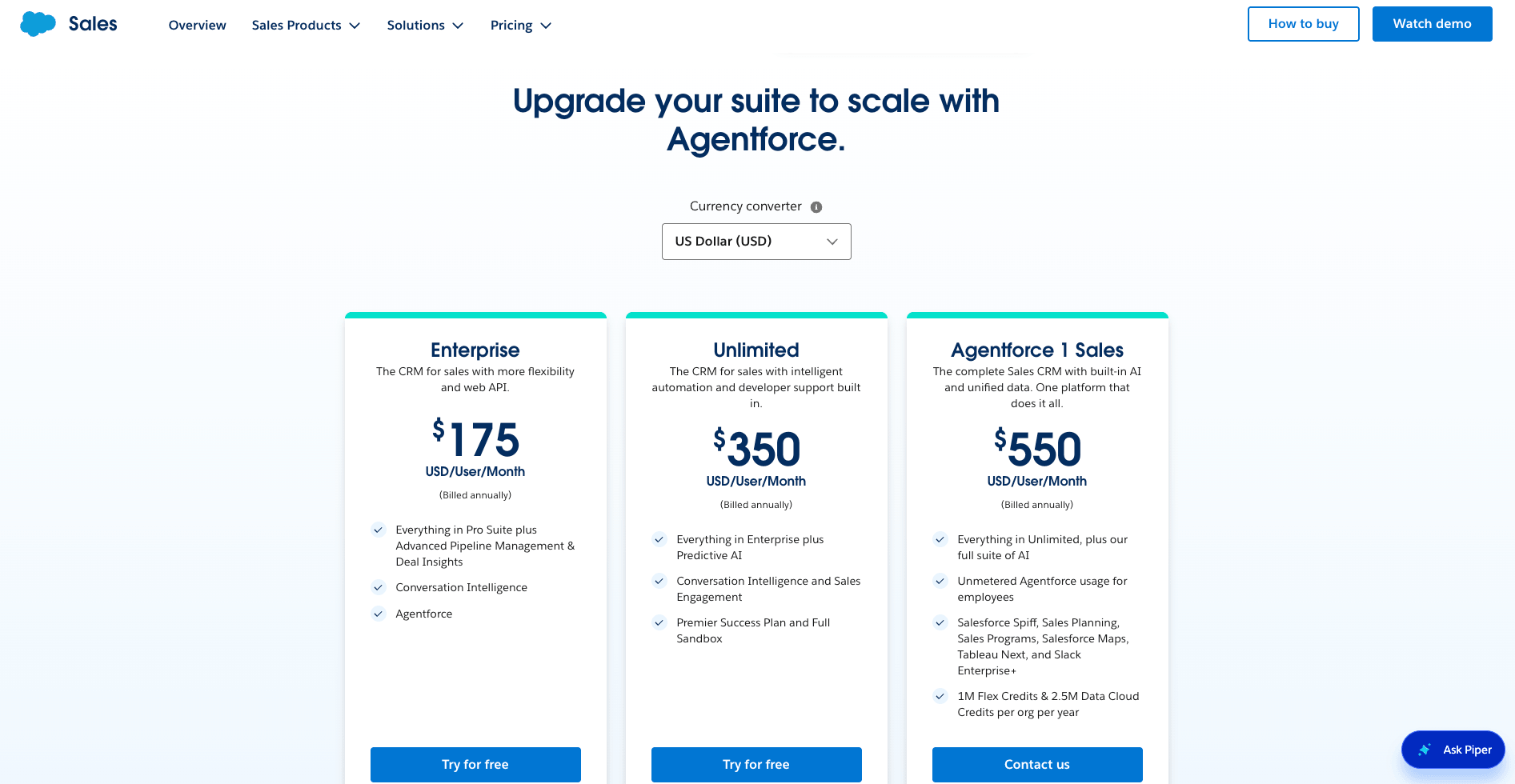
Salesforce Pricing (Sales Cloud)
Source: salesforce.com
Plan | Price | Key Note |
|---|---|---|
Starter Suite | $25/user/month | Basic CRM, no free tier available |
Pro Suite | $100/user/month | Pipeline management, basic forecasting |
Enterprise | $175/user/month | Workflow automation, custom apps |
Unlimited | $350/user/month | 24/7 support, unlimited customisation |
Einstein 1 / Agentforce | $550/user/month | Full AI suite: Einstein, Agentforce, Data Cloud |
Cost by Team Size
The table below compares estimated annual costs at the Professional/Enterprise tier, the most common tier for growing sales teams. Note: Salesforce figures exclude Marketing Cloud, which starts at $1,250/month for 10,000 contacts and is required for teams needing email marketing and automation.
Team Size | HubSpot Professional | Salesforce Enterprise | Annual Difference |
|---|---|---|---|
5 users | $5,400/yr | $9,900/yr | HubSpot saves $4,500 |
10 users | $10,800/yr | $19,800/yr | HubSpot saves $9,000 |
25 users | $27,000/yr | $49,500/yr | HubSpot saves $22,500 |
50 users | $54,000/yr | $99,000/yr | HubSpot saves $45,000 |
Hidden Costs and Add-ons
HubSpot's pricing is largely transparent; what you see at checkout is close to what you pay. Salesforce's modular structure regularly surprises buyers:
- Implementation fees: $1,200–$5,000 for standard deployments
- Certified consultant rates: $90–$250/hour for configuration and customisation
- Marketing Cloud: Sold separately from Sales Cloud, starts at $1,250/month for basic email marketing
- Einstein AI: Higher-tier AI features require a separate subscription or Unlimited/Einstein 1 plans
If you are evaluating multiple CRMs on cost, the compare top CRM costs guide covers pricing models across the major platforms side by side.
Automation and Flexibility
The choice between HubSpot and Salesforce often comes down to how each platform handles automation and customisation based on your business requirements. Understanding these differences matters before you commit, because switching CRMs mid-growth is expensive. For more context on what to evaluate before selecting a platform, see this guide to choosing the right CRM.
Workflow Automation: Visual Builders vs Code-Based Logic
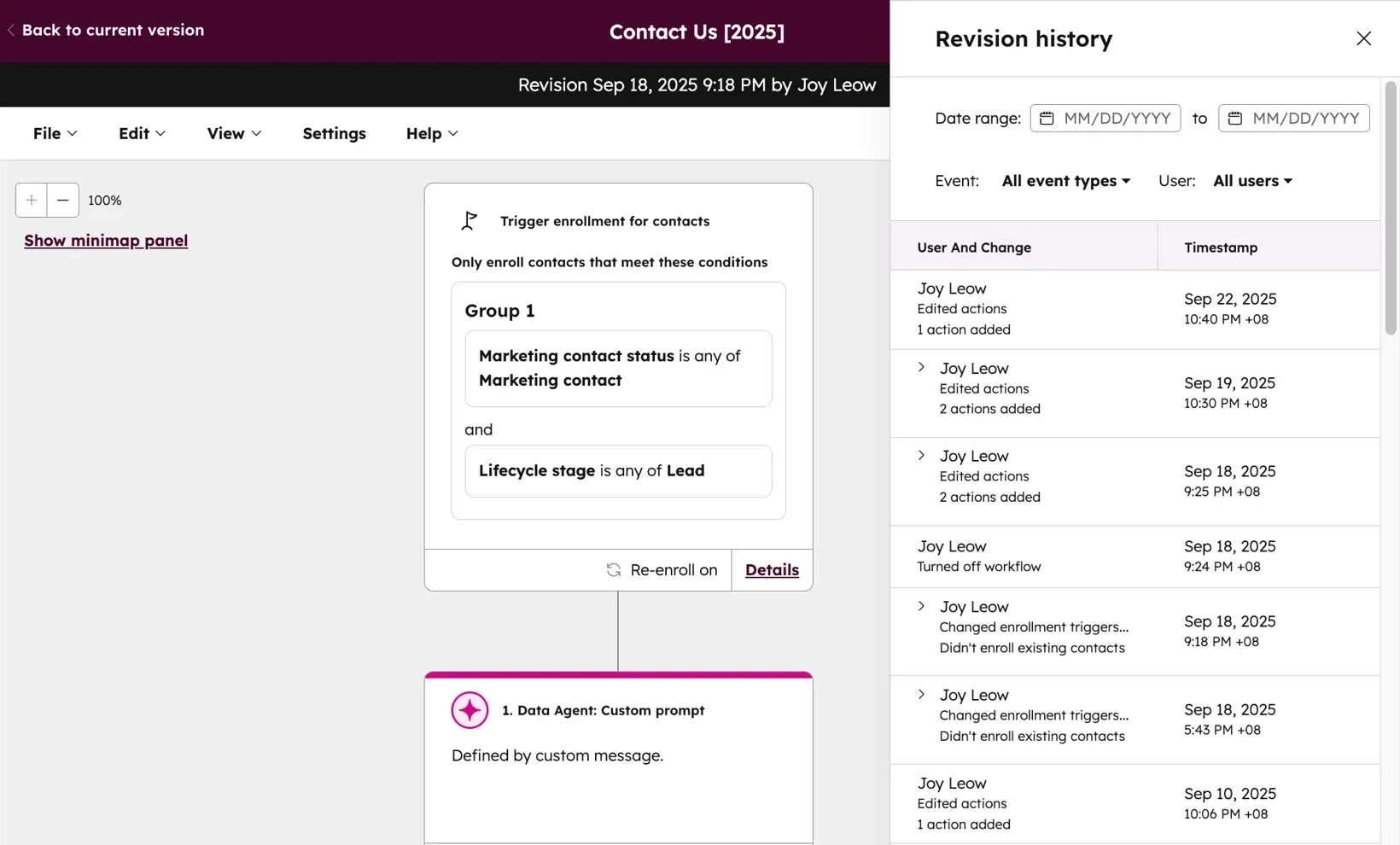
HubSpot Workflows use a drag-and-drop interface that anyone on your team can operate, no technical background required. You can automate marketing, sales, and customer service processes in hours, not weeks.
Source: knowledge.hubspot.com
Salesforce Flows are more powerful and more flexible, but they require technical expertise to configure and maintain. The platform's depth makes it better suited for complex, conditional processes, but the learning curve is steep, and many implementations require dedicated admin time or outside consultants.
Custom Objects and Fields: HubSpot Limits vs Salesforce Freedom
Salesforce functions as a build-your-own-CRM kit. Companies can modify almost every element of the platform and create custom objects for any business data type, with One-to-Many, Many-to-Many, and Master-Detail relationship support built in.
HubSpot's foundation is built around standard objects: Contacts, Companies, Deals, Tickets, and Engagements. Custom objects are supported, but only on Enterprise editions. Small businesses with standard workflows find HubSpot easier to manage. As organisations expand into more complex data models, Salesforce's flexibility becomes increasingly valuable.
Industry-Specific Solutions: Salesforce Clouds vs HubSpot Templates
Salesforce organises its products into specialised clouds for different functions and industries, including Nonprofit Cloud, Health Cloud, Financial Services Cloud, Education Cloud, Manufacturing Cloud, and Government Cloud. Each is a pre-built layer of industry-specific data models and workflows.
HubSpot does not offer industry-specific solutions at this level. Its approach focuses on integrating tools directly into a unified system, with templates serving as the starting point. For organisations in highly regulated industries or with unique vertical requirements, Salesforce's cloud structure is a significant advantage.
Turn CRM Data Into Revenue Insights With SparrowCRM

Core Features: HubSpot vs Salesforce
Both platforms have invested heavily in their feature sets over the past decade. The difference is not which one has more features; it is which features ship out of the box versus require configuration, add-ons, or separate purchases. For a detailed breakdown of what modern CRM platforms should include, the CRM features guide covers the full capability map.
Sales Tools: Sales Cloud vs Sales Hub
HubSpot Sales Hub automates routine tasks, so your team can focus on selling. Sequences, prospecting workspace, and meeting scheduling work out of the box without additional configuration. The platform has become more expensive over recent years as HubSpot has moved core features into higher tiers, a point that comes up regularly in community feedback. As one Reddit user noted: "My bill quickly increased due to nonsensical bundles."

Source: knowledge.hubspot.com
Salesforce Sales Cloud offers a comprehensive feature set, including configure-price-quote tools and AI-integrated forecasting. The Lightning App Builder allows no-code app creation for advanced users. However, the setup and admin overhead is a frequent friction point, community feedback consistently flags the need for a dedicated resource to keep configurations running smoothly.
Marketing Features: Marketing Cloud vs Marketing Hub
Marketing is HubSpot's original strength. Email marketing, landing pages, SEO tools, social media management, and marketing automation are included at all paid tiers and work inside the same database as sales, no integration required. HubSpot Marketing Hub ranked #1 on G2's marketing automation report in 2024.
Salesforce Marketing Cloud is sold separately from Sales Cloud and starts at $1,250/month for 10,000 contacts. It offers deeper capabilities for large enterprise campaigns, SQL access, relational data modelling, and Journey Builder for complex multi-channel automation. For organisations that need both platforms, the total cost of ownership widens significantly compared to HubSpot's all-in-one pricing.
Customer Service: Service Cloud vs Service Hub
HubSpot Service Hub offers ticketing, knowledge bases, and customer portals with a free entry-level tier, making it accessible to startups and small businesses from day one. G2 reviewers highlight that the free starting point removes the barrier for teams evaluating service tooling before committing budget.
Salesforce Service Cloud starts at $25/user/month and offers stronger data security and more granular customisation for complex service workflows. For enterprises in regulated industries where security posture is a buying criterion, this gap matters.
Reporting and Analytics
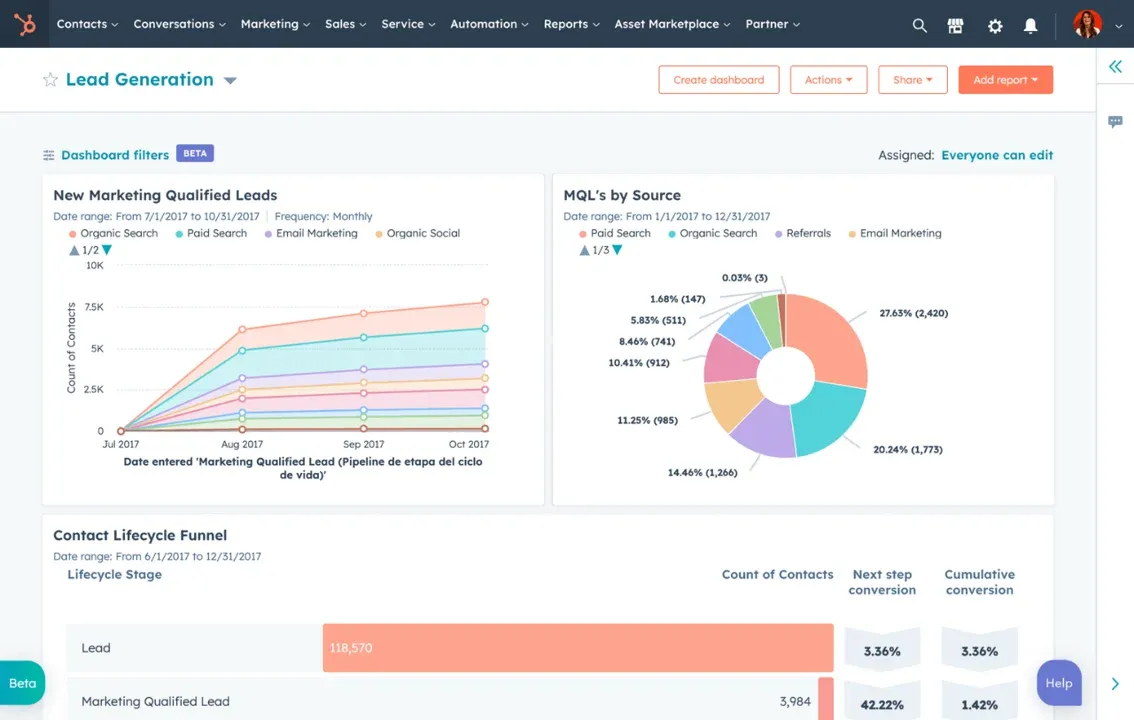
Salesforce leads on reporting depth. Custom dashboards, advanced pipeline views, and multi-object reporting are available from the Enterprise tier upward. Organisations with mature RevOps functions and dedicated analysts tend to get more value from Salesforce's reporting architecture.
Source: knowledge.hubspot.com
HubSpot's reporting is well-designed and accessible to non-analysts. Custom reports, attribution models, and pre-built dashboards cover the needs of most SMB and mid-market teams. For teams building out their analytics practice, the CRM reporting and analytics guide covers what to look for across both platforms.
Prefer a quick visual breakdown? Watch our full video comparison of HubSpot, Salesforce, and SparrowCRM, covering features, AI, and pricing for each platform in under three minutes.
AI Capabilities: Breeze vs Einstein
AI is now a central buying criterion for CRM, not a feature footnote. Both HubSpot and Salesforce have released significant AI tooling, but they differ in where the intelligence lives, who can use it, and what it costs. Understanding this divide helps you evaluate not just where AI is today but where it will be when your contract renews.
Salesforce Einstein and Agentforce: Enterprise-Grade AI
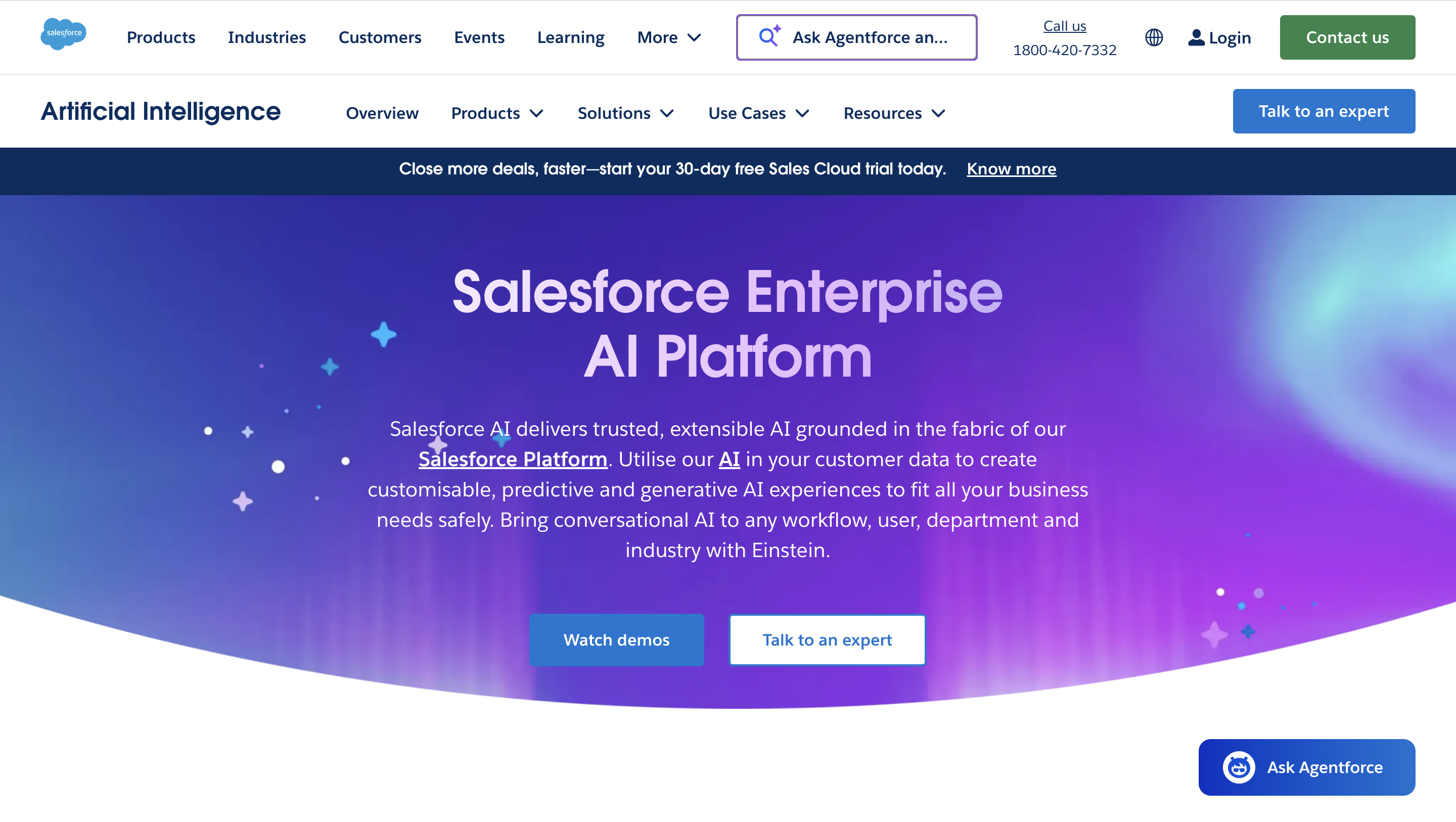
Salesforce Einstein delivers predictive analytics, natural language processing, and automated workflows across the platform. Its forecasting model achieves 87% accuracy on historical sales data, a meaningful advantage for enterprise teams managing complex pipelines. Organisations like Iron Mountain have reported an 80% case close rate using Einstein's AI-generated response recommendations.
Source:salesforce.com
Agentforce, launched in late 2024, is Salesforce's autonomous AI agent suite. These agents use the Atlas Reasoning Engine to make decisions independently across departments, from service resolution to prospecting. The capability is enterprise-grade but requires technical setup and, at full deployment, falls under the Unlimited or Einstein 1 pricing tier ($500–$550/user/month).
HubSpot Breeze: Accessible AI Without the Setup
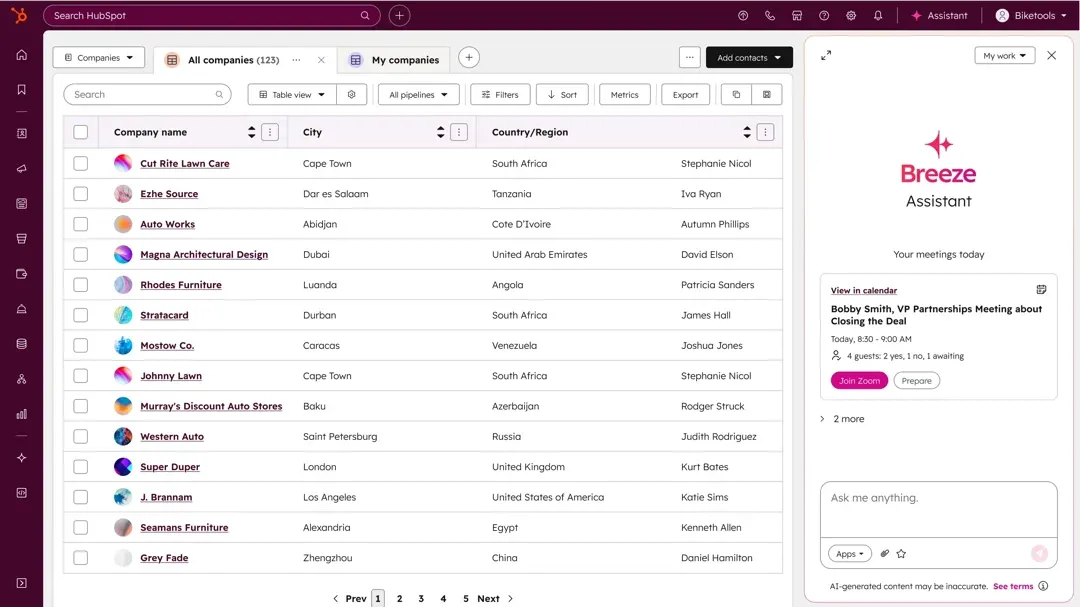
HubSpot has unified its AI capabilities under the Breeze brand, accessible without technical expertise. Breeze Copilot handles content generation and tailored workflow suggestions. Breeze Agents operate autonomously for content creation, social publishing, and prospecting. Breeze Intelligence (built on the Clearbit acquisition) enriches contact and company records automatically.
Source: hubspot.com
Companies using Breeze have reported 66% increases in win rates and 50% improvements in deal close rate. The key differentiator is deployment speed; Breeze ships inside HubSpot's existing plans at no additional cost, whereas Salesforce's equivalent AI layers require separate configuration and often a separate budget.
AI Comparison: Breeze vs Einstein
Criteria | HubSpot Breeze | Salesforce Einstein |
|---|---|---|
Setup required | Minimal, works out of the box | Technical configuration required |
Cost | Included in core plans | Often requires Unlimited or Einstein 1 tier |
Forecasting accuracy | Predictive lead scoring available | 87% sales forecast accuracy |
Autonomous agents | Breeze Agents (content, social, prospecting) | Agentforce (multi-department, Atlas engine) |
Best for | SMB teams that need AI without a dedicated admin | Enterprise teams with technical resources and complex data |
A Third Option Worth Considering: SparrowCRM
HubSpot and Salesforce represent two ends of the AI CRM spectrum, one optimised for accessibility, the other for enterprise depth. For SMB and mid-market sales teams, there is a growing middle ground: purpose-built AI CRM platforms that ship deal-level intelligence without the configuration overhead of Salesforce or the marketing-first framing of HubSpot.
SparrowCRM is one such platform, built specifically for the VP of Sales, revenue officers, and founders at companies between 2 and 500 employees. Its AI layer runs natively across every CRM object rather than as a bolt-on module.
On contact records, SparrowAI surfaces an ICP fit score (0–100), a real-time buying intent score driven by signals across emails, calls, meetings, and deal movement, a buyer profile categorising each stakeholder by decision-making power and focus area, and a best contact time recommendation based on past engagement patterns across channels.
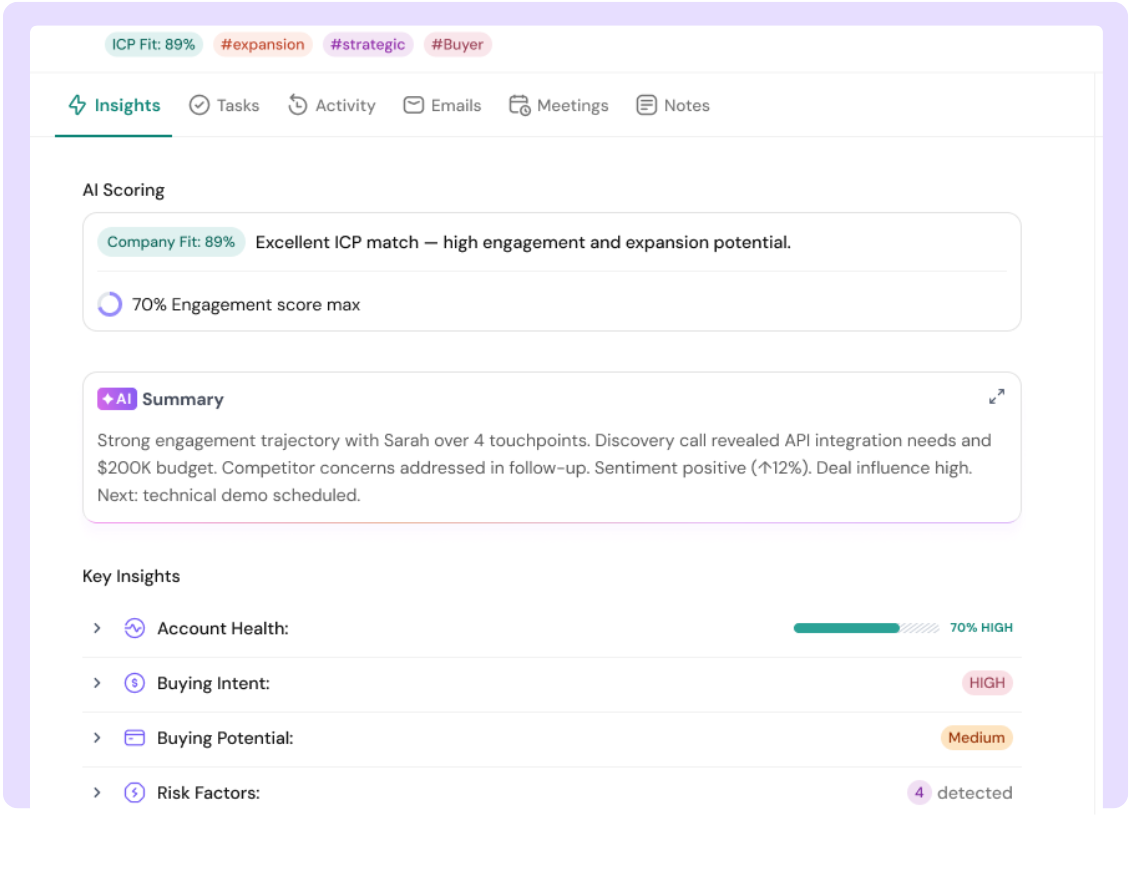
On deal records, it runs a deal score that updates with each activity, a buying committee analysis mapping every stakeholder to a decision role, a competitor mention tracker that flags and contextualises competitive references from transcripts and email threads, and a similar deals engine that surfaces closed-won precedents matching the current opportunity by industry, pain point, and deal stage.
When a deal is marked lost, SparrowAI automatically produces a deal loss analysis, pinpointing the actual cause from communication data rather than relying on the rep’s logged reason, alongside a deal health timeline and verbatim customer excerpts from transcripts.
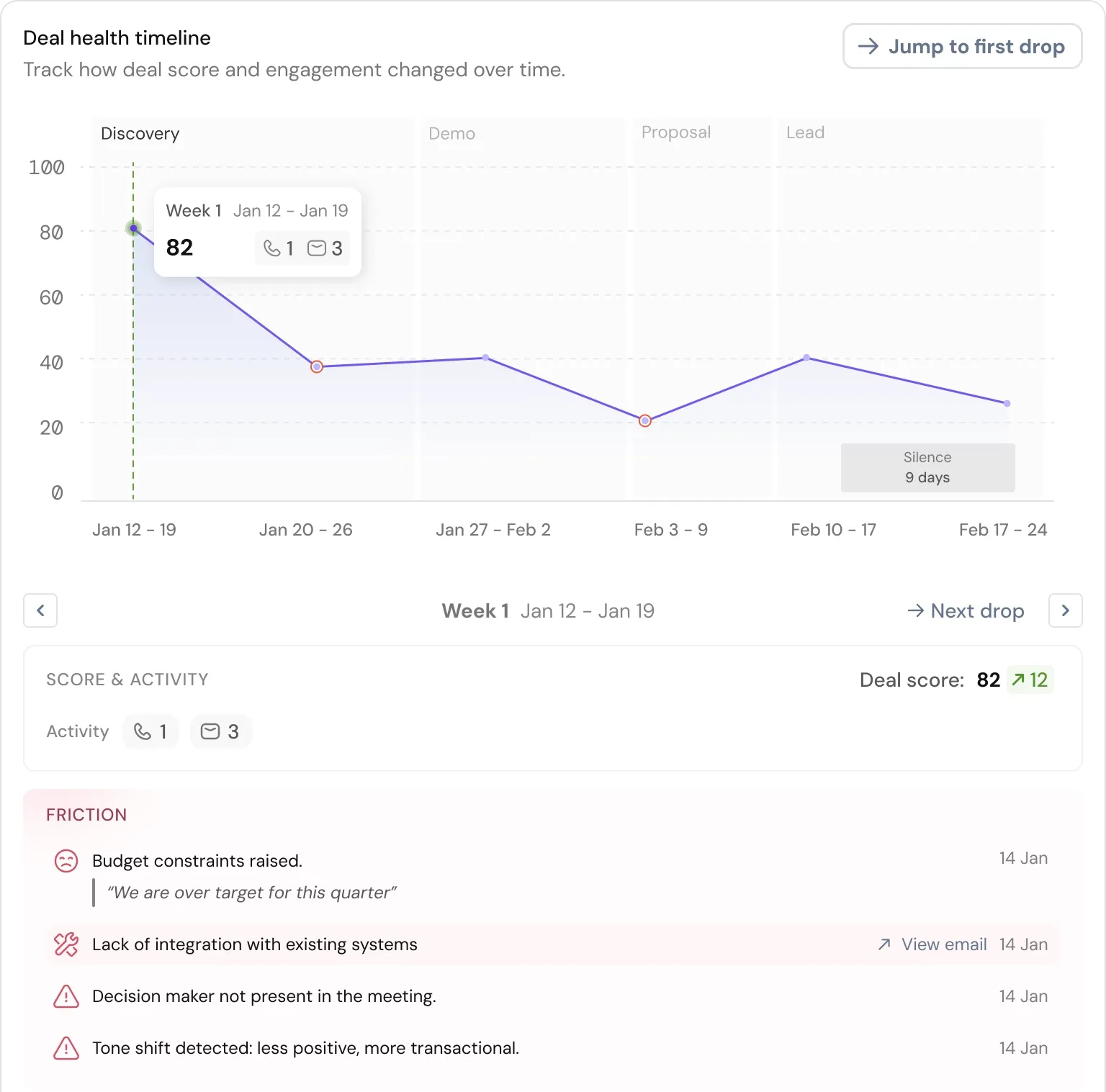
For teams who find Salesforce Einstein too expensive and technically demanding to deploy, and HubSpot Breeze too focused on marketing automation rather than deal intelligence, SparrowCRM’s AI is worth evaluating as a sales-first alternative.
Criteria | HubSpot Breeze | Salesforce Einstein | SparrowCRM SparrowAI |
|---|---|---|---|
AI focus | Marketing automation and content generation | Enterprise forecasting and predictive analytics | Deal intelligence and sales-specific signals |
ICP and lead scoring | Predictive lead scoring (Professional+) | Einstein led an opportunity scoring | ICP fit score (0–100) on every contact and company record, customisable by field |
Buying intent | Not a native feature | Einstein opportunity insights | Real-time intent score (0–100%) on contacts and companies, signal-level breakdown visible per record |
Deal intelligence | Deal health score and pipeline insights | Einstein deal scoring and opportunity health | Deal score updated per activity, buying committee map, similar deals engine, deal loss analysis with transcript excerpts |
Competitor mention tracking | Not a native feature | Via third-party competitive intelligence integrations | Native, flags competitor mentions per email, call, and meeting with quoted excerpt and channel context |
Setup requirement | Minimal, works out of the box | Requires technical configuration and often additional licensing | Minimal, runs natively across all objects from day one |
Best for | Marketing-led teams that need AI across content and automation | Enterprises with technical resources and complex data at scale | SMB and mid-market sales teams who want deal intelligence without admin overhead |
Comparing HubSpot and Salesforce? See What SparrowCRM Offers
App Marketplaces and Integration Ecosystem
Your CRM experience depends on how well it integrates with your existing tech stack. For a full view of how CRM integrations work and what to evaluate, see the CRM integrations guide on the SparrowCRM blog.
AppExchange vs HubSpot Marketplace: The Numbers
Salesforce AppExchange contains over 7,000 third-party apps versus HubSpot's 1,600+. Salesforce users have four times more integration options. Businesses with specialised tooling requirements, particularly in enterprise-specific verticals like manufacturing, healthcare, or government, benefit most from AppExchange's depth.
HubSpot's marketplace is smaller but better organised and easier to deploy. Most integrations are built in-house and installed without coding. HubSpot's percentage of free apps is higher than Salesforce's, which offsets some of the quantity gap for teams on tighter budgets.
Custom Development: Code Builder vs GitHub Integration
Salesforce provides Code Builder, a web-based development environment that brings Visual Studio Code to the browser, complete with Salesforce Extensions, CLI tools, and GitHub integration. For development teams building custom functionality on top of the CRM, this is a mature, professional toolchain.
HubSpot offers GitHub integration for source control, but it does not match Salesforce's native development environment. HubSpot's APIs are clean and well-documented, which works well for teams doing lighter integration work or building on top of standard objects.
Third-Party Tools: Zapier, Gmail, Slack, and More
Both platforms connect with essential business tools, including Gmail, Slack, and Zapier. The Slack for Gmail add-on lets teams move email conversations directly into Slack channels. Zapier bridges either CRM to thousands of other applications without custom code, and becomes particularly valuable when the native HubSpot-Salesforce connector doesn't satisfy a specific workflow requirement.
Ease of Use and Onboarding
Your team's adoption speed directly determines CRM ROI. A platform that sits underused because of complexity costs you in data quality, forecast accuracy, and rep productivity, regardless of the feature set. For a deeper look at what the implementation process involves for each platform, the CRM implementation guide walks through the key stages.
User Interface: Clean vs Complex Dashboards
HubSpot's dashboard keeps everything in one place. G2 users consistently describe it as smooth and easy, giving it an 8.9/10 ease of use rating. Salesforce scores a solid 8.0/10, which fairly reflects a more complex navigation structure where features are split across different apps and must be searched by name.
Setup Time: 36 Days vs Certified Admins
HubSpot Sales Hub takes an average of 36 days to get running and can be fully self-implemented by non-technical teams. Salesforce typically takes 60+ days for basic deployment and often requires certified administrators, who command approximately $85,000/year in salary, or external consultants at $90–$250/hour for custom configuration.
For small teams without a dedicated technical resource, this difference is not just about setup time. It determines whether your CRM stays maintained, updated, and adopted over the long term.
Learning Curve: Guided Milestones vs App-Based Navigation
HubSpot walks new users through step-by-step onboarding milestones. Non-technical users can build custom views, set up sequences, and create automation using a drag-and-drop interface with no training prerequisites. Salesforce's onboarding uses pop-ups and guided demos, but the platform's depth typically requires certified consulting for implementations to reach full functionality.
Who Should Choose HubSpot
HubSpot is the stronger choice for:
- Small to mid-sized businesses (1–500 employees). All-in-one pricing, no dedicated admin required, and average deployment in 36 days means your team can be selling within weeks, not months.
- Marketing-led organisations. Email marketing, landing pages, SEO, social media management, and automation are included at every paid tier, no separate platform purchase needed. HubSpot Marketing Hub ranked #1 on G2 in 2024.
- Teams consolidating tools. HubSpot replaces multiple point solutions with a shared-database platform across marketing, sales, and service. Fewer integrations to maintain, fewer sync failures, fewer data discrepancies.
- Organisations without dedicated CRM admins. Self-service configuration, extensive documentation, and accessible support mean non-technical managers can own and maintain the platform without specialist headcount.
- Fast-growing startups. Start on the free CRM with unlimited time and up to 1 million contacts. Scale to Professional or Enterprise without re-platforming. Pricing is transparent and predictable.
Who Should Choose Salesforce
Salesforce is the stronger choice for:
- Large enterprises (500+ employees). Unlimited customisation, complex approval workflows, advanced territory management, and the ability to model any organisational structure make Salesforce purpose-built for scale.
- Highly regulated industries. HIPAA, CMMC, FedRAMP, and SOC 2 compliance. Superior data security rating. Government Cloud available for public sector organisations.
- Complex multi-product sales. Advanced CPQ, 87% forecasting accuracy, custom revenue recognition, and multi-object reporting make Salesforce suited for enterprise deal complexity that HubSpot's standard objects cannot accommodate.
- Organisations that already have Salesforce admins. If you already have a certified in-house team to configure and maintain the platform, Salesforce's power becomes an asset rather than a liability.
- Companies needing AppExchange depth. 7,000+ pre-built integrations and industry-specific solutions. If a niche integration is business-critical, Salesforce almost certainly has it.
- Field service operations. Salesforce Field Service Cloud supports on-site service management with scheduling, dispatching, and mobile tools. HubSpot does not offer equivalent functionality.
Full Feature Comparison
Feature | HubSpot | Salesforce |
|---|---|---|
Core Strength | User-friendly CRM with strong marketing tools | Highly customisable enterprise CRM |
Setup Time | 36 days average, self-service | 60+ days, admin or consultant required |
Ease of Use (G2) | 8.7/10 | 8.0/10 |
App Marketplace | 1,600+ apps | 7,000+ apps (4,000+ free) |
AI Features | Breeze, 25% marketing efficiency gain, included in plans | Einstein, 87% forecast accuracy, additional cost at scale |
Starting Price | $9/user/month | $25/user/month |
Enterprise Price | $150/user/month | Up to $550/user/month (Einstein 1) |
Free Version | Yes, unlimited time, 1M contacts | 30-day trial only |
Best For | SMB to mid-market (1–500 employees) | Enterprise (500+ employees) |
Implementation | Self-service possible | Consultants at $90–$250/hour |
Custom Objects | Enterprise edition only | All paid editions, unlimited |
Marketing Tools | Built-in, G2 #1 in 2024 | Sold separately, Marketing Cloud from $1,250/month |
Industry Solutions | General platform with templates | Dedicated clouds per industry |
Data Security (G2) | 8.9/10 | 9.0/10 |
Time to Value | 2–8 weeks | 3–9 months for enterprise |
Final thoughts: The Right CRM Depends on Your Business Stage
HubSpot and Salesforce are both excellent CRMs. The question is not which one is objectively better; it is which one matches where your business is today and where it is heading.
If you are under 500 employees, lack a dedicated CRM admin, need built-in marketing tools, or want to be operational within weeks rather than months, HubSpot delivers faster time-to-value at lower total cost. If you are at enterprise scale, running complex multi-stage sales processes, operating in regulated industries, or need to build a custom CRM architecture, Salesforce's depth justifies the investment.
Before committing, calculate the total cost of ownership, not just subscription fees. Include implementation, admin headcount or consultant rates, and the marketing platform costs that apply to your use case. The compare top CRM costs guide walks through how to structure this comparison across the major platforms. Both HubSpot and Salesforce offer trial periods; start there before signing an annual contract.

Frequently Asked Questions (FAQs)
Related Articles
23 Aug, 2025
Attio vs HubSpot (2026): Features, pricing, migration & which CRM wins

20 Apr, 2026
HubSpot pricing explained: plans, real costs, and what to watch out for (2026)
13 May, 2026

