CRM SOFTWARE
Attio vs HubSpot (2026): Features, Pricing, Migration & Which CRM Wins

By Geethapriya
Last updated on Jul 6, 2026
Explore Attio CRM vs HubSpot CRM in 2026, compare features, pricing, and real user insights. Find the right CRM for your team with a clear breakdown of migration, compliance, and cost trade-offs.
- Attio vs HubSpot: Feature Comparison at a Glance
- What Is Attio?
- What Is HubSpot?
- Attio Pricing 2026: Plan Features and Costs
- HubSpot Pricing 2026: Tiered Structure Explained
- Attio vs HubSpot Pricing: Feature-to-Cost Comparison
- Comparison Table
- Data Migration: Moving To or From Each Platform
- Data Migration: Moving To or From Each Platform
- Data Compliance and Security: Attio vs HubSpot
- What Real Users Say: Attio vs HubSpot Reviews
- Which CRM Saves You More Money in 2026?
- Final thoughts
There’s no shortage of opinions on CRM pricing, and “Attio vs HubSpot” is a hot topic for startups weighing feature sets against monthly costs. Real user reviews show the tension clearly: Attio gets called out for being “very expensive” once you need features for more than a handful of users, with one Reddit user noting,
“I really like Attio, but I find them very expensive. I need to be able to connect and sync 3+ email accounts, and this is $150+ a month in Attio”.
On the other hand, HubSpot’s pricing draws criticism for steep jumps between tiers
“HubSpot’s jump from Starter to Pro pricing is utterly absurd,” posts a Reddit reviewer lamenting how upgrades can land in the five-figure bracket, and small teams end up paying for more seats than they need.
Finding the best CRM value in 2026 really comes down to what your team needs and how much you’re willing to spend. HubSpot tends to suit B2B companies that need more than just basic contact management, while Attio is often chosen for its clean interface and flexible setup. In this article, you’ll get a clear breakdown of how their pricing works and see side-by-side feature comparisons, giving you the info to decide which platform actually fits your business, without the hype.
Beyond pricing, the real question is whether Attio or HubSpot fits how your team actually works, and what it takes to get there. This guide covers both platforms end-to-end: what each tool does, how their core features compare, what migration looks like in practice, and which compliance standards each meets. If you are evaluating a CRM migration in 2026, this is the full picture.
TL;DR
Attio vs HubSpot: Feature Comparison at a Glance
Before diving into pricing, here is how the two platforms compare across the features that matter most to sales teams evaluating a CRM in 2026.
Feature | Attio | HubSpot |
|---|---|---|
Pipeline Management | Fully customizable Kanban-style pipelines, drag-and-drop stages | Visual pipeline with pre-built templates, advanced analytics |
Contact Management | Auto-enrichment from multiple sources, custom fields, and relationship mapping | Sophisticated tagging, segmentation, behavioral tracking, progressive profiling |
Workflow Automation | Visual workflow builder, team-focused, lightweight | Advanced conditional logic, cross-hub automation across sales, marketing & service |
Email Integration | Gmail + Outlook sync, centralized inbox, 200–unlimited sends depending on plan | Full email sequences, A/B testing, engagement tracking, and HubSpot branding on free |
AI Features | Ask Attio (natural language CRM queries), AI attributes, call intelligence on Pro | Breeze AI, data enrichment, lead scoring, content suggestions, forecasting |
Reporting & Analytics | Custom reporting via API, basic dashboards (G2: 5.0/10) | Advanced multi-touch attribution, revenue dashboards (G2: 8.2/10) |
Integrations | API-first, Zapier, Gmail, Outlook, Slack — smaller native marketplace | 1,500+ native integrations via App Marketplace |
Mobile App | Yes | Yes |
Free Plan | Up to 3 users, 50,000 records | Unlimited users (view-only after 2 seats), 1M contacts, limited features |
Best For | Startups, SMBs, 1-50 person teams, technical buyers | Mid-market, marketing-led organizations, 50-500+ employees |
Learning Curve | Low, most teams are productive within a day | Moderate to high, a full platform can take 1-2 weeks to configure |
Contract Terms | Monthly or annual | Annual required for Professional and Enterprise tiers |
What Is Attio?
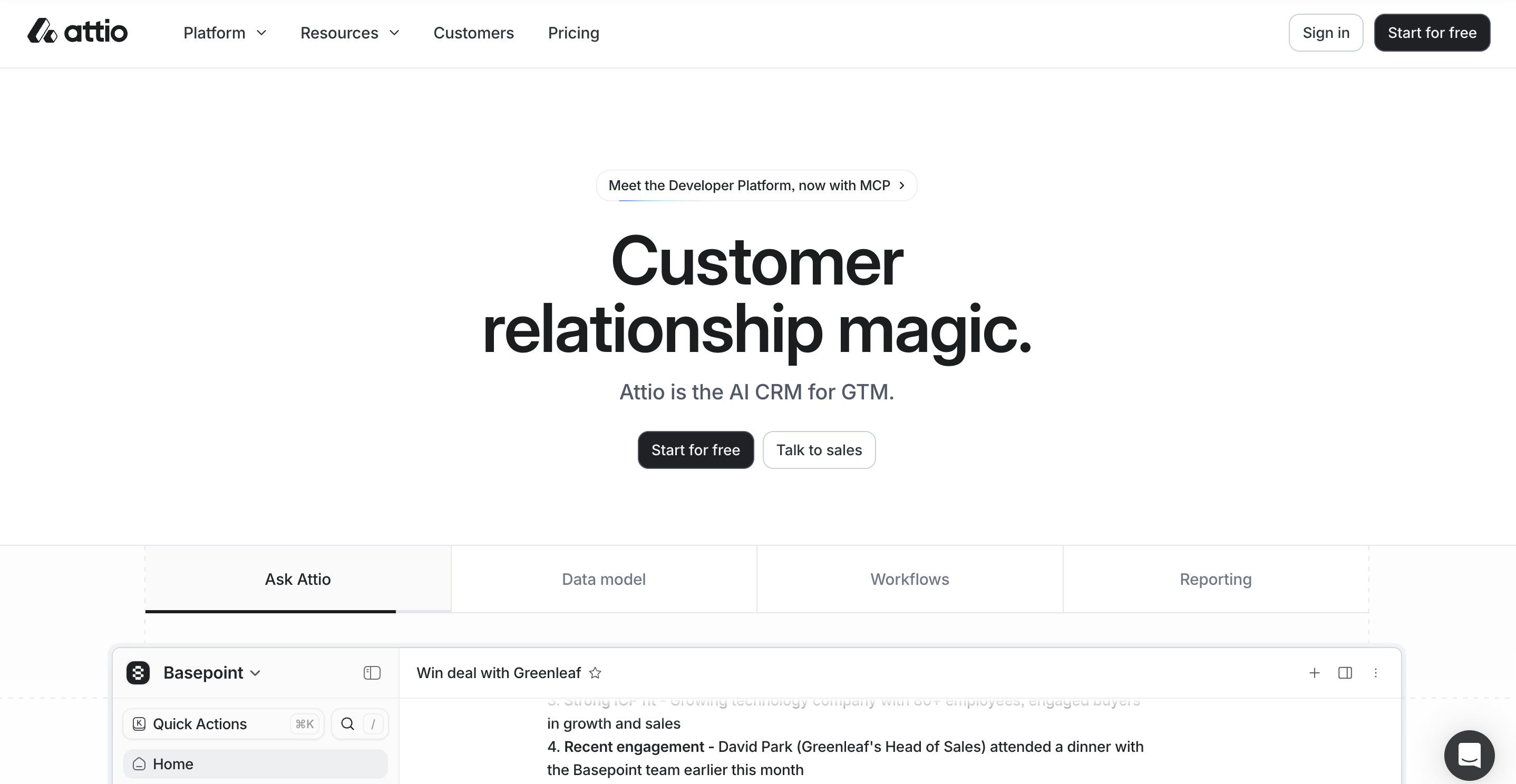
Attio is a modern, highly customizable CRM built primarily for startups, early-stage SaaS teams, and relationship-driven businesses that want full control over how their data is structured and how their workflows run. Unlike legacy CRMs that force you into preset templates, Attio lets you build your own data objects, pipeline stages, and automations from scratch.
Source: attio.com
It launched in 2019 and has grown rapidly among technical founders and product-led teams who want a CRM that behaves more like a flexible database than a traditional sales tool. Attio connects natively with Gmail and Outlook, auto-enriches contact records from multiple sources, and includes AI-assisted features like Ask Attio for querying your CRM data in natural language.
Best suited for: Teams of 1 to 50 who prioritize clean UI, fast setup, and deep customization over a broad feature suite.
What Is HubSpot?
HubSpot is one of the most widely used CRM platforms in the world, built around a hub structure that brings together sales, marketing, customer service, and operations in a single ecosystem. It was founded in 2006 and is used by over 200,000 companies globally, ranging from early-stage startups on the free plan to large enterprises on the Enterprise suite.
Source:hubspot.com
HubSpot's core strength is its breadth. Its Sales Hub covers pipelines, sequences, meeting scheduling, and call tracking. Its Marketing Hub adds email campaigns, ad management, landing pages, and lead scoring. Its Service Hub handles ticketing, live chat, and knowledge bases.
These hubs can be purchased separately or bundled, which makes HubSpot both highly scalable and, at the upper tiers, significantly more expensive than single-purpose CRMs. If you are also evaluating HubSpot against Salesforce, see our HubSpot vs Salesforce breakdown or the full best CRM software compared guide.
Best suited for: Mid-market and enterprise teams that need a unified sales and marketing platform, have dedicated CRM admins, and are planning for significant growth.
Prefer watching over reading? We have broken down the full Attio vs HubSpot comparison in a short video, covering features, pricing, and which one is the right fit for your team. Watch it here.
Attio Pricing 2026: Plan Features and Costs
Attio's pricing structure adapts to your business size and requirements. Let's get into each plan to find the right fit for your organization.

Source: attio.com
Free Plan: Up to 3 users with simple CRM tools
The Free plan costs nothing but comes with certain limits. You can add only 3 users, which makes it perfect for solopreneurs or tiny teams. The plan has up-to-the-minute contact syncing and automatic data enrichment features.
The Free plan limits you to 50,000 records and 3 standard objects (Companies, People, and one optional object). Each user's email account can send 200 emails monthly. Your workspace will receive 250 automation credits per month, up from the previous 100 credits.
Plus Plan: $29/user/month with automation and customization
The Plus plan runs at $29/user/month for monthly billing or $29/user/month for annual billing. This tier removes all seat restrictions, so you can add unlimited users.
The Plus plan expands your capacity to 250,000 records and 5 objects. Your monthly automation credits jump to 1,500, which gives you more workflow options. Each user can send 1,000 emails monthly. Growing teams that need extra customization and have outgrown the Free plan will find this tier ideal.
Pro and Enterprise Plans: Advanced features and support
The Pro plan costs $69/user/month monthly or $69/user/month annually. Your workspace capacity increases to 1 million records and 12 objects, including custom objects.
Pro users get 10,000 monthly automation credits, unlimited email sends, and priority support. The plan also features call intelligence with AI-powered transcripts.
Enterprise customers get unlimited objects, custom record limits, SAML and SSO features, and flexible invoicing options. The Enterprise plan's pricing depends on your needs. You'll also get dedicated migration help and advanced admin tools to manage complex team structures.
User Sentiments: Is Attio Worth the Price?
While Attio’s transparent tiered pricing is praised for simplicity, many users on Reddit and G2 say it becomes relatively expensive as usage grows. Small teams find the Free and plans accessible, but several reviewers mention that costs escalate quickly for larger teams or those needing advanced features
“I really like Attio, but I find them very expensive. I need to be able to connect and sync 3+ email accounts, and this is $150+ a month in Attio.” - Reddit, Pricing Criticism
At the same time, users often appreciate the predictable pricing model, stating that “there are no hidden fees or surprises.” Still, for businesses with tight budgets or rapidly expanding teams, the cost can be a limiting factor
“Be careful: bigger teams or ambitious workflows cause costs to shoot up quickly.” - Magier, Startup CRM Review
HubSpot Pricing 2026: Tiered Structure Explained
Source: hubspot.com
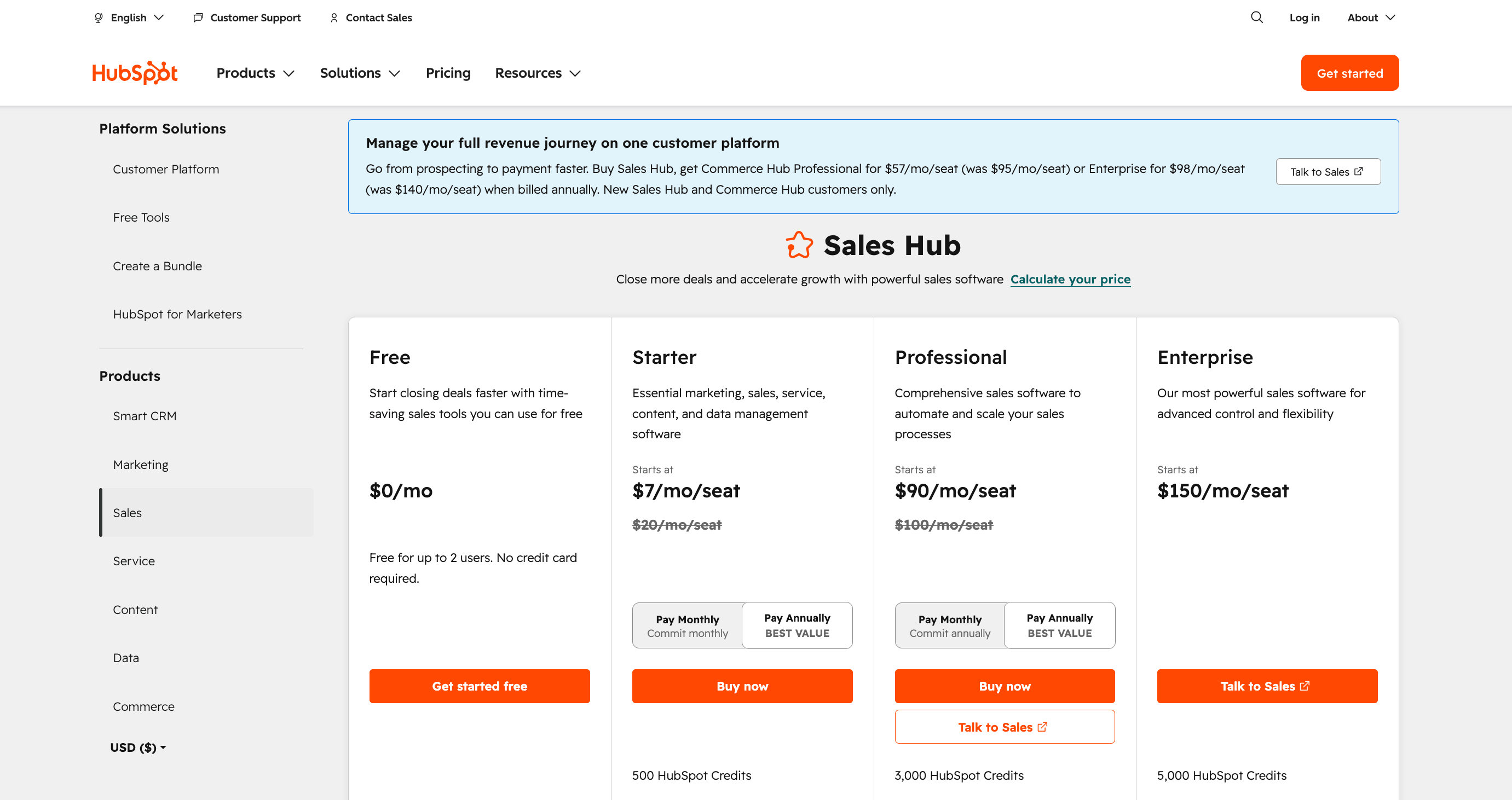
HubSpot organizes its 2026 pricing into six different product hubs. Each hub comes with separate pricing tiers that might seem complex to understand at first.
Free CRM: Unlimited users with limited features
HubSpot's Free CRM plan seems generous with contact management for up to 1,000,000 contacts. The plan now gives you 2 free seats with unlimited view-only access, a change from its previous unlimited user offering. You'll get simple contact management, deal pipelines, and forms. However, limitations exist with only 10 custom properties and one automated email per form. The free plan has HubSpot branding on all communications and limits marketing contacts to 1,000.
Starter Plan: $20/user/month with simple automation
The Starter tier costs $20 per user monthly, which reduces to $7 with annual billing. This plan removes HubSpot branding and provides 1,000 marketing contacts. It also unlocks key sales tools like email automation and meeting scheduling. Small teams and startups will find this plan useful as it has multiple currencies, permission sets, and support for up to 5 currencies. The Starter tier stands out as the only option that allows a month-to-month commitment instead of annual contracts.
Professional and Enterprise: Full suite access at a higher cost
Professional plans come with a substantial price increase, beginning at $450-$900 monthly, based on the hub. These plans have advanced features like custom reporting, AI tools, and workflow automation. Enterprise plans begin around $3,600 monthly and require onboarding fees between $3,000-$7,000. Both tiers need annual contracts paid upfront. Professional adds workflow automation and contact scoring, while Enterprise offers hierarchical teams and predictive lead scoring capabilities.
User Sentiments: Is HubSpot, Worth the Price?
Many HubSpot users appreciate the simplicity and generous contact limit of the free plan, but are frustrated by rapid feature restrictions and persistent branding. As teams scale, sentiments turn critical: several users complain about having to pay for bundled seats and tools they don’t need, with one Reddit reviewer calling the price jump from Starter to Professional “utterly absurd.” Others describe the required annual, upfront contracts at higher tiers as difficult for smaller or evolving businesses to justify, noting that costs escalate fast as needs grow.
“The tiered pricing makes you pay for more seats and tools than you actually need as a small business.”
- Revenue Reveal, Cost Critique
“Professional and Enterprise plans only allow annual contracts paid upfront. It’s a big commitment.”
- Forecastio, Contract Restrictions
Attio vs HubSpot Pricing: Feature-to-Cost Comparison
The value proposition becomes clearer as we analyze specific features against their costs. Let's look at what your money gets you with both CRMs.
Workflow automation: Attio Pro vs HubSpot Professional
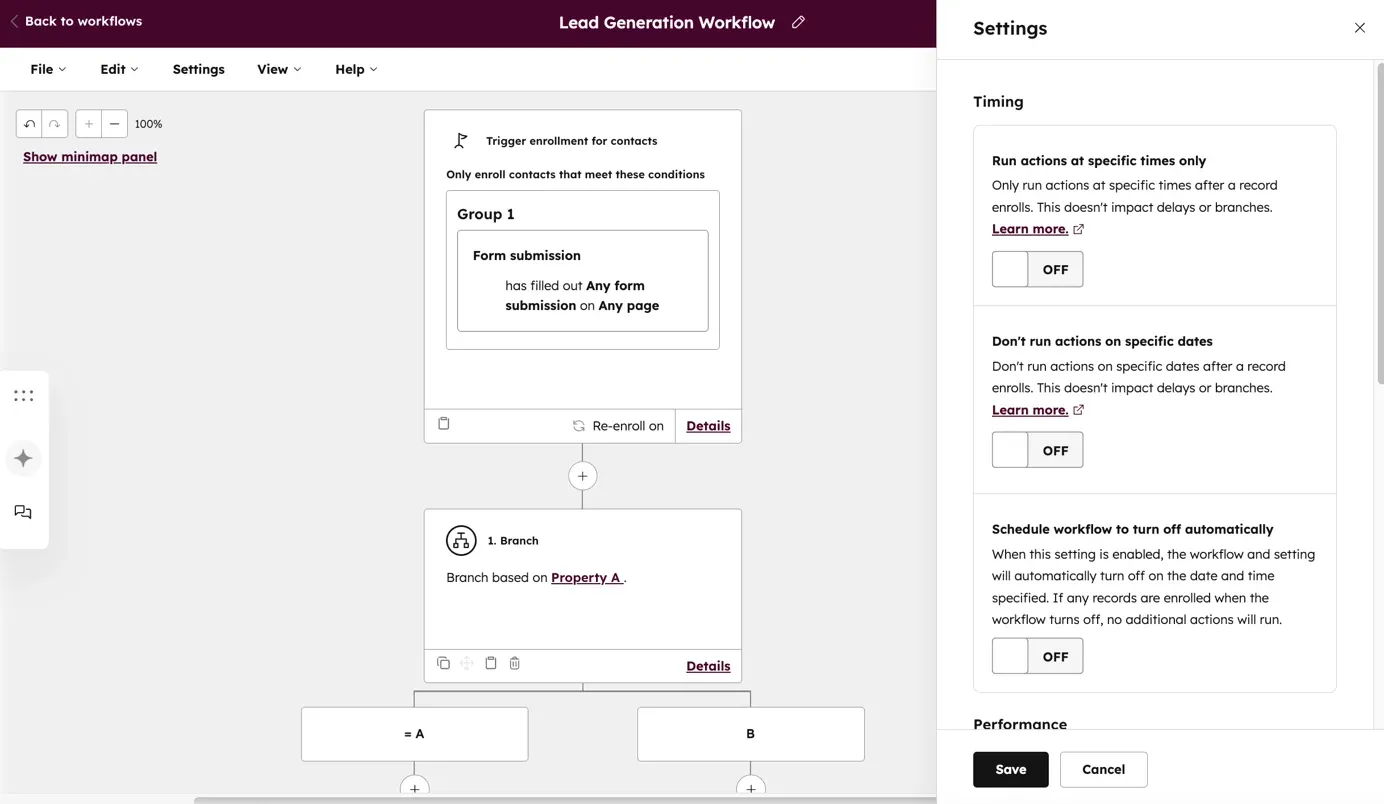
Attio Pro ($69/user/month) gives you 10,000 monthly automation credits and team-focused workflow automation with a visual builder. HubSpot Professional ($100/user/month) delivers more sophisticated cross-functional automation capabilities that span marketing, sales, and service departments. Teams needing complex, conditional logic workflows will find HubSpot's value superior despite its higher price tag.
Source: knowledge.hubspot.com
Contact enrichment and segmentation tools
Attio excels with its automatic contact data enrichment from multiple sources that creates detailed profiles without manual input. HubSpot takes a different approach with sophisticated tagging, segmentation, and behavioral tracking. Users report that HubSpot's Breeze Intelligence feature automatically adds known information to make data collection simpler.
Reporting and analytics capabilities by plan
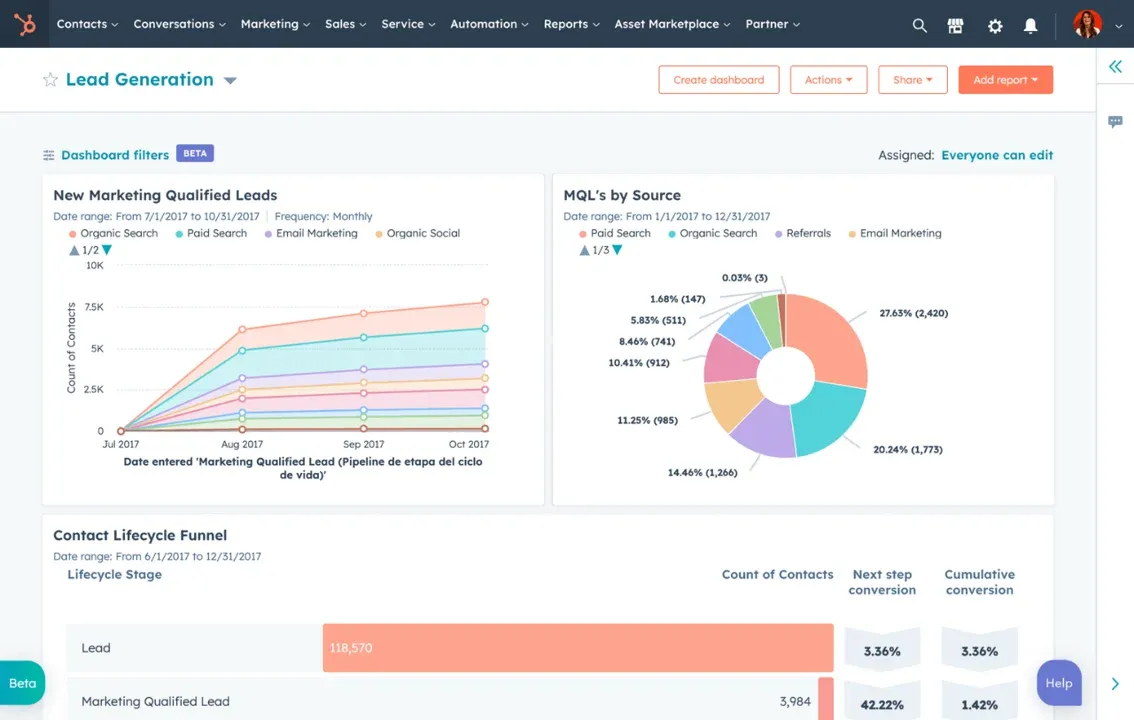
HubSpot dominates this category; users on G2 give HubSpot's Marketing ROI Analytics features a score of 8.2 compared to Attio's 5.0. HubSpot Professional has revenue attribution reporting and detailed dashboards. Attio provides simpler reporting features that focus on contact management.
Source: knowledge.hubspot.com
Integration options and API access
HubSpot's ecosystem has over 1,500 integrations through its App Marketplace, which makes it highly versatile to connect with your existing tech stack. Attio provides API access to integrations, but doesn't match HubSpot's extensive pre-built connection options. Businesses that rely heavily on third-party tools might find HubSpot's integration capabilities worth its higher cost.
Comparison Table
Feature | Attio | HubSpot |
Free Plan | Up to 3 users | Up to 2 users + unlimited view-only |
50,000 records, 3 standard objects | 1,000,000 contacts, 10 custom properties | |
Basic Paid Plan | Plus: $34/user/month | Starter: $20/user/month |
Mid-Tier Plan | Pro: $86/user/month | Professional: $450-$900/month |
Enterprise | Custom pricing | Starting $3,600/month |
Record Limits | Plus: 250,000 Pro: 1 million | Free: 1 million contacts |
Automation Credits | Free: 250/month Plus: 1,500/month Pro: 10,000/month | Basic automation in Starter Advances in Professional |
Email Capabilities | Free: 200 sends/month Plus: 1,000 sends/month Pro: Unlimited | Limited in Free Full features in paid plans |
Integration Options | Basic API access | 1,500+ integrations via App Marketplace |
Analytics Rating (G2) | 5.0 | 8.2 |
Best For | Small teams, startups (5-50 employees) | Larger organizations need complete features |
User Learning Curve | Immediate comfort | 1+ week to learn effectively |
Contract Terms | Monthly or annual billing | Annual contracts required for Professional/Enterprise |
Simplify sales, cut costs, and scale faster with SparrowCRM.
Data Migration: Moving To or From Each Platform
Migration is one of the most underrated considerations when choosing a CRM. Whether you are moving to Attio, moving to HubSpot, or switching between the two, here is what the process actually looks like, based on real user experiences.
Migrating to HubSpot
HubSpot provides a native CSV import tool for contacts, companies, deals, and activities. For larger migrations from Salesforce or other enterprise CRMs, HubSpot offers a Migration Assistance program through its community and solutions partner network.
The key migration steps for HubSpot: export your existing data as CSV files → map your current fields to HubSpot properties → clean and deduplicate records before importing → import in phases, starting with contacts, then companies, then deals and activities.
Common issues reported by teams migrating into HubSpot include custom object mapping complexity, duplicate records after import, and activity histories from older CRMs not transferring cleanly. Properties and custom fields must be pre-created in HubSpot before import, or the data will not map correctly. For detailed guidance, the HubSpot Community Migration thread is a practical starting point.
For teams coming from spreadsheets, HubSpot's import wizard is straightforward. For complex migrations from Salesforce or Dynamics, most teams recommend using a certified HubSpot Solutions Partner to handle data mapping and testing.
Migrating to Attio
Attio supports CSV imports for contacts, companies, and custom objects, and provides dedicated migration assistance on its Enterprise plan. For teams moving from HubSpot specifically, Attio's support documentation covers how to export your HubSpot data and structure it for import.
The most commonly reported challenge when migrating from HubSpot to Attio is data model translation, HubSpot's hub structure does not map 1:1 to Attio's flexible object model, which means you will need to rethink how your data is organized, not just move it. Teams who have made the switch note that the migration itself is technically straightforward, but re-configuration of workflows and automations takes significant time, those need to be rebuilt from scratch in Attio's visual workflow builder. For community perspectives, see the r/CRM thread on moving from HubSpot to Attio.
Migration Comparison
Migration Factor | Attio | HubSpot |
|---|---|---|
Native import tool | CSV import (contacts, companies, custom objects) | CSV import wizard with field mapping |
Dedicated migration support | Enterprise plan only | Solutions partner network + community |
From HubSpot specifically | Requires data model rethinking — workflows must be rebuilt | N/A |
Typical migration time | 1–3 days for data; 1–2 weeks for workflow rebuild | 2–5 days for data; 1 week for configuration |
Risk areas | Workflow and automation re-creation | Duplicate records, custom property pre-creation |
Third-party sync tools | Stacksync, Zapier, native API | 1,500+ native integrations, Stacksync |
Data Migration: Moving To or From Each Platform
Migration is one of the most underrated considerations when choosing a CRM. Whether you are moving to Attio, moving to HubSpot, or switching between the two, here is what the process actually looks like, based on real user experiences.
Migrating to HubSpot
HubSpot provides a native CSV import tool for contacts, companies, deals, and activities. For larger migrations from Salesforce or other enterprise CRMs, HubSpot offers a Migration Assistance program through its community and solutions partner network.
The key migration steps for HubSpot: export your existing data as CSV files → map your current fields to HubSpot properties → clean and deduplicate records before importing → import in phases, starting with contacts, then companies, then deals and activities.
Common issues reported by teams migrating into HubSpot include custom object mapping complexity, duplicate records after import, and activity histories from older CRMs not transferring cleanly. Properties and custom fields must be pre-created in HubSpot before import, or the data will not map correctly. For detailed guidance, the HubSpot Community Migration thread is a practical starting point.
For teams coming from spreadsheets, HubSpot's import wizard is straightforward. For complex migrations from Salesforce or Dynamics, most teams recommend using a certified HubSpot Solutions Partner to handle data mapping and testing.
Migrating to Attio
Attio supports CSV imports for contacts, companies, and custom objects, and provides dedicated migration assistance on its Enterprise plan. For teams moving from HubSpot specifically, Attio's support documentation covers how to export your HubSpot data and structure it for import.
The most commonly reported challenge when migrating from HubSpot to Attio is data model translation. HubSpot's hub structure does not map 1:1 to Attio's flexible object model, which means you will need to rethink how your data is organized, not just move it. Teams who have made the switch note that the migration itself is technically straightforward, but re-configuration of workflows and automations takes significant time; those need to be rebuilt from scratch in Attio's visual workflow builder. For community perspectives, see the r/CRM thread on moving from HubSpot to Attio.
Migration Comparison
Migration Factor | Attio | HubSpot |
|---|---|---|
Native import tool | CSV import (contacts, companies, custom objects) | CSV import wizard with field mapping |
Dedicated migration support | Enterprise plan only | Solutions partner network + community |
From HubSpot specifically | Requires data model rethinking — workflows must be rebuilt | N/A |
Typical migration time | 1–3 days for data; 1–2 weeks for workflow rebuild | 2–5 days for data; 1 week for configuration |
Risk areas | Workflow and automation re-creation | Duplicate records, custom property pre-creation |
Third-party sync tools | Stacksync, Zapier, native API | 1,500+ native integrations, Stacksync |
Data Compliance and Security: Attio vs HubSpot
For teams handling customer data, especially those operating in regulated industries, serving European customers under GDPR, or storing sensitive deal information, compliance is a non-negotiable part of the CRM decision.
Compliance Standard | Attio | HubSpot |
|---|---|---|
GDPR Compliance | Yes | Yes |
SOC 2 Type II | Yes | Yes |
ISO 27001 | Not publicly confirmed | Yes |
HIPAA | Not available | Available on Enterprise only |
SSO / SAML | Pro and Enterprise plans | Professional and Enterprise plans |
Data residency options | Limited, primarily US and EU | Available on Enterprise with an add-on |
Audit logs | Enterprise plan | Professional and Enterprise |
Role-based permissions | Yes (all paid plans) | Yes (varies by hub and tier) |
Data export/portability | Full CSV export available | Full export available across all plans |
Two-factor authentication | Yes | Yes |
Practical note: For SMBs handling standard B2B sales data, both platforms meet baseline compliance requirements. If you are operating under HIPAA, working in healthcare, or need documented ISO 27001 certification for enterprise procurement, HubSpot is the stronger choice. If your primary concern is GDPR and standard data security, both platforms satisfy requirements at the paid tier level.
What Real Users Say: Attio vs HubSpot Reviews
Review Metric | Attio | HubSpot Sales Hub |
|---|---|---|
G2 Overall Rating | 4.8 / 5 | 4.4 / 5 |
G2 Ease of Use | 9.4 / 10 | 8.6 / 10 |
G2 Quality of Support | 9.2 / 10 | 8.7 / 10 |
G2 Marketing ROI Analytics | 5.0 / 10 | 8.2 / 10 |
Capterra Overall Rating | 4.7 / 5 | 4.5 / 5 |
Number of G2 Reviews | ~150 | 13,000+ |
What Attio users praise
Clean interface, fast setup, flexibility of the data model, responsive support, and the fact that it does not feel bloated. Common praise theme: "It, just works the way my brain works."
What Attio users criticize
Gets expensive quickly as team size grows, limited built-in marketing tools, a smaller integration ecosystem, and reporting depth that falls short of HubSpot.
What HubSpot users praise
Breadth of features, strong automation, reliable data across the full funnel, a large community and documentation, and the free plan as a low-risk entry point.
What HubSpot users criticize
The jump from Starter to Professional pricing is a recurring complaint, described by multiple reviewers as "absurd" and "a cliff, not a step." Annual contracts on higher tiers create commitment risk. Teams often end up paying for features across multiple hubs they do not use.
Which CRM Saves You More Money in 2026?
When it comes to saving money on CRM in 2026, the decision honestly splits along company size and complexity. For startups and small teams, Attio is simply less painful on the wallet, with its free plan and straightforward pricing. Most users get what they need without sticker shock. Attio’s user interface is clean enough that new users ramp up quickly, but it’s not perfect: several reviewers complain that Attio’s costs escalate quickly as you add users and automation features, and advanced integrations can feel limited compared to larger platforms.
Some users say, “Attio gets pricey fast for teams that need more than basic CRM,” and note frustrations with the lack of deep marketing or analytics tools, forcing them to look elsewhere as their needs grow.
HubSpot, meanwhile, is where many budgets go sideways; what starts as an affordable Starter plan quickly escalates once you need real automation or marketing features. The Professional and Enterprise tiers can feel downright punishing. User sentiment backs this up: folks praise Attio for transparency but warn about scaling costs, while HubSpot gets called out for surprise fees, forced upgrades, and contracts that are tough to justify unless you’re betting on big growth.
For teams planning to stay nimble and cost-conscious, Attio delivers savings and a smooth experience for small setups, but may lack muscle for ambitious sales and marketing teams as complexity grows; HubSpot remains a contender for expansion, but only for companies that can stomach higher prices.
Final thoughts
The choice between Attio and HubSpot CRMs in 2026 comes down to your business needs and growth plans.Your current needs and plans should guide your choice. Small teams that focus on relationship management without complex marketing automation will save money with Attio. Companies that need sophisticated workflows across departments might find value in HubSpot's premium pricing through boosted productivity and scalability.

Frequently Asked Questions (FAQs)
Related Articles

25 May, 2025
ClickUp vs HubSpot Free CRM in 2026: Key Differences & Gaps
23 Aug, 2025
Pipedrive vs Monday CRM: Which Fits Your Business? [2026]
21 Aug, 2025