CRM SOFTWARE
Pipedrive vs HubSpot (2026): Which CRM should you actually use?

By Geethapriya
Last updated on Jul 24, 2026
Explore this blog to understand how Pipedrive and HubSpot compare across pipeline management, AI features, pricing, and real cost at scale, so you can choose the right CRM for your sales team.
We tested both platforms. Our team ran Pipedrive and HubSpot through the same sales workflows, from lead capture and pipeline management to automation, AI-powered insights, and reporting.
Here is what we found: Pipedrive and HubSpot are not competing for the same buyer. Pipedrive is a sales-first CRM, lean, fast to set up, and built around pipeline visibility. HubSpot is a revenue platform that is broader, more powerful, and significantly more expensive once you move beyond the free tier. The right choice depends entirely on what your team needs to accomplish in the next 12 months.
This comparison breaks down both tools across every dimension that matters, including features, AI capabilities, pricing, real cost at scale, migration support, and a clear verdict by team type. No vendor bias. Just the data.
Comparison of Pipedrive vs HubSpot: at a glance
Factor | Pipedrive | HubSpot | Winner |
|---|---|---|---|
Pipeline Management | Visual, drag-and-drop, sales-first | Multi-hub, more complex setup | Pipedrive |
Lead Management | Basic lead inbox, limited routing | Full lead capture, forms, and scoring | HubSpot |
Sales Automation | Workflow automation from the Growth plan | Sequences gated at Professional ($100/seat) | Pipedrive |
Reporting & Analytics | Custom dashboards from the Premium plan | Advanced reporting at the Professional tier | Tie |
AI Features | AI sales assistant, deal scoring | Breeze AI, Copilot, predictive scoring | HubSpot |
Ease of Use | Fast setup, intuitive UI | Steeper learning curve across hubs | Pipedrive |
Starting Price | From $14/seat/month (Lite, annual) | Free CRM; Sales Hub Starter $15/seat/month | HubSpot |
Best For | Outbound sales teams, SMBs | Teams needing sales + marketing + service | Depends on use case |
Watch: Pipedrive vs HubSpot: full comparison (2026)
Prefer a quick visual walkthrough? This video breaks down exactly how Pipedrive and HubSpot compare on pipeline management, sales automation, AI capabilities, and pricing
HubSpot overview
HubSpot launched in 2006 and has grown into one of the most widely used revenue platforms in the world, serving over 238,000 customers across more than 135 countries. It is not a CRM in the traditional sense; it is a suite of interconnected hubs: Marketing Hub, Sales Hub, Service Hub, Content Hub, and Operations Hub. Each hub can be purchased separately or bundled into a Customer Platform. The free CRM sits at the centre and is genuinely powerful for basic contact and deal management.
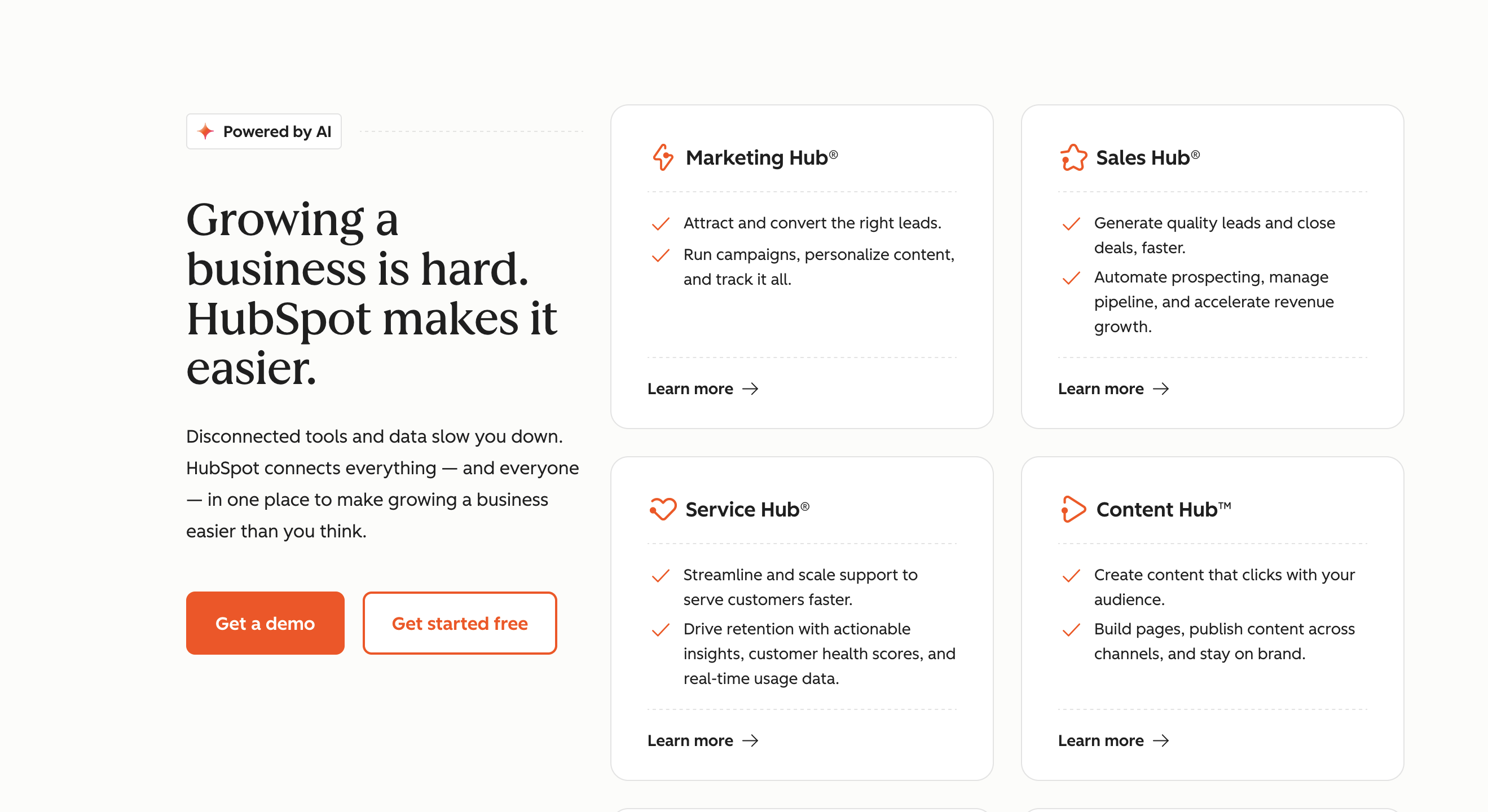
Source: hubspot.com
The platform's core strength is the depth of its ecosystem. HubSpot does email marketing, landing pages, live chat, help desk ticketing, content management, and reporting, all from one login. For teams that want to run their entire go-to-market operation on a single platform, nothing in the market matches HubSpot's breadth at the mid-market level. As of 2026, HubSpot has moved to a seat-based pricing model, which has significantly changed the cost structure for growing teams.
Who HubSpot is built for
HubSpot is built for teams where sales and marketing need to work from the same data. If your business runs inbound campaigns, nurtures leads through email sequences, manages a support inbox, and needs a unified view of the entire customer lifecycle, HubSpot is the natural fit. It is also well-suited to teams with a dedicated RevOps or marketing operations function that can manage the platform's configuration depth. For very small teams or pure outbound sales motions, the complexity and cost can become a barrier faster than expected.
Pipedrive overview
Pipedrive was founded in 2010 by salespeople who were frustrated with CRMs built for managers, not reps. That origin story still defines the product. Pipedrive is built around the pipeline view, a visual, drag-and-drop board where deals move through stages and reps always know what to do next. The platform now serves over 100,000 companies across 179 countries. In July 2025, Pipedrive rebranded its pricing tiers: Essential became Lite, Advanced became Growth, Professional and Power merged into Premium, and Enterprise became Ultimate.
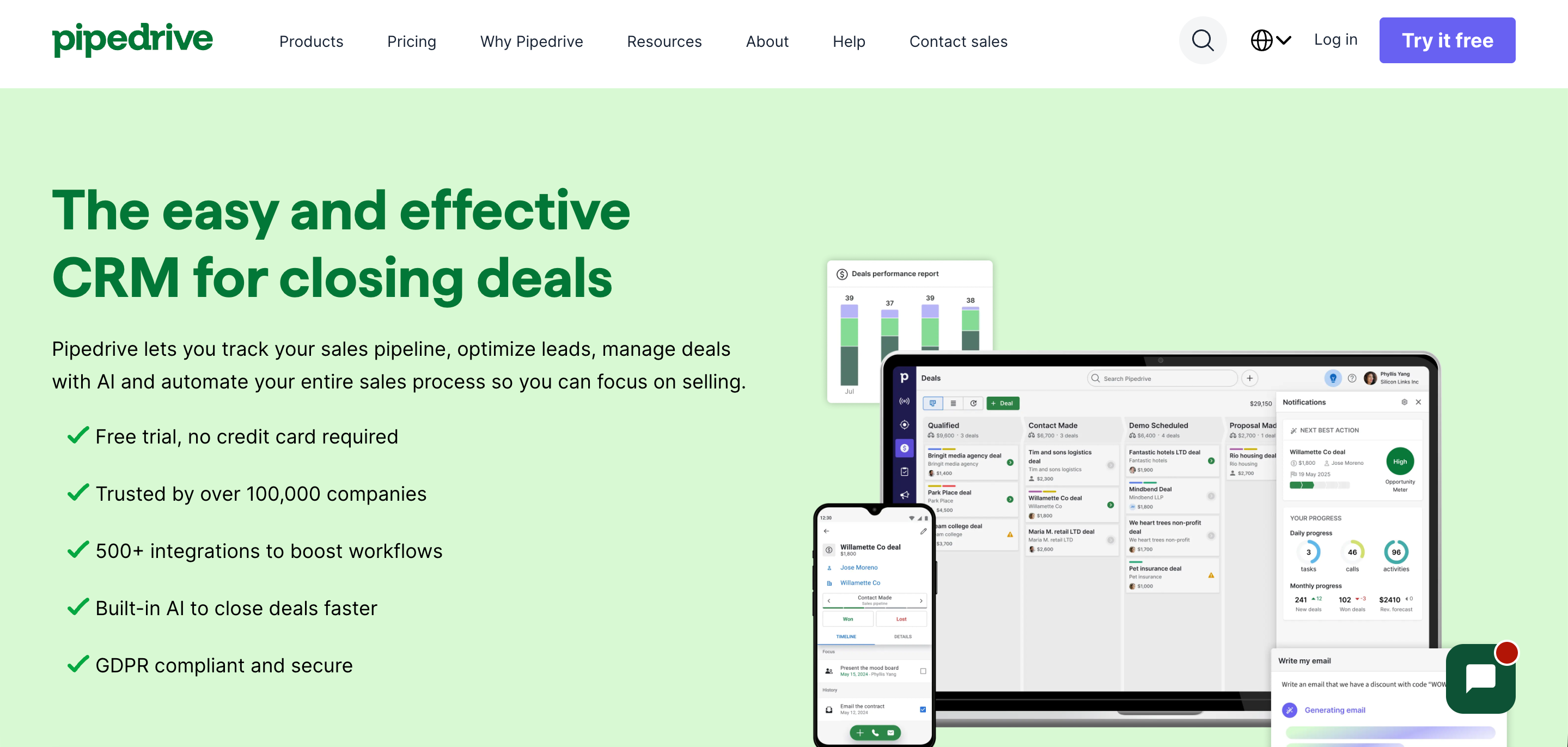
Source:pipedrive.com
Pipedrive's philosophy is deliberate constraint. It does not try to be a marketing platform or a customer support tool. It does pipeline management, contact tracking, email sync, automation, and reporting exceptionally well. The trade-off is that teams needing marketing automation, lead generation, landing pages, or a service desk will need to integrate additional tools. For sales-only teams, this focused approach means faster onboarding, cleaner data, and lower total cost of ownership at smaller team sizes.
Who Pipedrive is built for
Pipedrive is built for sales-led teams where the primary job is moving deals through a pipeline efficiently. It works best for outbound-heavy B2B teams, SDR and AE motions, founders managing their own sales, and small to mid-sized businesses where the CRM is used primarily by salespeople rather than marketers or support agents. If your primary question is 'where are my deals and what do I need to do today,' Pipedrive answers that faster and more clearly than any other tool in its price range.
Core features comparison
1. Pipeline management
Pipedrive: Pipeline management is where Pipedrive earns its reputation. The visual Kanban board is one of the cleanest implementations in the CRM market. Deals are cards, stages are columns, and moving a deal forward is a drag-and-drop action.
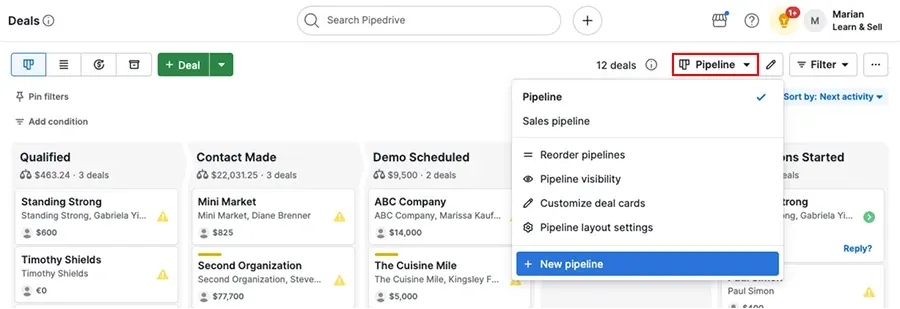
Source: support.pipedrive.com
Every plan includes unlimited pipelines and unlimited deals, which means even teams on the entry-level Lite plan can build multiple pipelines for different sales motions, new business, renewals, and partnerships without hitting a ceiling. Deal rotting indicators flag stale deals automatically, and the forecast view gives revenue projections based on expected close dates and weighted probabilities.
HubSpot: HubSpot's deal pipeline is functional and well-integrated with the broader platform, but it is not the primary reason teams choose it. On the free plan, you get one pipeline. Starter adds up to two, and Professional unlocks up to 25.
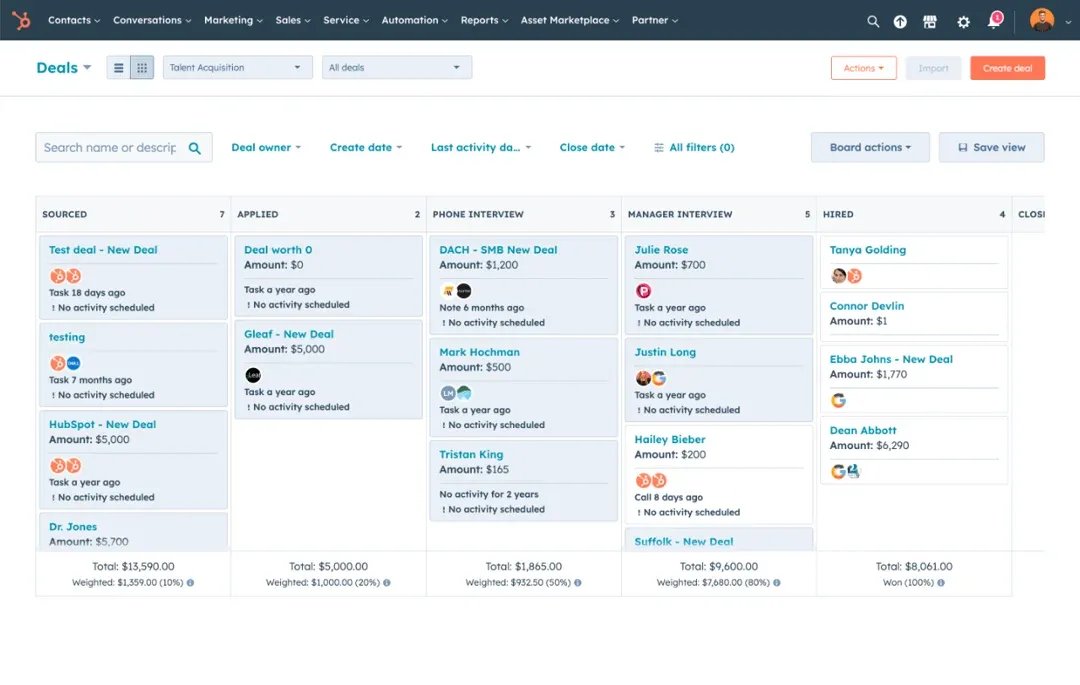
Source: knowledge.hubspot.com
The Kanban view exists and works, but the interface is more complex than Pipedrive's; there are more fields, more configuration options, and more decision points for every deal card. Where HubSpot's pipeline shines is in its integration with marketing and service data. You can see a contact's full lifecycle, from first content download to close, all within the deal record. For teams running account-based selling with multiple stakeholders, that context is valuable.
2. Lead management
Pipedrive: Pipedrive has a dedicated Leads Inbox where unqualified prospects can sit before being converted to deals. It is a useful staging area, but lead management is not Pipedrive's strength. Lead capture from web forms requires the LeadBooster add-on, which starts at around $32.50 per month per company on top of your plan cost.
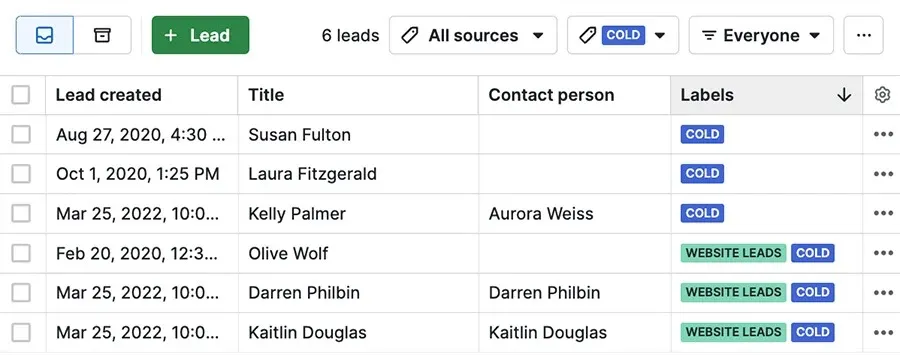
Source: support.pipedrive.com
Lead routing and assignment automation are available from the Growth plan but are relatively basic compared to dedicated marketing platforms. For teams with a high volume of inbound leads needing qualification workflows, Pipedrive requires either add-ons or integrations to match what HubSpot offers natively.
HubSpot: Lead management is one of HubSpot's strongest areas. Native forms, live chat, and landing pages capture leads directly into the CRM. Lead scoring, both manual rule-based and predictive AI-driven, is available at the Professional tier.

Source: knowledge.hubspot.com
Lead rotation and assignment rules can be configured to automatically distribute incoming leads to the right rep based on territory, round-robin, or custom criteria. Marketing Hub and Sales Hub share the same contact database, meaning a lead nurtured through a marketing email sequence transitions seamlessly into a sales deal without any data migration or manual handoff.
3. Sales automation
Pipedrive: Automation in Pipedrive is available from the Growth plan ($39/seat/month annual) and covers a solid range of use cases: automatic deal creation when a lead is qualified, stage-based task creation, email send triggers, and workflow automation across the pipeline.
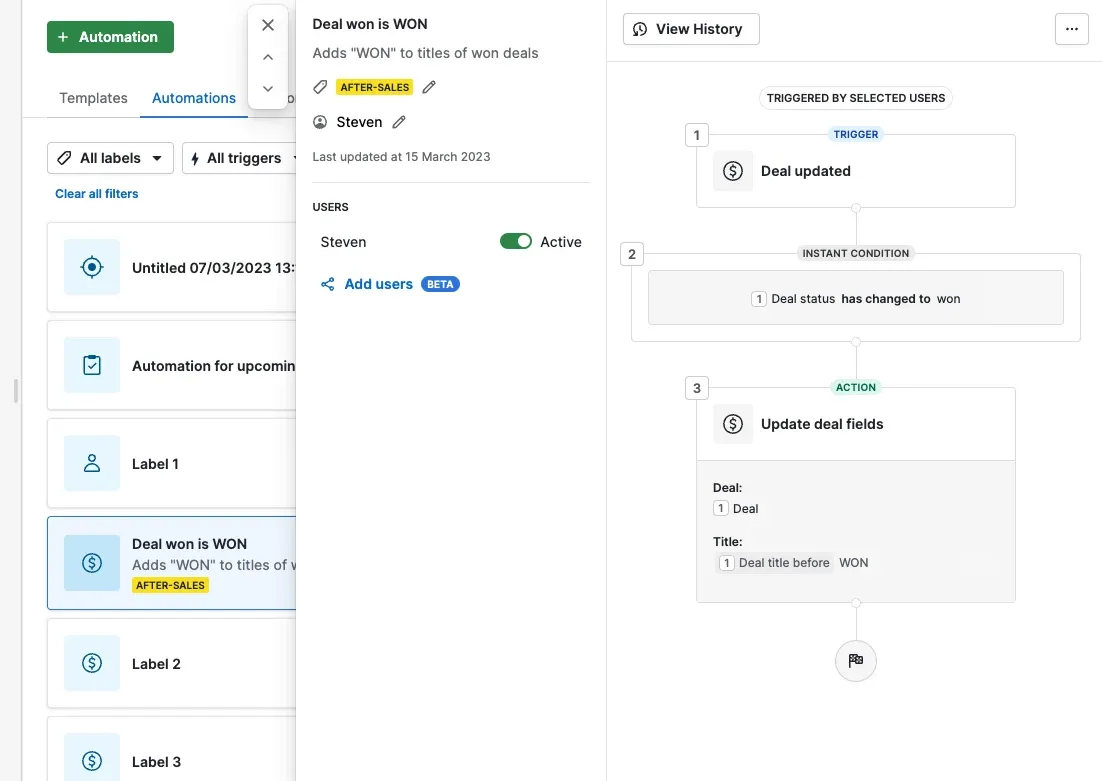
Source: support.pipedrive.com
The automation builder is visual and straightforward; most reps can build their own automations without IT involvement. The Growth plan includes up to 50 automation runs per company per day, which is sufficient for small teams. One important limitation: the automation cap is per company, not per seat, so a 20-person team on Growth shares that limit across the entire team.
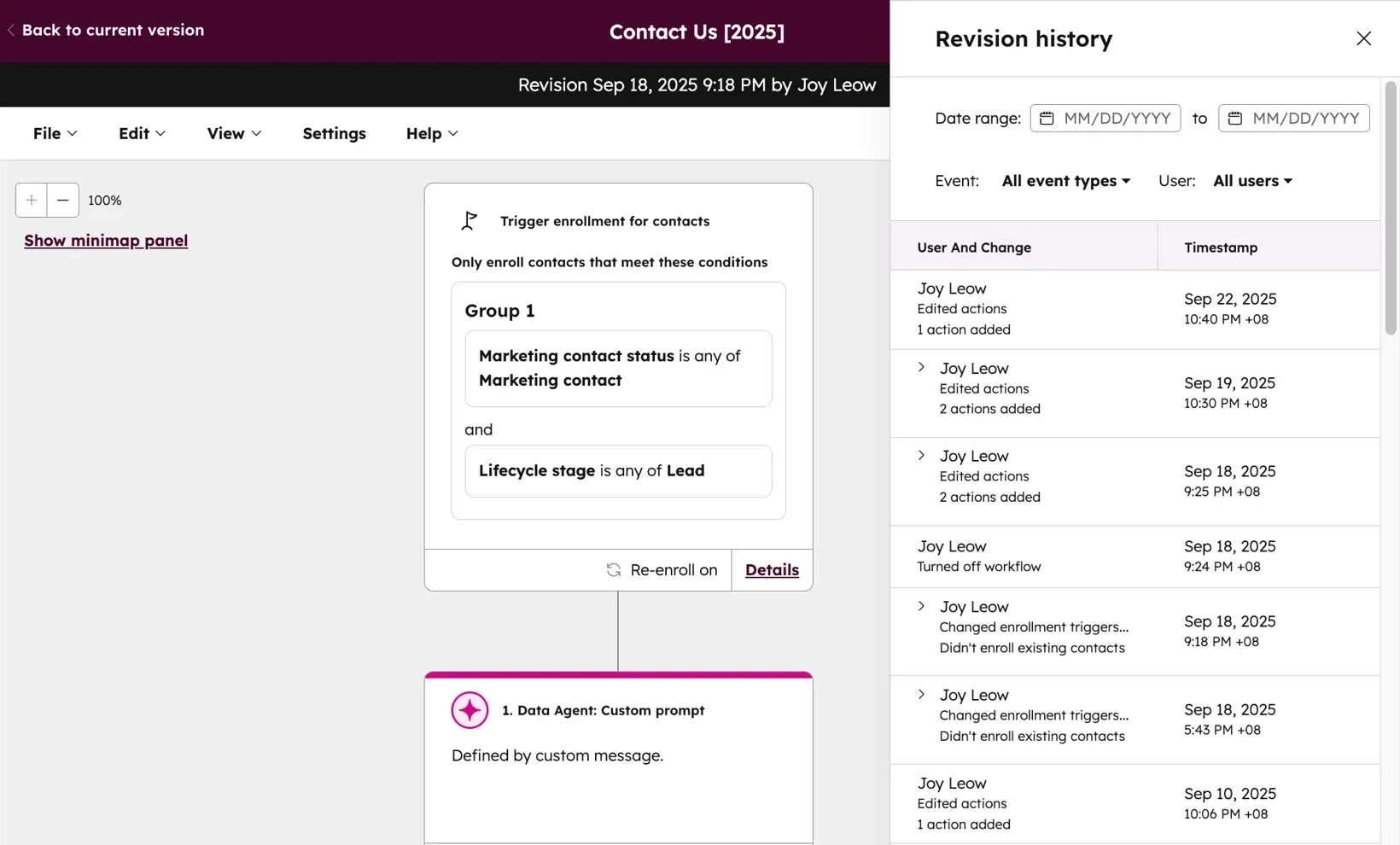
HubSpot: HubSpot's automation capabilities are significantly more powerful, but they come at a cost. Email sequences, the core outbound automation tool for sales teams, are only available from Sales Hub Professional at $100/seat/month.
Source: knowledge.hubspot.com
On the free and Starter tiers, there is no sequences feature. This is the most common point of frustration for teams that start on HubSpot free and hit the sequences wall. At the Professional tier, HubSpot offers branching workflows, enrollment triggers based on CRM properties, A/B testing, and cross-hub automation that connects sales actions to marketing campaigns and service workflows.
4. Reporting and analytics
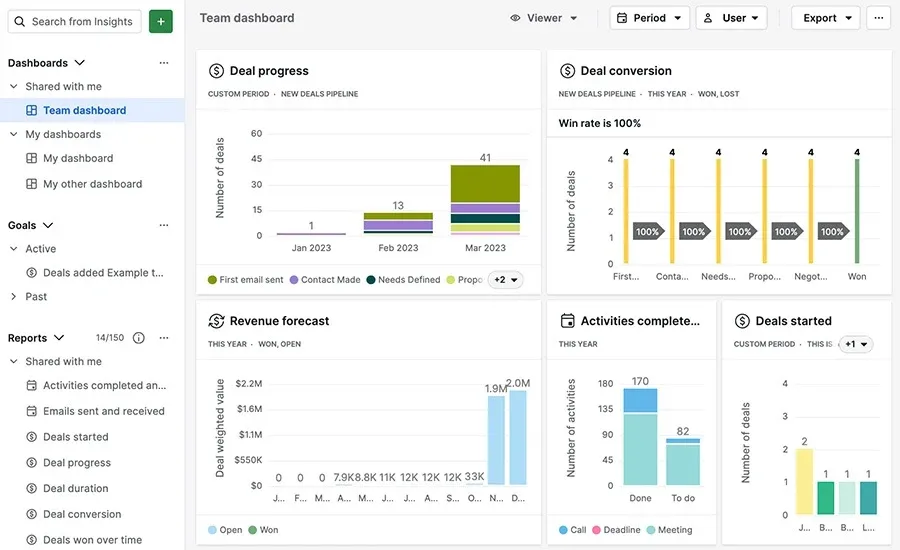
Pipedrive: Pipedrive's reporting has improved significantly with recent updates. Custom dashboards, revenue forecasting, and activity reports are available from the Premium plan ($49/seat/month annual). The Forecast view shows weighted pipeline value and projected close timelines.
Source: support.pipedrive.com
Deal velocity reports show how long deals spend in each stage, which is genuinely useful for identifying bottlenecks. The reporting is sales-focused and practical; it answers the questions a sales manager needs to answer daily. Where it falls short is in marketing attribution and cross-functional analytics, which simply are not in scope for a sales-only tool.
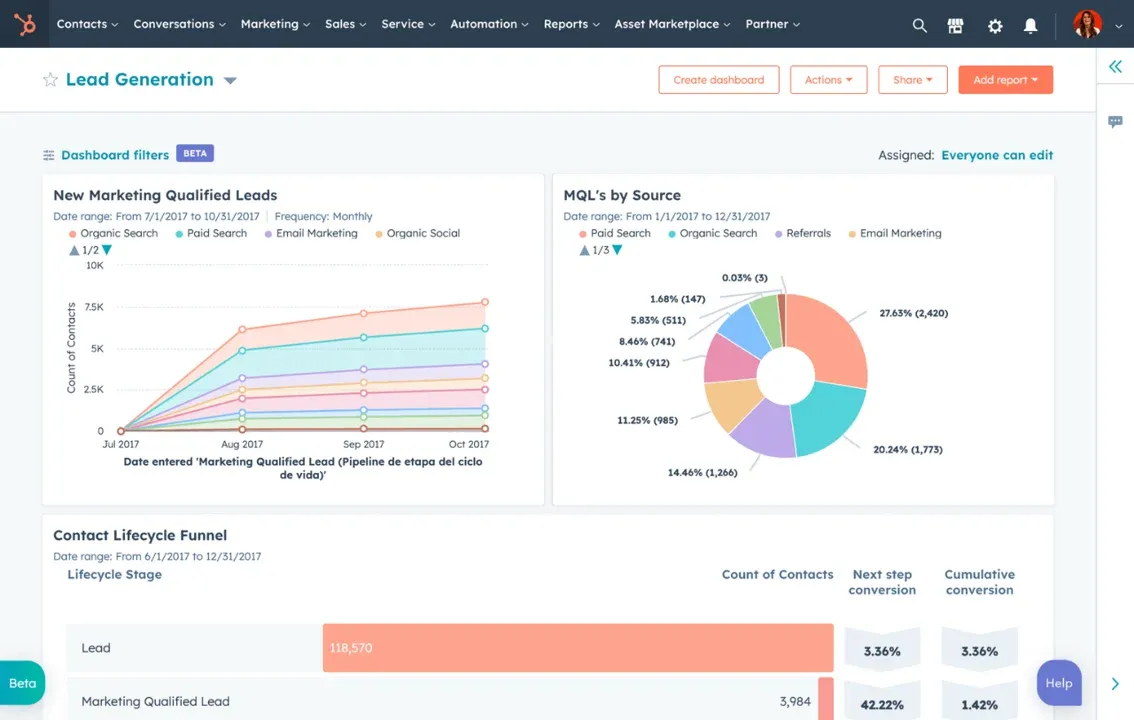
HubSpot: HubSpot's reporting at the Professional tier is comprehensive. Custom report builder, attribution reports, revenue analytics, and forecast dashboards are all available. The ability to build reports that span contacts, companies, deals, and marketing activity in a single view is genuinely powerful for RevOps teams.
Source: knowledge.hubspot.com
The free and Starter tiers are limited to pre-built dashboards and basic metrics. One common complaint from users is that building complex custom reports requires a significant time investment and often relies on a dedicated admin or HubSpot partner to configure correctly.
5. Integrations
Pipedrive: Pipedrive has a marketplace of over 400 integrations covering the tools most sales teams actually use, including Slack, Zoom, Google Workspace, Microsoft 365, Calendly, DocuSign, LinkedIn, and Zapier for anything else.
API access is available on all paid plans, though the new token-based rate limiting system introduced in 2024 means heavy API users on lower tiers may hit daily caps. The integration library is wide enough to cover most SMB sales tech stacks, but for complex multi-system architectures requiring deep two-way data sync, Pipedrive's API is less robust than Salesforce or HubSpot's.
HubSpot: HubSpot's App Marketplace has over 1,700 integrations, and its native integrations with tools like Salesforce, Gmail, Outlook, Slack, and LinkedIn are among the deepest in the CRM market.
The Operations Hub, available as a standalone product, offers programmable automation and data sync capabilities that go well beyond what any middleware tool like Zapier can deliver. For teams building sophisticated revenue stacks with multiple data sources, HubSpot's integration infrastructure is a meaningful advantage. The API is well-documented and widely supported by third-party developers.
AI features comparison
AI is now a central buying criterion for CRM selection. Here is how both platforms compare on their current AI capabilities.
AI Feature | Pipedrive | HubSpot |
|---|---|---|
Deal Scoring | AI deal scoring based on activity and pipeline signals | Predictive lead and deal scoring (Professional+) |
Email Assistance | AI email drafting in the composer | Breeze Copilot for email drafts, tone suggestions, and personalization |
Sales Assistant | AI-powered next action recommendations | Copilot assistant across all hubs with contextual suggestions |
Forecasting AI | AI-assisted revenue forecasting (Premium+) | Predictive forecasting with deal health indicators (Professional+) |
Conversation Intelligence | Basic call notes; no native call AI | Conversation Intelligence for call transcription and coaching (add-on) |
Content Generation | Email and note drafting | Breeze for blog posts, landing pages, sequences, and email campaigns |
AI Search | Not available | AI-powered smart search across CRM objects |
Data Enrichment | Basic company and contact enrichment | Breeze Intelligence for automatic data enrichment (credit-based) |
Availability | Included from Growth plan | Copilot included; advanced Breeze features require Professional+ |
HubSpot's AI investment is significantly larger in scope. Breeze AI spans content creation, data enrichment, conversation analysis, and predictive intelligence across all hubs. For teams that want AI woven into their entire revenue workflow, from first content touchpoint to deal close to customer support, HubSpot has built a more comprehensive AI layer.
Pipedrive's AI is more focused: deal scoring, next action suggestions, and email assistance are practical and well-integrated into the sales workflow. It is not trying to be an AI content factory. For sales teams, the AI features that matter most are knowing which deal to focus on and what to do next. Pipedrive delivers well.
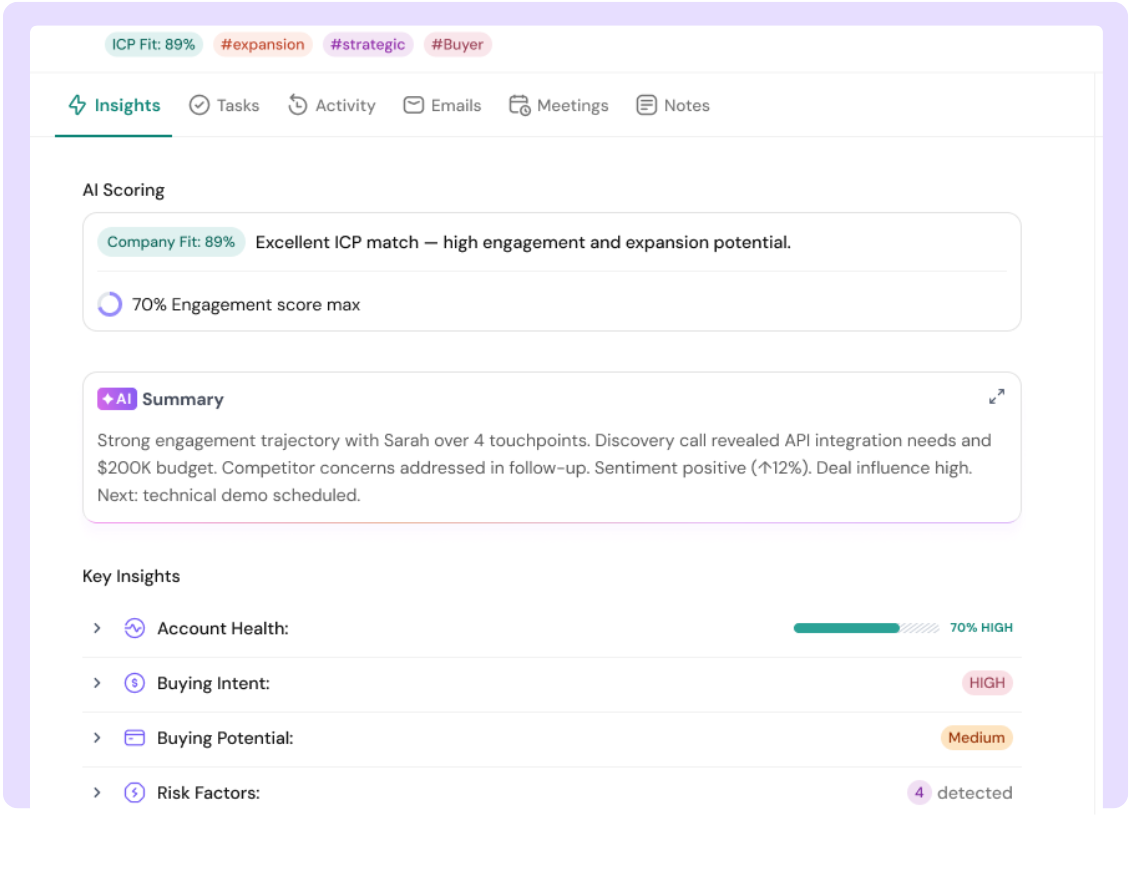
It is worth noting that a new category of AI-native CRMs is emerging, platforms like SparrowCRM, which are built AI-first from the ground up rather than adding AI features on top of existing workflows. These platforms offer capabilities like real-time buying intent scoring, competitor mention detection from call transcripts, and deal loss analysis, features that treat AI as the operating layer, not an add-on. Teams doing serious AI evaluation should include this category in their comparison.
Your CRM Should Drive Revenue, Not Admin Work

Pricing comparison
Pipedrive pricing structure (2026)
Note: Pipedrive rebranded its tiers in July 2025. Old names, Essential, Advanced, Professional, Power, Enterprise, have been replaced.
Plan | Annual Billing (per seat/mo) | Monthly Billing (per seat/mo) | Key Features |
|---|---|---|---|
Lite(was Essential) | $14 | $24 | Basic pipeline, unlimited deals, contacts, custom fields, email sync |
Growth(was Advanced) | $39 | $49 | Email automation, sequences, workflow automation (50 runs/day), meeting scheduler, live chat support |
Premium(was Professional + Power) | $49 | $79 | Custom dashboards, revenue forecasting, team inbox, LeadBooster included, AI features, and higher automation limits |
Ultimate(was Enterprise) | $79 | N/A (annual only) | Advanced security, dedicated support, sandbox environment, highest API token limits |
Add-ons that significantly affect total cost: LeadBooster (lead capture tools, included in Premium) from ~$32.50/company/month on lower plans. Campaigns (email marketing) from ~$16/month. Web Visitors (website tracking) from ~$41/month. For a complete breakdown, explore our detailed Pipedrive pricing guide.
HubSpot pricing structure (2026 - Sales Hub)
Plan | Annual Billing (per seat/mo) | Onboarding Fee | Key Features |
|---|---|---|---|
Free | $0 (up to 2 seats) | None | Basic CRM, contact management, 1 pipeline, limited reporting, no sequences |
Starter | $15 | None | 2 pipelines, basic automation, calling, simple email templates, conversation routing |
Professional | $100 | $1,500 mandatory | 25 pipelines, full sequences, advanced automation, custom reporting, forecasting, playbooks |
Enterprise | $150 | $3,500 mandatory | Unlimited pipelines, advanced permissions, custom objects, predictive lead scoring, and conversation intelligence |
Important: Sequences, the core outbound automation feature most sales teams expect from a CRM, are only available from Sales Hub Professional at $100/seat/month. On Free and Starter, sequences do not exist. This is the most common unexpected cost for teams starting on HubSpot.
Set up and onboarding costs
Pipedrive does not charge an onboarding fee. Implementation is included when you sign up for a plan above $400 per year. Most teams are functional within a few hours of signing up. The pipeline is visual, the fields are intuitive, and the learning curve is shallow enough that reps do not need formal training to start using the tool.
HubSpot charges a mandatory onboarding fee at the Professional tier: $1,500 for Sales Hub Professional and $3,000 for Marketing Hub Professional, paid as a one-time fee at the start of the subscription. This is in addition to the annual seat cost. HubSpot offers self-guided onboarding through HubSpot Academy, which is genuinely excellent, but the mandatory fee applies regardless of whether you use the guided onboarding service. For bootstrapped teams or startups on a tight budget, this is a real barrier to entry.
Migration support
Migrating to Pipedrive is relatively straightforward. The platform accepts CSV imports for contacts, companies, deals, and activities. There is a built-in import wizard that maps columns to CRM fields, handles duplicate detection, and supports bulk imports without a file size limit for most standard data types.
Pipedrive also has native migration tools for teams coming from Salesforce, HubSpot, Copper, and Zoho. These handle the mapping of custom fields and pipeline stages automatically. For teams needing hands-on migration assistance, Pipedrive's partner network includes certified implementation consultants.
HubSpot's migration support is more comprehensive but also more complex. The Import tool handles contacts, companies, deals, tickets, and custom objects via CSV, and there is a dedicated Migration Hub for teams moving from Salesforce. HubSpot also has a large partner and agency ecosystem with migration specialists.
The challenge with HubSpot migrations is that the platform's data model custom properties, association labels, and multi-hub data relationships require careful mapping before import. For teams migrating years of CRM history with complex custom configurations, a HubSpot-certified partner or solutions architect is typically recommended, which adds cost. Email sequence history and marketing campaign attribution are also difficult to migrate cleanly from other platforms.
Which one should you choose?
Choose Pipedrive if you are:
A 2 to 50-person sales team where the CRM is used primarily by sales reps. You run an outbound or hybrid sales motion. You want fast setup, clean pipeline visibility, and automation that works without a dedicated ops person to configure it. Your budget is under $50/seat/month, and you do not need marketing automation built into the same tool. Pipedrive at the Growth or Premium tier is one of the best value-for-money CRM decisions a sales-focused team can make in 2026.
Choose HubSpot if you are:
A team where sales and marketing need to share the same database and workflow. You run significant inbound lead volumes that need nurturing, scoring, and handoff automation. You have a RevOps function or a dedicated HubSpot admin who can manage the platform's depth. Your budget can cover $100/seat/month for Sales Hub Professional, and you understand the platform's true cost before signing. HubSpot is worth the premium when the full platform is used; it is not worth it if only Sales Hub is active.
Consider an AI-native alternative if:
You are evaluating both tools because you want AI to drive your sales process, not just assist it. Both Pipedrive and HubSpot have added AI features, but both were built on traditional CRM architecture and have retrofitted AI into existing workflows. A newer category of AI-native CRMs purpose-built around AI from the ground up, like SparrowCRM, offers capabilities like real-time buying intent scoring, AI deal health analysis, competitor mention detection, and automated next-action recommendations as core functionality, not add-ons. For teams where AI-driven selling is a strategic priority, this category is worth evaluating alongside the established players.
Still choosing between pipedrive and hubSpot?, Try AI native CRM
Final verdict
Pipedrive wins on simplicity, speed, and cost for pure sales teams. If your team's job is to move deals through a pipeline and close revenue, Pipedrive is the better tool at the better price. HubSpot wins when you need a full revenue platform, sales, marketing, and service working from shared data with enterprise-grade automation and reporting. The gap between them is not quality. It is the scope. Buy the tool that matches your scope, and you will not regret either choice.

Frequently Asked Questions (FAQs)
Related Articles

20 Apr, 2026
HubSpot pricing explained: plans, real costs, and what to watch out for (2026)

05 May, 2026
Pipedrive pricing (2026): Plans, add-ons, hidden costs, and honest verdict
23 Aug, 2025