AI & AUTOMATION
CRM Chatbots: The Real ROI of CRM Chatbots for Sales Teams

By Ganesh Ravi Shankar
Last updated on Jul 17, 2026
Discover how CRM chatbots help sales teams qualify leads faster, cut acquisition costs, and close deals 25% quicker.
- What is a CRM chatbot?
- Types of CRM Chatbots
- Built-in CRM chatbot vs. third-party integration: which is right for you?
- Key benefits of CRM chatbot integration
- Use cases of chatbots in sales workflows
- Real-world case study: How chatbots drive sales outcomes
- CRM platforms with built-in chatbot capabilities
- Common Mistakes to Avoid When Using Chatbots in CRM
- The Bottom Line
The numbers make a strong case to add a CRM chatbot to your sales toolkit. Sales teams with chatbots save time, spend less on customer acquisition, and hit their revenue targets more often. Let's get into the real benefits that make chatbots worth your money.
What is a CRM chatbot?
A CRM chatbot is an AI-powered conversational tool integrated directly into your Customer Relationship Management (CRM) system. It engages website visitors and prospects in real time, qualifies leads based on your ICP criteria, syncs all conversation data back into your CRM automatically, and routes qualified buyers to the right sales rep, without any human involvement. Unlike standalone chatbots, a CRM-integrated bot has full context: it can access contact history, deal stage, past interactions, and account data to deliver personalized responses at scale.
Types of CRM Chatbots
Not all CRM chatbots are built on the same logic. The type you deploy determines how flexible your qualification flows are, how natural conversations feel, and how much setup your team needs to maintain. There are four main types in use across sales teams today.
1. Rule-Based Chatbots
Rule-based chatbots operate on decision trees. Every response is pre-scripted; if a visitor answers A, the bot sends message B; if they answer C, it sends message D. They are reliable and easy to configure for narrow, well-defined tasks like booking demos or collecting contact details.
Best for: Teams that want predictable, low-maintenance qualification flows for a specific use case.
Limitations: They break outside their scripted paths. Any question the bot was not programmed for results in a dead end or generic fallback.
2. AI-Powered (NLP) Chatbots
These chatbots use Natural Language Processing to understand intent rather than match keywords. They can handle open-ended questions, detect sentiment, and adapt responses based on what the prospect actually says, not just which button they clicked.
Best for: High-volume pipelines where prospects ask varied questions and scripted flows would feel too rigid.
Limitations: Require training data and more initial setup. Responses can occasionally miss nuance in complex technical or pricing conversations.
3. Hybrid Chatbots
Hybrid chatbots combine rule-based logic for structured qualification steps with AI-powered handling for open conversation. They use scripted flows where precision matters, BANT screening, and ICP matching, and switch to NLP for everything else.
Best for: Most sales teams. The structured steps ensure clean CRM data; the NLP layer prevents conversations from hitting dead ends.
Limitations: More complex to configure than pure rule-based. Requires ongoing review of where the AI layer is underperforming.
4. Voice-Enabled Chatbots
Voice-enabled CRM chatbots handle spoken conversations, typically over phone or smart speaker interfaces. They transcribe speech, extract intent, and log structured data back into the CRM, removing the need for manual call notes.
This category overlaps significantly with call intelligence platforms, which analyse call transcripts and feed insights directly into CRM records.
Best for: Inside sales teams with high call volume who want automated logging without post-call admin.
Limitations: Accuracy depends heavily on audio quality and accent variability. Still less common than web-based chatbot deployments.
Built-in CRM chatbot vs. third-party integration: which is right for you?
Once you know which type of chatbot fits your workflow, the next decision is whether to use a chatbot native to your CRM or connect a dedicated third-party tool. The right answer depends on your team size, existing tech stack, and how much customization your sales process needs.
Factor | Built-in CRM Chatbot | Third-Party Chatbot |
|---|---|---|
CRM data sync | Native, real-time, zero setup | Requires API or Zapier config |
Setup complexity | Low, included in CRM plan | Moderate, separate onboarding |
Conversation flexibility | Limited to platform templates | Advanced, custom flows & NLP |
Omnichannel support | Typically web/widget only | Multi-channel out of the box |
Lead qualification depth | Basic ICP matching & routing | BANT logic, intent scoring |
Cost | Included in CRM subscription | Additional $50–$2,000+/mo |
AI / NLP capabilities | Improving, but often basic | Typically, more advanced models |
Reporting & analytics | Unified inside CRM dashboards | Separate dashboard; manual sync |
Best for | SMB / Mid-market teams wanting simplicity | High-growth teams needing multi-channel depth |
The built-in vs. third-party decision also touches your broader CRM feature strategy. If your team is evaluating what capabilities matter most across the platform, the CRM features guide covers the full capability landscape, including how chatbot integration fits within contact management, pipeline automation, and reporting.
Key benefits of CRM chatbot integration
When your CRM and chatbot work together, the result is more than automation — it is a qualification and data layer that runs continuously without rep involvement.
1. Automate lead qualification and routing
Smart CRM chatbots ask targeted questions about budget, timeline, goals, and decision-making roles. They compare answers against your Ideal Customer Profile to filter out low-fit leads, then route qualified contacts directly to the right rep. This connects directly with how lead routing automation works inside a CRM; the chatbot feeds the routing logic rather than waiting for a rep to manually review and assign.
AI-powered chatbots save sales teams up to 5 hours per week on lead qualification alone.
2. Capture and sync customer data instantly
CRM chatbots eliminate manual data entry. As conversations happen, bots log contact details, interests, objections, and timelines directly into the CRM. Every sales interaction is context-rich and real-time, so handoffs are smooth. Reps can see exactly what the lead already shared, enabling informed follow-ups without starting from scratch.
3. Shorten the sales cycle with instant responses
Bots engage leads the moment they express interest, reducing drop-offs during peak curiosity. Conversations continue even when your sales team is offline, keeping the funnel moving 24/7. Data shows companies using CRM chatbots close deals 25% faster than those relying solely on human follow-up.
4. Handle more leads without expanding headcount
One well-designed chatbot can manage thousands of conversations simultaneously across your website, WhatsApp, Facebook Messenger, and more. This allows you to handle surges during campaigns or peak sales seasons without increasing payroll, your reps only step in when a lead has already been qualified.
5. Improve CRM data quality in real time
Chatbots input information in structured formats, minimising errors. They update existing records with fresh insights, from contact changes to updated pain points or budget notes. Considering poor CRM data costs companies an average of $15 million per year, this benefit alone delivers a measurable return.
Turn website visitors into qualified pipeline automatically.
Use cases of chatbots in sales workflows
CRM chatbots show their real worth through specific sales workflows. These tools handle day-to-day tasks precisely and collect valuable data that flows right back into your CRM system.
1. Booking demos directly into sales calendars
CRM chatbots cut out the back-and-forth that slows down meeting setup. Prospects can see open slots in your team's calendars right away after showing interest, pick a time, and get booked automatically, no emails, no calls, no rep involvement. Reps receive a notification about the new meeting. This process cuts average time-to-meeting by 30% for many sales teams. Automated reminders also reduce no-shows, freeing reps from manual follow-up.
2. Pre-screening prospects for BANT/ICP fit
Smart CRM chatbots qualify leads through natural conversations that gather BANT details, Budget, Authority, Need, Timeline, and score against your ICP seamlessly. If your minimum deal size is $10,000, the chatbot asks budget questions diplomatically and only routes qualified prospects to reps, improving conversion rates by keeping the team focused on closable opportunities.
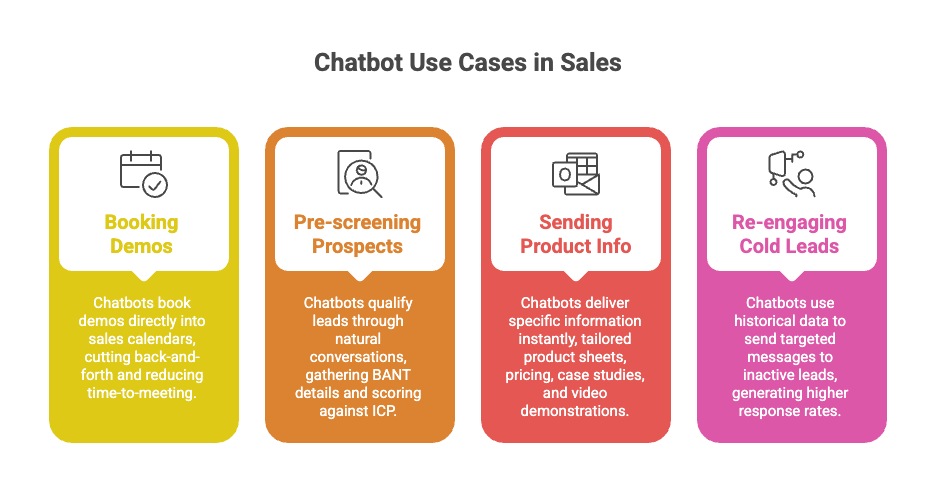
3. Sending product info or pricing automatically
CRM chatbots deliver specific information instantly when prospects ask for it, tailored product sheets based on expressed needs, pricing appropriate to company size, case studies from similar industries, and video demonstrations of relevant features. Quick responses maintain prospect interest during peak curiosity, especially outside business hours when human teams are unavailable.
4. Re-engaging cold leads with personalised nudges
CRM chatbots use historical data to send targeted messages to inactive leads at the right moments. These messages reference specific past interactions, acknowledge time gaps, and share relevant new information based on the prospect's known interests. This targeted approach generates response rates up to 5x higher than generic email campaigns.
Real-world case study: How chatbots drive sales outcomes
Case Study: Drift + Salesforce at Ellie Mae (now ICE Mortgage Technology)
Problem
Ellie Mae, a cloud-based platform serving the mortgage industry, was running a high-traffic marketing site but struggling with lead response time. Website visitors were landing on product pages and leaving without engaging. Their sales team was spending significant time manually reviewing inbound form fills, many of which were low-fit or incomplete. The qualification process was slow, and high-intent buyers were going cold before a rep could reach them.
Solution
Ellie Mae deployed Drift's conversational chatbot integrated with Salesforce CRM. The bot was configured with a hybrid qualification flow, rule-based for initial ICP screening (company size, segment, role) and AI-powered for open-ended product questions. Qualified leads were routed to the right sales rep instantly, with full conversation context written directly into the Salesforce contact record. No manual data entry. No rep review queue.
Outcome
According to Drift's published case study, Ellie Mae saw a 3x increase in qualified meetings booked through the site. Pipeline from chatbot-sourced conversations grew significantly, with a measurable reduction in lead response time from hours to under two minutes. The sales team shifted from reactive form-fill review to high-intent, context-rich conversations already pre-qualified before the first call.
Source: Drift Customer Stories — Ellie Mae
This type of qualification directly shapes pipeline health. For a deeper understanding of how pipeline momentum is measured and managed, see SparrowCRM's guide to sales pipeline management.
CRM platforms with built-in chatbot capabilities
1. Salesforce + Einstein Bots
Salesforce Einstein Bots link directly to your CRM data and create powerful automation options. These AI assistants handle basic sales questions while keeping track of customer history and interactions. The platform includes ready-to-use templates for sales scenarios, creates leads automatically, and smoothly transfers chats to human agents when needed. Einstein Bots can spot sales opportunities from regular conversations and add them to your CRM right away.
2. HubSpot Conversations & Workflows
HubSpot's chatbot solution stands out because it works across their marketing, sales, and service hubs. The visual builder lets you create conversation flows without coding. These chatbots qualify leads through natural conversations and automatically add prospects to relevant workflows based on their answers, keeping your team connected with leads even outside business hours.
3. Zoho CRM + SalesIQ Bot
Zoho SalesIQ combines CRM with smart chatbots at prices that work for smaller sales teams. The bots actively engage visitors by spotting high-value prospects based on behaviour and starting conversations at the right moment. Every interaction is logged in your CRM, with instant rep alerts when human intervention is needed.
4. Intercom, Drift, and third-party chatbot CRMs
Platforms like Intercom and Drift integrate with popular CRM systems and offer advanced conversation features. Drift specialises in conversational sales with advanced qualification workflows and meeting scheduling. Intercom excels at combining support and sales into single conversation flow. Both require additional setup time and ongoing subscription costs on top of your CRM.
Common Mistakes to Avoid When Using Chatbots in CRM
CRM chatbots can fail despite their sophistication when teams make implementation mistakes. My experience with dozens of sales teams has revealed three critical errors that hurt results. These simple fixes can boost your chatbot's performance significantly.
1. Broken CRM sync creates disconnected conversations
A gap between your chatbot and CRM ruins the customer's experience. Failed integration means your chatbot can't access previous interaction data. Customers hate repeating information they already shared. Such disconnects make your company look unprofessional and erode trust.
The biggest problem usually comes from incomplete API connections or outdated sync protocols. Your chatbot needs two-way communication with your CRM. Single direction data flow creates silos that defeat the integration purpose.
2. Too much automation without human backup
Teams often try to automate everything possible. Modern AI still struggles with complex requests, emotional nuances, and unexpected questions. Customers feel stuck in loops without clear paths to reach human help.
Your system needs specific triggers to move conversations to your sales team smoothly. Consider these triggers:
- Customers asking the same questions repeatedly
- Words that show frustration
- Questions outside programmed responses
- Valuable opportunities needing individual-specific attention
Sales reps should see the whole conversation history during handoff.
3. Basic chatbot scripts lacking personal touch
Robotic, generic chatbot responses hurt sales relationships. Your scripts should match your brand's voice while staying natural and conversational.
Good personalization goes beyond using customer names. Smart CRM chatbots mention past purchases, browsing patterns, and account details. Each interaction builds on previous ones instead of starting fresh.
Note that chatbots enhance your sales team's capabilities rather than replacing them. They handle routine work and create informed transitions to your human experts. Proper setup turns them into valuable sales tools that improve the customer's experience.
The Bottom Line
CRM chatbots ended up reshaping the scene for sales teams. These AI assistants save hours of valuable time and cut customer acquisition costs by a lot. Your existing systems blend with these assistants that handle routine tasks with precision. This lets your team focus on what humans excel at – building relationships and closing deals.
The results are clear. Sales teams with chatbots close deals 25% faster and achieve 67% higher sales. Deal sizes grow 25-40% larger through automated systems. On top of that, it improves your data quality as chatbots remove manual entry errors and update records live.
The right implementation makes all the difference. Your platform should line up with your current workflow. You should avoid too much automation and create smooth handoffs between bot and human agents. Note that chatbots support your sales team rather than replace them – they take care of routine tasks so your people can handle complex situations.
You need to decide how fast to add CRM chatbots to your sales toolkit, not whether to add them. About 58% of B2B companies now use AI tools to sell, and your competitors likely do too. Begin with small steps, track your results, and grow your chatbot features based on what works for your needs. Your sales team and profits will benefit from this move.