LEAD MANAGEMENT
Lead routing: what it is, how it works, and best practices

By Ganesh Ravi Shankar
Last updated on Sep 30, 2026
Explore this blog to understand what lead routing is, how different routing methods work, and which best practices and AI-driven approaches help sales teams cut response times and convert more leads.

Ganesh Ravi Shankar
Updated on Sep 30, 2026
A lead fills out a form on your website. Your team gets a notification. But who picks it up, and how fast?
For many sales teams, that question still gets answered manually. A manager scans the lead, decides who should take it, and sends a Slack message. By the time the rep responds, the lead has moved on.
Lead routing solves this. When it works well, every inbound lead reaches the right rep within minutes, based on clear rules rather than gut feel. When it breaks, leads pile up, reps overlap, and revenue slips.
This guide covers what lead routing is, the main routing methods, best practices to get it right, and how AI is changing what routing can do.
TL;DR
What is lead routing?
Lead routing is the process of assigning an inbound lead to the right sales rep, at the right time, based on a defined set of rules or criteria.
The criteria can be a simple route by territory, or cycle through reps in order. Or they can be layered: route by company size first, then industry, then rep availability. Either way, the goal is the same: get the lead to a qualified rep before the window closes.
Lead routing is part of a broader lead management workflow. It sits between lead capture and lead qualification, after a lead enters the system, but before a rep starts working on it.
Why lead routing matters for sales teams
Speed is the most direct reason. Research from Harvard Business Review found that companies that contacted leads within one hour were seven times more likely to qualify them than those that waited even two hours. Poor routing is one of the main reasons response time slips.
.png?2026-06-26T07:45:16.174Z)
Beyond speed, routing affects which rep gets which lead. A high-value enterprise account assigned to a junior rep just because they were next in the queue is a structural problem, not a people problem. Routing rules are what prevent mismatches like this.
There are three core problems leading to routing fixes:
- Slow follow-up caused by manual assignment decisions
- Lead-to-rep mismatches where the wrong rep gets a deal they are not equipped to work
- Dropped leads that sit unassigned because no clear owner was set
How lead routing works
The lead routing process step by step
The core routing sequence is the same across most setups:
- Lead enters the system: A form fill, an inbound call, a chat, or a manual import creates a lead record.
- Routing rules run: The system evaluates the lead's data on industry, geography, company size, and source against the set rules.
- A rep is assigned: The lead is sent to the matching rep, either directly or via a queue.
- The rep is notified: Email, CRM alert, or a Slack message tells the rep that a new lead is waiting.
- Fallback triggers if needed. If no rep qualifies, or the matched rep is unavailable, the lead goes to a fallback owner or manager queue.
The routing logic itself lives in your CRM or revenue operations platform. Each rule is essentially an if-then statement: if the lead's company size is over 200 employees and they are in the finance sector, assign to the enterprise team.
Lead routing methods explained
There is no single routing method that works for every team. The right method depends on your team size, deal complexity, and how your sales motion is structured. Most teams use a combination.
Method | How it works | Watch out for |
|---|---|---|
Round-robin | Equal load distribution across reps | Works well for similar leads; breaks when rep capacity or deal size varies |
Territory-based | Routes by geography, industry, or account segment | Clean for field sales; needs a fallback for cross-territory leads |
Skill-based | Matches lead type to rep expertise | High-quality routing requires up-to-date rep profiles in the CRM |
Account-based | Routes to the rep already owning the account | Critical for ABM; reduces duplicated outreach on the same account |
AI-based | Routes using ICP fit, intent signals, and deal score | Most precise; needs good CRM data to work reliably |
Round-robin lead assignment
Round-robin distributes leads sequentially across a rep pool. Rep A gets lead 1, Rep B gets lead 2, Rep C gets lead 3, then the cycle repeats. It is the simplest approach and works well when all reps have similar capacity, and the leads are roughly equivalent in value.
The problem with pure round-robin is that it does not account for rep workload, expertise, or lead quality. A rep who just closed a complex deal may be at capacity. A lead from a $500K account should not be routed the same way as a lead from a $5K account.
Territory-based routing
Territory routing assigns leads based on geography, vertical, or named account segment. A rep covering the Southeast gets all leads from that region. A rep focused on healthcare gets all healthcare leads.
This works well for field sales teams and companies with clear segment boundaries. The main risk is orphaned leads, which happen when a lead sits at the intersection of two territories, or when the assigned rep is on leave with no coverage rule in place.
.png?2026-06-26T07:46:03.835Z)
Skill-based routing
Skill-based routing matches lead type to rep expertise. If a lead comes from a healthcare company asking about compliance-heavy use cases, it goes to the rep with that vertical background, not the next person in the queue.
This approach requires keeping rep profiles current in your CRM. As reps move between roles or build new expertise, routing rules need to reflect that.
Account-based routing
In account-based selling, a lead from a company your team is already working with should never go to a random rep. Account-based routing checks whether the lead's domain is already tied to an active account or deal, and routes to the rep owning that account.
This prevents duplicated outreach, where two reps from the same company contact the same prospect independently, which is one of the fastest ways to damage a deal.
AI-based routing
AI-based routing moves beyond static rules. Instead of routing based solely on where a lead is from or which rep is next, it factors in signals like ICP fit score, buying intent, deal potential, and the rep's historical win rate with similar profiles.
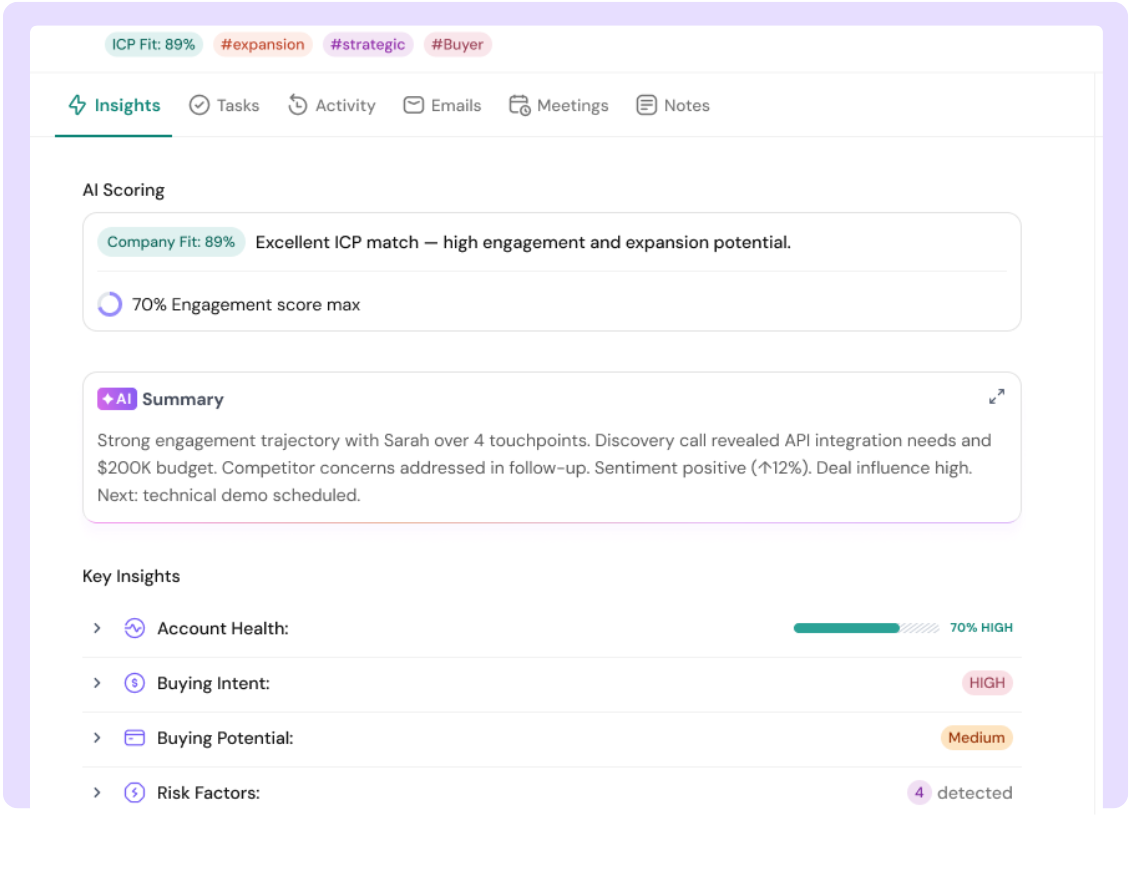
Tools like SparrowCRM use AI features such as ICP fit scoring and buying intent signals to support smarter assignment decisions, routing a high-fit, high-intent lead directly to a senior rep rather than letting it land in a general queue. We cover this in more depth in the AI section below.
Automate lead routing with SparrowCRM

Lead routing best practices
Routing rules are only as good as the logic behind them. Here are the practices that matter most.
Best practice | What it means in practice |
|---|---|
Define routing criteria first | Decide what data determines the assignment before writing a single rule |
Tie routing to lead scoring | High-score leads should always bypass the queue and go directly to senior reps |
Build fallback rules | Every rule needs a fallback. What happens when no rep qualifies, or a rep is OOO? |
Track speed-to-lead | Set a response SLA per lead tier; measure and review weekly |
Audit rules quarterly | As rep territory, capacity, and expertise change, your routing rules should too |
Avoid rep gaming | Cap daily assignments per rep and use queue locks to prevent cherry-picking |
Set clear lead assignment rules before you automate
Automation makes bad rules run faster. Before you automate anything, map out the criteria that should determine assignment in plain language. What makes a lead enterprise-grade? What signals suggest a lead should go to a specialist rather than a generalist? Write the logic in if-then terms before you configure it in your CRM.
Understand how lead assignment rules are typically structured and which fields give you the most reliable routing signal.
Connect routing to lead scoring
Routing and lead scoring should work together. A lead that scores above your MQL threshold should not sit in a general queue; it should go directly to a senior or specialist rep. Build scoring thresholds into your routing rules so that high-value leads get priority handling, not just faster notification.
Predictive scoring makes this even sharper. When scoring is based on historical win data rather than manual point assignments, routing decisions get more accurate over time. Learn how predictive lead scoring works.
.png?2026-06-26T07:46:57.621Z)
Build fallback logic into every rule
The most common routing failure is not a bad rule; it is a missing fallback. A rep goes on leave. A territory has no coverage. A new segment is not mapped to anyone. Without fallback logic, leads stall.
Every routing rule should have a defined fallback owner: a backup rep, a manager, or a shared queue. The fallback should trigger automatically, not after someone notices the lead has been sitting for 48 hours.
Track speed-to-lead as a routing health metric
Speed-to-lead, how quickly a rep contacts a lead after it is created, is one of the clearest signals that your routing is working. If average speed-to-lead is rising, routing is introducing delays. If it varies widely between reps, the rules are not being applied consistently.
Set a response SLA per lead tier (for example, 5 minutes for high-score leads, 2 hours for mid-score), and review actual performance weekly. The data will tell you where the rules are breaking down.
Lead routing examples
Example 1: Round-robin in a 10-rep inside sales team
A B2B SaaS company with 10 inside sales reps uses round-robin routing for all inbound leads from their website. Leads cycle through the rep pool in order. This works well during normal operations, but breaks down when three reps are on leave, and no coverage rule is in place, the cycling continues and leads to land with reps who are offline.
The fix: Add an availability flag to each rep's profile. The round-robin skips reps flagged as unavailable and routes to the next active rep. Unassigned leads after one full cycle go to a manager queue.
.png?2026-06-26T08:22:15.650Z)
Example 2: Territory routing for a field sales team
A logistics software company routes leads by US region: Northeast, Southeast, Midwest, and West. Each region has two reps with defined coverage. When a lead comes in from an address that sits on the border between two regions, both reps get notified, leading to duplicated outreach and an awkward first call for the prospect.
The fix: Assign every postal code to a single region. Add a tie-breaker rule that routes cross-territory leads to the rep with the lower current caseload. Review territory boundaries quarterly as the rep roster changes.
Example 3: AI-based routing using buying signals
A 20-rep SaaS sales team switches from rule-based routing to signal-based routing. Previously, leads were routed by company size. Now, routing also factors in ICP fit score, buying intent (based on pages visited, content downloaded, and time on the pricing page), and the rep's win rate with similar accounts.
A lead from a 50-person fintech company that visited the pricing page three times in one week scores high on both ICP fit and intent. Instead of going to the next rep in the round-robin, it routes directly to the rep with the highest close rate on fintech accounts. Average time-to-first-contact drops from 4 hours to 18 minutes for high-intent leads.
AI in lead routing: how intelligent routing works
From rule-based to signal-based routing
Rule-based routing is static. You define the criteria, and the system applies them. If your rules are good and your data is clean, it works. But the rules do not adapt. A rule that says "route enterprise leads to the enterprise team" does not account for whether the lead is actually ready to buy, or whether your best enterprise rep just took on three new deals.
AI-based routing changes this. Instead of matching a single data point (company size, region) to a rep, it evaluates a combination of signals in real time and surfaces the most relevant assignment. Think of it as routing that learns from what actually closes, not just what a manager decided months ago.
What AI routing looks at
The most effective AI routing systems pull from several data layers:
- ICP fit: Does this company match your ideal customer profile, size, industry, tech stack, and buying patterns?
- Buying intent signals: Has the lead visited high-intent pages (pricing, demo request, comparison pages)? Are multiple stakeholders from the same account engaging?
- Deal potential: Based on the lead's profile, what is the estimated deal value, and which rep has historically won similar deals?
- Competitor signals: If the lead has mentioned a competitor in a form or a call, that is a high-intent trigger. It should route to a rep equipped to handle competitive conversations.
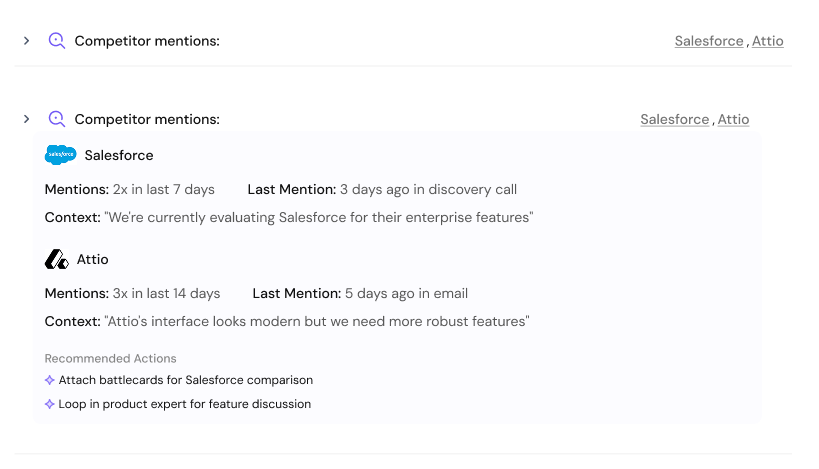
- Buying committee activity: If multiple people from the same company have engaged, the lead is further along than it looks. AI routing can flag this and assign it to a senior rep rather than treating it as a cold inbound.
SparrowCRM surfaces these signals: ICP fit scoring, buying intent, deal score, and buying committee analysis, so that routing decisions are based on what the lead is actually showing, not just which rep is next in the queue.
Use SparrowCRM for AI-powered lead routing
Common lead routing mistakes to avoid
Even well-designed routing systems break down. Here are the failure modes that come up most often:
- No fallback logic. Rules that do not have a fallback leave leads stranded when the primary match fails.
- Routing based on a single field. Using only company size or only geography misses important nuance. Layer at least two criteria.
- Outdated rep profiles. If rep territory, capacity, or expertise data is stale, routing sends leads to the wrong people.
- No SLA enforcement. Routing a lead to the right rep means nothing if there is no expectation about when they will follow up.
- Set and forget rules. Routing rules need to be reviewed as the team changes. A rule built for a 5-person team will not hold for a 25-person team.
- Ignoring the lead capture quality. Bad data at capture leads to bad routing downstream, garbage in, garbage out.
The lead qualification guide explains how to catch quality issues before a lead even enters the routing queue.

Frequently Asked Questions (FAQs)
Related Articles
.webp?2026-09-14T15:44:03.253Z)
19 Jun, 2026
Lead management: The complete guide to capturing, qualifying, and converting leads
.png?2026-07-01T11:07:52.418Z)
19 Apr, 2025
MQL vs SQL: what's the difference and how do leads convert
.webp?2026-09-11T06:31:30.422Z)
21 Jun, 2026

