CRM SOFTWARE
Pipedrive vs Monday CRM: Which Fits Your Business? [2026]

By Ganesh Ravi Shankar
Last updated on Jul 17, 2026
Explore this blog to get a practitioner-tested, no-bias verdict on Pipedrive vs Monday CRM — covering pipeline depth, ease of setup, automation, pricing, and which tool actually fits a sales team versus a cross-functional one in 2026.
- Quick Answer of Pipedrive vs Monday.com
- Pipedrive vs Monday at a Glance
- CRM Core Features: Contact, Deal, and Pipeline Management
- Automation and AI Capabilities
- Reporting, Analytics, and Forecasting
- User Experience, Support, and Value for Money
- Pipedrive vs Monday CRM Pricing (2026)
- Pipedrive Vs Monday CRM: Comparison Table
- Which Should You Choose? The Verdict by Team Type
- What Sales Teams Actually Say About Pipedrive vs Monday
- Conclusion
There’s constant debate online about workflow and sales CRMs every company promises the perfect fit, but real-world opinions are often far from unanimous. Forget the generic “Pipedrive vs Monday” comparison charts for a minute; it’s worth diving into the actual user experience to see how these platforms stack up.
"Unlike Pipedrive, Monday.com lacks structured CRM relationships between contacts, deals, and activities. It often misses the embedded business logic needed for scalable CRM deployments." --elevatiq
Pipedrive wins points for a straightforward approach and easy pipeline management, making it popular among fast-moving sales teams. Monday, meanwhile, attracts users with customizable boards and visual simplicity but several reviewers call out gaps in sales process automation and frustration with picking the right pricing tier. The real difference comes down to what matters for your business: If your team prizes sales-focused workflows and quick setup, Pipedrive might edge ahead; if you want broad flexibility for projects and collaboration, Monday can shine (if you’re willing to navigate its pricing hurdles).
This comparison covers what both platforms actually offer in 2026 — from everyday features to pricing, In March 2026, the SparrowCRM team set up trial accounts on both tools, testing pipeline configuration, email sync, and automation workflows across a 10-person sales setup, so you can see where Pipedrive and Monday deliver and where you might want to look elsewhere.
Quick Answer of Pipedrive vs Monday.com
Pipedrive is the better choice for sales-focused teams that need pipeline visibility, deal management, and sales automation out of the box. Monday CRM is better suited for teams that manage cross-functional projects alongside sales and want a flexible, customizable workspace. For teams that want AI-native sales intelligence, not just a pipeline tool, there are newer alternatives worth considering.
Pipedrive vs Monday at a Glance
Use this scorecard to compare both tools across the factors that matter most to sales teams and SMBs. Ratings are based on aggregated user feedback from G2, Capterra, and independent testing across sales teams of 5–50 seats (Q1 2026).
Criteria | Pipedrive | Monday CRM | Winner |
|---|---|---|---|
Ease of Use | 4.5 / 5 | 4.2 / 5 | Pipedrive |
Implementation Speed | Fast (1–3 days) | Moderate (3–7 days) | Pipedrive |
CRM / Sales Focus | Native CRM, built for sales | CRM add-on, work OS first | Pipedrive |
Pipeline Management | Excellent, visual drag-and-drop | Good, customizable but manual | Pipedrive |
Project Management | Limited | Excellent | Monday |
Automation | Strong, sales-specific triggers | Flexible, broader workflows | Tie |
Reporting & Analytics | Sales-specific dashboards | General dashboards | Pipedrive |
Pricing (Starts at) | $14/user/month (Lite) | $12/user/month (Basic) | Monday |
Free Plan | No | No | Tie |
Free Trial | 14 days | 14 days | Tie |
Integrations | 500+ | 200+ direct app connections | Pipedrive |
Mobile App | Strong | Good | Pipedrive |
Customer Support | 24/7 (higher plans) | Email + chat (all plans) | Monday |
Best For | Sales teams, SMBs, SDR teams | Cross-functional teams, agencies | Depends |
G2 Rating | 4.3 / 5 | 4.6 / 5 | Monday |
Capterra Rating | 4.5 / 5 | 4.6 / 5 | Monday |
CRM Core Features: Contact, Deal, and Pipeline Management
Every CRM promises to organize your sales process, but the devil is in the details. For a broader look at how CRM tools stack up, see our guide to best CRM software compared. Here's where Pipedrive and Monday really differ.
Source: support.pipedrive.com
Pipeline Customization: Drag-and-Drop vs Board Templates
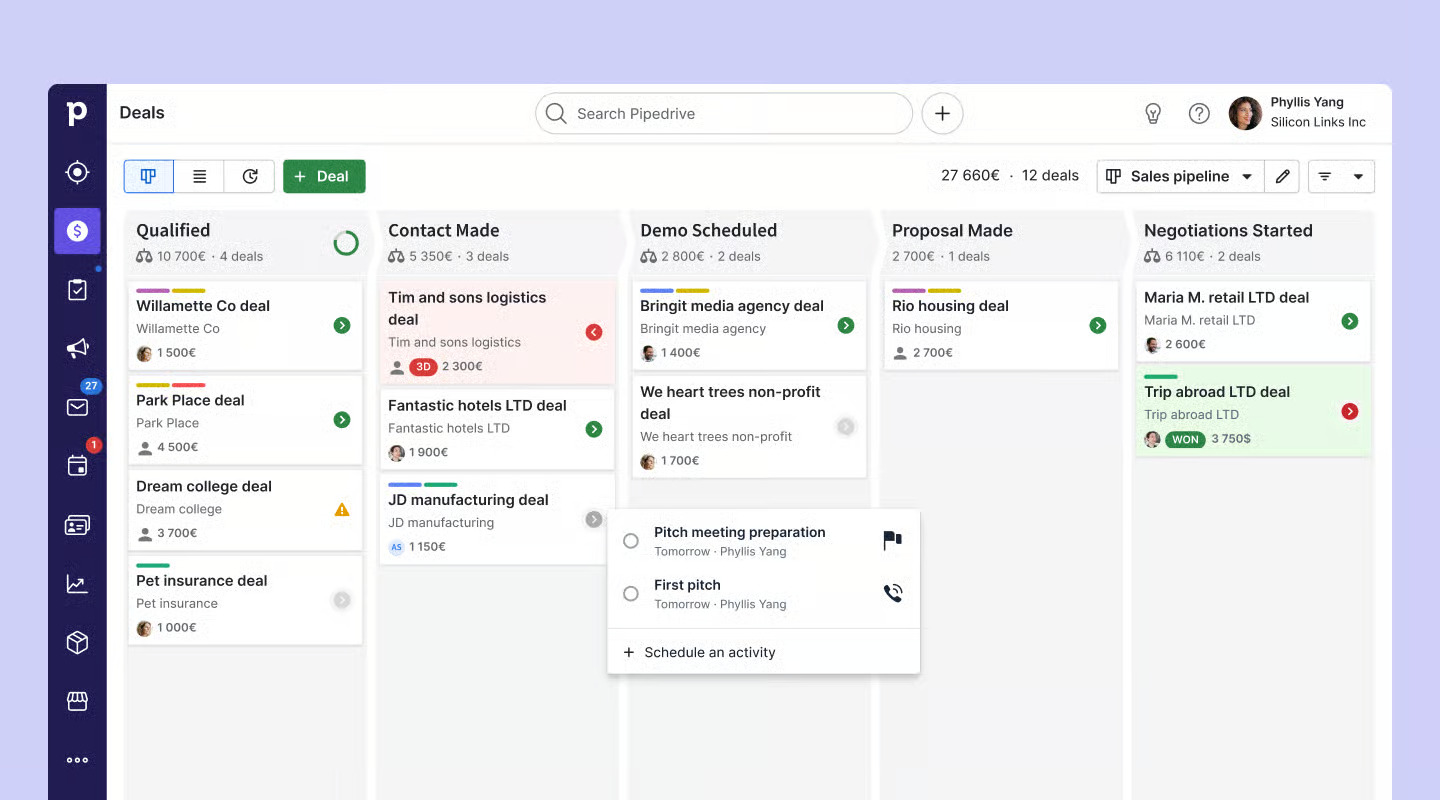
Pipedrive built their entire reputation around that visual sales pipeline that just clicks for sales teams. Picture this: you've got deals scattered across your Kanban-style board, and moving a prospect from "Initial Contact" to "Demo Scheduled" feels as natural as organizing your desktop. What really sets them apart? You can create separate pipelines for different sales processes, one for those quick software demos, another for complex enterprise deals that need three rounds of approvals.
Monday flips the script entirely. Instead of forcing you into a sales-first mindset, they hand you the building blocks: Kanban views, Timeline layouts, Gantt charts. You can slice and dice your pipeline data however you want with custom dashboards. It's powerful, sure, but it's also like being given a toolbox when you just wanted a hammer.
The trade-off? Pipedrive gets you moving faster. Monday gives you more options once you figure out what you actually need.
Contact Management: 360-Degree View vs Basic Tables
Pipedrive and Monday take noticeably different approaches to contact management. Pipedrive gives you a detailed contact record, custom fields, linked deals, and a full conversation history all show up in one spot. Automatic email sync keeps everything together, which sales teams say saves them time and hassles.
Monday CRM, by contrast, offers a real-time database that works well for storing contacts, but it lacks some of the built-in sales context you get with Pipedrive. Users find it useful for collaboration across sales, marketing, and support, but the relationship tracking doesn’t go as deep. For teams that need broad visibility more than hardcore sales tools, Monday’s contact management does the job,just without as much sales-specific detail.
Lead Inbox vs Lead Boards: Which is More Actionable?
Pipedrive's Leads inbox acts as a command center to generate leads, nurture them, and move them smoothly into your sales process. The LeadBooster add-on costs $39 per month and includes chatbots, live chat, web forms, and prospecting tools.
Monday handles lead management through customizable boards where you track lead status, assign team members, and set reminders. In spite of that, Monday's approach isn't as specialized for sales-specific lead management. You'll need more manual customization to get similar functionality.
Automation and AI Capabilities
Both platforms use automation and AI to eliminate repetitive tasks, but they approach this differently.
Source: support.pipedrive.com
Workflow Automation: Triggers and Recipes
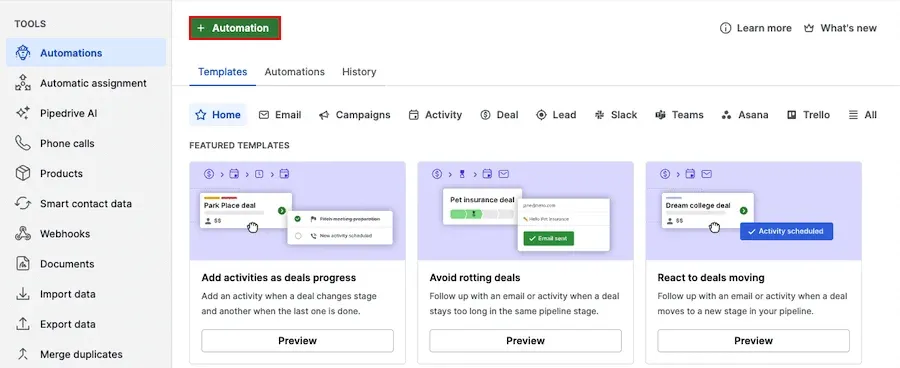
Pipedrive's automation focuses on sales activities from follow-up email sequences to deal rotation alerts for stagnant opportunities. The system handles everything automatically once you set up triggers like creating a new deal.
Monday's automation capabilities go beyond sales into broader workflow management. The platform connects projects through cross-board automation, status change notifications, and custom notification rules. Complex workflows become simpler to create with its visual automation builder.
AI Sales Assistant in Pipedrive: Deal Suggestions and Email Drafts
Pipedrive's AI Sales Assistant analyzes your sales data and recommends high-potential deals. This tool can predict win probabilities and suggest specific actions to improve closing rates.
The AI creates customized emails from simple prompts and turns lengthy email threads into brief overviews. Reviews show these features help sales teams reduce their administrative workload substantially.
Monday.com AI: Project Analyzer and Autofill Tools
Monday's AI approach uses specialized digital workers. The Project Analyzer watches projects as they happen, spots bottlenecks, and gives proactive insights.
The platform's "Autofill with AI" automatically fills dashboards. AI Blocks can pull information from documents, understand sentiment in communications, translate text, and sort data at scale without needing technical knowledge.
Reporting, Analytics, and Forecasting
Evidence-based decisions need powerful analytics. A close look at how these CRMs explain their capabilities reveals significant differences in their coverage.
Sales Forecasting: Real-Time Dashboards vs Custom Reports
Pipedrive gets forecasting right with real-time sales forecasting that includes confidence intervals and granular pipeline updates. When a deal moves from "Proposal Sent" to "Negotiation," you see that shift immediately across your entire forecast. Sales teams can course-correct mid-quarter instead of scrambling at month-end.
Source: support.monday.com
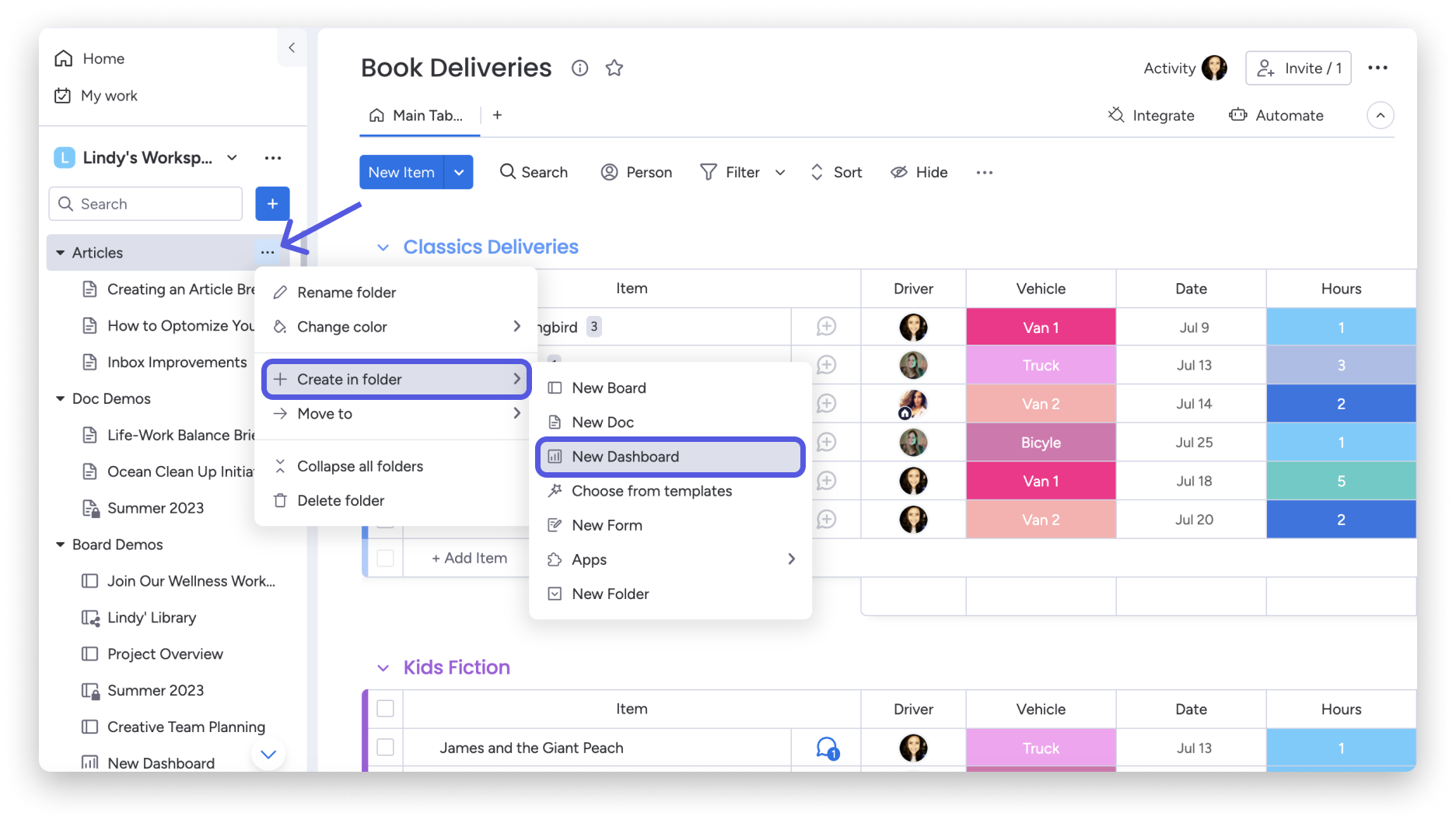
Monday's reporting tells a different story. It focuses on project management metrics with basic deal tracking. You'll get solid insights into team workload and project timelines, but don't expect the sales-specific forecasting depth that serious pipeline management demands.
Performance Metrics: Conversion Rates and Activity Logs
Here's where things get interesting. Pipedrive doesn't just track activities it measures what actually moves the needle:
- Lead-to-deal conversion rates broken down by source
- Revenue forecasts with probability weighting
- Pipeline velocity that shows where deals get stuck
Monday offers decent team performance tracking, but it lacks the sales optimization focus. You'll know who's busy, but you won't know who's actually closing deals efficiently.
Visual Reporting: Funnel Charts vs KPI Dashboards
Pipedrive's funnel charts do something most CRMs miss, they make pipeline problems obvious. When you see prospects dropping off after demos, you know exactly where to focus your training efforts.
Monday's KPI dashboards look impressive and centralize tons of information. Great for monitoring overall team health and project status. But for sales-specific insights? They fall short of what dedicated sales teams need.
As one advertising consultant put it on G2:
"Pipedrive's intuitive workflow makes client pipeline management exceptionally clear".
That clarity matters when you're trying to hit revenue targets, not just check off tasks.
User Experience, Support, and Value for Money
The best CRM choice often depends on how well it works day-to-day, the quality of support you get, and the overall value for money. Real users share the most reliable insights about these platforms.
Ease of Use:
Pipedrive gets consistent praise for its simple pipeline setup and intuitive interface; a common sentiment is that
“Pipedrive is easier out of the box for first-time CRM users.”
But some users flag that its customization and reporting options feel limited for more complex workflows, and others complain that automation is too basic for scaling sales teams.
Monday CRM edges slightly ahead in ease-of-use ratings is 9.0/10 on G2 and a 4.6/5 overall. Users appreciate the highly visual interface, but several reviews mention that flexibility comes at the cost of initial clarity setups can be overwhelming, especially if you stray outside template workflows (G2 Monday CRM).
Customer Support:
Monday takes the lead with broader support: 24/7 availability via live chat, email, and phone even on lower-priced plans. Still, some users complain about response quality, noting that they sometimes receive generic answers or slow follow-ups (G2 Monday CRM). Pipedrive offers chatbot support for all tiers, live chat during business hours (Advanced) or 24/5 (Professional), and limited phone support for higher plans, but Reddit users occasionally mention delayed or unhelpful responses when escalated issues arise (Reddit).
Pricing and Free Trials:
Both CRMs offer a 14-day free trial (no credit card required). Pipedrive’s Essential plan starts at $14 per seat/month, while Monday’s entry-level is slightly cheaper at $12 per seat/month. However, Monday’s pricing structure is called out on Reddit and review platforms for being confusing as teams scale, with bundles and restrictions leading to surprise charges (Reddit).
Upgrade to a AI-native CRM That Drives Real Sales Growth
Pipedrive vs Monday CRM Pricing (2026)
Pipedrive Pricing Plans

Source: pipedrive.com
Current pricing is available on the Pipedrive pricing page. All plans include unlimited deals and contacts, plus a 14-day free trial. No free plan is available.
Plan | Price (per user/month, billed annually) | Best For |
|---|---|---|
Lite | $14 | Individuals and small teams starting out |
Growth | $24 | Teams needing email sync, automation, and workflows |
Premium | $49 | Growing sales teams needing full reporting and AI |
Ultimate | $69 | Multi-team operations with advanced permissions |
Monday CRM Pricing Plans
Source: monday.com
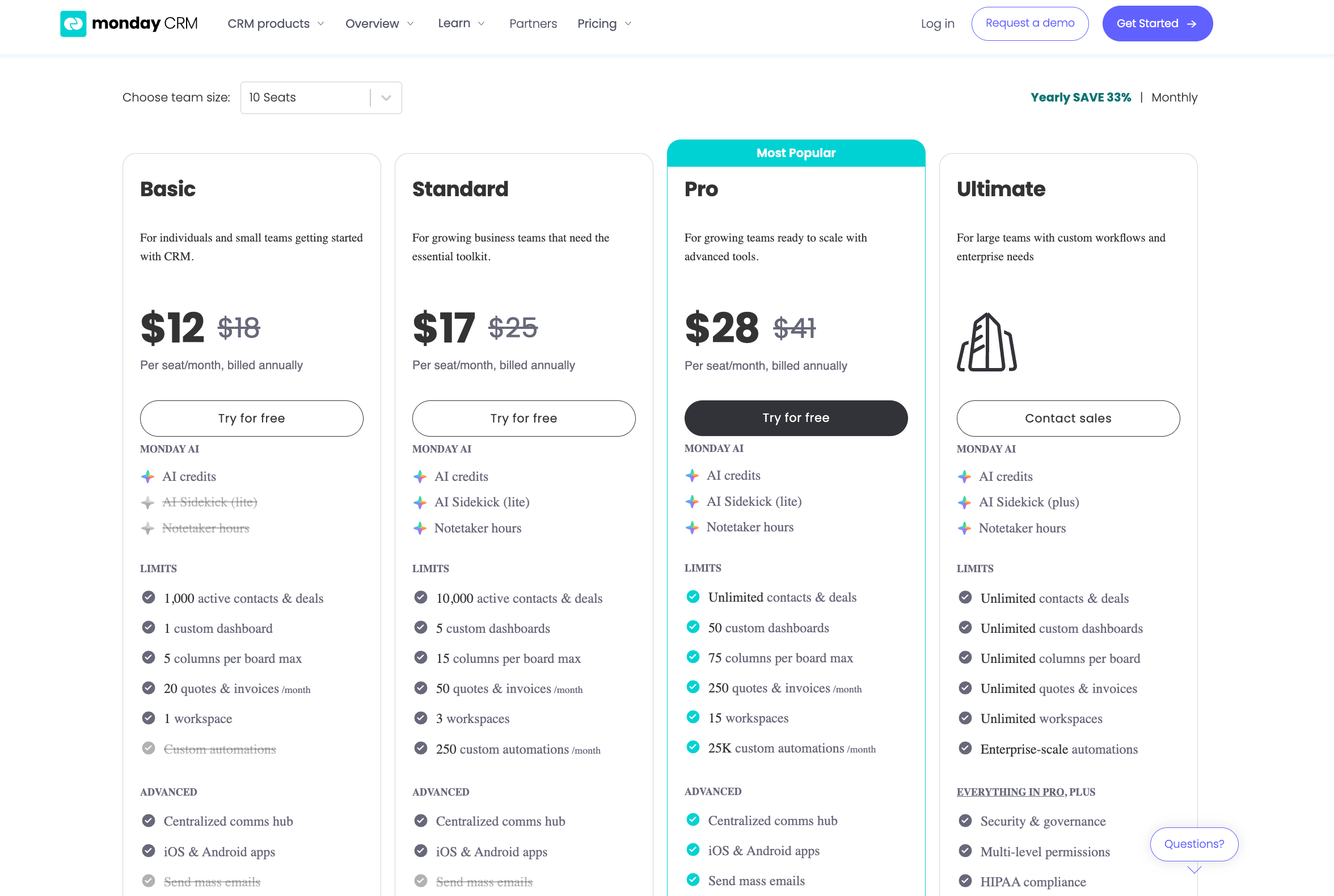
Current pricing is available on the Monday CRM pricing page. Monday CRM requires a minimum of 3 seats on all plans and is priced separately from the core Monday Work Management product.
Plan | Price (per user/month, billed annually) | Best For |
|---|---|---|
Basic | $12 | Small teams managing contacts and pipelines |
Standard | $17 | Teams needing automations and integrations |
Pro | $28 | Advanced reporting, forecasting, and sales analytics |
Enterprise | Custom | Large teams with security, SSO, and compliance needs |
Which Is Better Value?
For a sales team of 10 people, Pipedrive's Growth plan costs $240/month. Monday's Standard plan costs $170/month, significantly cheaper at first glance. However, Monday's Standard tier is considerably lighter on CRM-specific capabilities. Teams that need deal automation, email tracking, and sales reporting will typically need Monday's Pro plan ($280/month for 10 users), making the gap much smaller in practice.
For teams with fewer than 15 seats running a structured sales process, Pipedrive delivers more CRM-native value per dollar. For teams already using Monday for project management, adding Monday CRM avoids paying for a second tool.
Not sure which one fits your team? Watch our honest side-by-side breakdown, covering pipeline depth, AI gaps, and which tool actually moves revenue.
Pipedrive Vs Monday CRM: Comparison Table
Feature | Pipedrive | Monday CRM |
Starting Price | $14 per user/month | $12 per user/month |
Free Trial | 14 days | 14 days |
Integration Options | 500+ integrations | 200+ direct app connections |
Core Focus | Sales pipeline management | Broad work management solution |
Pipeline View | Dedicated visual sales pipeline with Kanban-style board | Multiple views (Kanban, Timeline, Gantt) |
Contact Management | 360-degree view with email sync and communication history | Simple tables with live database updates |
Lead Management | Dedicated Leads inbox + LeadBooster add-on ($39/month) | Customizable lead boards |
AI Capabilities | • Deal suggestions with win probabilities • Email drafting • Email thread summarization | • Project analysis • Autofill dashboards • Document extraction |
Automation | Sales-focused triggers and actions | Cross-board workflow automation |
Reporting | • Live sales forecasting • Pipeline velocity analysis • Conversion rate tracking | • Project management metrics • KPI dashboards • Simple deal tracking |
G2 Ratings | • Overall: 4.3/5 • Ease of use: 8.9/10 | • Overall: 4.6/5 • Ease of use: 9.0/10 |
Customer Support | • Chatbot (all plans) • Live chat (Growth+) • Phone (Premium/Ultimate) | 24/7 support across all plans (chat, email, phone) |
User Feedback | "Easier out of the box for first-time CRM users" - Reddit | "Flexibility can be initially overwhelming" - User reviews |
Email Integration | Gmail, Google Contacts, Outlook.com | Not specifically mentioned |
Which Should You Choose? The Verdict by Team Type
Choose Pipedrive if…
Your team is sales-first. You need a visual pipeline with deal stages, activity reminders, and sales-specific reporting. You are running a structured outbound or inbound sales motion where reps need to track every deal touchpoint. Pipedrive's activity-based selling framework is purpose-built for this — it does not require extensive configuration to work as a CRM out of the box.
Best fit: SDR/AE teams, B2B sales teams, SMBs under 200 seats, teams migrating from spreadsheets to a proper CRM.
Choose Monday CRM if…
Your team manages sales alongside project delivery, client work, or cross-functional operations. Monday shines when you need one platform to track both a deal pipeline and the post-sale project that follows. If your team already uses Monday for work management, adding the CRM layer avoids tool fragmentation and additional cost.
Best fit: Agencies, consulting firms, operations-heavy teams. For more context, see how HubSpot vs ClickUp compares for similarly flexible team setups.
Consider an AI-Native CRM if…
Neither Pipedrive nor Monday was built with AI as a foundation. If your team needs a CRM that goes beyond pipeline tracking, one that scores leads automatically, suggests next actions, and surfaces deal risk in real time, tools like SparrowCRM are worth evaluating. SparrowCRM is designed specifically for sales-led SMBs and mid-market teams that want AI-native intelligence, not a legacy CRM with AI bolted on. Compare your options across our best CRM software compared guide.
What Sales Teams Actually Say About Pipedrive vs Monday
Sales practitioners who have used both tools consistently point to the same dividing line: Pipedrive feels like a CRM. Monday feels like a spreadsheet with extra steps.
Teams who switch from Monday to Pipedrive often cite the pipeline view as the key differentiator, the ability to see every deal at every stage at a glance, with activity reminders attached to each deal, is something Monday's CRM layer does not replicate with the same immediacy.
Teams that stay with Monday tend to be managing client projects after the sale. The ability to move a closed deal directly into a project board, without switching tools, is a genuine workflow advantage that Pipedrive cannot match.
The Pipedrive pricing criticism comes up frequently among teams under 10 seats: the jump from Lite to Growth is steep relative to what you get at the base tier. Monday's lower entry price is a real advantage for early-stage teams testing whether a structured pipeline justifies the investment.
Neither tool has a strong reputation for customer support at entry-level plans, a consistent friction point across both user communities worth accounting for in your evaluation.
Conclusion
The best choice between these two popular CRM solutions depends on what your business needs. Pipedrive excels as a sales-focused tool with user-friendly pipeline management and strong forecasting features. Reddit users praise Pipedrive because it's "easier out of the box for first-time CRM users." Sales teams looking for quick results will find it ideal.
Monday CRM takes a different approach with more versatility beyond sales management. The platform excels in customizable workflows and comprehensive project management tools. A quick look at G2 ratings shows the difference - Monday scores an impressive 4.6/5 overall compared to Pipedrive's 4.3/5. Both platforms get high marks for ease of use.
Budget-conscious teams might lean toward Monday's $12 per user monthly price tag versus Pipedrive's $14. The extra cost of Pipedrive could be worth it for its specialized sales features. Many Pipedrive users say they get great value from its 360-degree contact views and AI-powered sales tools.
Several factors should shape your choice. Pipedrive makes sense if your team wants a dedicated sales pipeline tool that's quick to set up and provides sales-specific reports. Monday works better when you need a versatile platform that handles both project management and team collaboration.
If you are still evaluating the broader CRM landscape, explore how these tools compare against others in our best CRM software compared guide, or see side-by-side breakdowns for HubSpot vs Salesforce, Attio vs HubSpot, and Freshsales vs Zoho CRM.
Each platform comes with a 14-day free trial. You can test both systems using your actual workflows. The right CRM isn't about having the most features - it's about what your team will use every day. Let your sales process, team size, and growth plans guide this choice instead of following trends.

Frequently Asked Questions (FAQs)
Related Articles
23 Aug, 2025
Attio vs HubSpot (2026): Features, pricing, migration & which CRM wins
.png?2026-04-29T07:55:51.865Z)
21 Aug, 2025
Freshsales vs Zoho CRM (2026): Which Fits Your Budget & Needs?
21 Aug, 2025

