AI & AUTOMATION
How to use ChatGPT for sales: prompts, use cases, and a practical playbook

By Geethapriya
Last updated on Sep 14, 2026
Explore this blog to learn exactly how to use ChatGPT for sales, from writing better prompts to closing more deals with AI-powered workflows.

- What ChatGPT actually does in a sales workflow
- How to write a sales prompt that gets useful output
- ChatGPT for sales prospecting
- ChatGPT for discovery and qualification
- ChatGPT for proposals, deal management, and multi-threading
- ChatGPT for sales coaching and skill-building
- ChatGPT use cases by sales stage: quick reference
- Where ChatGPT falls short in sales
- Final thoughts
Most sales reps have opened ChatGPT, typed something, and walked away underwhelmed. That is not a ChatGPT problem. It is a prompt problem.
ChatGPT is not a search engine you query once. It is a thinking partner that performs exactly as well as the context and structure you give it. When a rep types 'write me a cold email,' they get a generic template. When they give it a prospect's LinkedIn role, company stage, recent hiring signals, and their own product's value proposition, they get something they can actually send.
This blog walks through how to use ChatGPT specifically for sales, organized by stage, built around real prompt templates, and honest about where the tool falls short. Whether you are an SDR building a pipeline or an AE managing a complex deal, there is a practical use case in here for you.
What ChatGPT actually does in a sales workflow
ChatGPT is a large language model built on patterns learned from vast amounts of text. For sales, that means it can draft, summarize, reframe, roleplay, research, and structure information at speed as long as you are the one supplying the context and judgment.
It does not replace the human in the deal. It handles the time-intensive preparation work that slows reps down, prospect research, first-draft messaging, objection prep, and call summaries, so more of the day goes to actual conversations. According to a HubSpot State of Sales report, sales reps spend only 28% of their week actually selling. ChatGPT can compress the rest.
How to write a sales prompt that gets useful output
The single biggest reason ChatGPT underdelivers in sales is a weak prompt. This section will fix that.
The anatomy of a strong sales prompt
Every high-quality sales prompt has four components:
- Role: Tell ChatGPT who it is: a B2B SDR, an AE at a SaaS company, a sales manager prepping a team for negotiation
- Context: Share the relevant details of the prospect's industry, job title, company stage, recent news, and current pain point
- Constraint: Define the limits of length, tone, what to avoid, and format
- Output format: Specify what you want: a 3-email sequence, a bullet list, or a 60-second call script
Weak prompt: Write me a cold email for a VP of Sales.
Strong prompt: You are an SDR at a B2B SaaS company that sells AI-native CRM software to sales teams of 10–50 people. Write a cold email to a VP of Sales at a 30-person SaaS startup in the US. They recently raised a Series A and are hiring SDRs. Keep it under 100 words, no buzzwords, lead with a specific pain point around scaling outbound without a structured pipeline, and end with one low-commitment CTA.
The second prompt takes 40 seconds to write and produces something you can send. The first one produces something you delete.
50 ChatGPT Prompts for Sales Teams
ChatGPT for sales prospecting
Prospecting is the most time-heavy phase in a sales rep's week. Research, list building, personalization, and sequencing can eat three to four hours a day. ChatGPT compresses each of these.
Writing cold email sequences with pain point framing
Instead of starting every email from scratch, use a structured prompt to generate a full sequence tailored to a specific pain point. Job postings are one of the best signal sources; they reveal exactly what the company is struggling with right now.
PROMPT — Pain Point Cold Sequence:
You are an experienced B2B SDR. Draft a 5-step email sequence for a [job title] at [company name].
Their assumed pain points based on a recent job posting are:
Pain point 1: [insert]
Pain point 2: [insert]
Pain point 3: [insert]
Each email should be under 100 words, skip pleasantries, lead with value,
and build on the previous message. Include two subject line options per email.
Tone: direct, professional, no jargon.
Building lookalike account lists
You already know your best customers. ChatGPT can help you find more of them by analyzing the characteristics of closed-won accounts and surfacing similar companies.
PROMPT — Lookalike Account Research:
Analyze this company: [insert website URL or description].
Identify their industry, company size, what they sell, and who they sell to.
Based on this ICP: [insert 2–3 sentences about your ideal customer],
give me 10 similar companies that match this profile.
For each, include: company name, website, size, industry,
and one sentence on why they are a strong fit.
Researching a prospect before an outbound call
Feed ChatGPT a LinkedIn profile, company page, and any recent news, and ask it to produce a one-page briefing. This takes 90 seconds and replaces 20 minutes of tab-switching.
PROMPT — Pre-Call Research Brief:
I am preparing for a discovery call with [name], [title] at [company].
Here is their LinkedIn summary: [paste].
Company website: [URL].
Summarize: their likely priorities, potential pain points relevant to [your product],
two ice-breaker angles, and three discovery questions I should ask.
For a deeper dive on prospecting workflows, see our guide on lead capture strategies and lead qualification frameworks.
ChatGPT for discovery and qualification
Discovery is where most deals are won or lost. The reps who ask the right questions in the right order understand the prospect's business better than the prospect sometimes does. ChatGPT can help you build a sharper discovery toolkit, fast.
Generating a discovery question bank by persona
Different buyer types need different questions. A CFO has a different frame of reference than a VP of Sales or a RevOps lead. Give ChatGPT the role and the context and it will generate a tailored question bank you can filter and reuse.
PROMPT — Discovery Question Bank:
You are an experienced AE selling [product category] to [company type].
Generate 15 discovery questions for a [job title] at a [industry] company
with [company size] employees. Focus on uncovering pain around [core problem area].
Organize questions into: current state, impact of the problem, and desired outcome.
Avoid yes/no questions.
Summarizing a prospect's digital footprint before a call
If the company has been covered in recent press, published a thought leadership piece, or is actively hiring in a specific department, that context belongs in your discovery conversation. Use ChatGPT to synthesize it.
Pair this with the data your CRM already surfaces. A CRM that automatically tracks contact activity, engagement scores, and buying signals gives ChatGPT the fuel to produce something genuinely personalized, rather than generic.
Explore how sales pipeline stages map to the discovery phase in our dedicated pipeline guide.
ChatGPT for proposals, deal management, and multi-threading
Late-stage deals involve multiple stakeholders with different priorities. An economic buyer cares about ROI. A technical evaluator cares about integration complexity. A legal stakeholder cares about compliance. A generic follow-up email treats all of them the same, and that is why most follow-up emails go ignored.
Drafting personalized follow-ups after a demo
Immediately after a demo, the best move is a follow-up that reflects the actual conversation-specific pain points raised, objections mentioned, and next steps agreed. ChatGPT can generate this in 60 seconds if you feed it the right inputs.
PROMPT — Post-Demo Follow-Up:
I just finished a 45-minute demo with [name], [title] at [company].
Key pain points they raised: [list 2–3].
Objection they had: [insert].
Competitor they mentioned: [insert].
Next steps agreed: [insert].
Write a follow-up email under 150 words that:
- Acknowledges their specific pain points
- Addresses the objection briefly
- Confirms the next steps
- Is warm but moves the deal forward.
Multi-threading using buying committee roles
Most deals die because only one person in the buying committee knows about you. Multi-threading means getting the right message to each stakeholder, and each message has to speak to what that role cares about.
PROMPT — Multi-Threading by Buyer Role:
I am selling [product] to a company where I have identified three stakeholders:
1. [Name A], VP of Sales — focused on pipeline visibility and forecast accuracy
2. [Name B], CFO — focused on cost justification and ROI
3. [Name C], IT Lead — focused on integration with existing tools
Write three separate outreach messages — one for each stakeholder.
Each should be under 80 words, reference what their role cares about,
and create urgency without being pushy.
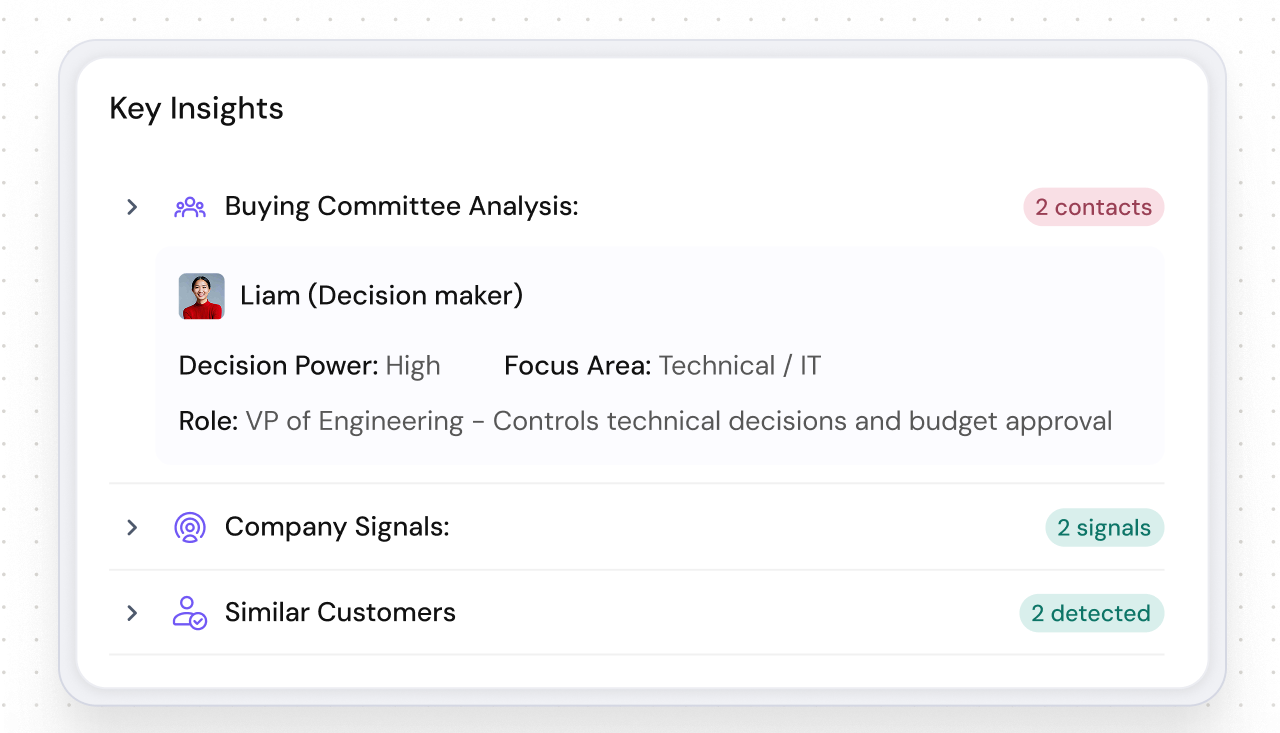
SparrowCRM's Buying Committee Analysis feature automatically maps every contact in a deal to their buyer type, decision-making power, and focus area, so you already know who the Decision Maker, Influencer, and Gatekeeper are before you write a single word. Feed those roles directly into your ChatGPT prompt and the personalization becomes genuinely precise.
Read more about CRM lead management workflows and how AI in sales CRM can sharpen your deal strategy.
See how SparrowCRM turns every sales call into instant CRM data
ChatGPT for sales coaching and skill-building
Sales training typically happens in group sessions, quarterly offsites, or not at all. ChatGPT gives every rep a private practice partner, available at any time, endlessly patient, and able to roleplay any scenario you throw at it.
Objection handling role-play
Give ChatGPT a specific objection your team hears regularly, budget concerns, competitor preference, timing, and have it roleplay as a skeptical prospect. Practice your response. Ask for feedback. Iterate.
PROMPT — Objection Role-Play:
You are a skeptical VP of Sales at a 40-person SaaS company.
I am going to pitch you [product name].
When I make my pitch, raise the following objection: 'We already use [competitor]
and we are not looking to switch right now.'
After I respond, give me feedback on what landed, what felt weak,
and what I should have said instead.
Win/loss debrief prompts
Paste a deal summary, the stakeholders involved, the stages it moved through, the objections raised, the competitor mentioned, and the outcome, and ask ChatGPT to identify the pattern and suggest what to do differently next time.
This is especially powerful when combined with structured deal data from your CRM. Review our full guide on sales forecasting and pipeline metrics to understand what data points to pull before a debrief.
Preparing for a high-stakes meeting
Before a strategic call, use ChatGPT to simulate the conversation. Give it the attendee profiles, the likely agenda, and the outcome you need, and ask it to help you anticipate where the conversation will go and how to steer it.
You can also use it to generate ice-breakers, refine your opening statement, and sharpen your value proposition for a specific audience in minutes.
ChatGPT use cases by sales stage: quick reference
Sales Stage | Use Case | What to Feed ChatGPT |
|---|---|---|
Prospecting | Cold email sequences | ICP, job posting, pain points, company info |
Prospecting | Lookalike account research | Best customer profile, ICP criteria |
Discovery | Question bank by persona | Buyer role, industry, product category, problem area |
Discovery | Pre-call research brief | LinkedIn profile, company URL, recent news |
Proposal/Demo | Post-demo follow-up | Pain points raised, objections, competitor mentioned |
Deal Management | Multi-threaded outreach | Stakeholder roles, what each cares about |
Coaching | Objection role-play | Specific objection, product, buyer profile |
Coaching | Win/loss debrief | Deal timeline, stakeholders, outcome, CRM data |
Where ChatGPT falls short in sales
Transparency builds trust, so here is the honest version.
- ChatGPT has no access to real-time data. It cannot tell you that your prospect just hired a new VP, raised a round, or mentioned your competitor in a recent earnings call. You need to supply those signals manually, or use a CRM that surfaces them automatically.
- It cannot track live engagement. It does not know that your prospect opened your email four times in the last 24 hours or that their engagement score just jumped. Signals like these, the ones that tell you when to reach out, require live CRM data, not a language model.
- It has no memory between sessions unless you re-establish context. Every conversation starts fresh. If you want consistent output, build a prompt template you paste at the start of each session.
- It halluccinates. For any factual claim, company stats, competitor features, or product details, verify independently. Never use unverified output in a live pitch.
ChatGPT is a drafting and reasoning tool. An AI-native CRM is the live intelligence layer. The two work together; the CRM surfaces what is happening in the deal right now, and ChatGPT helps you figure out what to say and do about it.
Final thoughts
ChatGPT does not make an average rep great. It makes a prepared rep faster. The reps who get the most out of it are the ones who take 60 seconds to build a real prompt, supply genuine context, and treat the output as a first draft, not a finished product.
The combination that consistently works: live CRM intelligence tells you what is happening in the deal, and ChatGPT helps you act on it with sharper messaging, better preparation, and faster execution. Neither alone closes deals. Together, they significantly reduce the time spent on everything that is not actually selling.
Start with one prompt this week. Pick the prospecting sequence or the pre-call research brief. Run it on a real account. Edit the output. Send it. Measure the difference.