CRM SOFTWARE
CRM Compliance: GDPR, HIPAA, CCPA & Data Privacy Guide

By Ganesh Ravi Shankar
Last updated on Jun 26, 2026
Explore this blog to understand what CRM compliance means, which regulations, including GDPR, HIPAA, CCPA, SOX, and FINRA, apply to your CRM system, what each law requires your CRM to do technically, and how to audit your current setup against a plain-language compliance checklist.

Ganesh Ravi Shankar
Updated on Jun 26, 2026
Managing customer data in a CRM is not just a technology decision. It is a legal obligation. Depending on your industry, the size of your business, and the countries you operate in, your Customer Relationship Management (CRM) system may be subject to one or more data protection regulations, including GDPR, HIPAA, CCPA, SOX, and FINRA.
CRM compliance means ensuring your CRM system collects, stores, processes, and shares customer data in a way that meets the legal standards set by these frameworks. Getting it wrong is not just a reputational risk. The financial penalties are substantial, and enforcement is increasing across all major jurisdictions.
This guide breaks down every major regulation that applies to CRM systems, what each one requires your CRM to do, the penalties for non-compliance, and a practical checklist your team can use to audit your current setup.
What Is CRM Compliance?
CRM compliance is the practice of configuring and operating your Customer Relationship Management system in alignment with applicable data protection, privacy, and industry-specific regulations.
A CRM system holds some of the most sensitive data your business manages — names, email addresses, phone numbers, purchase history, call recordings, meeting transcripts, health information, and financial records. Each of these data types carries specific legal obligations depending on where your customers are located, what industry you operate in, and how the data is being used.
CRM compliance is not a one-time setup. It is an ongoing operational requirement that spans data collection, storage, access control, retention, deletion, and breach response.
Why it matters for your CRM specifically
Your CRM is the central hub where customer data flows in from email, calls, meetings, forms, and integrations. If one of those data streams captures regulated information without the right controls in place, consent records, access logs, encryption, or deletion workflows, the entire CRM becomes a compliance liability.
Key Regulations That Apply to CRM Systems
The following regulations are the most commonly applicable to CRM systems used by sales and customer-facing teams. The table below summarises each regulation, who it applies to, and the maximum penalty for non-compliance.
Regulation | Full Name | Who It Applies To | Geographic Scope | Enforcing Body | Max Penalty |
|---|---|---|---|---|---|
GDPR | General Data Protection Regulation | Any business handling EU/UK resident data | EU + UK | National DPAs | €20M or 4% of global annual revenue, whichever is higher |
HIPAA | Health Insurance Portability and Accountability Act | Healthcare providers, health plans, business associates | United States | HHS / OCR | Up to $1.9M per violation category per year |
CCPA / CPRA | California Consumer Privacy Act / California Privacy Rights Act | Businesses meeting revenue or data thresholds with CA residents | California, US | CA Attorney General | $2,500 per unintentional; $7,500 per intentional violation |
SOX | Sarbanes-Oxley Act | Publicly traded US companies and their vendors | United States | SEC / DOJ | Up to $5M and 20 years imprisonment for wilful violations |
FINRA | Financial Industry Regulatory Authority | Broker-dealers and financial services firms | United States | FINRA | Up to $1M per violation per day |
PDPA | Personal Data Protection Act | Businesses operating in Singapore | Singapore | PDPC | Up to SGD 1M or 10% of annual Singapore turnover |
Each of the sections below covers what that regulation specifically requires from your CRM system.
GDPR and CRM Compliance
The General Data Protection Regulation (GDPR) applies to any organisation that collects or processes personal data belonging to individuals in the European Union or the United Kingdom, regardless of where the business itself is based. If your CRM contains a single contact record from an EU resident, GDPR applies.
What GDPR requires from your CRM system
- The lawful basis for processing every contact record in your CRM must have a documented lawful basis for data processing. For sales CRMs, this is typically legitimate interest or consent.
- Consent management: if consent is your lawful basis, your CRM must store a record of when, how, and what the individual consented to. A checkbox on a landing form does not satisfy GDPR unless the consent record is timestamped, specific, and retrievable.
- Data subject rights: your CRM must be able to respond to data subject access requests, deletion requests (the right to be forgotten), and data portability requests.
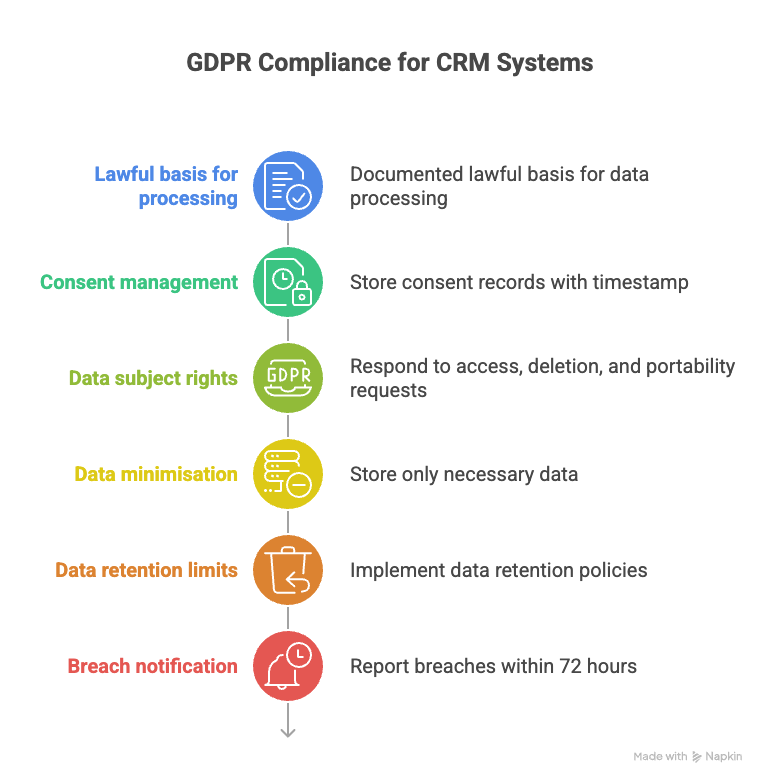
- Data minimisation: your CRM should not store data beyond what is necessary for the stated purpose. Enrichment fields that are never used but pull in PII create compliance exposure.
- Data retention limits: personal data must not be kept longer than necessary. Your CRM should support configurable data retention policies and automated deletion workflows.
- Breach notification: a data breach must be reported to the relevant supervisory authority within 72 hours of becoming aware of it. Your CRM must maintain audit logs that allow you to determine exactly what data was accessed or exfiltrated.
Penalties: Up to €20 million or 4% of global annual revenue, whichever is higher. The highest GDPR fine to date was €1.2 billion issued to Meta in 2023.
HIPAA and CRM Compliance
The Health Insurance Portability and Accountability Act (HIPAA) governs the handling of Protected Health Information (PHI) in the United States. If your organisation is a healthcare provider, health plan, healthcare clearinghouse, or business associate, any CRM system that handles patient or health-related data must be HIPAA-compliant.
PHI in a CRM context includes patient names linked to health conditions, diagnosis codes, appointment history, treatment records, prescription data, and billing information related to healthcare services.
What HIPAA requires from your CRM system
- Access controls: Only authorised personnel should be able to view PHI. Your CRM must support role-based access control (RBAC) that restricts record visibility based on a user's assigned role.
- Audit controls: HIPAA requires covered entities to record and examine activity in systems that contain ePHI. Your CRM must maintain detailed audit logs of who accessed, modified, or exported PHI records, and when.
- Encryption: PHI must be encrypted both at rest and in transit. Unencrypted storage of health-related contact records in a CRM is a direct HIPAA violation.
- Automatic logoff: sessions must time out after a defined period of inactivity to prevent unauthorised access on shared devices.
- Business Associate Agreements (BAA): if your CRM vendor processes PHI on your behalf, a signed BAA is legally required. A BAA establishes that the vendor is contractually bound to handle PHI in accordance with HIPAA standards. Without a BAA, using a CRM with PHI is non-compliant regardless of the CRM's technical security features.
- Breach notification: HIPAA's Breach Notification Rule requires covered entities to notify affected individuals and HHS within 60 days of discovering a breach. Breaches affecting 500 or more individuals in a state also require media notification.
Penalties: HIPAA penalties range from $100 to $50,000 per violation, with a maximum of $1.9 million per violation category per year. Wilful neglect that is not corrected carries the highest penalties.
Note for B2B sales teams in regulated industries:
Even if your company is not a healthcare provider, if you sell to hospitals, clinics, pharmaceutical companies, or health insurers, the data you collect about contacts at those organisations, including meeting notes, call transcripts, and email threads, may inadvertently capture PHI. This is why HIPAA training and CRM configuration reviews matter even in B2B sales roles adjacent to healthcare.
CCPA / CPRA and CRM Compliance
The California Consumer Privacy Act (CCPA), strengthened in 2023 by the California Privacy Rights Act (CPRA), gives California residents significant rights over how businesses collect and use their personal information.
The CCPA applies to for-profit businesses that meet any of the following thresholds: annual gross revenue exceeding $25 million, buying or selling personal information of 100,000 or more California residents per year, or deriving 50% or more of annual revenue from selling California residents' personal information.
What CCPA require from your CRM system
- Right to know: You must be able to tell any California contact what personal data you hold about them, how you collected it, and who you have shared it with. Your CRM must support record-level data visibility and export.
- Right to delete: Upon request, you must be able to delete a California resident's personal information from your CRM and instruct any third-party integrations or downstream systems that received that data to do the same.
- Right to opt out of sale: If your business sells or shares contact data with third-party data brokers or advertising networks, your CRM workflows must support a clear opt-out mechanism that is respected across all integrated tools.
- Data inventory and mapping: You must know what personal data flows into and out of your CRM, including which integrations pull or push contact records to third parties.
- Do Not Sell / Do Not Share flags: Your CRM should support contact-level flags that prevent data from being passed to third parties when a California resident exercises their opt-out right.
Penalties: $2,500 per unintentional violation and $7,500 per intentional violation, enforced by the California Office of the Attorney General. There is also a private right of action for data breaches, allowing individuals to sue for damages of $100 to $750 per consumer per incident.
SOX and FINRA Compliance in CRM Systems
For publicly traded companies and financial services firms, CRM compliance extends beyond data privacy into financial record-keeping and communications governance.
Sarbanes-Oxley Act (SOX)
SOX requires publicly traded companies to maintain accurate financial records and implement internal controls that prevent fraud. For CRM systems, this means:
- Deal record integrity: CRM records related to revenue recognition, contract values, and closed opportunities must not be alterable after the fact without an audit trail. Any modification to a deal record should be timestamped and attributed to a specific user.
- Access controls on financial data: Only authorised personnel should be able to modify deal amounts, contract values, or revenue forecasts in the CRM.
- Audit trails: SOX requires that internal controls be documented and testable. Your CRM must support full field-level audit history on any record that feeds financial reporting.
FINRA Record-Keeping Requirements
FINRA requires broker-dealers to retain all business-related communications for a minimum of three years (first two years in an easily accessible location). CRM systems used by financial services teams must support:
- Record retention for the required minimum period
- Storage in a tamper-evident, unalterable format
- Accessibility for regulatory examination on demand
- Integration with approved archiving systems
CRM Features Required for Compliance: Regulation Mapping
This table maps specific CRM capabilities to the regulations that require them. Use it as a feature audit checklist for your current CRM setup.
SparrowCRM supports role-based access controls, field-level audit logging, contact-level data deletion, opt-out flags, and configurable data retention. For a full walkthrough of how to configure these features, see the SparrowCRM features guide.
CRM Feature Required | GDPR | HIPAA | CCPA | SOX | FINRA |
|---|---|---|---|---|---|
Role-based access controls (RBAC) | Required | Required | Recommended | Required | Required |
Field-level audit logs | Required | Required | Recommended | Required | Required |
Data encryption at rest | Required | Required | Required | Recommended | Required |
Data encryption in transit (TLS) | Required | Required | Required | Recommended | Required |
Consent record storage | Required | N/A | Required | N/A | N/A |
Contact-level data deletion | Required | Required | Required | N/A | N/A |
Data export (portability) | Required | N/A | Required | N/A | N/A |
Opt-out / do-not-contact flags | Required | N/A | Required | N/A | N/A |
Session auto-timeout | Recommended | Required | Recommended | Recommended | Recommended |
Business Associate Agreement (BAA) | N/A | Required | N/A | N/A | N/A |
Immutable record retention | N/A | N/A | N/A | Required | Required |
Data retention policy config | Required | Required | Required | Required | Required |
Breach notification workflows | Required | Required | N/A | N/A | N/A |
Third-party data sharing controls | Required | Required | Required | N/A | N/A |
The right CRM makes compliance easier

What Does a Compliant CRM Setup Look Like? A Practical Checklist
Use this checklist to audit your current CRM configuration against the most common compliance requirements across GDPR, HIPAA, CCPA, and general data governance standards.
Data Collection and Consent
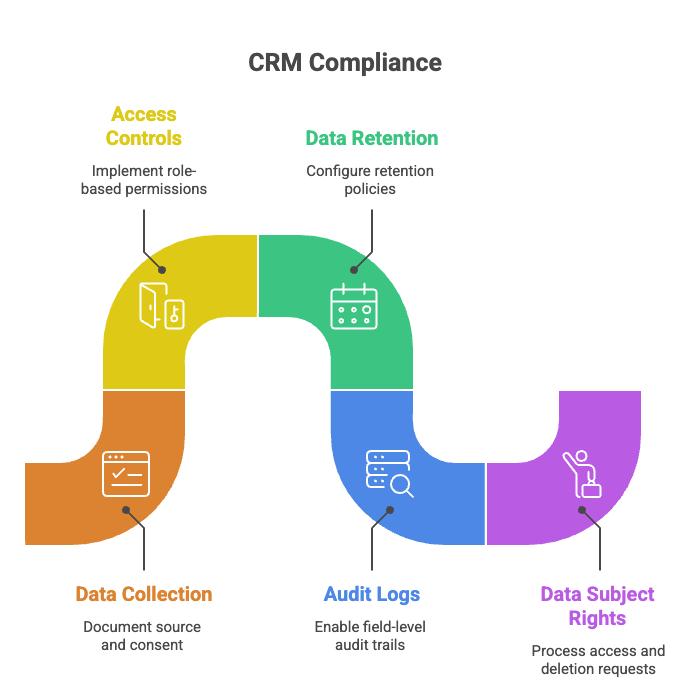
- Every contact record has a documented source and lawful basis for data processing
- Consent records include a timestamp, the method of capture, and what the contact consented to
- Lead capture forms include a consent checkbox linked to a privacy policy
- No contact data is collected beyond what is necessary for the stated business purpose
Access and Security Controls
- Role-based permissions are configured so that only relevant team members can view sensitive records
- Admin access is restricted to named individuals and reviewed quarterly
- All CRM sessions enforce an automatic timeout after a defined inactivity period
- MFA (multi-factor authentication) is enabled for all CRM user accounts
Data Storage and Retention
- A data retention policy is documented and configured within the CRM
- Records are automatically flagged or deleted after the retention period expires
- All contact data is encrypted at rest and in transit
- No PHI or regulated data is stored in unstructured free-text fields without access controls
Audit and Accountability
- Full field-level audit logs are enabled for all object types (contacts, companies, deals)
- Logs are retained for a minimum period aligned to applicable regulations: 3 years for FINRA, 6 years for HIPAA, and 5+ years recommended for GDPR
- Any CRM integrations that receive or send contact data are documented
Data Subject Rights and Deletion
- A process exists to receive and respond to data access requests within 30 days (GDPR) or 45 days (CCPA)
- Contact-level deletion can be executed individually or in bulk
- Deletion cascades to associated records, deals, notes, and activity history
- Opt-out flags prevent the record from being enrolled in sequences or shared with third parties
Third-Party and Integration Controls
- All CRM integrations are reviewed for their own compliance posture
- A Business Associate Agreement is signed with your CRM vendor if PHI is processed (HIPAA)
- Data sharing with ad networks, analytics tools, or enrichment providers is documented
What Happens If Your CRM Is Not Compliant?
Non-compliance with data protection regulations carries four categories of risk:
- Financial penalties: As outlined in the regulation table above, fines range from thousands of dollars per violation under CCPA to tens of millions under GDPR. GDPR enforcement alone has resulted in over €4 billion in fines since 2018.
- Reputational damage: A publicly reported data breach or regulatory enforcement action has a measurable impact on customer trust. For B2B companies, a compliance failure often results in lost enterprise deals where procurement teams conduct vendor security assessments.
- Operational disruption: Regulatory investigations, audits, and breach response procedures consume significant internal resources. HIPAA investigations by the Office for Civil Rights can take months and require producing extensive documentation.
- Contractual liability: Many enterprise contracts include data processing agreements (DPAs) and representations about compliance status. A CRM non-compliance issue can trigger breach of contract claims from enterprise customers who relied on your compliance representations.
How to Keep Your CRM Compliant Over Time
CRM compliance is not a one-time audit. Regulations update, your CRM configuration changes, and your team's data practices evolve. The following practices help sustain compliance:
- Conduct a CRM data audit every six months: Review what data is being collected, how it is being used, and whether any new integrations have introduced data flows that were not previously documented.
- Assign a CRM compliance owner: Designating a named individual responsible for both CRM administration and compliance creates accountability. This is typically a RevOps or Sales Operations role working alongside legal or a Data Protection Officer for GDPR purposes.
- Review and renew consent records annually: If a contact has not engaged in 12 months and their consent was captured more than 24 months ago, consider re-consent or deletion.
- Train your sales team on data handling: The most common source of CRM compliance failures is not technical — it is a sales rep pasting PHI into a notes field, forwarding a contact export to a personal email, or enrolling an opted-out contact into a sequence.
- Monitor regulatory updates: GDPR enforcement guidance evolves through national supervisory authority decisions. The CCPA has been amended. HIPAA updated its Security Rule in 2024. Subscribe to updates from your relevant regulatory bodies to stay current.
Use a CRM built for compliance. See how SparrowCRM approaches contact management and real-time data handling to understand how its architecture supports data governance out of the box.
If you are evaluating a CRM for a regulated industry, our guide to choosing the right CRM covers the compliance evaluation criteria alongside pricing, features, and deployment considerations.
For teams managing multiple integrations, see the CRM integrations guide for an overview of how integration architecture affects your data compliance posture.

Frequently Asked Questions (FAQs)
Related Articles

11 Apr, 2025
On-target earnings (OTE) in sales: How it works & why it matters

12 Apr, 2025
Future-Proofing Sales: Harnessing Predictive Sales Analytics and AI-Driven Forecasts

26 Jun, 2026

