CRM SOFTWARE
Real-time CRM data: how it works and why it matters for sales teams

By Ganesh Ravi Shankar
Last updated on Jun 8, 2026
Explore this blog to understand what real-time CRM data is and why live data access determines how fast your sales team can respond and close deals.

Ganesh Ravi Shankar
Updated on Jun 8, 2026
CRM systems were built to store contacts. Today, the best ones do something far more valuable: they surface what is happening with your buyers right now, and give your sales team a reason to act before the moment passes.
Businesses that give their reps live access to customer data consistently outperform those running on yesterday's pipeline snapshots. When a prospect returns to your pricing page, downloads a case study, or opens a follow-up email, the window to respond is measured in minutes, not the next morning after a batch sync runs.
This guide explains what makes a CRM genuinely real-time, how event-driven data processing differs from the batch-based approach most legacy CRMs still use, and what that difference means for lead response, forecasting, and deal velocity. For a full overview of the features that define a modern CRM, the CRM features guide covers the complete capability set.
What is real-time CRM?
A real-time CRM is a system that processes and displays customer data as events occur, without a scheduled delay. When a contact fills out a form, revisits your pricing page, or clicks a link in a sequence email, a real-time CRM logs that event immediately and makes it visible to whoever needs to act on it.
Traditional CRM systems run on batch processing: data is collected throughout the day and pushed into the CRM on a fixed schedule, often overnight. By the time a rep sees that a lead engaged with a proposal, the window to follow up at peak interest has already closed.
Real-time CRMs flip that dynamic. Instead of a static record of what happened, your team gets a live feed of what is happening, updated continuously across every touchpoint.
Key capabilities of a real-time CRM include:
- Instant visibility into contact activity across email, website, and calls
- Automatic lead score updates as prospects engage with content
- Live pipeline dashboards that reflect deal progress without manual entry
- Trigger-based alerts that notify reps the moment a high-intent action occurs
- Automatic removal of stale or duplicate records as new data arrives
Event-driven vs. batch-based CRM data processing: what is the difference?
The architecture behind how your CRM processes data has a direct impact on how fast your team can act. There are two approaches: batch processing and event-driven processing.
Batch processing
Batch-based CRMs collect data throughout the day and write it to the database in scheduled chunks, typically nightly or at set hourly intervals. This approach is computationally efficient and works well for generating periodic reports, but it introduces a structural lag between when something happens and when your team knows about it.
For a sales team, that lag has a cost. A lead who returned to your demo request page at 10 am may not appear as a hot priority until the next morning's CRM sync. By then, a competitor who saw the same signal in real time may already have a meeting booked.
Event-driven processing
Event-driven CRMs process each customer action as a discrete event the moment it is recorded. Rather than bundling updates, the system immediately routes new data to the relevant record, triggers any associated workflows, and updates dashboards and lead scores in real time.
The result is an expanding, continuous timeline of customer interactions rather than a periodically refreshed snapshot. Sales teams can act on buying signals within minutes, not hours or days.
Batch vs. event-driven CRM: a direct comparison
Factor | Batch processing | Event-driven (real-time) |
Data refresh | Nightly or hourly schedule | Continuous, as events occur |
Lead score updates | Periodic, based on last sync | Instantly, based on each action |
Follow-up timing | Delayed rep sees data after the fact | Immediate rep alerted at the moment of engagement |
Pipeline accuracy | Reflects yesterday's state | Reflects the current state |
Forecasting reliability | Based on stale snapshots | Based on live deal progression |
Best suited for | Reporting and historical review | Sales execution and outreach timing |
How real-time data collection works inside a CRM
Every real-time CRM is powered by a data ingestion layer that listens for customer events and routes them immediately to the right records, workflows, and dashboards. Three core mechanics drive this: data collection and triggers, event routing, and live visualisation.
Data collection and trigger events
The system monitors customer behaviour across every connected touchpoint, your website, email sequences, calendar, and integrated tools. When a prospect takes a meaningful action, the CRM captures it as an event and can immediately fire a trigger.
High-value trigger events in a sales context include:
- Website visits to pricing or product pages
- Form submissions and demo requests
- Email opens, link clicks, or reply detection
- New funding announcements or company growth signals
- Re-engagement after a period of inactivity
Event routing and workflow automation
Once an event is captured, the CRM routes it to the relevant records and can trigger automated actions, assigning tasks to reps, updating lead scores, moving deals between pipeline stages, or sending a personalised follow-up. This removes the manual lag between a buyer signal and a sales response.
Live dashboard visualisation
Real-time dashboards translate this continuous data stream into visible, actionable summaries. Sales leaders see pipeline health, rep activity, and deal progression as it happens. Reps see their prioritised task lists updated automatically as lead scores shift throughout the day. The CRM dashboard serves as the central surface where all of this live data becomes visible and actionable for the team.
How real-time CRM data improves every stage of the sales funnel
Prospecting: identifying high-intent leads the moment they signal interest
Static lead lists tell you who you targeted. Real-time intent signals tell you who is actively researching right now. When a prospect visits your pricing page, downloads a technical document, or engages with a specific topic on your site, a real-time CRM surfaces that behaviour immediately, so your team reaches out while interest is at its peak.
Lead management: keeping every contact record current and actionable
Contact data decays quickly. People change roles, companies restructure, and buying committees shift. A real-time CRM continuously validates and refreshes the records your team works from, so reps are not calling a contact who left the company three months ago or segmenting based on behaviour from last quarter.
Live lead management allows your team to:
- Segment contacts based on this week's actions, not last month's status
- Score and reprioritise leads automatically as engagement changes
- Flag dormant leads for re-engagement before they go cold permanently
Pitching: using live data to tailor every conversation
Generic pitches underperform because they ignore what the buyer has done since the last conversation. Real-time CRM data gives reps context before every call or email, what content the prospect viewed, which features they spent time on, and what questions they asked previously. That context is the difference between a pitch that feels timely and one that feels like a template.
Closing: acting at the exact moment a buyer is most engaged
Deals are often lost not because the product was wrong, but because the follow-up came too late. When a prospect returns to your proposal page or opens the pricing document for a third time, that is the moment to reach out. A real-time CRM triggers an alert the instant those high-intent actions occur, so your team closes in the window of peak engagement, not after it has passed.
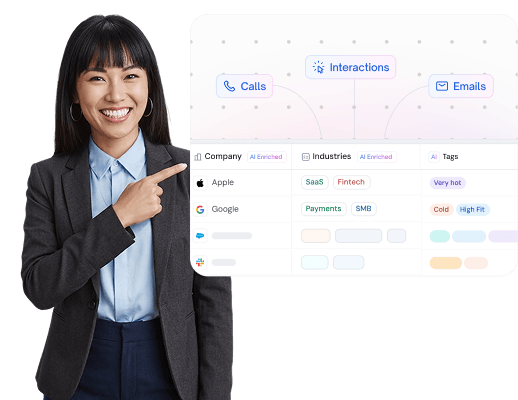
See real-time CRM in action
Key benefits of real-time CRM for sales teams
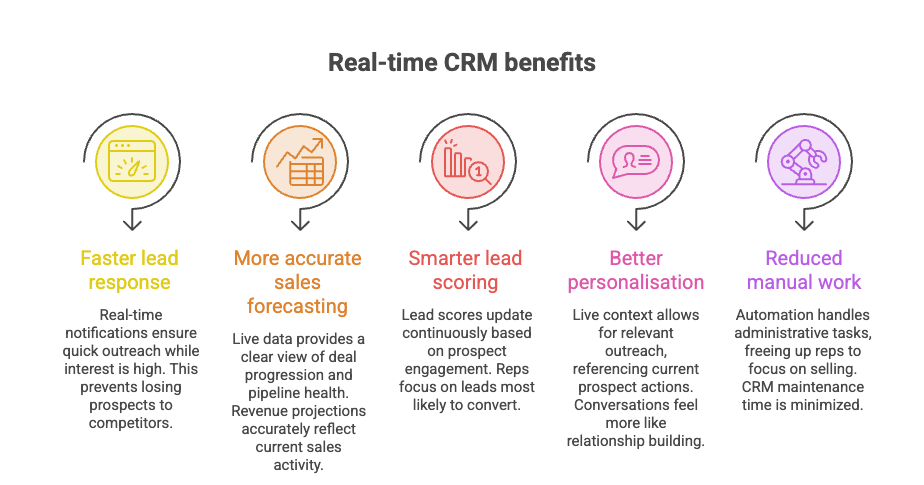
Faster lead response
When a lead fills out a form or revisits your pricing page, the moment they are most open to a conversation is right then. Real-time CRM notifications ensure your team reaches out while interest is live, not hours later when the prospect has already moved on or spoken to a competitor.
More accurate sales forecasting
Forecasts built on batch-processed, day-old data carry compounding inaccuracies. Real-time CRMs give managers a live view of deal progression, rep activity, and pipeline health, so revenue projections reflect what is actually happening, not a snapshot from yesterday's sync.
Smarter lead scoring and prioritisation
Lead scores in a real-time CRM update continuously as prospects engage with your content and team. A contact who spent time on your case studies this morning gets automatically reprioritised above one who has not engaged in two weeks, without anyone manually reviewing the pipeline. Reps spend their day on the leads most likely to convert.
Better personalisation at scale
Personalisation requires the current context. A real-time CRM gives every rep a live view of what each prospect has done, read, or asked, so outreach references what is relevant today, not what was in the notes from three calls ago. This makes conversations feel less like a sales process and more like a continuation of a relationship.
Reduced manual work for reps
Real-time CRMs automate the administrative layer of sales logging calls, updating pipeline stages, triggering follow-up tasks, and flagging overdue actions. Reps spend less time maintaining their CRM and more time using it to sell.
Why response timing is one of the most important variables in sales
Speed of response is not just a courtesy metric; it directly affects whether deals start or stall. The first sales team to engage a buyer after they express intent has a significant structural advantage. Every hour of delay reduces the likelihood that a prospect will take your call, respond to your email, or remain in an active buying mode.
Real-time CRM eliminates the information lag that forces teams to act on yesterday's signals. When your system surfaces a high-intent action the moment it happens and routes it to the right rep immediately, response timing becomes a competitive advantage rather than an afterthought.
Nucleus Research reports that CRM systems now deliver an average return of $3.10 for every dollar invested, a figure that reflects the compounding value of faster lead response, more accurate forecasting, and reduced manual overhead.
What real-time CRM looks like in an AI-native system
Most CRM platforms added real-time capabilities as an upgrade layer on top of a batch-processing core. AI-native CRMs are built differently; real-time data is not a feature, it is the foundation the entire system runs on.
SparrowCRM is built as an AI-native platform for small sales teams. Rather than surfacing raw data and leaving interpretation to the rep, the system continuously analyses live signals and translates them into prioritised actions.
ICP Fit Score and Buying Intent Score
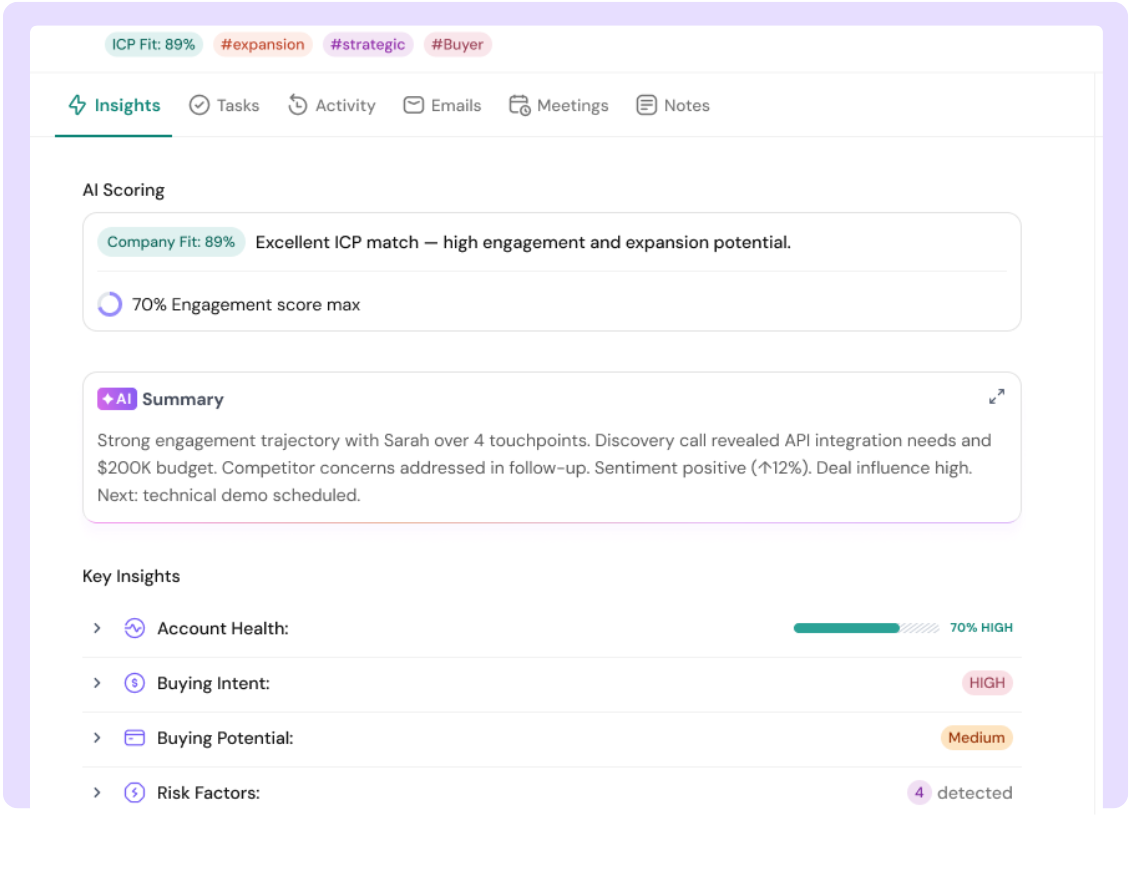
SparrowCRM evaluates every contact against your ideal customer profile in real time. As a prospect's behaviour shifts, visiting key pages, engaging with sequences, and responding to outreach, the system updates their ICP Fit Score and Buying Intent Score automatically. Reps see a ranked, current view of who is worth calling today.
Meeting Intelligence and live conversation summaries
After every call or meeting, SparrowCRM generates a structured summary, key topics covered, commitments made, sentiment signals, and a scored evaluation of the conversation. Next Actions are generated automatically, so reps know exactly what to do after each interaction, without spending time on manual note-taking.

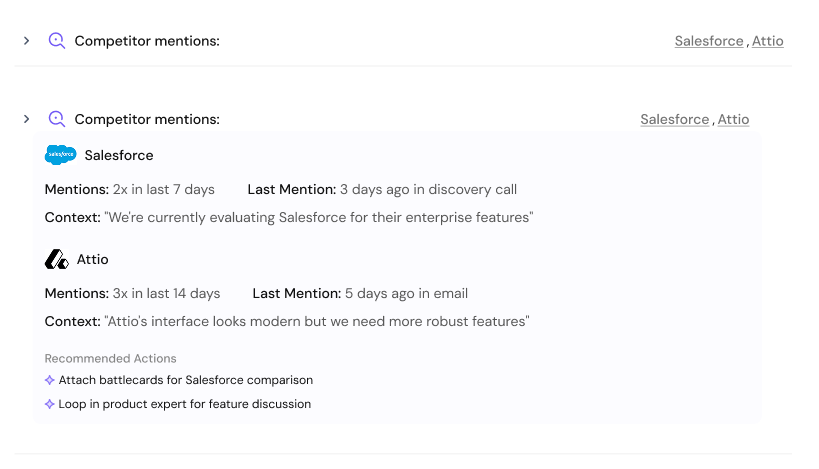
Competitor mention detection
When a prospect mentions a competing product in a call or email thread, SparrowCRM flags it in real time. The rep is alerted before the next touchpoint, with enough context to adjust positioning or prepare a differentiation response before the deal moves further.
Deal Loss Analysis
SparrowCRM analyses patterns across lost deals and surfaces the signals that most consistently predict deal failure, so sales leaders can intervene earlier in future deals that show the same trajectory. This is real-time data working at the system level, not just the rep level.
SparrowCRM is designed for sales teams of 2–50 people at SaaS, tech, and finance companies. See how the platform handles CRM data management and live pipeline tracking.
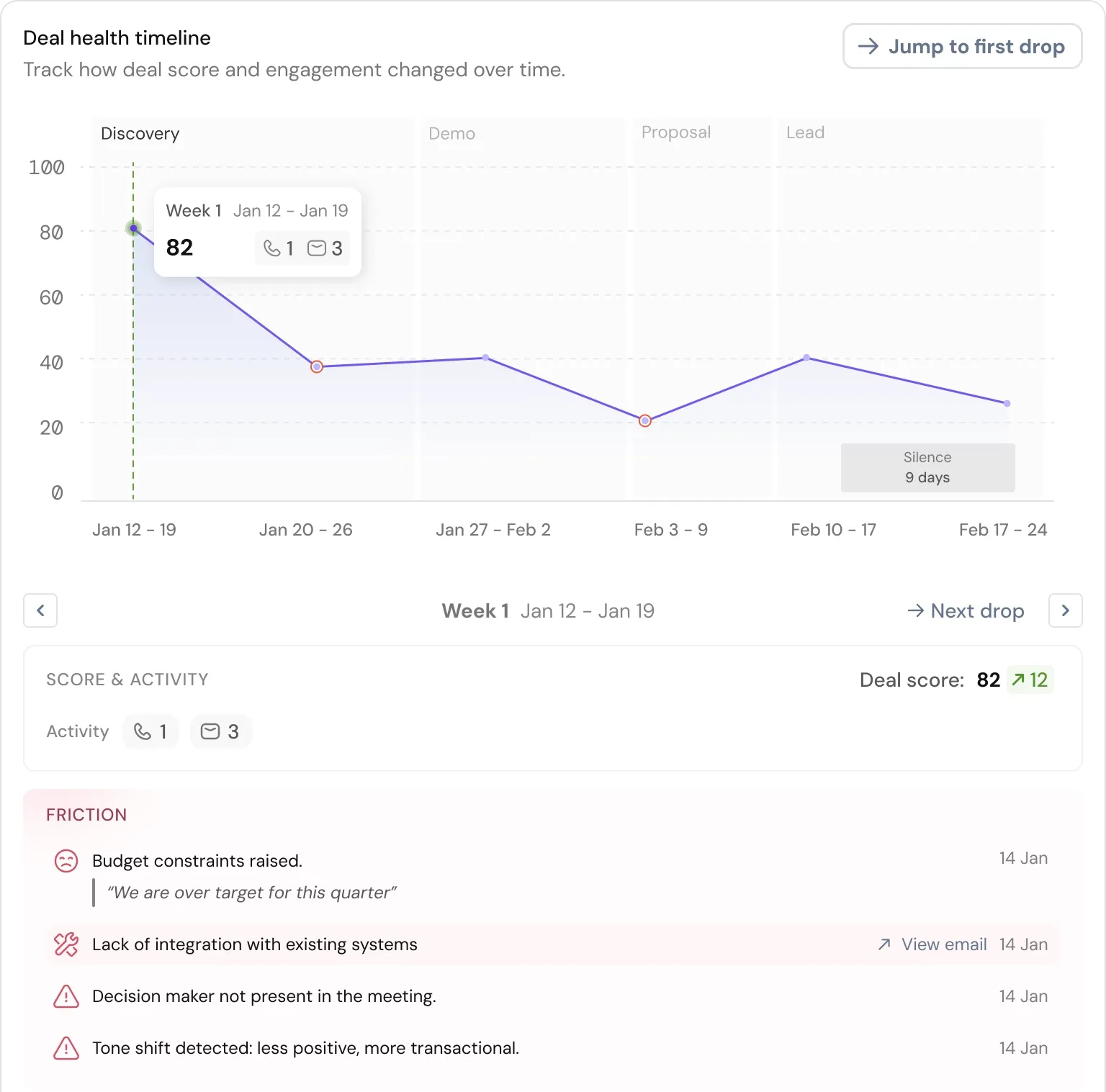
From first touch to close, automate your entire sales pipeline with AI
Final thoughts
The difference between a traditional CRM and a real-time one is not cosmetic. It determines whether your team sees a buying signal today or tomorrow, whether a lead score reflects this morning's behaviour or last week's, and whether your pipeline forecast is built on what is actually happening in your deals or on a delayed snapshot.
For sales teams at small and mid-size companies, where every rep carries a large share of the pipeline, and there is no room for slow follow-ups, real-time data is not a premium feature. It is table stakes.
Understanding how event-driven CRM architecture works, and choosing a system built around it, is one of the highest-leverage decisions a sales leader can make. The compounding benefit of faster responses, smarter prioritisation, and more accurate forecasting shows up in every stage of the funnel. If you are evaluating what your current tool is actually capable of, the voice-to-CRM guide is a useful companion to understand how automatic data capture removes the manual logging layer entirely.

Frequently Asked Questions (FAQs)
Related Articles

02 Apr, 2026
What Is CRM Software? The Complete Guide for Sales Teams in 2026

07 Apr, 2026
CRM Features That Actually Move Deals Forward (Not Just Fill Dashboards)

25 Apr, 2025

