CRM SOFTWARE
Attio review: Is it the right CRM for your team in 2026?

By Ganesh Ravi Shankar
Last updated on Sep 1, 2026

Ganesh Ravi Shankar
Updated on Sep 1, 2026
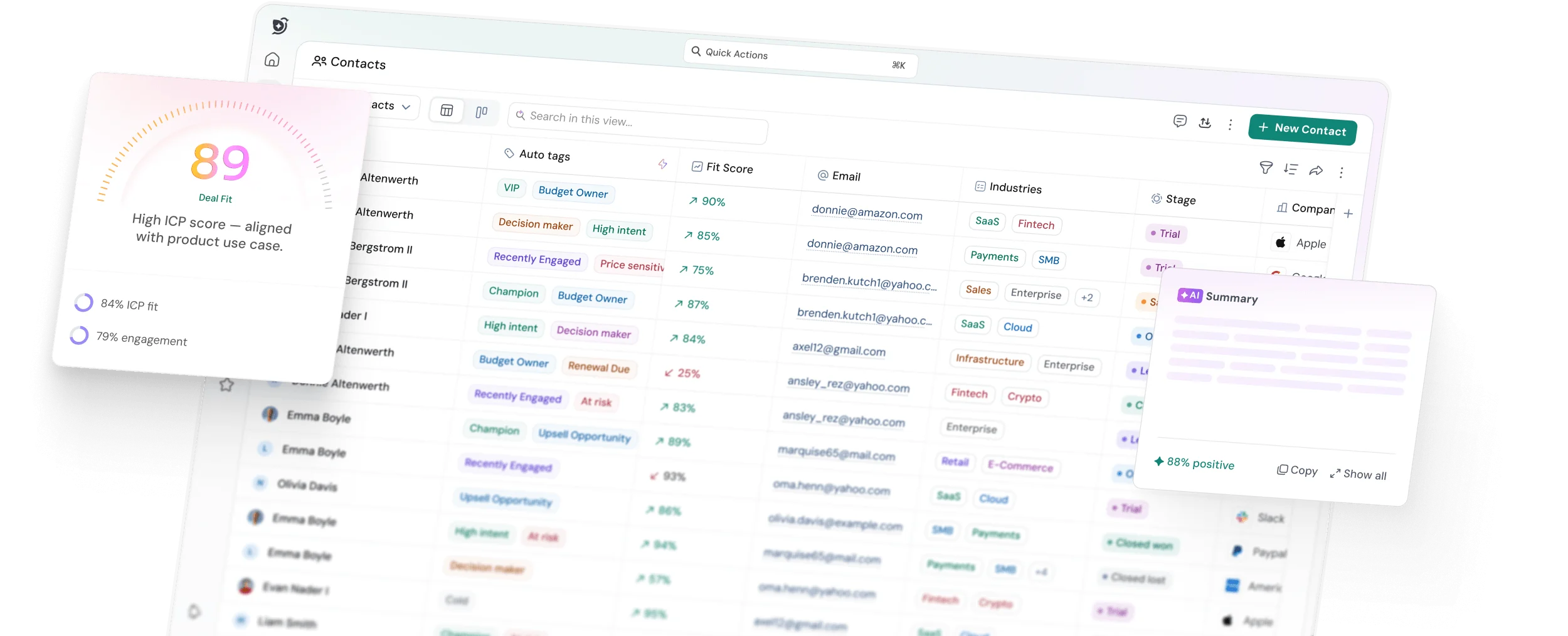
Attio is one of the lightest and most modern CRM platforms, combining a clean interface with flexible, relationship-focused features. It can be a strong fit for small and growing teams of 2–50 members that want a CRM without the complexity of traditional platforms.
I tested Attio using its 15-day free trial, evaluating its features, usability, real-world use cases, and pricing to understand where it performs well and where it falls short. If you're considering Attio for your team, this review gives you a detailed, hands-on look at what you get before you decide to buy.
Key takeaways
- Attio is a lightweight, flexible CRM that works especially well for small and growing sales teams that value a clean, customizable interface.
- Its strongest differentiator is AI-powered workflows. Ask Attio and AI agents can handle research, enrichment, classification, summarization, and CRM updates beyond basic automation.
- Our testing found Attio easy to use, with features such as email sync, multiple pipelines, sequences, keyboard shortcuts, and activity history making everyday sales work simpler.
- Attio has some important trade-offs, including limited reporting and marketing capabilities, email-account restrictions, higher-tier access to call intelligence, and potential friction when scaling or migrating complex CRM data.
Our honest evaluation of Attio features
We tested Attio across the areas that matter most when deciding whether a CRM can become part of your team's daily workflow.
Rather than judging every feature in isolation, we focused on how the platform works together: how easily data enters the CRM, how relationships are organized, how deals move through pipelines, how automation works, and how much work AI can take off a sales team's plate.
1. Contact and relationship management
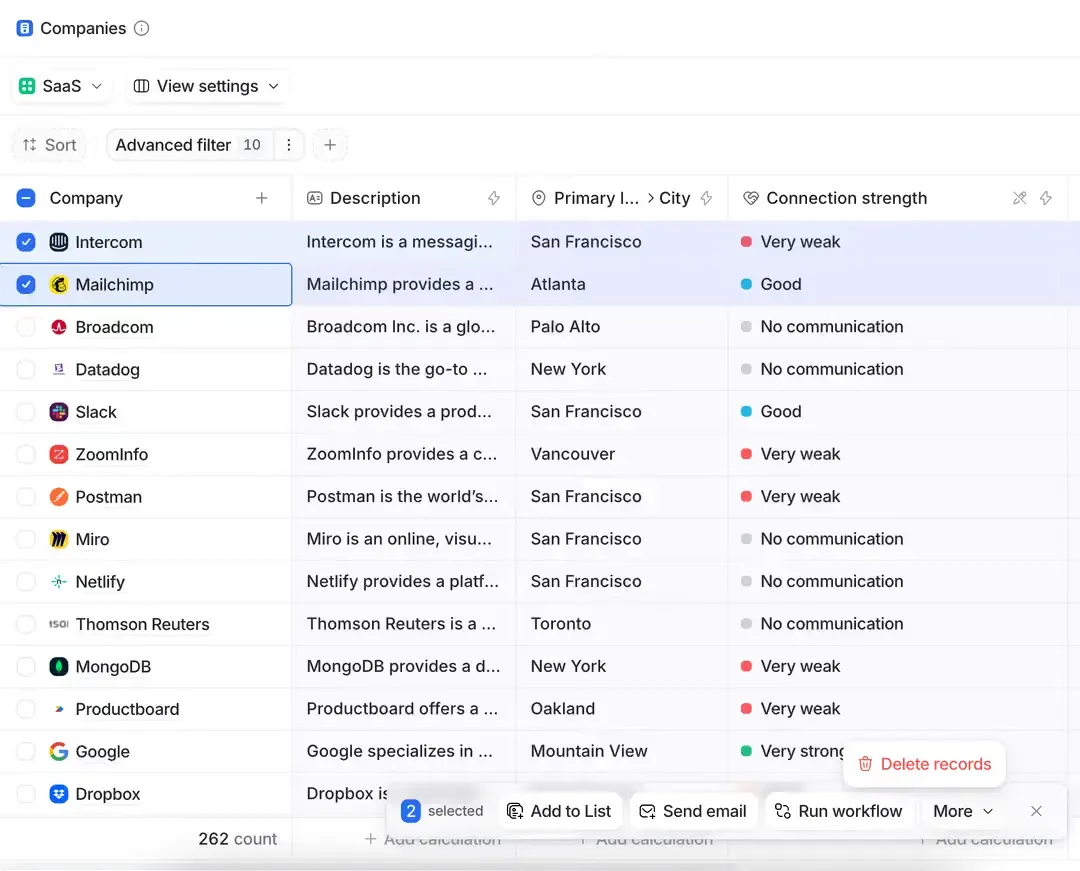
After testing Attio with 50 leads, we found that its contact and relationship management is built around the everyday tasks salespeople need to handle: keeping customer details organized, tracking conversations, adding notes, and remembering follow-ups.
Attio brings people, companies, and deals into a flexible structure, while email, notes, and tasks help keep customer context accessible. During our testing, we found the keyboard shortcuts particularly useful for everyday work. N lets you quickly create a note, while T can be used to create a task, making it easier to record information or set a follow-up without navigating through multiple menus.
Source: attio.com/help
Email is also central to Attio's relationship management. Once connected, it automatically brings relevant conversations into the CRM and can create people from email interactions. This gives salespeople a clearer view of their communication history without having to switch between their inbox and CRM.
However, there is an important limitation in how Attio handles activities across records. People, companies, and deals are treated as separate objects, so a note added to a person's record does not automatically appear on the related deal's timeline. The same applies to tasks and meetings.
This means teams may need to deliberately associate activities with the right record or use workflows to bridge the gap. For teams that frequently move between contact and deal-level activity, this is something worth considering before adopting Attio.
2. Deal and pipeline management
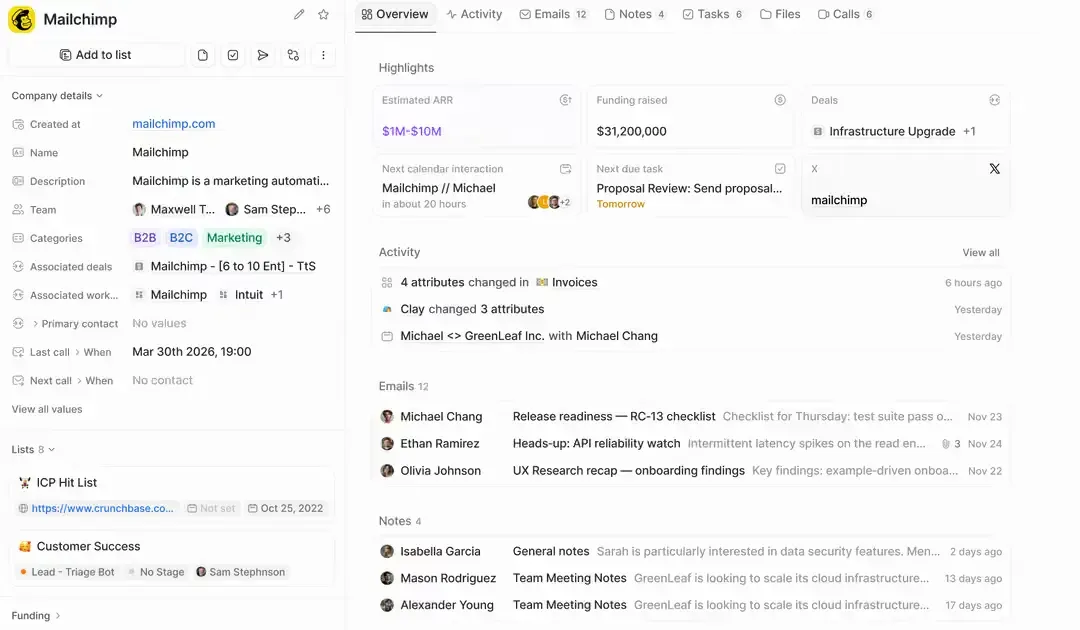
Deals in Attio are straightforward to set up and manage. You can create a new deal directly from the Create option in the top-right corner, or bring existing deals into Attio through imports or CRM migration. The migration option is particularly useful for teams moving from another CRM, as Attio supports migration from major CRM platforms through Import2, including the ability to bring over deals and associated activities.
Source: attio.com/help
You can also create multiple deal pipelines based on different use cases, sales processes, or groups of people. This makes it easier to keep separate sales motions organized instead of forcing every opportunity into a single pipeline. Within a deal, you can add notes and meetings, although these activities remain specific to the deal record.
Another thing we liked during testing was that deal settings are accessible directly within the Deals section. You can edit deal stages and customize the cards without having to navigate to a separate settings area, which makes pipeline management more convenient. Attio also offers both Kanban and table views, so teams can switch between a visual pipeline and a more structured view of their deals.
3. Email and calendar
Email is one of the areas where Attio feels particularly different from a conventional CRM.
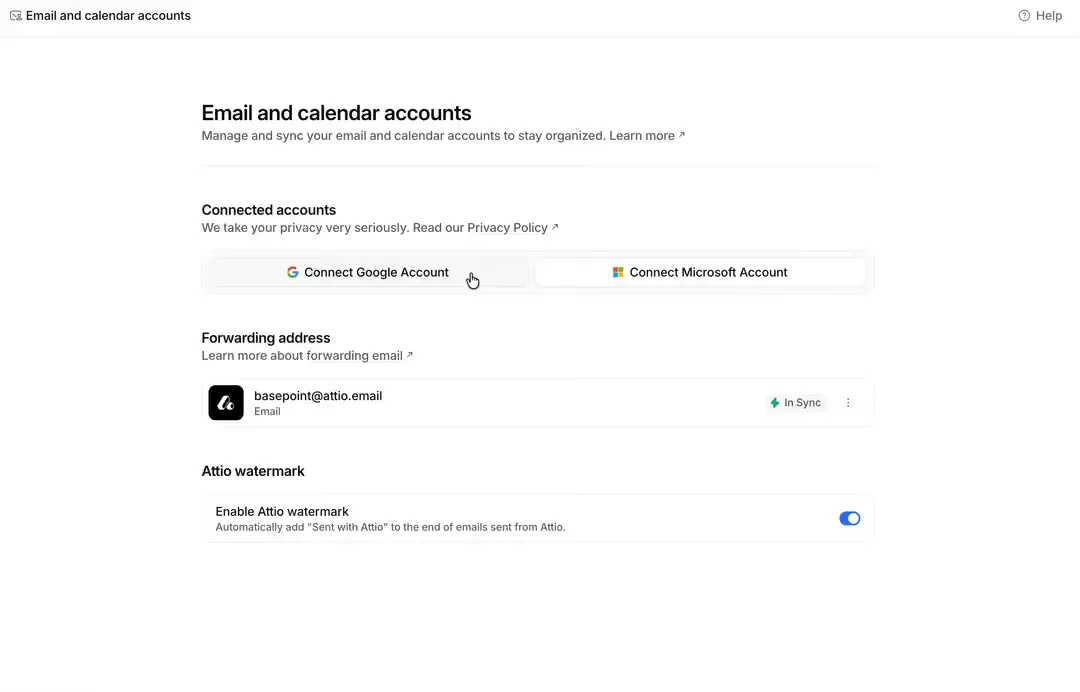
During our testing, connecting email was straightforward, and Attio automatically brought existing conversations into the CRM. This made it easier to see the communication history associated with contacts and deals.
A G2 reviewer similarly highlighted Attio's direct email integration, writing that it “automatically tracks emails” and makes it easier to “create and manage deals from those conversations.”
Source: attio.com/help
Attio also connects with Gmail, Microsoft, and Zoom and can use meeting activity as part of its relationship context.
However, email connectivity becomes more restrictive as you move between plans. The current plan structure allows one synced email account per user on Free and two on Pro, and 3+ on Enterprise. Email volume is also capped at 200 emails per month on Free and 1,000 on Plus, while Pro and Enterprise offer unlimited email volume.
That matters for teams managing several mailboxes or higher-volume communication workflows.
4. Automations and workflows
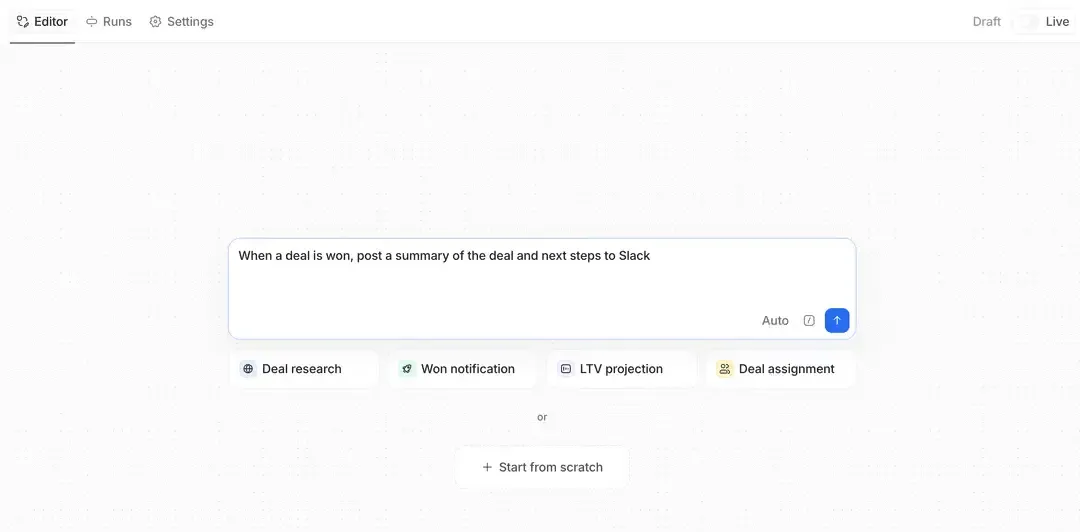
I personally liked Attio’s automation and workflow capabilities as one of its strongest areas, particularly because Ask Attio makes it easier to create workflows without building everything manually from scratch. Teams can either start with a blank workflow or use Ask Attio to help create one, then add different agents to handle specific tasks.
For example, the Web Agent can research information from the public web and use those findings to enrich CRM records. Custom Agents can analyze internal CRM data and update records, while the Classify Record Agent can organize or segment records based on both structured fields and unstructured information such as notes. The Summarize Agent can also process activity history and turn previous interactions into a more concise summary.
Source: attio.com/help
What makes this particularly useful is how Attio combines CRM data, workflows, and AI agents in the same process. Instead of relying only on traditional trigger-and-action automation, you can build workflows where AI handles tasks such as researching prospects, enriching records, classifying contacts, or updating CRM data.
Looking for an Attio alternative? Start with AI CRM for free
5. Reporting and analytics
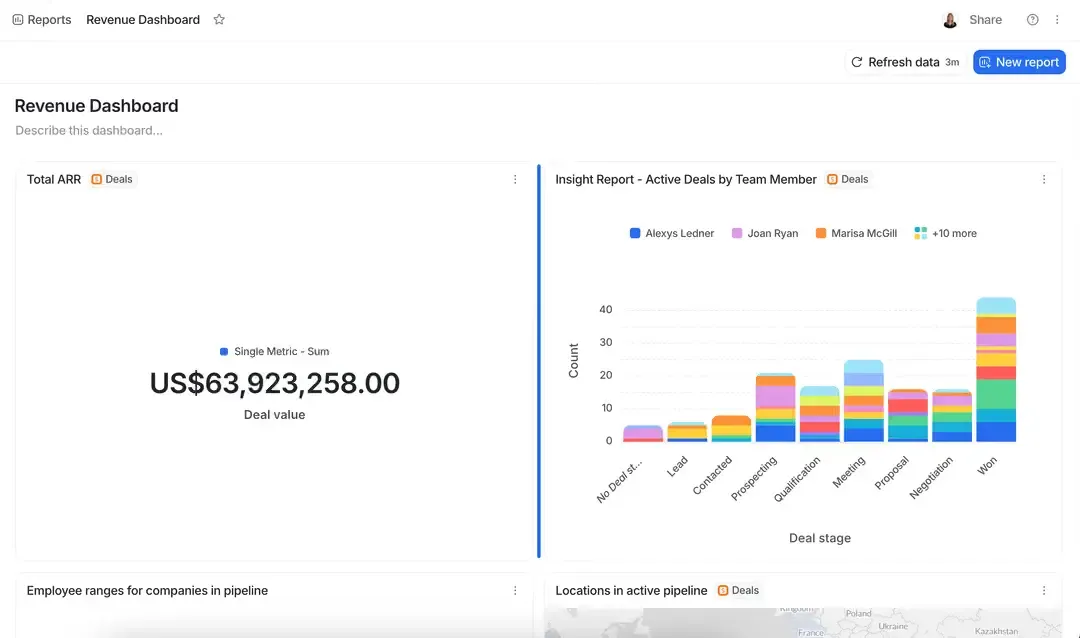
Attio's reporting is useful for teams that need visibility into their CRM, but this is also an area where we think the platform has room to improve.
The current plans differ significantly in reporting capacity. Free supports up to 3 reports, Plus supports 15, Pro supports 100, and Enterprise supports 100+ reports.
Source: attio.com/help
Attio also offers insight reports, funnel reports, segmentation, targets, historical attributes, and time comparisons.
However, during our evaluation, reporting did not feel as deep as what you get from CRMs built primarily around advanced sales analytics and forecasting. One G2 reviewer also described the reporting area as something that could be clearer to use, writing, “The reporting could be a little more intuitive and easier to navigate.” (G2)
So, if your reporting requirements are mainly pipeline visibility and operational tracking, Attio can work well. If you need deep revenue analytics and highly sophisticated forecasting, you'll want to test this area carefully.
6. AI capabilities
AI is one of the areas where Attio has developed quickly.
During our trial, we explored several AI capabilities, including:
- Web Agent for public-web research and record enrichment
- Custom Agents for working with internal CRM context
- Classify Record Agent for segmentation
- Summarize Agent for activity history
- Ask Attio for interacting with CRM data using natural language
- AI-powered workflows for automating CRM tasks
.webp?2026-09-01T10:23:36.674Z)
Source: attio.com/help
The Web Agent was particularly useful because the research it gathers can be used to update CRM fields through workflows.
Attio's 2026 releases have also pushed AI further. Ask Attio can now take actions, while newer integrations extend Attio's AI context into tools such as Slack, Notion, Raycast, and Claude through its MCP ecosystem.
This makes Attio's AI direction more interesting than simply adding an AI chatbot on top of a CRM.
7. Integrations
Attio supports a growing ecosystem of apps and developer tools, including Gmail, Outlook, Slack, Mailchimp, Outreach, Mixmax, Typeform, and Zapier.
The platform also added an MCP server in 2026, allowing Attio to connect more directly with the broader AI ecosystem. It has also added integrations and developer capabilities throughout the year.
That said, Attio’s number of integrations is still relatively low compared with other CRM platforms. Teams with a large sales technology stack should evaluate Attio carefully, especially if their workflow depends on several specialized prospecting, calling, marketing, and engagement tools. In those cases, you may need additional integrations or external tools to complete the workflow.
If you’re evaluating Attio before making a purchase, it’s also worth comparing it with HubSpot. Our Attio vs. HubSpot comparison breaks down the key differences in features, pricing, and overall fit to help you decide which CRM is better for your team. Compare Attio vs. HubSpot
What’s new in Attio in 2026?
Attio has released 50 updates in 2026, covering AI, workflows, mobile, reporting, developer tools, and the core CRM experience.
1. New features released in 2026
Some notable additions include:
- Ask Attio for working with CRM data using natural language
- Native dictation for Ask Attio
- MCP server for connecting Attio with external AI tools
- Web Research Agent improvements for record enrichment
- Files API for managing files through the API
- Attio in Clay and Slack
- Calls on mobile and redesigned mobile apps
- New Workflows, workflow blocks, and formula attributes
- Files on Deals and Custom Objects
- Failed email tracking
- Bulk task deletion and improved importing
- Developer updates such as record merging, transcript uploads, and programmatic sequence unsubscribes
2. Major product improvements
Attio has also focused on improving everyday usability. The May 28, 2026 update introduced a redesigned Android app, improved Ask Attio, easier access to List and Object settings, and better navigation.
One notable improvement was faster email synchronization, with average email parsing becoming more than four times faster. Failed email tracking also gives teams better visibility into messages that were not delivered.
3. What these updates mean for sales teams
Overall, the 2026 updates reduce manual CRM work while making Attio's AI capabilities more useful. Teams can use AI for research, enrichment, classification, summaries, and CRM updates, while workflow and API improvements make it easier to automate repetitive processes.
The bigger shift is that Attio is moving beyond being a lightweight CRM toward an AI-native CRM where agents can work directly with customer data and workflows. This gives sales teams more automation while retaining the flexible interface that initially made Attio attractive.

What matters more when choosing a CRM?
What do real Attio users say?
Our 15-day free trial testing gave us a hands-on view of Attio, but customer reviews provide another perspective. We looked at recent G2 reviews to see whether real users experienced the same strengths and limitations we found during testing.
1. What users like about Attio
Ease of use, flexibility, and AI are the strongest themes across the reviews.
For example, Arvi C., a small-business CEO and founder, rated Attio 5/5 and praised its customizable interface and AI capabilities. They specifically noted that Attio was easier to get comfortable with than several other CRMs they had used. Read the full G2 review
A mid-market verified user rated Attio 3.5/5 and similarly highlighted its flexibility and simple navigation. They use Attio across teams to manage contacts, deals, and custom lists for different use cases. Read the full G2 review
Another small-business user also gave Attio 3.5/5, highlighting its AI-native approach and integrations with AI tools such as Claude and Town. They said the AI and flexibility were key reasons for switching from Affinity. Read the full G2 review
This matches our experience during the free trial. Attio feels easy to navigate, while still giving teams plenty of flexibility to create lists, pipelines, workflows, and AI-powered processes.
2. What users think Attio could improve
The limitations mentioned by users are more specific to how they use the CRM.
- Email visibility: Arvi C. wanted the ability to see whether recipients had read emails, particularly when using Google Workspace. G2 review
- Call intelligence: A mid-market user felt that call recordings could be more useful if information from transcripts could automatically update account or contact fields. G2 review
- Event tracking and UI: Another user said the interface could be improved and that event-related information could be handled more thoughtfully. They currently rely on a third-party Luma integration for event attendance data. G2 review
- Migration effort: The same user described their Affinity-to-Attio migration as medium to hard and said they needed a consultant to help with data mapping and cleanup. G2 review
3. Where user reviews agree with our experience
The biggest overlap is Attio's combination of a clean interface, flexible data structure, and useful AI capabilities. Users describe it as easy to learn and customize, which is consistent with what we found while testing the platform.
Our testing also showed that Attio's AI becomes particularly useful when connected to workflows and CRM data. Features such as Ask Attio, Web Agent, classification, and summarization allow teams to go beyond simply storing customer information.
At the same time, the reviews highlight areas worth evaluating before you commit: email tracking, call intelligence, event data, and migration complexity. These may not matter to every team, but they can become important if they are central to your sales workflow.
How much does Attio cost?
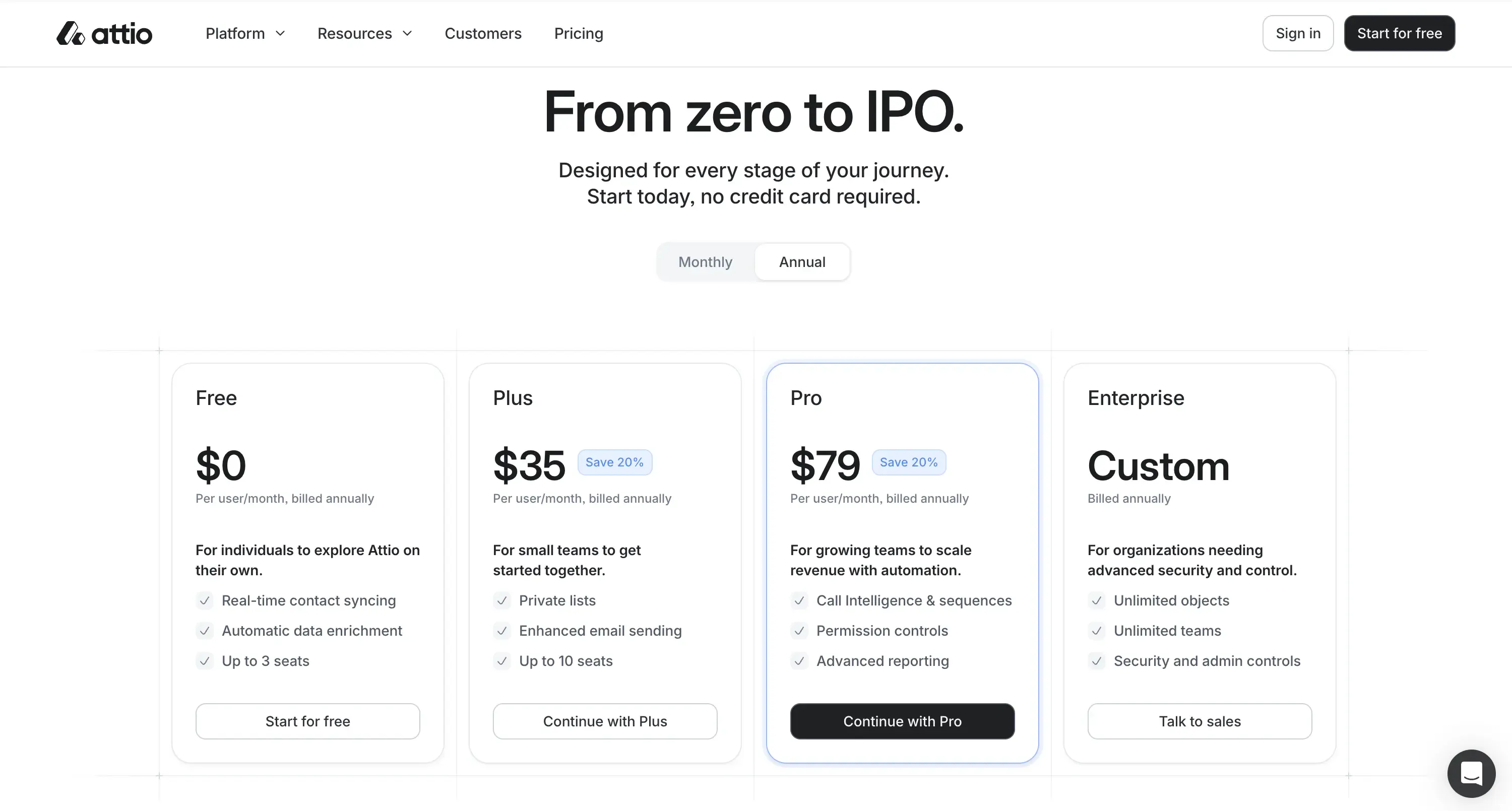
Source: attio.com
1. Attio has four main plans: Free, Plus, Pro, and Enterprise.
The exact cost depends on whether you choose monthly or annual billing, so it's worth checking the current pricing before purchasing.
Plan | Price | Seats | Records | Email accounts/user | Reports |
Free | $0/user/month | Up to 3 | 50,000 | 1 | Up to 3 |
Plus | $35/user/month | Up to 10 | 250,000 | 1 | Up to 15 |
Pro | $79/user/month | Unlimited | 1 million | 2 | Up to 100 |
Enterprise | Custom | Unlimited | Custom | 3+ | 100+ |
Pricing note: The screenshot shows the annual billing prices: Plus at $35/user/month and Pro at $79/user/month, with a 20% saving displayed. Enterprise is custom-priced and billed annually.
Attio's current plan structure also includes credits for AI and automation usage. Free includes 100 seat credits per user/month and 250 workspace credits/month, while Pro increases this to 1,000 seat credits per user/month and 10,000 workspace credits/month.
2. What you get with each plan
The Free plan is designed for small teams and includes up to three seats, 50,000 records, core CRM functionality, and access to Attio's AI and automation capabilities.
Plus expands the workspace to 10 seats and 250,000 records.
Pro removes the seat limit, raises the record limit to one million, increases email connectivity to two accounts per user, and provides higher reporting, credit, and advanced capability limits.
Enterprise is designed for larger organizations that need custom limits, more advanced administration, and enterprise-level support.
One important pricing consideration is that features that may be important to sales teams can sit behind higher tiers. For example, Call Intelligence is available on Pro and Enterprise, while email account limits also increase as you move up the plans.
3. How Attio pricing changes as you scale
Attio can be cost-effective when you're a small team, but the economics change as your team grows.
The issue isn't only the per-user price. You also need to consider:
- How many email accounts each user needs
- How much AI and automation usage you expect
- Whether you need advanced reporting
- Whether you need Call Intelligence
- Whether you need additional outbound tools
- Whether your team needs more advanced permissions
This is why the headline seat price shouldn't be the only number you use when comparing Attio with other CRMs.
For a deeper breakdown of Attio's current pricing and scaling costs, see our Attio pricing guide.
Is Attio’s free plan actually useful?
Yes. We found Attio's free plan more useful than a typical limited CRM free tier.
What’s included in Attio Free?
The Free plan supports:
- Up to 3 seats
- Up to 50,000 records
- 1 email account per user
- Up to 3 reports
- AI and automation capabilities
- 100 seat credits per user/month
- 250 workspace credits per month
The plan gives a small team enough room to actually use the CRM rather than simply test a few features.
Who is the free plan best for?
We'd recommend Free primarily for founders, very small sales teams, and teams evaluating Attio before committing to a paid plan.
It's particularly useful if your CRM needs are centered around contact management, relationships, deals, email history, and lightweight automation.
A three-person team can get a meaningful understanding of how Attio fits into its workflow without immediately paying for a subscription.
When should you upgrade?
The decision to upgrade becomes easier when you start hitting one of the plan's practical limits.
You may need to move to Plus or Pro if you need:
- More seats
- More records
- More email accounts per user
- More reports
- Higher AI and automation usage
- Advanced sales capabilities such as Call Intelligence
The free plan is therefore useful as a working CRM for a small team, but it isn't designed to remain sufficient for every growing sales organization.
Your First 3 CRM Seats Are Free

Is Attio easy to use?
This is one of Attio's biggest strengths.
During our trial, we found the interface clean and relatively easy to understand, especially compared with traditional CRMs that expose a large number of configuration options immediately.
1. Setup and onboarding
Getting started was straightforward.
Importing data was easy, and connecting email felt similar to the setup process in other modern CRM platforms.
Once the mailbox was connected, Attio began bringing conversations into the CRM and creating people based on email interactions.
2. Interface and navigation
Attio's interface is one of the areas where the platform feels noticeably modern.
The company also made several navigation improvements in 2026, including a redesigned record page, refreshed sidebar, and improvements to dropdown navigation.
During our trial, activity and chat history were also easy to revisit, which helped keep previous interactions visible without making the interface feel crowded.
3. Customization and flexibility
Attio gives teams a lot of flexibility around how they structure CRM data.
You can work with companies, people, deals, lists, and custom objects rather than being locked into one predefined CRM model.
This is particularly useful for teams with different use cases, such as separating prospects, active customers, inbound leads, or other relationship categories.
4. Learning curve
The basic CRM functions are easy to learn.
Where the learning curve increases is with the more advanced parts of Attio.
Workflows, agents, custom objects, AI actions, and automation give experienced users considerably more flexibility, but they also require more experimentation to use effectively.
The good news is that you can start with the simple CRM functions and gradually introduce the advanced capabilities.
Attio also supports keyboard shortcuts for everyday actions. During our testing, we found that N can be used to create a note, while tasks can also be created using T keyboard shortcuts. Team members can be mentioned with @, making collaboration faster.
These are small features, but they make a difference when the CRM is part of your daily workflow.
What are the limitations of Attio?
Attio is a strong CRM, but it isn't designed to solve every sales and marketing problem inside one platform.
1. Marketing limitations
Attio is primarily a CRM and relationship management platform.
It can capture leads through forms and support sequences, but teams looking for a complete marketing stack including broader campaign management, nurturing, advertising, and marketing automation may still need additional tools.
This is less of an issue for sales-led teams and more important for companies that want marketing and sales operations tightly connected inside one platform.
4. Reporting limitations
Attio's reporting is useful for operational CRM visibility, but advanced analytics can be a different story.
The platform supports insight reports, funnel reports, segmentation, targets, historical attributes, and time comparisons, but teams that depend heavily on advanced revenue forecasting and sophisticated sales analytics should test the reporting experience before committing.
This also matches some of the G2 feedback we reviewed in this review: G2 review.
3. Integration limitations
Attio's ecosystem is expanding quickly, but it currently offers 100+ integrations, which is fewer than many competing CRM platforms.
Teams with complex sales stacks may therefore need to connect multiple external tools for calling, prospecting, enrichment, and outbound engagement.
The platform is a strong CRM foundation, but its smaller integration ecosystem may limit how well it replaces every tool in a mature sales stack.
4. Email account limitations
Email is one of Attio's strengths, but it also has plan-based limitations.
Current limits are:
- Free: 1 account per user
- Plus: 1 account per user
- Pro: 2 accounts per user
- Enterprise: 3+ accounts per user
Email volume also increases significantly across plans, from 200 emails/month on Free to 1,000 on Plus, with unlimited email volume on Pro and Enterprise.
This is worth considering if your sales team manages multiple inboxes or uses several Microsoft 365 or Google Workspace accounts.
5. Pricing and scaling considerations
Attio's pricing becomes more important as the team grows.
A small team can get considerable value from the Free or lower paid tiers. But teams with higher seat counts, heavier AI usage, multiple mailboxes, advanced reporting requirements, and outbound-specific needs can see the total cost increase.
The real comparison should therefore include both Attio's subscription cost and the cost of tools you'll still need around it.
Still unsure whether Attio is the right fit? Check out our 7 Attio alternatives we tested for different sales, marketing, AI, and CRM use cases.
How does Attio support CRM migration?
Switching CRMs typically involves weeks of manual export-import cycles. Attio streamlines this through multiple pathways.
1. Exporting data from your existing CRM
If you're moving from another CRM, Attio provides a dedicated Import2 migration service.
Import2 is available on Plus, Pro, and Enterprise, and only workspace admins can perform these migrations.
Attio currently lists support for a large number of source CRMs, including Salesforce, HubSpot CRM, Pipedrive, Zoho CRM, SugarCRM, Close, Folk, Freshsales, Insightly, Monday, Microsoft Dynamics, and others.
2. Importing data into Attio
Import2 can migrate:
- Companies
- People
- Deals
- Custom objects
- Notes
- Tasks
- Files
The migration itself is free for Attio users when initiated through Attio's Migrate CRM workflow.
This is a meaningful advantage for teams moving from another CRM because they don't necessarily need to build the migration from scratch.
3. CSV and spreadsheet imports
If your existing CRM isn't supported by Import2, Attio provides a CSV import option.
This gives teams a fallback when a direct migration connector isn't available.
However, there are differences between Import2 and CSV migration. For example, Attio notes that its CSV importer does not support importing notes, while Import2 can handle them.
4. API-based migration
For more customized migrations, Attio also provides API access.
This is useful when you need more control over how records and attributes are mapped or when your source isn't supported by Import2 or CSV.
The API route is particularly relevant for teams with custom CRM structures or migration requirements that don't fit a standard import.
Attio review: Our final verdict
Attio is a genuinely strong CRM for teams that value simplicity, flexibility, relationship data, and modern AI capabilities.
Our testing showed that the platform is easy to get started with, while its deeper features give more advanced users plenty of room to build sophisticated workflows.
Who should use Attio?
Attio is a strong fit for:
- Small and growing teams that want a modern CRM
- Founders who want a CRM that is quick to adopt
- Sales teams that rely heavily on email and relationship history
- Teams that need flexible CRM data structures
- Companies interested in AI-powered enrichment and workflows
- Teams that want to gradually introduce automation rather than configure a complex CRM from day one
Who should consider an alternative?
You may want to evaluate other CRMs if you need:
- A complete marketing and sales platform in one system
- Deep sales forecasting and advanced analytics
- A full outbound sales stack with calling, prospecting, and engagement built in
- Extensive multi-mailbox support without moving to higher tiers
- More enterprise-oriented CRM administration and customization
Is Attio worth it in 2026?
Yes, for the right team.
Attio's biggest strength isn't any single CRM feature. It's the combination of a flexible data model, clean interface, email-based relationship context, workflows, and increasingly capable AI agents.
Its 2026 releases show that Attio is investing heavily in this direction, particularly around AI, workflows, developer tools, and integrations.
The question is whether those strengths match your team's requirements.
If you want a lightweight CRM that can grow into a more intelligent, automated system without immediately feeling like an enterprise platform, Attio is worth serious consideration.
If your priority is deep marketing, advanced sales analytics, or an all-in-one outbound sales operation, you'll want to compare it with more specialized alternatives before making the decision.
Our verdict: Attio is an excellent modern CRM foundation, particularly for small and growing teams, but its value depends heavily on how much of your sales and marketing stack you expect the CRM itself to replace.