CRM SOFTWARE
CRM Challenges: Why Most CRMs Fail Sales Teams (and How to Fix It)

By Geethapriya
Last updated on May 26, 2026
Explore this blog to understand the 8 most common CRM challenges, from poor user adoption to bad data quality and get practical, proven fixes for each one.

Geethapriya
Updated on May 26, 2026
Most companies don't have a CRM problem. They have a CRM fit problem. CRM implementations fail between 30% and 70% of the time, yet 91% of companies with 10 or more employees are running one. The math reveals an uncomfortable truth: most sales teams are using a system that is actively working against them, and many don't realise it until the damage is already done.
The challenges of CRM rarely show up on day one. They emerge six months in, when reps stop logging calls, pipeline data turns unreliable, and Monday forecast calls become guesswork sessions. By then, the budget is spent, and the rollout is officially complete, but the system isn't actually being used.
This guide covers the 8 most common CRM challenges, their root causes, and the fixes that actually hold. Whether you're evaluating a new system, troubleshooting a struggling rollout, or watching adoption slip, start here. For the full implementation roadmap, see our guide on CRM implementation best practices.
What Makes CRM Challenges So Costly?
The danger with CRM problems is that they're quiet at first. A few reps skipping data entry looks like a habit issue. One tool that won't sync appears to be a temporary glitch. But the downstream effects compound fast. Poor data quality alone causes 44% of businesses to lose 10% of their annual revenue, according to CRM data quality research from Scratchpad. That's not a tech issue; it's a revenue issue that shows up in missed forecasts and lost deals.
Beyond revenue, CRM challenges drain the time sales reps don't have to spare. Research from Zapier shows reps spend only 4–5 hours a day on core selling activities. A system that adds friction, clunky data entry, confusing navigation, broken integrations, eats directly into that window.
52% of sales leaders say their CRM hurts rather than helps their sales opportunities. When the tool built to help your team close deals becomes the reason they're losing time, the CRM implementation challenges you're facing become a sales leadership priority, not just an IT one.
The 8 Most Common CRM Challenges (and How to Overcome Them)
1. Poor User Adoption
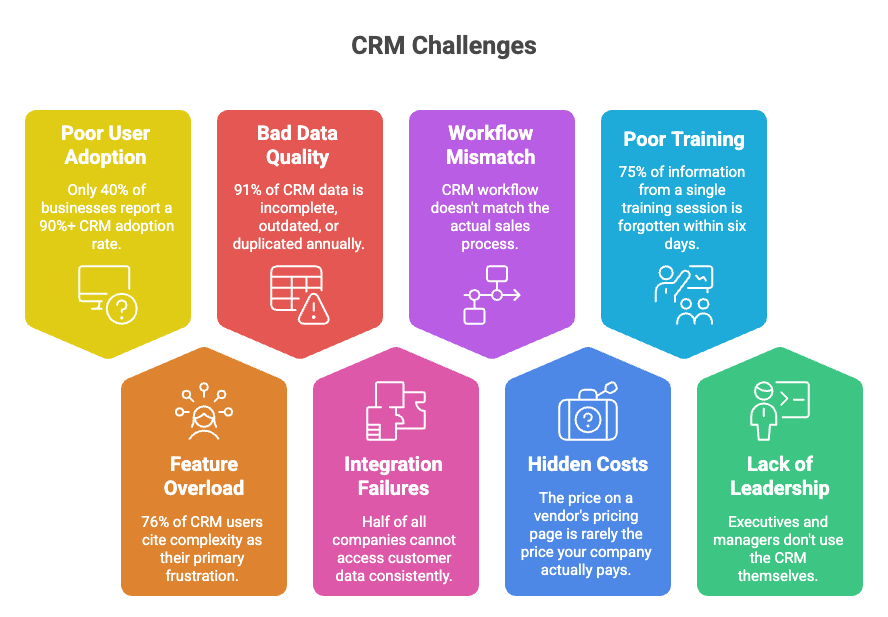
User adoption is the leading cause of CRM failure across every platform Salesforce, HubSpot, Zoho, and others. Only 40% of businesses report a 90%+ CRM adoption rate, according to G2 data. In 6 out of 10 companies, more than 10% of employees who should be using the CRM simply aren't or are using it so minimally that the entire value proposition collapses.
Sales reps don't resist CRM because they're resistant to change. They resist it because the system demands more than it returns. When it takes more effort to log a call than to make one, reps build workarounds. They track deals in personal spreadsheets, send follow-ups from their own inbox, and update the CRM just enough to survive the Monday pipeline review, then go back to their parallel system the next morning.
The fix starts before launch: Involve the sales team in system selection. Choose a CRM built around the actual selling workflow, not the other way around. Then build a reinforcement loop: managers should run every forecast call inside the CRM. When leadership visibly depends on it, adoption follows. See the CRM training and adoption guide for a full approach.
2. Feature Overload and Complexity
This is the CRM problem that rarely gets named directly. Vendors compete on feature count, so platforms ship with hundreds of capabilities most teams will never use. Research shows 76% of CRM users cite complexity, lack of user-friendliness, or inability to customise as their primary frustration. And 72% say they would willingly trade advanced features for a simpler, easier system, a number that reveals how far CRM design has drifted from what salespeople actually need.
Feature overload doesn't just frustrate users. It creates hidden costs: more training time, more ongoing support, more internal maintenance. One documented case involved a mid-sized company that implemented a feature-heavy CRM without consulting its sales team. Adoption dropped almost immediately. The system became an expensive, underused tool at the centre of a workflow that had rebuilt itself around the CRM's gaps.
The practical fix: run a feature audit. Identify the three to five workflows your team uses daily. Turn off or hide everything else. A CRM that does fewer things well will always outperform one that does everything poorly. This is the design philosophy behind SparrowCRM, an AI-native CRM built to reduce friction for small sales teams, not add more layers to it.
3. Bad Data Quality and Duplicate Records
CRM data quality is one of the most underestimated challenges of CRM. Research shows 91% of CRM data is incomplete, outdated, or duplicated annually. Contact data decays at approximately 30% per year, meaning one-third of your database becomes unreliable within 12 months without active maintenance. Gartner estimates companies lose an average of $12.9 million annually to poor data quality costs that surface as missed outreach, wrong forecasts, and broken personalisation.
The most common data problems are predictable: duplicate records when two reps log the same contact separately, empty fields skipped during a busy sales call, outdated information nobody flagged after a contact changed roles, and inconsistent formatting across entries. Each problem is small alone. Together, they make the CRM untrustworthy and an untrustworthy CRM gets used less and less.
How to fix: The fix requires both process and tooling. Set required fields for every new contact record. Use drop-down menus instead of free-text fields wherever possible. Run monthly data audits using built-in deduplication tools or a dedicated data cleaner. And automate validation rules at entry, catching a bad format at input is exponentially cheaper than cleaning it up six months later.
4. Integration Failures Across Tools
Half of all companies cannot access customer data consistently across their marketing, sales, and service systems. This is a direct result of poor CRM integrations. When the CRM doesn't sync reliably with your email client, calendar, or engagement tools, data gets siloed. Reps start logging activity in two places, or they stop logging it altogether. The CRM becomes a record of what management asked for, not what's actually happening in the pipeline.
The most common CRM implementation challenges around integration are email sync failures, duplicate records from conflicting imports, and live data not reflecting updates in real time. According to Gestisoft's CRM implementation research, organisations with strong API connections complete deal handoffs faster and maintain far fewer data gaps than those relying on manual processes.
When evaluating a CRM for integration quality, ask for a list of native connectors, not just available integrations. Native integrations are more reliable than API bridges built through middleware. If a vendor cannot demonstrate a live integration with a tool your team uses daily, treat it as a red flag. See CRM integrations: what to look for in a full evaluation framework.
5. CRM Workflow Doesn't Match the Sales Process
Almost 80% of CEOs admit their sales teams have poorly defined or ignored sales processes. When the CRM is configured around an idealised process rather than the one reps actually use, shadow systems emerge. Reps build parallel tracking in Slack, Notes, or spreadsheets because it's faster. The CRM becomes a place to record information after the fact, not a tool that drives the actual selling motion.
This CRM adoption challenge is often invisible to leadership because the data still looks complete. Reps fill in the required fields before pipeline review, then return to their spreadsheet the next morning. The signal to watch: if CRM activity spikes on Sunday evenings and flatlines for the rest of the week, the workflow isn't embedded in daily selling, it's being performed for an audience.
The fix requires discipline before configuration begins. Map your real sales process first, the actual stages, the real triggers, and the objection points your reps navigate daily. Then configure the CRM to match that map. Stage names should reflect what reps say in a deal review, not what looks clean in a default template. For a structured approach, see the CRM implementation guide.
6. Hidden Costs and Budget Surprises
The price on a vendor's pricing page is rarely the price your company actually pays. Enterprise licensing is just the starting point. Add training for new hires, customisation to fit your workflow, ongoing technical support, integration middleware, and data migration costs escalate fast. Many companies discover they've committed to a platform that requires a part-time internal administrator just to keep it functional.
For small and mid-sized teams, this is one of the most painful CRM implementation challenges. A system that looks like $30 per user per month on the pricing page can easily exceed $150 per user once you add the integrations you actually need, the support tier that responds within 24 hours, and the consultant required to configure pipeline stages correctly in the first place.
The fix is a total cost of ownership analysis before signing. Ask vendors directly: what does a typical customer at our headcount spend in year one, including all implementation, training, and support? Request case studies from companies of your size. And budget for an internal CRM owner, even at 10% of someone's existing role. Unmanaged CRMs don't hold steady. They degrade.
7. Poor Onboarding and CRM Training
A one-day CRM orientation creates the illusion of readiness. Research consistently shows that 75% of information from a single training session is forgotten within six days. CRM onboarding that doesn't build in repetition, role-specific practice, and real workflow application fails quickly, and the damage appears in data quality and CRM adoption challenges within the first 60 days.
The pattern in failing implementations is consistent. A vendor runs a half-day session. Reps feel confident on day one. By week two, they're navigating around features they can't remember and skipping the ones that feel complicated. By month two, the workarounds have become the official process, and nobody wants to admit it because the go-live announcement went out company-wide.
Effective CRM training is ongoing, not one-time. Record every session so reps can reference them later. The role-based tracks that an SDR needs to know differ from what a closing rep or manager needs. Create a short internal knowledge base covering the five most common tasks. And treat the first 90 days as the real onboarding window, with structured check-ins, coaching, and usage tied to team performance metrics.
8. Lack of Leadership Buy-In
This is the CRM challenge that underlies all the others. When executives and managers don't use the CRM themselves — don't log their own activity, don't pull reports from it in meetings, don't reference pipeline data during strategy calls, they send an unambiguous message to the team: this tool doesn't actually matter.
Organisational research from Radin Dynamics confirms that employees take cues from leadership behaviour, not from formal policy. A well-configured CRM with poor executive adoption will fail faster than a basic CRM that leadership visibly depends on. When the VP of Sales opens the CRM on screen during every forecast call and references its data in strategic discussions, the norm shifts. Teams follow what they observe, not what they're told.
The fix: make CRM a leadership behaviour first. Executives log their own activity. Managers run pipeline reviews inside the CRM, not alongside it. Public acknowledgment of top CRM users in team meetings, in Slack, in one-on-ones builds the social proof that makes adoption feel like the norm rather than the enforcement.
CRM Challenge vs. Root Cause vs. Fix: Quick Reference
Use this table to quickly diagnose which CRM problems your team is facing and match each one to a targeted fix. If you recognise more than three challenges here, start with the one directly costing you deals or data quality and work outward.
CRM Challenge | Root Cause | Fix |
|---|---|---|
Poor User Adoption | CRM demands more from reps than it gives back | Simplify UI; tie usage to pipeline review; lead by example |
Feature Overload | Too many unused features create confusion and friction | Feature audit: turn off everything the team never uses |
Bad Data Quality | Manual errors, duplicates, and stale contacts accumulate | Required fields, monthly audits, automated validation at entry |
Integration Failures | Email, calendar, tools don't sync — data gets siloed | Native integrations first; strong API support over middleware |
Workflow Mismatch | CRM process doesn't match how reps actually sell | Map the real sales process first; configure CRM around it |
Hidden Costs | Training, support, and customisation exceed budget | Calculate the full year-one cost of ownership before signing |
Poor Onboarding | One-time training is forgotten within six days | Role-based tracks; reinforce weekly; record sessions for reference |
No Leadership Buy-In | Leaders don't use CRM, so teams don't either | Executives log activity; run every forecast call inside the CRM |
Why These CRM Challenges Keep Coming Back
Most CRM fixes are band-aids. Teams run a data cleanup, and the duplicates return in three months. They hold a training session and adoption drops again by quarter-end. They configure a new integration, and it breaks six weeks later. The reason these challenges of the CRM cycle back isn't a lack of effort; it's a structural architecture problem that individual fixes can't solve.
Traditional CRMs were built to store data, not to reduce the effort of entering it. Every challenge on this list, poor adoption, bad data, integration friction, workflow mismatch, traces back to the same design assumption: that sales reps will consistently do the manual work of keeping the CRM current. In practice, most won't. The research is detailed on this.
This is where the shift to AI-native CRM architecture changes the equation. SparrowCRM is an AI-native CRM built specifically to reduce the manual burden that drives these challenges. Automatic activity capture addresses the data entry problem at the source. A simplified pipeline design eliminates workflow mismatch. An interface built for small sales teams not enterprise rollouts, lowers the adoption barrier before training begins. If you're evaluating options, see how to choose the right CRM for your business.
How to Choose a CRM That Avoids These Problems
Most CRM buying decisions are made on features and price. The ones that stick are made on fit. Before evaluating any platform, map your actual sales process on paper, not as you wish it worked, but as it works today. Any CRM you choose should be configurable to that reality, not require you to rebuild your workflow around its defaults.
Evaluate integration depth before signing. Ask vendors for a working demonstration of native connectors for the specific tools your team uses daily: email client, calendar, prospecting platform, support system. Native integrations are more reliable than API bridges. If a vendor can't show a live working integration with a tool your reps use every day, treat it as a meaningful risk.
Prioritise simplicity over feature count. The most persistent CRM adoption challenges trace back to complexity. A CRM that your whole team uses at 80% of its capability beats one used by half the team at 20%. Run a real pilot with your actual sales reps before committing. Their week-two feedback tells you more than any vendor demo. See our CRM implementation guide for the full evaluation checklist.
What Sales Practitioners Are Saying
The r/CRM community on Reddit is where practitioners, not vendors, document what's actually failing. Recurring themes across threads align closely with the challenges in this guide: teams defaulting back to spreadsheets after rollout, reps gaming pipeline stages before forecast calls, managers piling on required fields as the solution to data quality issues, which makes adoption worse, not better. These discussions surface directly in Google's SERP for CRM-related queries, a signal that peer insight now shapes how buyers evaluate CRM decisions.
The consensus from practitioners is consistent: the CRM tools that get used are the ones that make selling easier, not the ones with the longest feature list. The right benchmark when evaluating or troubleshooting your CRM is whether your reps open it because they want to, not because they feel watched.
Conclusion
CRM challenges are not inevitable; they are predictable. Poor adoption, data decay, integration failures, and workflow mismatches happen for specific, diagnosable reasons. Each has a fix. The teams that overcome these crm problems don't do it by adding more features or holding more training days. They do it by choosing the right system for how they sell and configuring it around reality, not around a vendor's default template.
If your CRM is creating friction instead of removing it, that's the signal. Start with the challenge costing you the most adoption, data quality, or integration and solve that one first. For a full implementation roadmap, see our CRM implementation guide. If you're evaluating a new system, see how to choose the right CRM for your business.

Geethapriya
Geethapriya is a Growth Marketer and Business Researcher who researches and writes about CRM, sales, marketing, and customer engagement. Her work focuses on understanding industry trends, customer and sales challenges, and how businesses can use technology to build more effective growth processes.