CRM SOFTWARE
Best CRM for Financial Advisors in 2026: Reviewed and Compared

By Geethapriya
Last updated on Aug 3, 2026
Written by a Growth Marketer who evaluated each platform against real advisory workflows, compliance requirements, custodian integrations, client householding, and daily practice operations included.
QUICK SUMMARY
Explore this blog to compare the 8 best CRM platforms for financial advisors in 2026, reviewed on compliance strength, G2 ratings, and real advisor community feedback, so you can choose the right system for your practice size and workflow without second-guessing.
Top CRM Tools for Financial Advisors
See which CRM tools financial advisors actually rely on to manage clients, stay compliant, and grow their practice.
- Salesforce Financial Services Cloud — Best for Large Financial Firms
- Wealthbox — Best for Independent Advisors
- Zoho CRM — Best Value for Smaller Advisory Firms
- SparrowCRM — Best for AI-Native Sales + Client Management
- Redtail CRM — Best for Compliance-First Advisors
- Junxure — Best for Wealth Management Practices
- Monday CRM Review — Best for Visual Workflow Management
- Pipedrive — Best for Pipeline-Focused Advisors

Stop Managing Clients on Spreadsheets
See how an AI-powered CRM helps financial advisors close more, comply faster, and grow their book of business without the admin overload.
The best CRM for financial advisors can dramatically transform client relationship management. Research shows that 86% of financial advisors attribute their success directly to their client's return expectation management.
Financial advisors without proper CRM software miss valuable opportunities. Statistics reveal that half of wealth management professionals operate without account aggregation software or CRMs. This technology gap damages client relationships, and studies show 30% of investors would switch advisors simply due to communication issues.
The ideal CRM strengthens client relationships and expands business growth. This technology ensures compliance requirements and optimizes workflow efficiently. Our team has evaluated top platforms to create this piece about the 8 best CRM solutions for financial advisors in 2026. The comparison covers features, pricing and everything between. Our analysis includes prominent platforms like Salesforce Financial Services Cloud starting at $300/user/month and budget-friendly alternatives like Zoho CRM with plans from $14/user/month.
How We Evaluated These CRM Tools
Every platform in this guide was assessed against criteria that matter specifically to financial advisory practices, not generic sales teams. Our evaluation covered six dimensions: compliance infrastructure (FINRA/SEC record-keeping, WORM storage, audit trails), custodian and portfolio tool integrations, client householding and relationship mapping capabilities, workflow automation depth, pricing transparency, and real-world user sentiment sourced from G2, Capterra, and practitioner communities, including r/CFP and r/financialplanning on Reddit. Tools were scored independently; no vendor partnerships influenced placement or coverage.
Why Financial Advisors Need a Finance CRM?
Success as a financial advisor depends on building strong, long-term relationships with clients. A specialized CRM (Customer Relationship Management) system is no longer a luxury—it’s a core tool that transforms how advisory practices manage relationships, ensure compliance, and scale operations.
1. The Cost of Operating Without the Right CRM
Without a dedicated CRM, financial advisors face significant challenges:
- Disconnected client experiences lead to reduced trust and satisfaction.
- Security risks expose sensitive financial data to breaches.
- Compliance issues can result in regulatory penalties or reputational damage.
The right CRM system addresses these concerns by centralizing client information, streamlining workflows, and automating repetitive tasks—giving advisors more time to focus on what they do best: providing personalized financial guidance.
2. Task Automation: Save Time, Increase Focus
Automation is one of the most valuable benefits of financial CRMs. These systems:
- Send follow-up emails automatically
- Schedule meetings and reminders
- Track client interactions across multiple channels
By offloading routine administrative work, financial advisors gain valuable time to engage more deeply with clients and deliver tailored advice—without getting buried in paperwork.

What's more important in a financial advisor CRM?
3. Delivering Personalized and Consistent Client Experiences
A specialized CRM gives advisors the tools to truly understand and support their clients:
- Track financial goals, milestones, and key life events
- Maintain detailed interaction histories (calls, emails, meetings)
- Segment clients based on financial status, needs, or lifecycle stage
With every detail at your fingertips, you can provide high-touch, customized service that fosters loyalty and trust.
4. Operational Efficiency: A CRM That Powers Your Daily Work
CRMs significantly boost daily practice operations. Advisors who leverage these systems benefit from:
- Faster, more accurate responses to client inquiries
- Tailored financial recommendations based on complete data
- Goal tracking dashboards to monitor progress over time
- Integrations with financial planning platforms and custodians
All client data lives in one secure system, making it easier to collaborate, prioritize, and deliver better service every day.
5. Built-In Compliance Management
In the highly regulated financial services industry, compliance isn't optional. Many financial CRMs offer:
- FINRA and SEC-compliant record-keeping
- Automatic audit trails
- Built-in data protection aligned with GDPR, CCPA, and the Data Privacy Framework
These features help ensure that your practice meets legal standards while minimizing the burden of manual tracking.
6. Prioritizing Data Security in Client Relationships
Security is a non-negotiable in financial services. A modern CRM protects sensitive client data through:
- End-to-end encryption
- Multi-factor authentication
- Role-based access controls
Since clients entrust you with their most private financial information, demonstrating strong data security builds confidence and reinforces your professional reputation.
7. Enabling Team Collaboration and Business Continuity
Modern CRMs offer a shared, real-time view of each client profile, enabling teams to collaborate effectively:
- Advisors can step in seamlessly when colleagues are unavailable
- Consistency in service quality is maintained as the team grows
- Internal communication improves through shared task and note features
As your practice expands, this unified view becomes essential for operational continuity and maintaining high service standards.
Key Features Financial Advisors Should Look for in a CRM
A CRM with the right features can transform your financial advisory practice. CRM systems built for financial services offer vital capabilities that generic options simply don't have.
1. Compliance Support (FINRA, SEC, GDPR)
A CRM for financial advisors must fully support regulatory compliance. FINRA and SEC rules require thorough record-keeping of all business communications and transactions, with proper indexing and specific retention periods.
Your CRM should store records in Write Once, Read Many (WORM) format to meet SEC 17a-4 requirements. This format ensures data remains unaltered and includes time-stamped serialization and download-ready access. Automatic quality verification and duplicate data storage are essential to prevent data loss.
Leading systems also help comply with global regulations like GDPR and CCPA, offering peace of mind and reduced legal risk.
2. Document Management and E-Signature
Strong document management improves productivity and safeguards sensitive information. The best financial CRMs centralize all key documents—plans, contracts, performance reports—in one secure, easily accessible location.
These systems must offer:
- End-to-end encryption for data at rest and in transit
- Permission controls for viewing or editing access
- Secure e-signatures to streamline approvals and reduce physical paperwork
Detailed audit trails track every document interaction, giving you transparency and accountability at every stage.
3. Workflow Automation
Workflow automation enhances efficiency across your practice. A capable CRM should automatically handle:
- Data entry updates
- Meeting scheduling
- Follow-up communications
- Document and compliance reminders
This reduces manual effort and ensures consistency. Look for systems that send alerts about compliance deadlines, regulatory updates, or upcoming renewals—keeping you proactive and client-focused.
4. Relationship (Householding) Views
To deliver personalized service, you need a complete overview of each client. The best CRMs provide a unified relationship view that includes:
- All historical interactions
- Financial goals and milestones
- Family connections and household data
5. Client Segmentation
Client segmentation lets you deliver tiered and tailored service. While traditional models group clients by revenue (e.g., platinum/gold/silver), modern CRMs enable segmentation based on behavior, preferences, and needs.
This empowers you to:
- Personalize communication and service levels
- Target upsell opportunities more effectively
- Identify high-growth potential clients
6. Integration with Custodians and Planning Tools
Integration capabilities should guide your CRM selection. Your system must work seamlessly with custodians who manage client transactions and assets, enabling automatic data syncing and reducing manual errors.
Top CRMs also integrate with:
- Financial planning software
- Portfolio management systems
- Risk assessment tools
Quick-Reference: Which CRM Is Best for Your Practice?
CRM | Starting Price | Key Features | Main Pros | Main Cons | G2 | Best For |
|---|---|---|---|---|---|---|
Salesforce | ~$150 (contact sales) | 360° view, relationship center, AI analytics, industry workflows | Built for fin. services, advanced AI, highly customizable | Expensive, long setup, steep learning curve | 4.4/5 | Large firms |
Wealthbox | $45 | 2-way email sync, activity streams, workflow automation, 130+ integrations | Clean UI, excellent mobile, bank-grade encryption | Price increases, limited mail merge, and email sync bugs | 4.6/5 | Independent advisors / small-mid RIAs |
Zoho CRM | $14 | 360° view, Canvas studio, AI assistant (Zia), 800+ integrations | Free plan, easy to use, deep customization | Variable support, limited FINRA-specific tools | 4.1/5 | Small/mid firms — value |
SparrowCRM | Free / $19/user/mo | AI deal scoring, engagement tracking, pipeline mgmt, next-action AI, contact intelligence | AI-native, deal intelligence, modern UI, prospecting + client mgmt combined | Not advisor-specific by design, the newer platform | — | Growth-phase practices with active prospecting |
Redtail CRM | $45 | Automated workflows, Redtail Imaging, compliant texting, and email archiving | Advisor-built, strong compliance, 100+ integrations | Dated interface, limited AI, and support can lag | 4.3/5 | Compliance-first advisors |
Junxure | ~$65 | Intelligent workflows, client portal, risk assessments, and digital onboarding | Advisor-built, excellent compliance, custodian integrations | Steep learning curve, pricey, fewer integrations | 4.2/5 | Wealth management firms |
monday CRM | $12 | 27+ view types, no-code automation, advanced analytics, custom forms | Flexible, intuitive, AI suggestions, scales well | No advisor-specific compliance, mobile lags desktop | 4.7/5 | Visual workflow teams |
Pipedrive | $14 | Visual pipeline, contact timeline, LeadBooster, 350+ integrations | Simple, customizable pipelines, great reporting | Basic AI, limited compliance, support varies by plan | 4.2/5 | Pipeline-focused advisors |
Salesforce
Starting Price
~$150 (contact sales)
Key Features
360° view, relationship center, AI analytics, industry workflows
Main Pros
Built for fin. services, advanced AI, highly customizable
Main Cons
Expensive, long setup, steep learning curve
G2
4.4/5
Best For
Large firms
Wealthbox
Starting Price
$45
Key Features
2-way email sync, activity streams, workflow automation, 130+ integrations
Main Pros
Clean UI, excellent mobile, bank-grade encryption
Main Cons
Price increases, limited mail merge, and email sync bugs
G2
4.6/5
Best For
Independent advisors / small-mid RIAs
Zoho CRM
Starting Price
$14
Key Features
360° view, Canvas studio, AI assistant (Zia), 800+ integrations
Main Pros
Free plan, easy to use, deep customization
Main Cons
Variable support, limited FINRA-specific tools
G2
4.1/5
Best For
Small/mid firms — value
SparrowCRM
Starting Price
Free / $19/user/mo
Key Features
AI deal scoring, engagement tracking, pipeline mgmt, next-action AI, contact intelligence
Main Pros
AI-native, deal intelligence, modern UI, prospecting + client mgmt combined
Main Cons
Not advisor-specific by design, the newer platform
G2
—
Best For
Growth-phase practices with active prospecting
Redtail CRM
Starting Price
$45
Key Features
Automated workflows, Redtail Imaging, compliant texting, and email archiving
Main Pros
Advisor-built, strong compliance, 100+ integrations
Main Cons
Dated interface, limited AI, and support can lag
G2
4.3/5
Best For
Compliance-first advisors
Junxure
Starting Price
~$65
Key Features
Intelligent workflows, client portal, risk assessments, and digital onboarding
Main Pros
Advisor-built, excellent compliance, custodian integrations
Main Cons
Steep learning curve, pricey, fewer integrations
G2
4.2/5
Best For
Wealth management firms
monday CRM
Starting Price
$12
Key Features
27+ view types, no-code automation, advanced analytics, custom forms
Main Pros
Flexible, intuitive, AI suggestions, scales well
Main Cons
No advisor-specific compliance, mobile lags desktop
G2
4.7/5
Best For
Visual workflow teams
Pipedrive
Starting Price
$14
Key Features
Visual pipeline, contact timeline, LeadBooster, 350+ integrations
Main Pros
Simple, customizable pipelines, great reporting
Main Cons
Basic AI, limited compliance, support varies by plan
G2
4.2/5
Best For
Pipeline-focused advisors
8 Best CRM for Financial Advisors
1Salesforce Financial Services Cloud — Best for Large Financial Firms
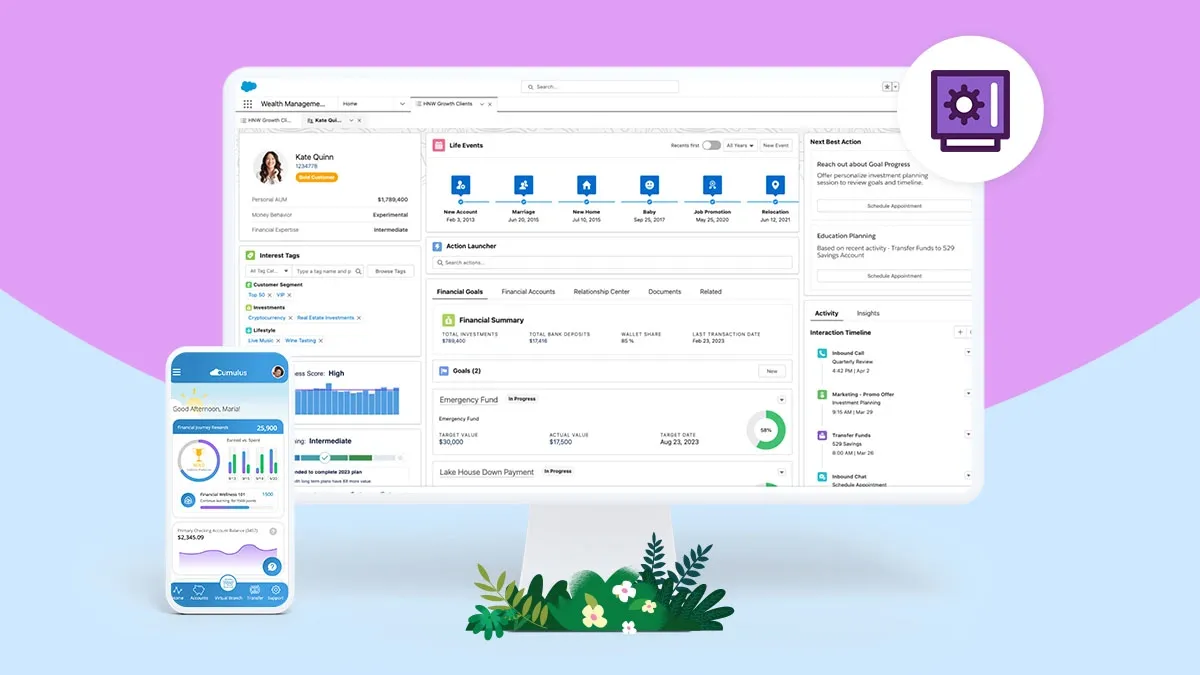
Source: Salesforce
Salesforce Financial Services Cloud is an AI-powered CRM platform designed for wealth management, banking, and insurance professionals. Through collaboration with financial services professionals, this resilient infrastructure delivers specialized tools that go beyond standard CRM capabilities.
What advisors say: Rated 4.4/5 on G2 across verified reviews, with users praising the depth of its financial services data model while noting setup complexity and cost as genuine barriers for smaller practices. The consensus in advisor communities is clear: it's a powerhouse for enterprise firms, but overkill for solo or small RIA practices.
Salesforce Financial Services Cloud Key Features
The Advisor Home Page puts your daily responsibilities, appointments, and goals in one view to help you plan better. This dashboard gives you quick insights into client relationships and tasks that need attention.
The 360-degree client view brings together scattered client data including accounts, investments, transactions, and interactions in one user-friendly interface. This complete view lets you:
- See financial data (investments, insurance, retirement plans) in one place
- Cut down on manual data gathering
- Get analytical insights for customized advice
The platform features a relationship center that maps financial accounts, assets, liabilities, and financial goals for individual clients and households. This household view reveals family connections and helps provide strategic advice.
Salesforce Financial Services Cloud Pros and Cons
Pros:
- Designed specifically for financial services with industry-standard objects and data models
- AI analytics help create customized recommendations
- Adapts to your specific business needs
- Strong mobile features let you access client data anywhere
- Updates happen automatically three times a year
- Reliable compliance tools for financial regulations
Cons:
- Costs more than other financial CRMs
- Complex features might challenge advisors who want simpler solutions
- Setup might need external help if you lack IT support
- Takes time to learn all features
- Some integrations could add extra costs
Salesforce Financial Services Cloud Pricing
Salesforce comes in different editions with increasing capabilities:
- Enterprise Edition: Features industry-specific data models, financial goals tracking, practical segmentation for client outreach, and service process studio
- Unlimited Edition: Adds more AI capabilities, extra automation capacity, Premier Success Plan, and full sandbox environment
- Einstein 1 Edition: Delivers performance management, scheduler, enablement, team collaboration with Slack, Data Cloud, and extra AI requests
Salesforce keeps exact pricing private, but Financial Services Cloud starts at about $150 per user monthly. Full implementations can reach $1,800 yearly per user. You'll need to contact their sales team to get pricing for your needs.
The platform offers a 30-day free trial without requiring a credit card, so you can test it before making a decision.
2Wealthbox — Best for Independent Advisors
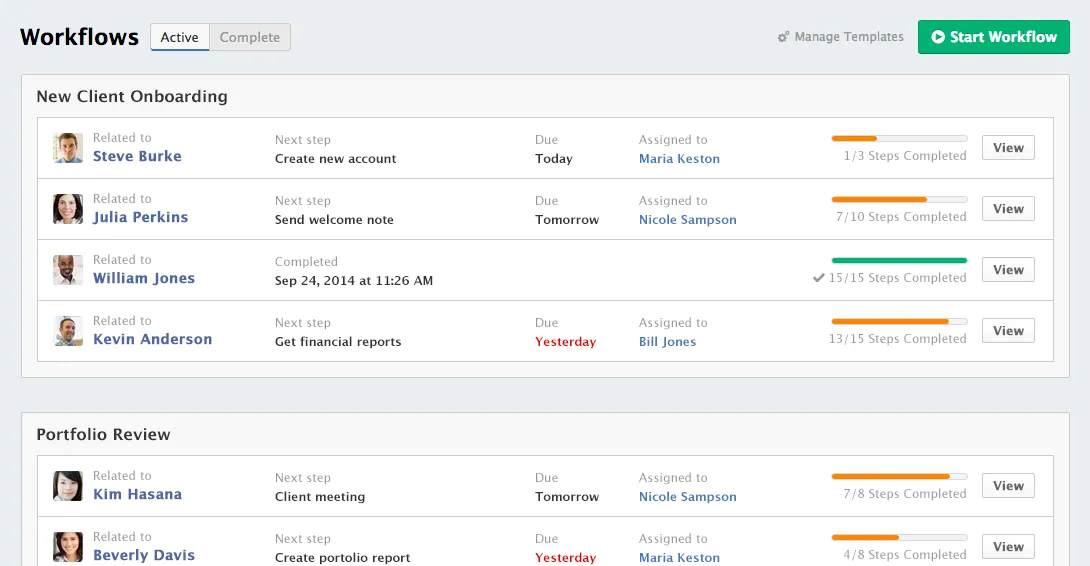
Image Source: Wealthbox
Wealthbox has become popular with financial advisors because of its user-focused approach to CRM. Since its launch in 2014, this platform delivers simplicity without compromising on powerful features advisors use every day.
What advisors say: Rated 4.6/5 on G2 (106 verified reviews) and consistently cited in r/CFP discussions as the top pick for RIA firms under 10 advisors. Wealthbox has earned top placements for being 'Easiest to Use,' having 'Best Results,' and being 'Most Likely to Recommend' among financial advisor CRM tools. At Schwab Advisor Services, Wealthbox ranks #1 out of 9 CRM vendors for user engagement.
Wealthbox Key Features
Wealthbox shines at contact management with an easy-to-use interface that shows all client details in one place. You can organize financial information and communication history while controlling access to specific client data.
Wealthbox Mail is a standout tool. The system creates a two-way connection with your existing email account. You can send and receive messages without leaving the platform. Users say the email integration is "all that, and a bag of chips" and the shared email accounts help teams work better together.
The platform has reliable workflow automation with customizable templates that complete tasks without micromanagement. These processes make everything run smoothly from client onboarding to annual reviews.
Activity streams work as with a private social network for your team. They provide live updates and make collaboration easier, especially when you have remote teams. On top of that, the tracking tool helps you see your book of business with filters by sales funnel stage.
Wealthbox merges with more than 130 tools including AI systems, billing platforms, custodial services, and marketing solutions.
Wealthbox Pros and Cons
Pros:
- User-friendly interface that's quick to learn
- Mobile app rated highest among wealth-tech CRMs
- Strong collaboration features through activity streams
- Two-way email sync with tracking capabilities
- SOC 2, Type 2 certification with bank-level 256-bit encryption
Cons:
- Higher pricing than some competitors with recent price increases
- Limited mailmerge fields for marketing campaigns
- Email integration sometimes has syncing issues with folders
- Some users find the tagging system confusing across different sections
Wealthbox Pricing
Wealthbox comes in four pricing tiers:
- Basic: $45 per user monthly with 2GB storage, 1 workspace, and 3 contact roles
- Pro: $59 per user monthly with 5GB storage, 1 workspace, and 5 contact roles
- Premier: $79 per user monthly with 10GB storage, 5 workspaces, and unlimited contact roles
- Enterprise: Custom pricing with 20GB storage, unlimited workspaces, dedicated account manager, and enhanced security features
3Zoho CRM — Best Value for Smaller Advisory Firms
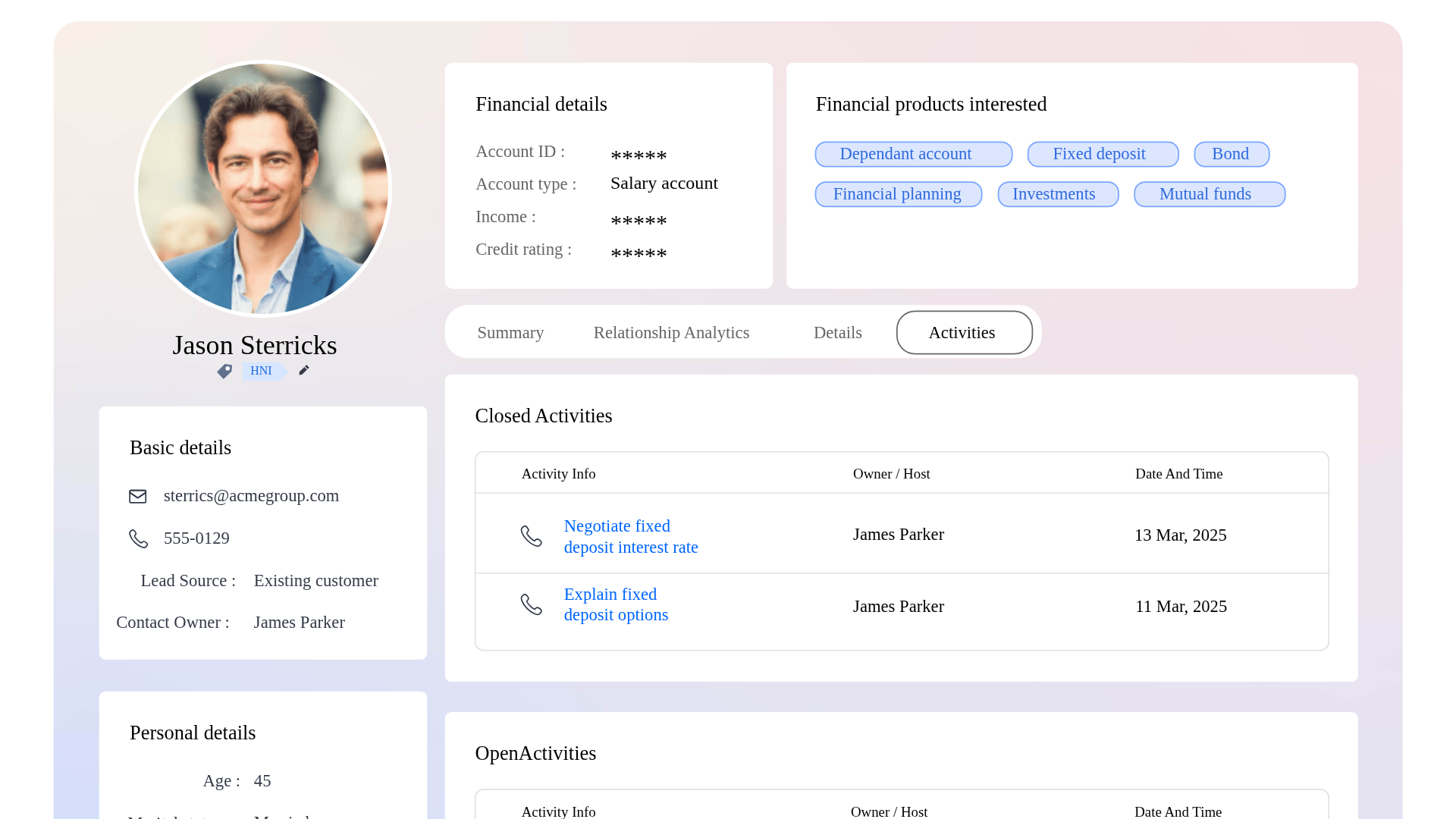
Image Source: Zoho
Zoho CRM gives financial advisors a powerful yet affordable solution that combines simplicity with dependable functionality. Financial professionals who want customization without complexity have started adopting this easy-to-use platform.
What advisors say: Rated 4.1/5 on G2 across thousands of verified reviews, with advisors at smaller practices valuing the affordability and customization depth. A common note in advisor communities is that Zoho requires workarounds for FINRA-specific compliance features, something purpose-built tools like Redtail handle natively. Discussion threads on r/financialplanning reflect that Zoho works best as a starting CRM before firms scale into advisor-specific platforms.
Zoho CRM Key Features
Zoho CRM delivers a detailed 360-degree client view that brings financial data, policy documents, and insurance records together in one interface. You can personalize your CRM with drag-and-drop simplicity through the platform's Canvas design studio.
Financial advisors will find Zoho's integration capabilities valuable. The platform connects with over 800 apps through the Zoho Marketplace, including essential financial tools like Zoho Finance Plus for invoicing and accounting.
The platform's AI assistant, Zia, adds practical value by:
- Predicting lead conversion likelihood
- Identifying the best times to contact clients
- Capturing information from client emails automatically
- Detecting anomalies based on sales trends
Financial teams can benefit from Zoho's workflow orchestration, which designs and automates customer engagement for tailored experiences. Sales force automation removes manual tasks while process management tools maintain consistency in client interactions.
Zoho CRM Pros and Cons
Pros:
- Free plan supports up to three users with essential features
- Easy-to-use interface that new users can quickly learn
- Multiple customization options to match your workflows
- Reliable mobile app for iOS and Android with quick access to contacts and leads
- Advanced security measures protect sensitive financial data
Cons:
- Users report mixed experiences with customer support response times
- New users might find customization options overwhelming
- Reports could be more powerful and easier to use
- Interface needs a modern update
- Non-technical users struggle with email template customization
Zoho CRM Pricing
Zoho's tiered pricing offers substantial savings with annual billing:
- Free: Up to 3 users get contact tracking, simple automation, and standard reports
- Standard: $14/user/month (annual billing) includes sales forecasting, lead scoring, and marketing automation
- Professional: $23/user/month (annual billing) adds inventory management, Google Ads integration, and mass email scheduling
- Enterprise: $40/user/month (annual billing) features AI-powered tools, client portals, and approval processes
- Ultimate: $52/user/month (annual billing) offers advanced AI capabilities and customization
Each plan comes with a free trial so you can test the features before deciding. Zoho CRM offers excellent value for financial advisors who need capable client management solutions without breaking the bank.
4SparrowCRM — Best for AI-Native Sales + Client Management
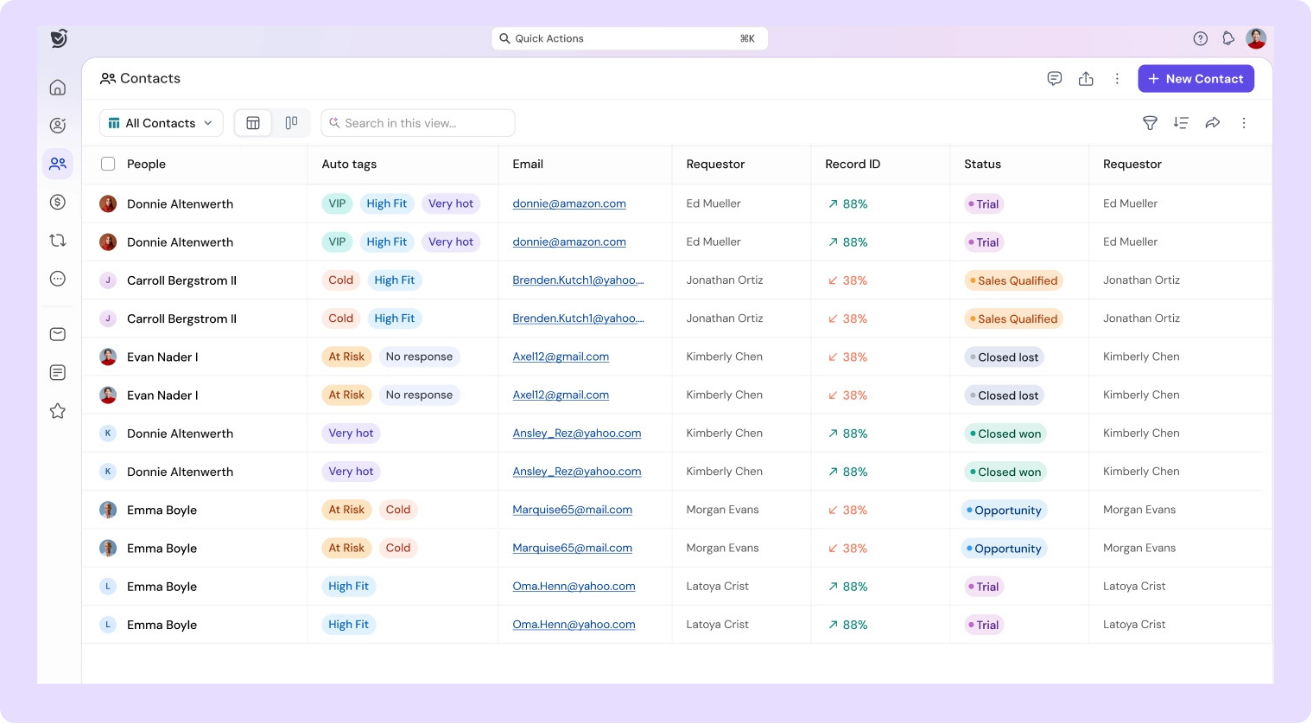
SparrowCRM is an AI-native CRM built for sales teams that need more than a contact database — it combines intelligent deal management, engagement tracking, and next-action AI in a single platform. While not purpose-built exclusively for financial advisory, it is particularly compelling for advisory practices that run an active prospecting workflow alongside ongoing client management.
SparrowCRM Key Features
AI Deal Scoring: SparrowCRM automatically scores each deal based on activity, engagement, and risk signals, so you always know which prospects deserve attention most. Deal health is visible at a glance, with reasons surfaced directly in the deal record.
Engagement Score and Buying Committee Analysis: The platform maps every contact associated with a deal into roles (Decision Maker, Influencer, Gatekeeper) and scores their engagement level. For advisory practices managing multiple stakeholders across a household or corporate client, this view surfaces who is truly engaged and who needs re-engagement.
Competitor Mentions Intelligence: SparrowCRM automatically flags when a competitor is mentioned in emails, call transcripts, or meeting conversations, with the exact context. This helps advisors understand competitive pressure early and adjust positioning before it becomes a deal risk.
AI-Generated Next Actions: After every interaction, SparrowCRM's AI recommends the specific next step for each deal or contact, not generic reminders, but context-aware actions derived from what was actually discussed.
Deal Won-Lost Analysis: When a deal is marked as lost, SparrowCRM performs an AI analysis across all email exchanges, call transcripts, and meeting notes to pinpoint the exact reason — and surfaces takeaways for future similar deals.
Pipeline Management and Dashboards: Full pipeline visibility with customizable stages, deal tracking, and reporting dashboards. Teams can share dashboards with read-only, edit, or share access — including scheduled email delivery of reports.
SparrowCRM Pros and Cons
Pros:
- AI-native architecture, deal intelligence and next actions are built in, not bolted on
- Buying committee mapping, ideal for advisory practices managing complex household or corporate client structures
- Competitor mentions intelligence, surfaces competitive risk automatically from conversations
- Deal won-lost analysis, helps practices learn from lost opportunities systematically
- Modern, clean UI, minimal learning curve, fast onboarding
- Combines prospecting intelligence with client relationship management in one platform
SparrowCRM Pricing
Free: $0/user/month, 3 seats, unlimited records, AI scoring on deals, contacts, and meetings
Growth: $19/user/month, Everything in Free, plus AI call notetaker, auto-tagging by deal stage, buying intent signals, email sequences with AI
Pro: $49/user/month, Everything in Growth, plus full conversation intelligence, call recording and transcription, unlimited AI-generated reports
Enterprise: Custom pricing, Everything in Pro, plus full API access, dedicated CSM, custom SLAs
Turn more prospects into long-term clients with AI-driven deal and relationship insights
5Redtail CRM — Best for Compliance-First Advisors
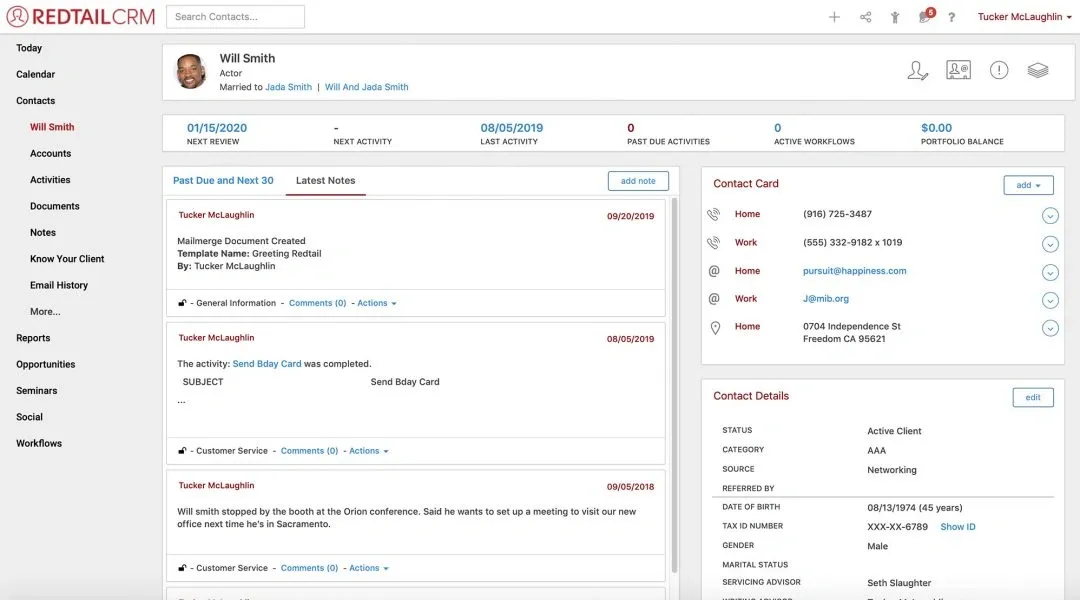
Image Source: Redtail Technology
Redtail CRM led the way as the first cloud-based CRM specifically designed for financial advisors. This trailblazing solution continues to shape state-of-the-art advisor technology today.
What advisors say: Rated 4.3/5 on G2 and widely referenced in r/CFP community threads as the industry standard for compliance-heavy practices. Praise clusters around workflows, integrations, and centralized client management. The most common critique on Capterra is the dated interface — but advisors consistently say the compliance depth and Redtail Speak justify it for regulated firms.
Redtail CRM Key Features
Redtail delivers efficient workflows through its accessible interface. The platform creates standardized processes that match your existing workflows. Each task has clear accountability, so nothing gets overlooked.
The CRM's deep integration capabilities make it unique, connecting to many financial services applications that eliminate duplicate data entry. The integration network connects compliance tools, marketing automation platforms, and portfolio management systems.
Redtail Imaging gives the most important attention to document management by linking electronic document storage to contact records directly. You can take control of documents and reduce office clutter with a paperless approach.
Redtail Speak gives you a compliant texting solution for client communication. You can text clients and chat with staff while proper archiving maintains compliance. The Email Archive and Retention feature handles email correspondence with the same compliant approach.
Redtail Campaigns handles marketing needs and helps accelerate new business. The personalized marketing collateral helps build deeper client relationships.
The mobile app connects you to your CRM data away from your desk. Your business stays active as long as you have your phone.
Redtail CRM Pros and Cons
Pros:
- Solutions built specifically for financial advisors
- Strong document management capabilities
- Compliant communication tools for texting and email
- Large integration network with financial services applications
- Customer service team known for "extreme customer service"
Cons:
- User interface looks dated compared to newer options
- AI capabilities are nowhere near some competitors
- Customization options more limited than other platforms
- Support unavailable 24/7
- Price structure costs more after recent changes
Redtail CRM Pricing
The platform updated its pricing structure from a flat-fee model to a per-user approach:
- Growth Plan: $45 per user/month (billed annually) or $59 per user/month (billed monthly) for up to 5 users
- Premium Plan: Has Redtail Imaging and Redtail Speak at $65 per user/month (billed annually)
- Enterprise Plan: Custom pricing with unlimited users
The Growth Plan's core CRM features include contact management, document storage, customizable fields, client segmentation, compliant note-taking, calendar tools, reports, sales pipeline tracking, and mobile access.
New users can explore Redtail through a 30-day risk-free trial with complete functionality. This trial helps you see if Redtail's industry-specific features and compliance tools fit your practice's needs.
6Junxure — Best for Wealth Management Practices
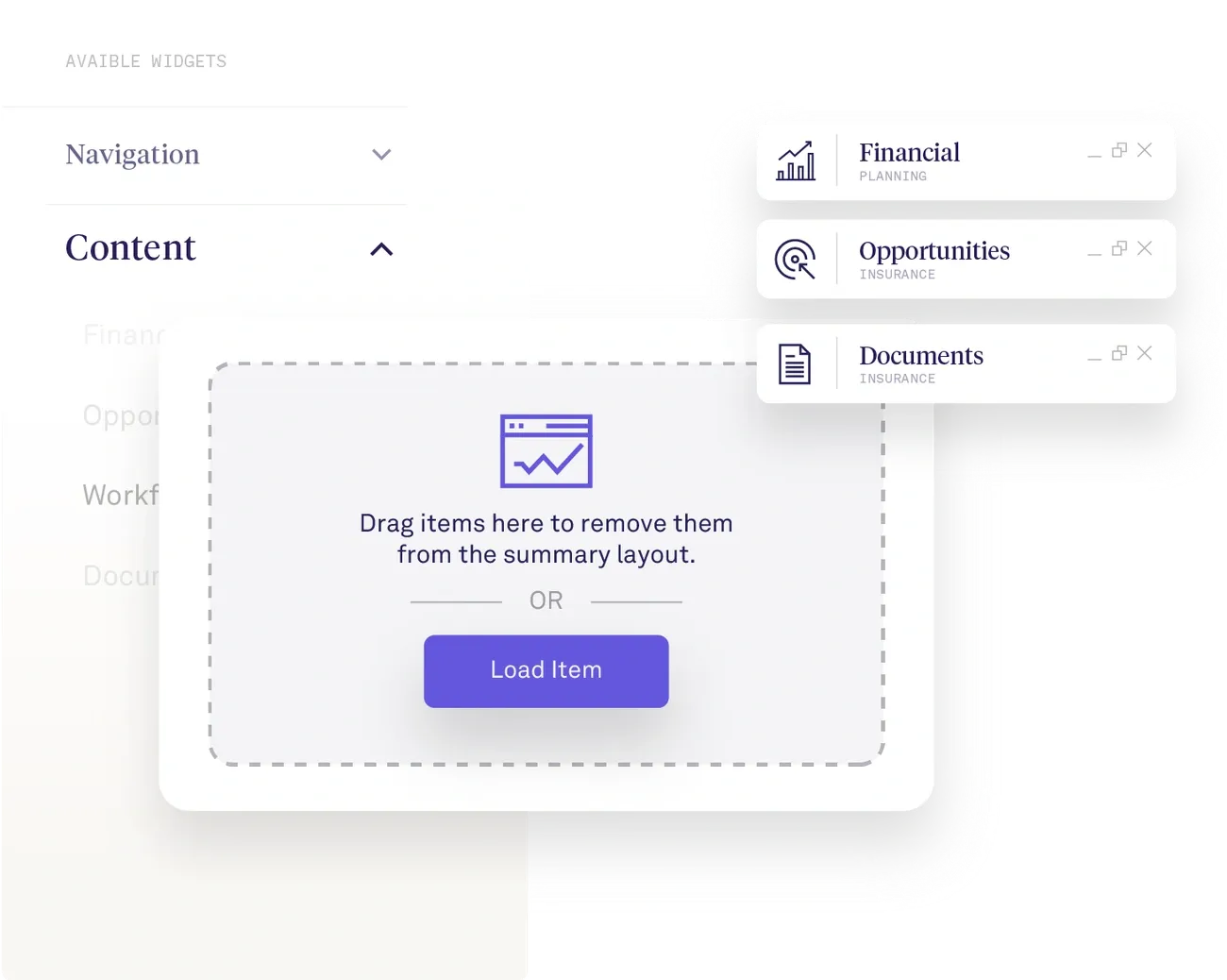
Image Source: AdvisorEngine
Financial advisors who knew the industry's unique challenges created Junxure, an intelligent practice management solution built for wealth management firms. AdvisorEngine acquired the platform in 2018, and it evolved while staying true to its industry-focused roots.
What advisors say: Rated 4.2/5 on G2, favored by ensemble and mid-size wealth management firms. Users in advisor communities frequently highlight the depth of its compliance workflow automation as a differentiator over general-purpose CRMs — particularly for practices managing complex household structures and regulatory review cycles.
Junxure Key Features
Junxure excels with intelligent workflow automation that makes client management easier. The system shows a complete 360° view of clients and puts all important information in one accessible interface. This detailed view helps you give more individual-specific service and reduces administrative work.
The secure Client Portal makes shared work between your firm and clients possible. Clients can access documents and financial information in a protected environment. Junxure's engagement questionnaires use complex scoring algorithms on client responses and create individual-specific portfolio recommendations. This becomes a great way to get insights for creating tailored financial strategies.
Automated risk assessments and yearly reviews help your organization stay compliant with regulations. The platform brings together business management tasks like digital onboarding, goal-based planning, trading, and marketing in one system.
Junxure Pros and Cons
Pros:
- Built specifically for wealth management by advisors who know the industry
- Resilient compliance tools with automated risk assessments
- Strong integration capabilities with custodians and portfolio platforms
- Detailed document management system
- Customizable investment framework that fits your processes
Cons:
- Learning curve is steep due to many features
- Cost structure might not work for smaller practices
- Interface looks less modern than newer options
- Fewer third-party integrations than some competitors
Junxure Pricing
Junxure's mid-range pricing starts at $65 per user monthly. Some sources show a lower rate of $44 monthly per user with a minimum of three users. This makes Junxure neither the cheapest nor the most expensive CRM option available.
The platform gives you unlimited data and document storage at no extra cost. This advantage matters because financial advisory work needs lots of document storage.
7Monday CRM Review — Best for Visual Workflow Management
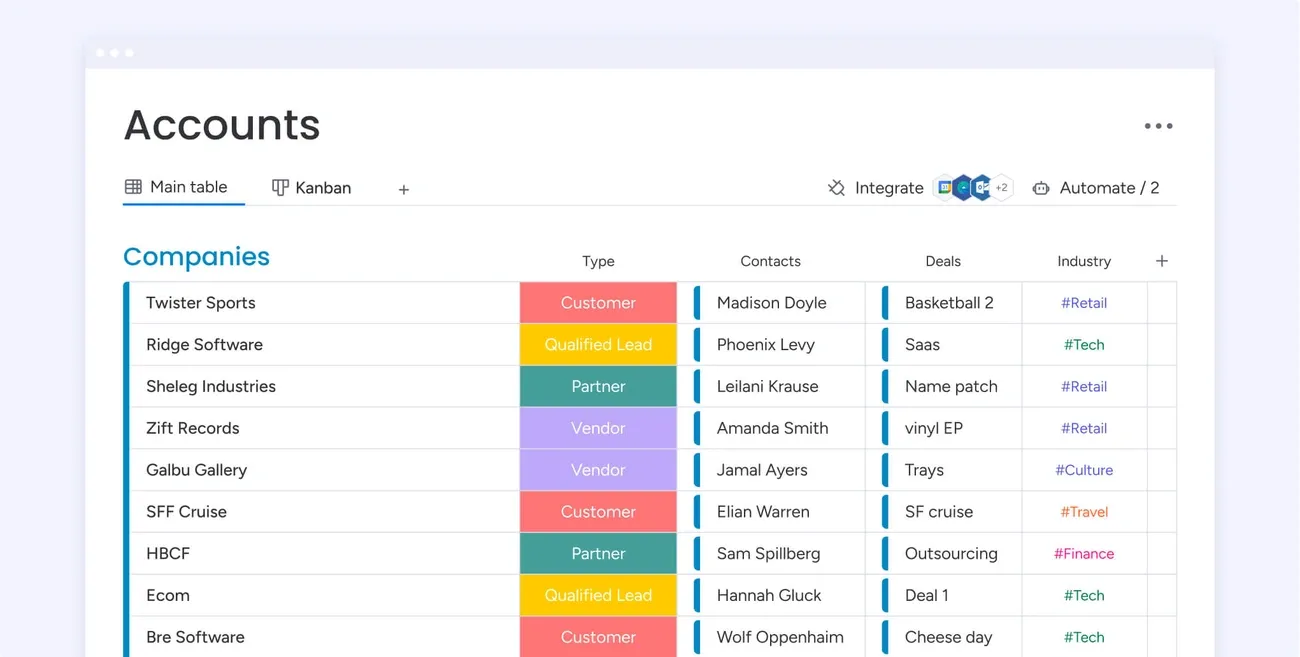
Image Source: Monday.com
monday CRM stands out with its vibrant, visual interface that makes complex client relationship management simple and straightforward. Financial advisors who want to customize their workflow will find the platform's adaptability particularly appealing.
What advisors say: Rated 4.7/5 on G2 overall — the highest G2 score in this list. However, advisor communities on r/financialplanning note it lacks the advisor-specific compliance infrastructure that Redtail and Wealthbox provide natively. Best suited for advisory teams that prioritize workflow visibility and task management and are willing to build compliance workarounds manually.
Monday CRM Key Features
monday CRM gives you exceptional control to customize everything from dashboards to automations. Client segmentation works with tailored parameters such as financial goals, risk levels, or investment profiles. The platform features 27 different work views that include Kanban, Calendar, Gantt, and Workload views.
Advanced analytics and reporting tools track tasks, sales metrics, and customer behavior patterns effectively. No-code automation features remove repetitive tasks while keeping client communication consistent.
Financial advisors need strong compliance measures, and monday CRM delivers advanced security and governance features that align with client data storage regulations. The system enables you to:
- Build custom forms to gather financial documents from clients
- Log calls with automatic summaries to enhance collaboration
- Track team performance through detailed dashboards
- Score leads to segment potential customers better
Monday CRM Pros and Cons
Pros:
- Cloud-based access from mobile devices suits remote financial teams perfectly
- Platform adapts to your specific workflow needs
- User-friendly design reduces learning time
- Powerful automation features save time
- AI capabilities generate tailored client emails
Cons:
- Navigation becomes complex at times
- Multiple pricing tiers create confusion
- Desktop version outperforms mobile app
- Recurring tasks need complex automation rules
Monday CRM Pricing
monday CRM presents four pricing tiers with annual billing discounts:
- Basic: Starting at $12/seat/month with customizable pipelines and unlimited contacts
- Standard: Starting at $17/seat/month, adds advanced account management, email integration, and 250 monthly automation actions
- Pro: Starting at $28/seat/month includes email tracking, 25,000 monthly automation actions, and expanded dashboard capabilities
- Enterprise: Custom pricing delivers advanced analytics, enterprise-grade security, and detailed automation
Each plan comes with a 14-day free trial. monday CRM's seat-based pricing grows with your financial advisory practice.
8Pipedrive — Best for Pipeline-Focused Advisors
Source: Pipedrive
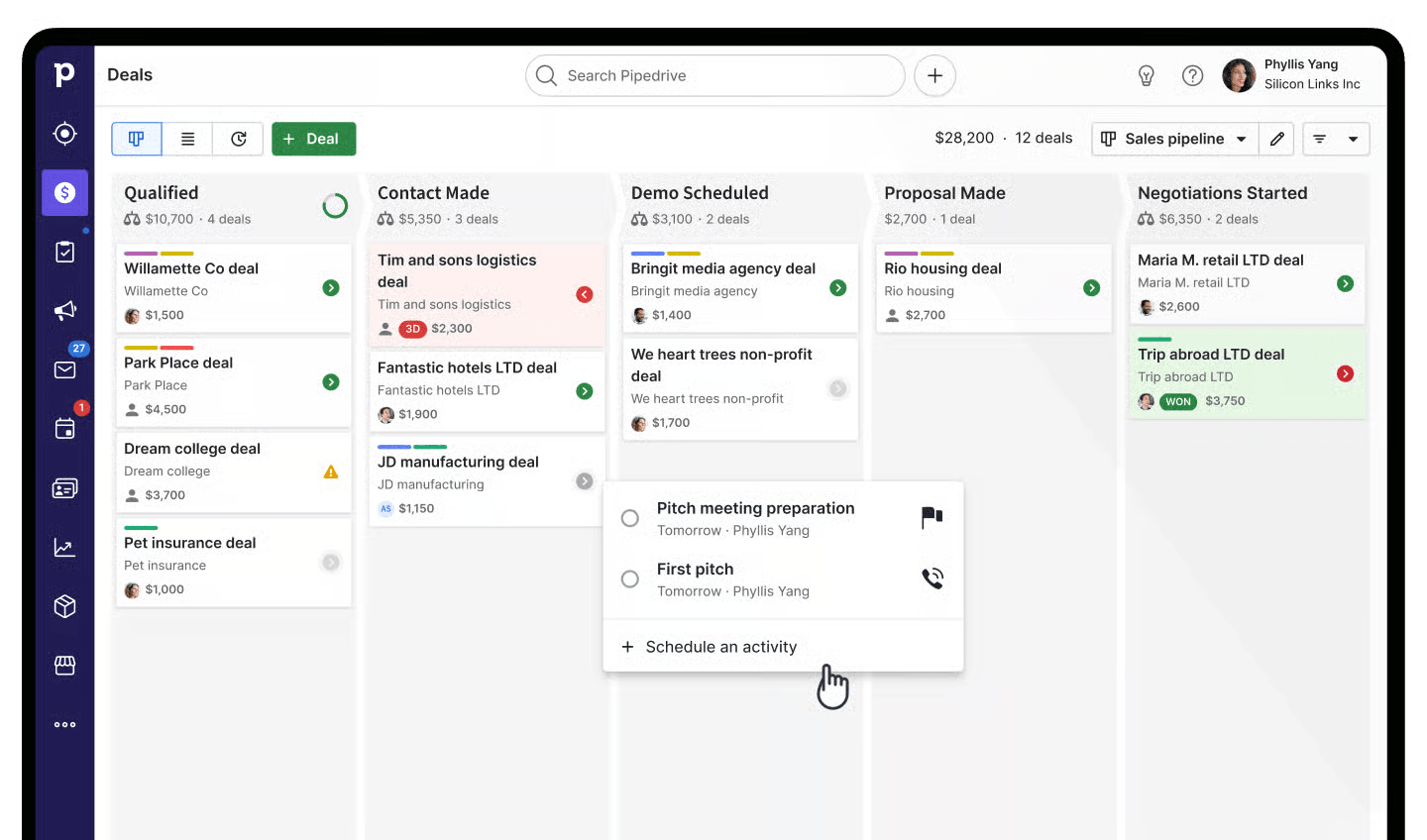
Pipedrive changes contact management for financial advisors with its visual sales pipeline approach. This CRM combines an easy-to-use design with powerful functionality that helps you build stronger client relationships.
What advisors say: Rated 4.2/5 on G2 with strong feedback from advisors running active prospecting pipelines. Community feedback on r/CFP reflects that Pipedrive works well for growth-focused solo advisors but requires manual workarounds for FINRA-compliant record-keeping, a meaningful gap compared to purpose-built tools.
Pipedrive Key Features
Pipedrive stands out with its workflow automation that puts administrative tasks on autopilot. You can spend more time creating individual-specific customer experiences. The pipeline management feature shows your deal stages visually and helps analyze conversion rates to find areas for improvement.
The contact timeline shows your complete history with each client. Your team members can quickly check past conversation context before follow-ups. Security features protect your data with two-factor authentication, suspect access monitoring, and a centralized secure hub for client data—everything in financial compliance.
The platform connects smoothly with over 350 apps and add-ons through powerful integration capabilities. Financial advisors can utilize the LeadBooster add-on to discover target customers from a database of over 400 million profiles.
Pipedrive Pros and Cons
Pros:
- Exceptionally clean, user-friendly interface
- Excellent customization options that adapt to your sales process
- Strong visual pipeline management for tracking client relationships
- Best-in-class reporting with easy-to-customize dashboards
- Mobile app functionality for managing client data on the go
Cons:
- Higher price point following recent increases
- Limited AI capabilities compared to some competitors
- Automation features nowhere near competitors like HubSpot
- Stratified customer support access based on pricing tier
Pipedrive Pricing
Pipedrive offers five pricing tiers with monthly or annual billing options:
- Essential: $14/user/month (annual) or $24/user/month (monthly)
- Advanced: $29/user/month (annual) or $39/user/month (monthly)
- Professional: $49/user/month (annual) or $64/user/month (monthly)
- Power: $64/user/month (annual) or $79/user/month (monthly)
- Enterprise: $99/user/month (annual) or $129/user/month (monthly)
Each tier adds more features like email integration, automation capabilities, AI tools, and enhanced security options. You can test all functionality with a 14-day free trial before committing.
Conclusion
My personal experience with these CRM solutions shows that the right system can revolutionize your practice. The best CRM will alter how you manage client relationships and accelerate your business growth.
Your specific needs should guide your choice. Salesforce Financial Services Cloud excels for larger firms needing complete features. Wealthbox proves ideal for solo advisors and growing teams. Zoho CRM delivers excellent value to smaller practices. Redtail stands out with strong compliance tools for regulatory-focused advisors.
Spreadsheets and outdated systems remain popular among financial advisors - a dangerous approach that creates data vulnerabilities and stunts growth. Poor communication alone causes 30% of investors to switch advisors. A suitable CRM helps you avoid this risk.
These key factors should guide your decision:
- Budget constraints and pricing structure
- Team size and collaboration needs
- Compliance requirements specific to your practice
- Integration needs with your existing tech stack
- User experience and learning curve
Most providers offer free trials - use them. Ground experience with a system matters more than paper specifications. My testing revealed that seemingly perfect solutions often felt awkward in actual use.
CRM implementation requires effort but yields substantial returns. Our research shows that advisors using specialized CRMs spend up to 20% more time on valuable client interactions instead of administrative work.
The financial advisory world becomes more competitive each year. Advisors who lack proper tools risk falling behind competitors who use these systems to create better client experiences. Today's CRM choice influences your practice efficiency, client satisfaction, and growth potential significantly.
Your practice needs should determine your CRM solution. Start evaluating options now to revolutionize your client relationship management.

Geethapriya
Geethapriya is a Growth Marketer and Business Researcher who researches and writes about CRM, sales, marketing, and customer engagement. Her work focuses on understanding industry trends, customer and sales challenges, and how businesses can use technology to build more effective growth processes.