CRM SOFTWARE
Zoho CRM pricing (2026): Plans, real costs, add-ons, and honest alternatives

By Geethapriya
Last updated on Aug 3, 2026
Explore this blog to understand exactly how much Zoho CRM costs, what each plan includes, what the hidden fees are, and whether it is the right fit for your sales team before you commit.
Geethapriya
Updated on Aug 3, 2026
If you are evaluating Zoho CRM for your organization, the pricing page alone will not give you the full picture. Five plans, multiple bundles, add-on fees, tiered support costs, and AI gated behind higher tiers; there is a lot to unpack before you can make a confident decision.
This guide breaks down every Zoho CRM plan with real cost scenarios for different team sizes, explains what you get at each tier, covers the add-ons and hidden costs that regularly surprise buyers, and compares Zoho against Freshsales, HubSpot, Pipedrive, and Attio so you can make an honest side-by-side call.
Whether you are a founder at a 10-person SaaS company, a VP of Sales mapping total cost of ownership, or a RevOps lead shortlisting CRM platforms, this guide is built around the decisions you actually need to make.
Zoho CRM pricing at a glance (2026)
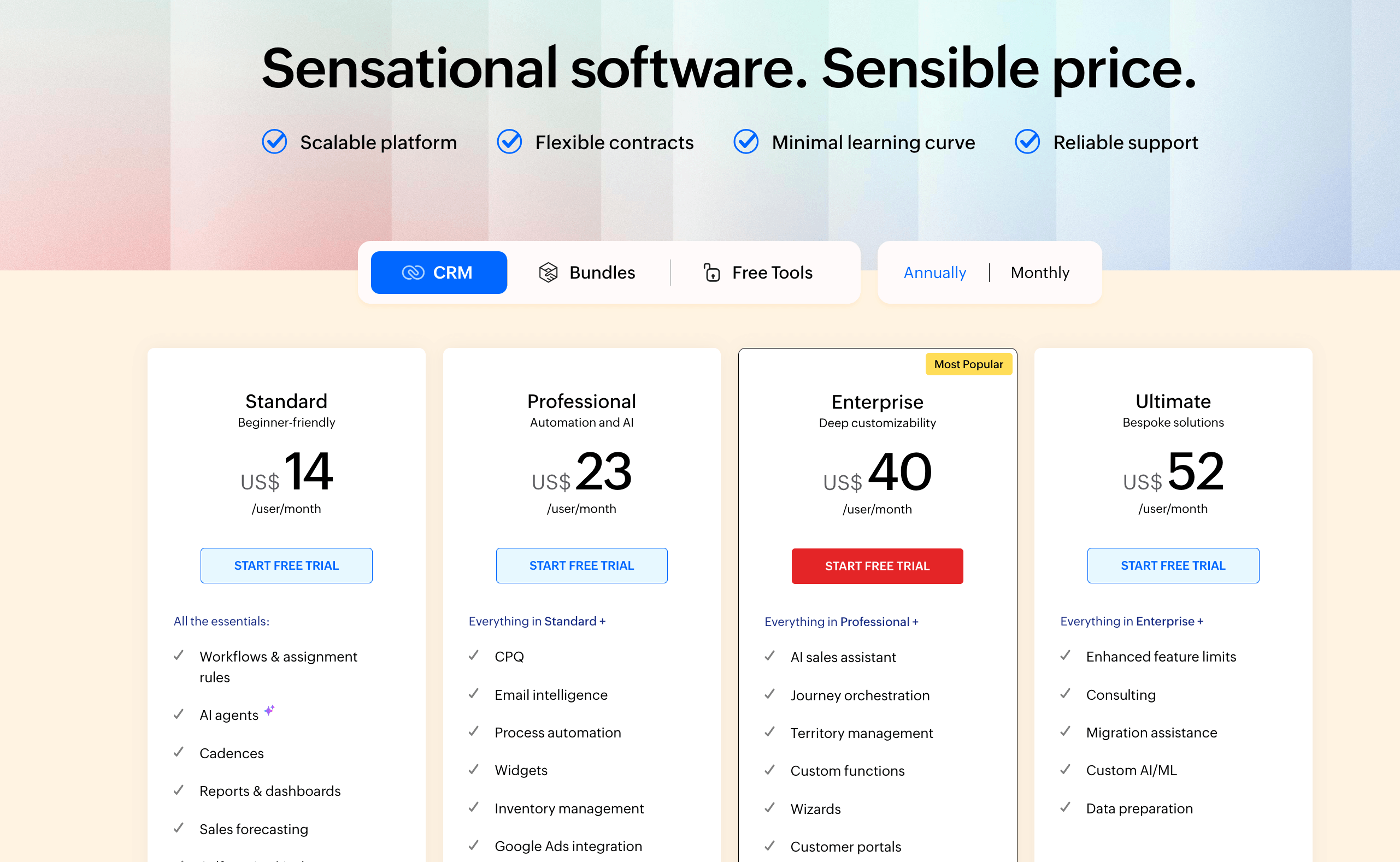
Zoho CRM offers five editions: one free plan and four paid tiers. All paid plans support unlimited users and are priced per user, per month. Annual billing saves roughly 28–34% compared to monthly.
Plan | Annual /user/mo | Monthly /user/mo | Users | Free Trial | Best For |
Free | $0 | $0 | Up to 3 | No limit | Solo / early testing |
Standard | $14 | $20 | Unlimited | 15 days | Small sales teams |
Professional | $23 | $35 | Unlimited | 15 days | Teams needing automation |
Enterprise | $40 | $50 | Unlimited | 15 days | Larger, data-driven teams |
Ultimate | $52 | $65 | Unlimited | 15 days | Enterprises, advanced analytics |
Annual billing is almost always the right default if you have a stable team. The savings compound quickly; a 10-person team on Enterprise saves $1,200 per year by committing annually versus monthly.
What Zoho CRM actually costs for your team size
Per-user pricing only tells part of the story. Below is the monthly bill for teams of 5, 10, and 20 users across all paid plans, for both annual and monthly billing cycles.
Plan | 5 users (Annual) | 10 users (Annual) | 20 users (Annual) | 5 users (Monthly) | 10 users (Monthly) | 20 users (Monthly) |
Standard | $70/mo | $140/mo | $280/mo | $100/mo | $200/mo | $400/mo |
Professional | $115/mo | $230/mo | $460/mo | $175/mo | $350/mo | $700/mo |
Enterprise | $200/mo | $400/mo | $800/mo | $250/mo | $500/mo | $1,000/mo |
Ultimate | $260/mo | $520/mo | $1,040/mo | $325/mo | $650/mo | $1,300/mo |
Annual billing consistently saves 28–30% compared to monthly billing. For a 20-person team on Enterprise, that difference is $2,400 per year. Factor in add-ons, onboarding, and support (covered below) to arrive at your actual total cost of ownership.
Zoho CRM pricing plans explained
1. Free plan: $0 for up to 3 users
The free plan covers the basics: leads, contacts, accounts, deals, tasks, events, call logs, and mobile app access. It is a legitimate entry point if you are a solo operator or a very small team doing early pipeline testing.
What it does not include: sales forecasting, multiple pipelines, workflow automation, mass email, or any meaningful customization. The moment your team grows to four people, or you need to automate a single task, you hit the wall and must move every user to a paid plan.
Storage is capped at 1 GB total. Use the free plan to learn the interface, not to run a real sales operation.
2. Standard plan: $14/user/month (annual), $20/user/month (monthly)
Standard is where Zoho becomes functional for a working sales team. You get multiple pipelines, basic lead scoring, mass email (250 emails per day), customizable dashboards, sales forecasting, and access to Zoho Marketplace for integrations.
The cap of 10 custom fields per module will feel tight for most teams within six months. Workflow automation exists, but it stays basic. Reporting is limited to 100 custom reports. If your sales process has any real complexity, you will likely need a professional within a year.
3. Professional plan: $23/user/month (annual), $35/user/month (monthly)
Professional is the first tier that lets you build and enforce a sales process at scale. The standout additions are Blueprint, a visual process editor that maps your sales workflow step by step, and SalesSignals, which sends real-time notifications when leads engage across email or social channels.
You also get inventory management, Google Ads integration, webhooks, and expanded automation. Custom fields jump from 10 to 155 per module. Email volume increases to 500 per day. For most SMBs with a real outbound or inbound sales motion, Professional is the minimum viable plan.
4. Enterprise plan: $40/user/month (annual), $50/user/month (monthly)
Enterprise unlocks Zia, Zoho's AI assistant. Zia can surface predictive lead scores, recommend the best time to contact a prospect, flag anomalies in your pipeline, and automate rule-based workflows. This is the only plan on which AI becomes a genuine sales tool; it is not available on Free, Standard, or Professional.
You also get territory management, multi-user portals for client or partner collaboration, sandbox testing, advanced customization (300 custom fields per module), and journey orchestration. Enterprise is built for larger teams managing complex, multi-department processes.
5. Ultimate plan: $52/user/month (annual), $65/user/month (monthly)
Ultimate is primarily an extension of Enterprise, not a new tier. You get higher API limits, advanced analytics through Zoho Analytics, 2,000 daily emails, expanded storage (5 GB base + 1 GB per user), and priority support included.
The upgrade is driven by capacity and reporting depth, not new tools. Teams on Enterprise that are hitting operational ceilings, high API usage, large datasets, or heavy analytics demands are the natural fit.
Zoho CRM plan feature comparison
Feature | Free | Standard | Professional | Enterprise | Ultimate |
Pipelines | 1 | Multiple | Multiple | Multiple | Multiple |
Custom Fields / Module | 5 | 10 | 155 | 300 | 500 |
Workflow Automation | No | Basic | Advanced | Full | Full |
Blueprint (Process Mgmt) | No | No | 3 Blueprints | 50 Blueprints | 100 Blueprints |
Zia AI | No | No | No | Yes | Enhanced |
Sandbox Testing | No | No | No | Yes | Yes |
Custom Reports | Basic | 100 | Unlimited | Unlimited | Unlimited + Analytics |
Territory Management | No | No | No | Yes | Yes |
Storage | 1 GB total | 1 GB + 512 MB/user | 1 GB + 512 MB/user | 1 GB + 1 GB/user | 5 GB + 1 GB/user |
Add-ons, AI, and what Zoho CRM actually costs after extras
The sticker price is the starting point, not the full picture. Most teams evaluating Zoho encounter three categories of additional cost: onboarding, support, and add-ons.
Add-On | Cost | Notes |
Jumpstart Onboarding | $200/hr, 10-hr minimum ($2,000) | Professional setup assistance — not free |
Premium Support | 20% of the annual license fee | 3-hour response, 24/5 phone + chat |
Enterprise Support | 25% of the annual license fee | 1-hour response, 24/7, onboarding specialist |
Extra File Storage | $4.60/month per 5 GB | Base storage varies by plan |
Additional Data Backups | $12 per backup | 2 free backups/month included |
Zia AI | Enterprise ($40/user/mo) and above only | Not available on Free, Standard, or Professional |
The AI gap in Zoho's pricing model
Zia, Zoho's AI assistant, only activates at the Enterprise plan ($40/user/month). That means a 10-person team pays $4,800/year in license fees before AI becomes available. On Standard or Professional, there is no AI at all.
This is the cost variable most buyers miss when they compare Zoho on sticker price alone. A five-person team that wants predictive lead scoring or next-best-action recommendations from day one isn't choosing between a fourteen-dollar plan and a forty-dollar plan. They're choosing between having AI or not having it at all, and the twenty-six-dollar-per-user monthly gap between Standard and Enterprise is the real price of that one feature, not an upgrade convenience fee.
Need AI before you're ready for Enterprise pricing?

Zoho for startups: The program worth knowing about
Zoho runs a dedicated startup program for early-stage companies. Qualifying startups receive Zoho Wallet credits worth approximately ₹1.86 lakh (around $2,200 USD) that can be applied across Zoho products, including CRM.
The program is designed to let startups access the full Zoho product suite, CRM, campaigns, books, and analytics at low or zero cost during the early growth phase. Details and eligibility criteria are available on the Zoho Startups page.
The wallet credit is not a discount on a specific plan; it is a credit balance applied to your Zoho account. Once exhausted, standard pricing applies. For a pre-revenue or Series A team, this program is worth exploring before defaulting to a paid plan.
What users actually say about Zoho CRM pricing?
A practitioner sharing experience from working with both platforms across client accounts in r/crm put it plainly: HubSpot wins on interface and ease of use for sales teams, but the cost and limited customization become friction points over time. Zoho, on the other hand, earns its place through the breadth of the Zoho Suite; the apps integrate tightly with each other, and the pricing stays manageable even as you scale.
It is a trade-off that surfaces consistently among buyers evaluating both tools: HubSpot is faster to adopt, Zoho is more flexible and more affordable. The decision usually comes down to whether your team needs a clean, low-training-curve experience or a customizable, cost-efficient platform they are willing to configure properly.
Zoho CRM alternatives: Pricing comparison
If Zoho CRM is in your shortlist, at least one of these tools likely is too. The table below is a simple side-by-side on starting price, free plan, AI availability, and primary buyer fit.
CRM | Starting Price (Annual) | Free Plan | AI Included | Best For |
Zoho CRM | $14/user/mo | Yes (3 users) | Enterprise+ only | Feature-rich teams with tech resources |
Freshsales | $9/user/mo | Yes (3 users) | Growth plan ($29) + | SMBs want simple AI-assisted selling |
HubSpot CRM | $15/user/mo (Starter) | Yes (limited) | Pro ($90/user) + | Marketing + sales alignment at mid-market |
Pipedrive | $14/user/mo | No | Add-on ($39/mo) | Sales-first teams wanting pipeline clarity |
Attio | $34/user/mo | Yes (limited) | All paid plans | Modern, data-first teams at Series A+ |
A few things the table does not show: HubSpot's cost escalates sharply at Professional ($90/user/month for Sales Hub), making it significantly more expensive for teams beyond 10 people. Freshsales is the closest like-for-like competitor in terms of price. Attio targets a different profile of modern, data-rich teams at Series A and beyond. For a detailed comparison, see the best CRM software compared guide and the Freshsales vs Zoho CRM breakdown. For context on how pricing models differ across CRM platforms, the CRM pricing models guide covers the key structures worth understanding before you decide.
Who should use Zoho CRM?
- Teams of 15 or more that need territory management, advanced workflow automation, and multi-department coordination. Enterprise and Ultimate are built for this scale.
- Businesses already using other Zoho products: Zoho Books, Zoho Campaigns, or Zoho Desk. The inter-product integration is tight, and CRM Plus becomes compelling when you are already using three or more Zoho tools.
- Organizations with dedicated IT or RevOps resources who can manage the setup, configuration, and ongoing administration. Zoho rewards investment in configuration.
- Teams selling physical products that need inventory management built into the CRM, a capability that is rare at the $23/user price point.
Who should look elsewhere?
- Small teams of any size that need AI from day one: Zia only activates at Enterprise, forty dollars per user per month, and even a team of two or three cannot access AI features on any lower plan. If AI-assisted scoring and next-step guidance need to work from week one, this is the tier constraint to plan around before you commit to a lower plan you'll likely outgrow within six months.
- Non-technical teams without admin support. Zoho's power comes from configuration teams that cannot invest time in setup, will find it overwhelming, and will be underused.
- Founders and early-stage teams who need to go from zero to an active pipeline quickly. The learning curve and setup overhead make faster-to-deploy CRMs a better fit at that stage.
- Teams frustrated by feature gating who want automation, AI, and process management without jumping from $14 to $40 per user to unlock them.
Final thoughts on Zoho CRM pricing
Zoho CRM earns its reputation as one of the most feature-rich CRMs at its price point. Standard and Professional offer real value for small-to-mid-sized sales teams that can configure them properly. Enterprise and Ultimate are built for larger organizations with dedicated resources to manage the platform in depth.
The honest caveat: the headline price is not the real price for most teams. Add onboarding, factor in the support tier you need, and calculate where AI sits on your roadmap, and the total cost of ownership looks meaningfully different from the $14/user starting point.
Use the 15-day free trial on the plan you are seriously considering, not the free plan. The gap between Standard and Professional, or Professional and Enterprise, is large enough that testing the right tier matters before you commit to an annual contract.

Geethapriya
Geethapriya is a Growth Marketer and Business Researcher who researches and writes about CRM, sales, marketing, and customer engagement. Her work focuses on understanding industry trends, customer and sales challenges, and how businesses can use technology to build more effective growth processes.
Frequently Asked Questions (FAQs)
Related Articles
.png?2026-04-29T07:55:51.865Z)
21 Aug, 2025
Freshsales vs Zoho CRM (2026): Which Fits Your Budget & Needs?

05 May, 2026
Pipedrive pricing (2026): Plans, add-ons, hidden costs, and honest verdict
20 May, 2026