LEAD MANAGEMENT
Customer journey map made simple: practical guide and examples

By Ganesh Ravi Shankar
Last updated on Jul 7, 2026
Explore the key steps, best practices, and real examples to build customer journey maps that drive better sales outcomes.

Ganesh Ravi Shankar
Updated on Jul 7, 2026
A customer journey map shows every step a customer takes with your company, not just what they buy. It captures what they do, think, and feel at each stage, from first hearing about you to becoming a repeat customer. Most teams map the visible touchpoints and miss the rest, which is where the real friction usually hides. This guide shows you how to build one properly, with a real B2B example you can copy.
TL;DR
What is a customer journey map?
A customer journey map is a visual picture of every step a customer takes with your company. It shows what customers do, what they think, and how they feel at each stage. Good maps go beyond a simple funnel view. They capture the full experience, not just the parts your team can see.
A journey map helps you see your business the way your customer sees it. This shift in view uncovers pain points and gaps your team might miss from the inside. It turns assumptions into evidence your whole team can act on.
Key components of a customer journey map
Every journey map that works well needs these basic elements:
- Customer persona: a representation of your target audience with specific goals and needs
- Stages: the different phases of the customer's experience, such as awareness, consideration, and decision
- Touchpoints: all interactions between customers and your brand
- Actions: what customers do at each stage
- Emotions: how customers feel during each interaction
- Pain points: obstacles customers face during their experience
It also includes moments of truth, the key events that change how a customer perceives your brand, along with the improvements you plan to make.
How customer journey maps differ from sales funnels
Sales funnels track how interested a lead is in buying. Journey maps track every touchpoint before, during, and after the sale. Funnels move in a straight line. A lead pipeline works the same way, tracking the actions your team takes to move a deal forward. A customer journey rarely moves in a straight line at all.
A journey map shows why customers act the way they do, not just what they do. It captures research habits, doubts, and blockers that a funnel or pipeline view misses. This makes it a sharper tool for finding exactly where deals stall.
Real customer journey map example: B2B SaaS VP of Sales
Here is a real, worked example for Priya, VP of Sales at a 40-person SaaS company evaluating a new CRM.
Stage | Touchpoints | Actions | Emotions | Pain point | Opportunity |
Awareness | LinkedIn post, peer recommendation | Searches "best CRM for SMB sales teams", reads comparisons | Curious, slightly overwhelmed | Generic "best CRM" lists don't match her team size | Publish content aimed at 20-50 person teams, not enterprise buyers |
Consideration | Product demo, G2 reviews, sales call | Shortlists 3 CRMs, asks her ops lead for input | Cautiously optimistic, worried about switching cost | Hard to tell which AI features are real vs. marketing | Show a live Buying Committee Analysis view during the demo |
Decision | Pricing page, contract review, procurement | Requests a 2-rep pilot before signing | Ready to commit, still a little anxious | Procurement asks security questions she can't answer alone | Give sales a one-page security summary ready for procurement |
Onboarding | Kickoff call, in-app setup, support chat | Imports pipeline, trains team in week one | Hopeful, impatient for quick wins | Reps resist logging activity during migration | Turn on AI Next Actions from day one so reps see value fast |
Advocacy | Quarterly business review, referral request | Shares results with peer VPs, agrees to a case study | Confident, proud of the improved close rate | No easy way to prove which feature drove the improvement | Use Deal Score history to show a clear before-and-after |
How customer journey mapping transforms sales teams
1. Better customer understanding
Journey mapping gives sales teams a full view of what drives or blocks a customer's decision, across every stage, not just the call they're on. Reps can then focus on high-value leads first. This means less guessing and more targeted outreach.
2. Enhanced personalization
When reps know where a prospect stands in the journey, they can tailor every message. That means recommending the right feature, at the right time, for the right pain point. This relevance builds trust faster and shortens the path to a real conversation.
3. Streamlined sales processes
Mapping the journey exposes bottlenecks, like redundant follow-ups or unclear handoffs. Fixing these creates a smoother path from first contact to close. Reps spend less time on admin and more time selling, which shortens the overall sales cycle.
.png?2026-07-06T12:48:49.608Z)
4. Improved collaboration
A shared journey map gives sales, marketing, and support one version of the truth. Each team sees how its work connects to what happens before and after. This keeps messaging consistent and removes finger-pointing when a deal stalls.
5. Increased conversion rates
Journey maps flag the exact stages where prospects lose interest or hit friction. Fixing those specific points removes real blockers instead of guessing at fixes. Recovered deals add up fast, and win rates rise across the team over time.
6. Predictive selling opportunities
Mature journey mapping pairs with predictive signals to flag needs before a customer states them. Reps can then suggest the right upsell or cross-sell at the right moment. This turns account growth into a repeatable motion that feels proactive, not pushy.
SparrowCRM helps you close more deals.
Business benefits of implementing customer journey mapping
Higher customer retention and satisfaction
Mapping the customer experience shows you exactly what keeps people loyal. Removing friction at key moments builds trust before problems turn into complaints. Teams that fix pain points early see stronger retention over time, since they are acting before customers leave instead of after.
Increased sales and revenue growth
Experience-driven businesses grow revenue roughly 1.4 times faster than their peers, and their customer lifetime value grows 1.6 times more, according to Smaply's research on journey mapping value. These gains come from understanding exactly what drives conversions. Happy customers also become referral sources, which compounds the initial investment in mapping.
More efficient lead qualification and nurturing
Journey mapping shows exactly how prospects move through your pipeline. This reveals what information a prospect needs at each step, not what your team assumes they need. Reps can then deliver the right content at the right moment, which makes every follow-up count.
.png?2026-07-06T12:49:29.638Z)
Reducing friction in the sales process
Bain and Company's retention research shows that a 5% increase in customer retention can raise profits by 25% to 95%. Most of that gain comes from removing the small obstacles that block conversions. Fixing checkout or onboarding friction recovers meaningful revenue, and better handoffs between marketing and sales close the rest of the gap.
The 5 essential steps to create your first journey map
Step 1: Define your goals and scope
Start with a clear goal. What specific problem are you trying to solve, and for which customer segment? Pull in people from different departments so the map reflects more than one point of view. A map that tries to cover everything ends up helping no one.
Step 2: Build customer personas with real data
Your map is only as good as the persona behind it. Pull data from customer interviews, support logs, web analytics, and conversations with frontline staff. Include both demographics and psychographics, like goals and motivations, so you understand who your customer really is, not who you assume they are.
Step 3: List all customer touchpoints
Touchpoints happen every time a customer connects with your brand, directly or indirectly. Organize them by stage: awareness, consideration, decision, onboarding, and advocacy. Include website visits, calls, emails, and even review reading, so the map tells the full story, not just the visible parts.
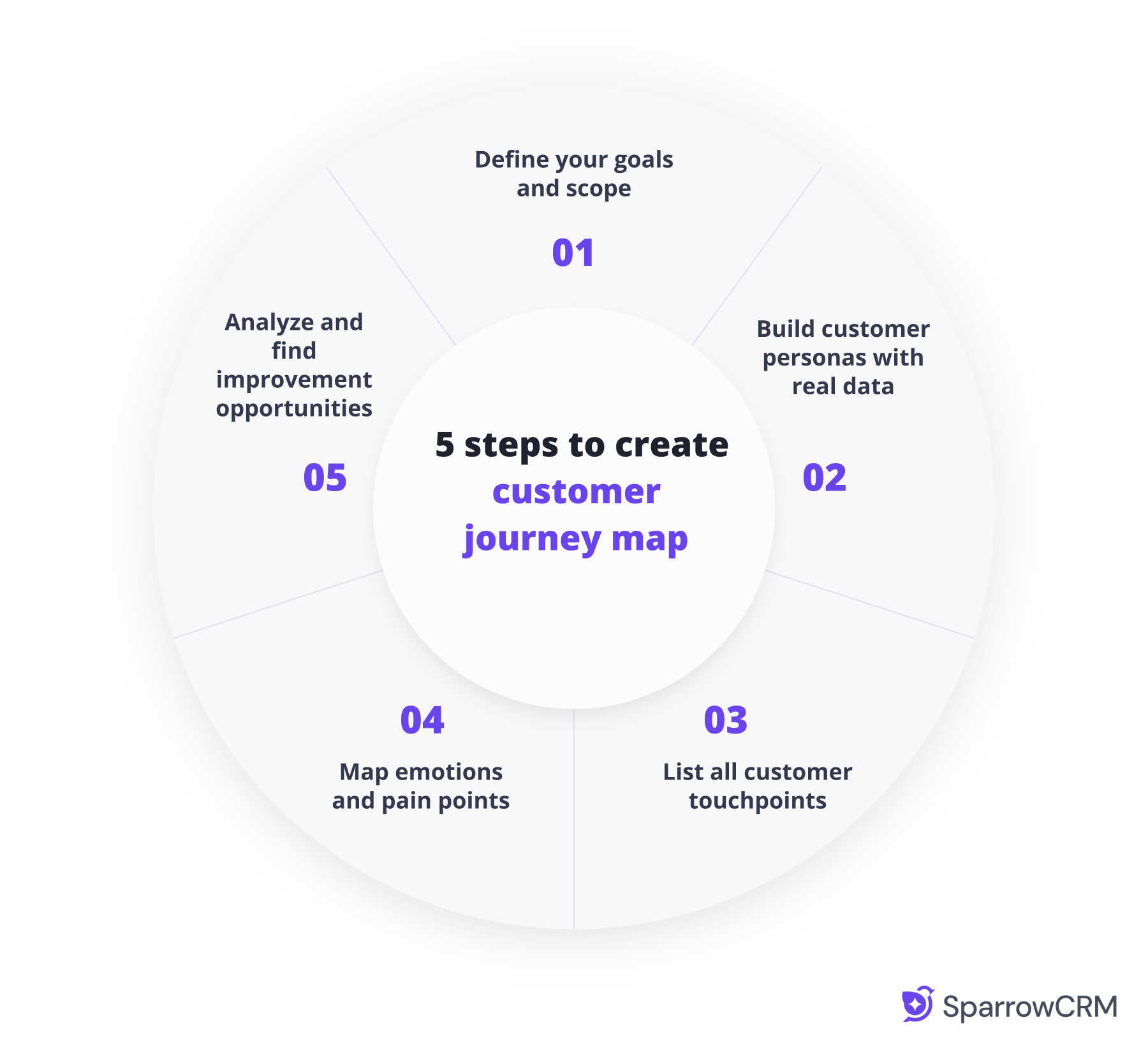
Step 4: Map emotions and pain points
Put yourself in the customer's shoes at each touchpoint. What are they thinking, feeling, or worried about right then? These emotional peaks and valleys often decide whether someone stays or leaves, and naming them clearly is what turns a map into something your team can act on.
Step 5: Analyze and find improvement opportunities
Your finished map will show gaps, overlaps, and rough spots in the experience. Turn every pain point into a specific task with a clear owner. Test fixes with a small group before rolling them out company-wide, since the goal is a concrete plan, not just a diagram.
Best practices for customer journey mapping
Common mistakes to avoid
The biggest mistake is starting without a clear objective. Teams that map just to have a map rarely see real value from it. The second most common mistake is skipping research and guessing at customer needs instead, which usually leads to fixing problems that were never actually there.
- Taking a business-centric rather than customer-centric viewpoint
- Creating overly complex maps that confuse rather than clarify
- Developing generic personas that lack specific behavioral traits
- Trying to map everything at once instead of focusing on the journeys that matter most
Optimizing journey maps for different business models
Every business type needs its own approach to mapping. B2B companies should focus more on relationship touchpoints, since deals involve multiple stakeholders. E-commerce businesses might focus more on the purchase flow itself. Either way, start small and build up instead of mapping everything at once.
How to continuously update and improve your journey map
Customer journey maps need regular updates to stay useful. Review your map whenever new behavior trends emerge, you ship a major product update, or you spot a new customer segment. Assign one team member to own maintenance, and monitor retention, conversion, and satisfaction to confirm your changes are working.
How SparrowCRM turns your journey map into daily action
Most journey maps stop at a diagram on a wall. Buying Committee Analysis maps every stakeholder in a deal by role and decision power, so you know exactly who to focus on at the consideration stage. This works together with data captured through call intelligence and email activity.
AI Next Actions suggests the right follow-up automatically, based on where a deal actually sits in the journey, not a generic cadence. Deal Score tracks momentum through each stage in real time, so you catch a stalling deal before it goes cold.
See every customer touchpoint with SparrowCRM.
Final thoughts
Customer journey mapping works when it drives action, not when it just documents the past. Companies that map the journey and act on it see real gains in retention and revenue, as the data above shows. Start with one segment, one persona, and one clear goal.
Treat the map as a living document. Update it as your product and customers change, and tie every finding to an owned task. That is what separates a map that sits in a drive from one that actually improves your sales process.