CRM SOFTWARE
Spreadsheets vs CRM Software: The Real Cost Comparison for Sales Teams

By Geethapriya
Last updated on May 26, 2026
Explore this blog to understand the real difference between spreadsheet CRM and dedicated CRM software, including a 7-signal readiness test, AI feature comparison, and a step-by-step migration guide built for growing sales teams.

Geethapriya
Updated on May 26, 2026
Most sales teams don't switch from spreadsheets because someone told them to. They switch because something broke a deal fell through the cracks, a rep sent the wrong proposal, or the monthly pipeline review turned into a 2-hour reconciliation exercise.
If your team still runs on Google Sheets or Excel, this guide is not here to shame you. Spreadsheets work up to a point. The real question is whether you've crossed that point, and if so, what moving to a CRM actually looks like in practice.
Below, you'll find a head-to-head feature comparison, a 7-signal readiness test, an AI tools breakdown for both environments, a plain-English cost analysis, and a step-by-step migration guide.
What Is a Spreadsheet CRM, and When Does It Actually Work?
A spreadsheet CRM is exactly what it sounds like: using Google Sheets, Microsoft Excel, or similar tools to manage contacts, leads, and follow-ups without dedicated CRM software. It works well in a narrow set of conditions.
Spreadsheets are genuinely effective when:
- Your active lead count is below 50–100 contacts
- You have a solo founder or a team of two to three people
- Your sales cycle is short, and transactions are low-stakes
- You need a free, zero-training-curve solution right now
Beyond those conditions, the cracks begin to show fast. And the costs of staying on spreadsheets are rarely visible until they've already done damage.
For a deeper look at what CRM software can replace and extend, see the complete guide to CRM software for sales teams.
Spreadsheet CRM vs Dedicated CRM: Side-by-Side Comparison
Here is a direct feature-by-feature breakdown across the dimensions that affect sales team performance most:
Feature | Spreadsheet | CRM Software |
|---|---|---|
Starting Cost | Free (Google Sheets / Excel web) | From $15–$20/user/month |
Contact Capacity | Up to ~50–100 contacts effectively | Thousands, no performance drop |
Data Entry | Manual, ~3.4 hrs/week per rep | Automated data capture |
Data Accuracy | Up to 90% contain errors (Gartner) | Built-in validation & deduplication |
Real-Time Updates | No version conflicts are common | Yes, instant team-wide sync |
Follow-Up Management | Manual reminders, easy to miss | Automated sequences & alerts |
Customer History | Buried in cells; no timeline | Full interaction timeline |
Collaboration | Multiple file versions | Single source of truth |
Security | No access controls or encryption | Role-based access, encrypted storage |
AI Features | Basic (Copilot, Gemini add-ons) | Native AI scoring, forecasting, and emails |
Reporting | Manual formulas & pivot tables | One-click dashboards, visual reports |
Lead Scoring | Not available | Built-in, behavior-based scoring |
Scalability | Degrades with growth | Scales with your team |
Revenue Impact | 15% avg. loss from data errors | Prevents leakage; boosts close rate |
Why Spreadsheets Break as Your Sales Team Grows
1. Version control becomes a full-time job
When four reps each maintain their own copy of the pipeline sheet, no one is working from the same reality. Studies show up to 88% of spreadsheets contain errors, and most of them go undetected until a deal-critical moment. Duplicate records, stale lead statuses, and conflicting contact details are not edge cases; they are the default outcome of a shared spreadsheet over time.
2. No reminders means no follow-up discipline
A spreadsheet can store a follow-up date. It cannot chase you when that date passes. Hot leads cool off and opportunities stall, not because reps are lazy, but because the tool has no mechanism to enforce the pipeline cadence your team agreed on.
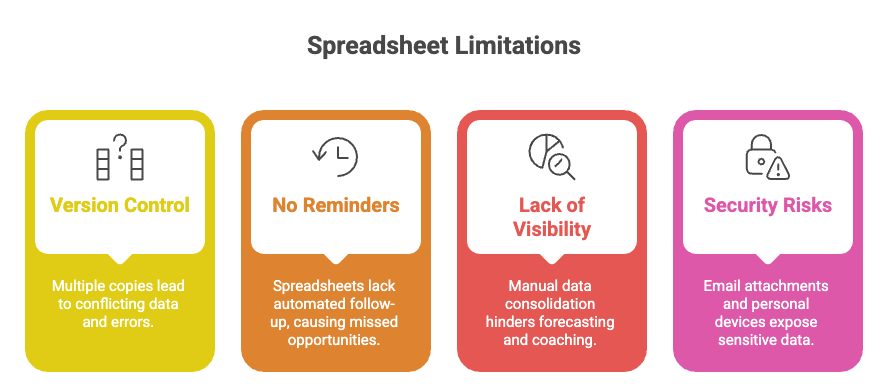
3. You cannot see what you cannot measure
Spreadsheets offer no visibility into rep activity, deal velocity, or pipeline health without manual calculation. Sales managers often spend hours every week consolidating data from individual rep files before they can have a useful forecast conversation, which directly competes with coaching and strategy. See how CRM reporting and analytics change this dynamic entirely.
4. Security is a genuine risk
Spreadsheets containing customer data typically travel through email attachments and personal devices. There is no access control, no audit trail, and no encryption. For teams handling any volume of sensitive customer data, this is not a theoretical risk; it is a compliance liability.
Challenges With Using Excel
Sales teams often start with spreadsheets, but Excel as a CRM system creates frustrating roadblocks that hurt your bottom line.
1. Chasing updates across multiple versions
Excel becomes a version control nightmare when your team grows beyond a few people. Your sales manager tries to unite monthly reports but finds conflicting customer details and outdated lead statuses in different files. One rep updates prospect information, but others don't see these changes for hours. This leads to embarrassing duplicate follow-ups. Studies show all but one of these spreadsheets have errors that affect results. Your team wastes time chasing the "latest version" without live collaboration capabilities, and nobody knows which file has the right data.
2. Forgetting follow-ups due to lack of reminders
Excel works great with data, but it wasn't built to manage relationships. Your spreadsheets can't work like a calendar or send reminders. Hot prospects get forgotten, questions stay unanswered, and opportunities stall without automatic alerts. Questions like "When did we last contact this lead?" or "Did anyone answer that payment question?" remain mysteries. Your team depends on memory to track customer touchpoints—a method that fails as your sales pipeline expands.
3. Losing deals because of outdated info
Static spreadsheets can't keep up with today's sales environments. Tasks like lead generation and data updates become tedious without automation. This affects your closing rates in several ways:
- Customer history stays buried in tiny cells with no complete view of past interactions
- Manual data entry creates mistakes that ruin customer experiences
- Duplicate records leave teams confused about correct prospect information
- Spreadsheets lack lead scoring or qualification tools, so high-priority prospects get missed
These limitations turn Excel from a helpful tool into a major roadblock between your team and consistent sales success.
Benefits of CRM vs Spreadsheets
CRM software does more than replace your crm comparison spreadsheet—it discovers the potential of fundamentally changing how sales teams work. Let's get into the main advantages that make dedicated CRMs worth thinking about over traditional spreadsheets.
1. Automated workflows and follow-ups
Sticky notes and manual calendar reminders are things of the past. CRM systems trigger actions based on specific events automatically. The system can send personalized emails, schedule follow-up tasks, and alert team members without human intervention when a lead reaches a certain stage. Your pipeline keeps moving forward as this automation cuts down missed opportunities. Your CRM takes care of reconnecting with prospects, which gives consistent follow-through on every lead.
2. Centralized customer data with full history
CRMs create detailed customer profiles, unlike a crm excel spreadsheet where information stays in isolated cells. A complete timeline shows every interaction from first contact to most recent purchase. Customer conversations become more informed as phone calls, emails, meetings, and notes appear in chronological order. This historical view helps avoid those awkward "I'll have to look that up" moments that hurt customer relationships.
3. Up-to-the-minute collaboration across teams
Collaboration emerges as a major difference when comparing crm vs spreadsheet options. Your team's system updates instantly and everyone works from the same platform. Changes appear immediately to sales reps in different locations, which completely eliminates version control problems. On top of that, permissions settings help control who can view or edit specific information—a feature shared spreadsheets cannot match.
4. Advanced reporting and sales forecasting
CRMs pack analytical power that simple spreadsheets can't match. Your data transforms into visual dashboards that show pipeline health, conversion rates, and sales projections. These insights help spot bottlenecks, predict future revenue, and make evidence-based decisions about resource allocation. Report generation takes just a few clicks instead of hours of manual work.
5. Lead scoring and segmentation tools
CRMs rank leads based on their conversion likelihood using behavioral data and engagement metrics automatically. Your team focuses on the most promising prospects first through this prioritization. The segmentation tools group contacts by industry, company size, or purchasing stage—enabling targeted marketing campaigns that spreadsheets cannot support.
See SparrowCRM in action, no spreadsheet needed.
Hidden Costs of Using Excel for CRM
Free Excel spreadsheets might look appealing at first glance, but they come with hidden expenses. These costs become obvious only after your sales team struggles with their limitations. Let's get into what these spreadsheets really cost your business beyond the subscription fee.
The word "free" attached to Google Sheets is technically accurate and practically misleading. Here is where the real cost accumulates:
1. Time cost: The hours you don't see
Sales reps spend an average of 3.4 hours per week on manual data entry alone (Salesforce State of Sales). Across a team of five reps, that is 884 hours per year, the equivalent of over five months of one person's working time, spent updating rows instead of building relationships.
2. Error cost: The revenue you lose quietly
Manual data entry errors cost businesses an average of 15% of their revenue, according to Gartner research on data quality. That figure includes missed follow-ups, wrong proposals sent to the wrong contacts, and duplicate outreach that damages prospect trust.
3. Opportunity cost: The deals that die silently
The most expensive spreadsheet failure is the deal that simply stops moving. No one notices. The lead goes cold. The spreadsheet still shows it as "active." There is no pipeline health score, no automated nudge, no system alert, just a row in a spreadsheet that nobody revisits.
This is the cost structure that makes "free" spreadsheets significantly more expensive than a $20/user/month CRM at scale. For a full breakdown of how CRM data hygiene directly affects revenue, that guide covers the specific failure modes in detail.
4. Security risks: No access control or encryption
Your team's Excel CRM files often travel through email or sit on personal devices. This creates major security risks. Unlike proper CRMs with reliable permission settings, spreadsheets don't offer encrypted storage for sensitive customer data. They also lack any backup plan if someone accidentally erases data. These security gaps become more dangerous as your business grows, putting both customer relationships and compliance at risk.
The comparison between CRMs and spreadsheets shows that the "free" Excel option costs more than you'd think. Time waste, missed opportunities, collaboration problems, and security issues add up quickly.
Cost Comparison: CRM vs Spreadsheet Over Time
The comparison between spreadsheets and CRM systems goes beyond just upfront costs. You need to analyze the true price tag as your business grows.
1. Original cost: Free spreadsheet vs CRM subscription
Spreadsheets look cheaper at first. Google Sheets is free, and simple Excel comes with Microsoft Office. CRM systems use a subscription model, with prices that change based on features and users. But the savings from spreadsheets disappear once you add other costs. Many CRMs let you start free to test their features before you spend money.
2. Time cost: Manual updates vs automation
Spreadsheets take up too much time. Sales teams spend about 3.4 hours each week just entering data. This adds up to 550+ hours yearly on repetitive tasks that don't generate revenue. CRMs handle these tasks automatically so your team can build relationships and close deals instead of updating records.
3. Lost chances: Missed deals from poor tracking
The biggest cost comes from deals that fall through the cracks. Sales teams often miss following up with hot leads without proper tracking. Research shows businesses lose up to 15% in revenue because of manual data entry mistakes. CRMs prevent these losses with automated workflows, reminders, and accurate records.
4. Scalability: CRM grows with your team, Excel doesn't
Excel creates more problems as your business gets bigger:
- Large data sets slow everything down
- Teams struggle to work together
- Version control becomes a nightmare
- Security risks grow without proper controls
CRMs grow naturally with your business and handle more users, contacts, and data without issues.
5. Free CRM comparison spreadsheet: How to review options
Create a simple spreadsheet to compare:
- Setup costs vs. long-term ROI
- Time saved through automation
- How well it works with your current tools
- Security features and compliance standards
- Room for future growth
This review should show if spreadsheets make financial sense or if a CRM would work better for you over time.
When Is It Time to Move from Spreadsheets to CRM?
The right moment to upgrade from your CRM Excel spreadsheet to a full CRM system can save you months of frustration. These four clear signs will tell you it's time to make the switch.
1. You're managing more than 50 leads
Spreadsheets become difficult to handle beyond 50 leads. Research shows companies typically move to a CRM 3-6 months after their original growth phase as spreadsheets no longer meet their needs. Scrolling through rows takes too much time, and tiny spreadsheet cells can't capture detailed notes from customer calls. Your team will miss follow-ups because spreadsheets don't provide proactive reminders.
2. You need to track sales rep performance
Do you know which of your reps closes more deals? Who runs more effective calls? Which team members let sales cycles run too long? Your CRM comparison spreadsheet can't provide this vital performance data. You can't coach effectively or assign leads to your top performers without visibility into individual and team metrics. A CRM captures these metrics automatically.
3. You want to automate repetitive tasks
Sales reps should spend their time selling, not on manual data entry. Studies show reps waste about 14 hours weekly (35% of their workweek) on administrative tasks and spreadsheet maintenance. Your team needs automation if you hear "I'll update the spreadsheet later" multiple times each week.
4. You're losing track of customer conversations
Your customers can tell when you're disorganized. Your team asks customers for the same information repeatedly without a centralized system. They send incorrect documents and seem out of touch. The risk of errors increases dramatically when important client details scatter across multiple versions of your spreadsheet. This fragmentation makes it impossible to provide customized service.
Note that your startup phase solutions might limit your growth now. A switch from Excel for CRM to proper CRM software will help you reclaim time, improve organization, and close more deals faster.
How to Transition from Spreadsheet to CRM: A 6-Step Migration Guide
Most teams that "tried a CRM and it didn't work" failed at the transition, not the software. Here is a practical migration path that protects your existing data and sets your team up to actually use the system.
Step 1: Audit your spreadsheet before you migrate anything
Open your master spreadsheet and count the number of duplicate contacts, blank rows, and outdated statuses. Most teams discover their spreadsheet is messier than they realized. Clean first, remove duplicates, standardize field names (e.g., decide whether it's "Company" or "Organisation" and pick one), and delete records that have been inactive for over 12 months. Migrating bad data into a CRM just gives you an expensive version of the same problem.
Step 2: Map your spreadsheet columns to CRM fields
Every column in your spreadsheet needs a destination in the CRM. Common fields are straightforward: Name, Email, Company, Phone, Lead Status. Less common ones, like custom qualification criteria or pipeline stages need to be created as custom fields in your CRM before you import. Do this mapping in a separate document before you touch the import tool.
Step 3: Import in stages, not all at once
Start with your 20–30 most active leads. Import them, verify the data looks correct, check that custom fields mapped properly, and have one rep do a live walkthrough of a contact record before you import everything else. This staged approach catches 90% of formatting errors before they affect 100% of your data.
Step 4: Set up your core automations before going live
The single biggest reason CRM adoption fails is that reps revert to spreadsheets because the CRM creates friction without delivering value. The value comes from automation. Before your full team goes live, configure at minimum: a lead assignment rule, a follow-up reminder sequence for new leads, and a pipeline stage progression trigger. These three automations alone will make the switch immediately worthwhile. See how sales tracking software complements CRM automation for full pipeline visibility.
Step 5: Run a parallel week
For the first full week, keep your spreadsheet open alongside the CRM. Have reps update both simultaneously. This is uncomfortable and slightly inefficient by design; it forces reps to see the comparison directly, and it creates a safety net if something needs to be rolled back. After one week, archive the spreadsheet and commit to the CRM as the single source of truth.
Step 6: Review data health at 30 days
At the 30-day mark, run a data audit inside your CRM: how many records have complete information, how many automations have fired, how many follow-ups were completed vs missed. Compare this to what your spreadsheet could tell you at the same point. The difference in visibility is typically the moment teams stop asking whether the switch was worth it.
A well-structured CRM transition also sets the foundation for better sales forecasting and revenue reporting, which becomes significantly more accurate when data quality improves.
AI in Spreadsheets vs AI in CRM: A Practical Comparison
This is the fastest-moving part of the spreadsheet vs CRM conversation in 2026. Both environments now have access to AI, but they are not equivalent. Understanding the difference matters for any team evaluating which tool to invest in.
What AI can do in a spreadsheet today?
Microsoft Copilot in Excel and Google Gemini in Sheets have both improved substantially. You can now draft email templates, run formula suggestions, generate pivot table summaries, and flag data anomalies using natural language prompts. These are genuinely useful capabilities for individual users working in isolation.
The ceiling, however, is the spreadsheet itself. AI in a spreadsheet can only act on the data in that file. It cannot pull in interaction history from email threads, call recordings, or chat logs. It cannot trigger a follow-up sequence. It cannot update a deal record based on a call outcome. The intelligence is bolted onto a fundamentally static structure.
What AI does natively in CRM software
CRM-native AI operates on connected, live data across the entire customer journey, not a snapshot in a file. The practical implications are significant:
Task | AI in Spreadsheets | AI in CRM |
|---|---|---|
Drafting Emails | Copilot / Gemini add-ons (manual trigger) | Native AI email generation from contact history |
Lead Scoring | Not available natively | Automatic score updates based on behaviour |
Pipeline Forecast | Manual formulas with human assumptions | AI-predicted close probability per deal |
Data Enrichment | Manual lookup or CSV import | Auto-enrichment from web signals & activity |
Meeting Summaries | Copy-paste into cells manually | Auto-generated post-call briefs in CRM record |
Duplicate Detection | Manual review or VLOOKUP | Automatic detection and merge suggestions |
Sentiment Analysis | Not available | Flags at-risk deals from email/call tone |
Workflow Triggers | Not available | AI suggests the next best action per deal stage |
For teams that have started evaluating AI-powered CRM features, the gap between bolt-on AI and native AI widens with every new feature cycle.
The bottom line: AI in a spreadsheet makes an individual more productive. AI in a CRM makes the entire sales operation more intelligent.

Geethapriya
Geethapriya is a Growth Marketer and Business Researcher who researches and writes about CRM, sales, marketing, and customer engagement. Her work focuses on understanding industry trends, customer and sales challenges, and how businesses can use technology to build more effective growth processes.
.webp?2026-10-05T09:02:41.083Z)